Python Study

Introduction

When

Python is a widely used high-level programming language for general-purpose programming, created by Guido van Rossum and first released in 1991.
Python第一版发布于1991年,由Guido van Rossum编写。

What

An interpreted language, Python has a design philosophy which emphasizes code readability (notably using whitespace indentation to delimit code blocks rather than curly brackets or keywords), and a syntax which allows programmers to express concepts in fewer lines of code than possible in languages such as C++ or Java.[22][23] The language provides constructs intended to enable writing clear programs on both a small and large scale.
首先我们要知道Python跟Lua一样,是解释型语言(不需要编译,通过解析执行,有自己的解析器)。Python设计理念强调可读性(通过缩进而非{}来表示代码块)。

Python features a dynamic type system and automatic memory management and supports multiple programming paradigms, including object-oriented, imperative, functional programming, and procedural styles.
Python是动态类型语言,同时有自己的内存管理机制,支持多种编程范式(待深入学习了解)。

Why

了解了Python When & What。那么我们Why什么要选择学习使用Python了?
Python is powerful… and fast; plays well with others; runs everywhere; is friendly & easy to learn; is Open.
supports multiple programming paradigms. It has a large and comprehensive standard library.[25]
把上面可以归纳如下:

  1. Run everywhere(跨平台)
  2. Friendly & easy to learn(学习更友好更容易(对于无编程经验的人更加友好,语法更nature))
  3. Supports multiple programming paradigms(支持多种编程范式)
  4. Large and comprehensive standard library(丰富的标准库和Package)

Note:
这里提一句Python里很有名的一句话:
“Life is short, you need python.”

IDE & Editor

学习任何一门编程语言,好的IDE或者Editor都能帮助我们更加快速的学习。
因为初学Python且Python是解析执行,这里暂时不考虑过于强大的IDE。
IDE详情选择可以参考Python IDE
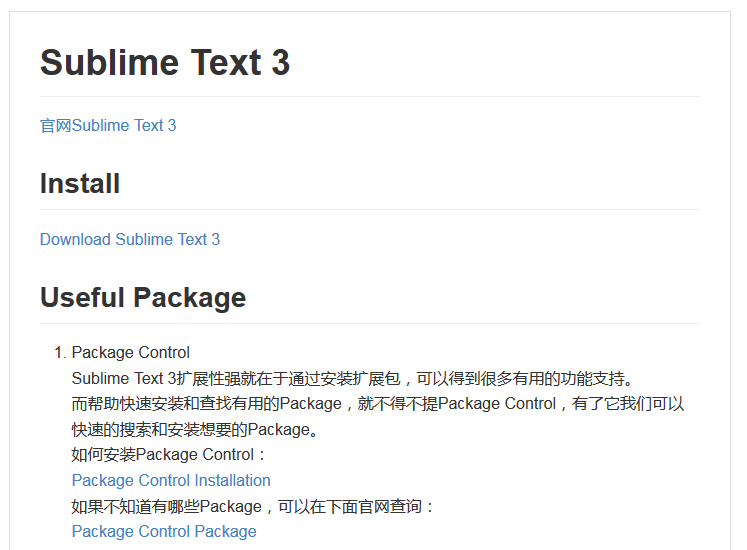
这里通过使用Sublime Text 3以及其Python相关的扩展插件作为学习Python的Editor。
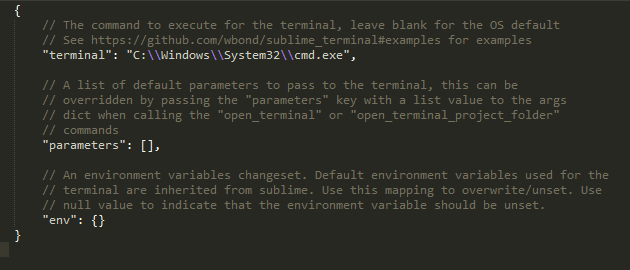
Sublime Text 3 Python相关插件设置详情

Python Version Choosen

Python有一个比较重要版本分割线2.x & 3.x。
详情参见Python2orPython3
这里就不深入去了解2.x和3.x之间的区别了。
简单的理解就是3.x提供了更多更全的功能支持,同时有更多的丰富的库支持。如果作为初学者,并不需要维护老版本(2.x)的工具代码时,完全可以从3.x学起。

Useful Package

Pip

Python有丰富的标准库。而其中最重要也是新手第一时间就应该安装的就是Pip。
Pip对于Python就好比Package Control好比Sublime Text 3。
Pip(Python Package Index)是一个Python Package集中管理安装的扩展包。
Pip安装详情参考官方文档
Pip安装成功后我们就可以通过Pip去查看或安装丰富的Python Package了。
Package Install:
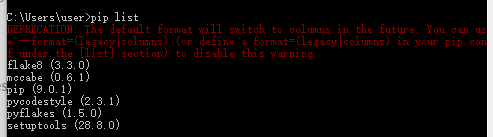
PipPackageInstallation
Show Intalled Packages:
PipListInstalledPackages
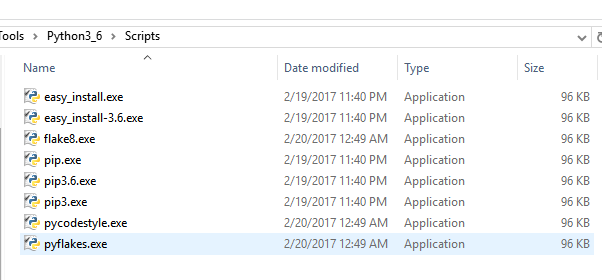
安装之后的Package可以在安装目录查看到:
PythonPackageLocation
更多关于Pip使用查看官方文档

argparse

详细的介绍会在后面Tip的Command Line Args篇章

Tutorial(基础篇)

Introduction

Keywords and Identifier

Identifier(标识.e.g funcname, variable ……)定义规则:

  1. Keywords不能用做变量声明(这应该是任何语言都通用的规范了吧)
  2. 变量名不能以数字开头
  3. 变量名不能用特殊符号(e.g. !, @, #, $, %)
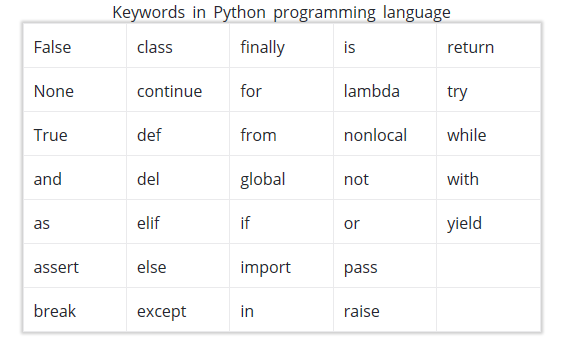
    简单了解下Python的关键词:
    PythonKeywords

Note:
Python is a case-sensitive language. This means, Variable and variable are not the same. Always name identifiers that make sense.
Python是大小写敏感的,大小写不同的变量名是不同变量。

Statements & Comments

Instructions that a Python interpreter can execute are called statements.
Python可解析执行的语句叫做Statements。
多行Statements可以通过\或者[]或者{}或者()链接或封装:

1
2
3
4
5
a = 1 + 2 + \
3 + 4 + \
5 + 6

b = (1 + 2 + 3 + 4)

Python设计理念强调可读性(通过缩进而非{}来表示代码块):
同时Python注释是通过# or ‘’’ or “””:

1
2
3
4
5
6
7
8
for i in range(5):
if i >= 5:
print("{0} >= 5".format(i))
break
else:
# No break happends in for loop
# Then execute this block
print("No number is equal or greater than 5!")

Docstring(Docstring is short for documentation string):
可以看出Docstring是一段文档描述(好比在C#里通过///编写描述信息一样)。Python在书写格式上要求比较严,虽然不会导致报错,但会算作不是规范的写法,这也就是我们为什么会去安装Sublime Text 3 flake8这样的linter插件了。

1
2
3
4
5
6
def addition(par1, par2):
"""This funtion is used to get result of (a + b)."""
return par1 + par2

print(addition(1, 2))
print(addition.__doc__)

DocString
可以看到我们定义了一个加法函数,并编写了docstring。
通过func_name.__doc__我们可以得到那段描述

Python I/O and Import

Python里的输入输出交互(好比C++里的cin,cout)是通过input和print。
因为需要交互所以需要在可执行Python代码的terminal里执行python脚本:
PythonInputAndOutput

因为Python的import是指import Module,我们需要知道Python里Module的定义,
Modules refer to a file containing Python statements and definitions.
Modules在Python里是指一个文件所包含的所有定义和声明(以文件为单位划分,文件名即为import的名字)。

在import Module还有一个重要的点就是,我们需要知道Python查找所有*.py的搜索路径(跟环境变量有点像):

1
print("sys.path:{0}".format(sys.path))

ImoprtSearchPath

我们可以指定只导入特定定义(e.g. from math import pi)

Note:
Python的Module和C#的namespace概念不一样,前者是以文件为单位,后者是以命名空间划分(支持在多个文件里定义在同一命名空间下)

Python Operators

运算符跟大多数编程差不多,这里只讲几个比较特殊的:
Logical Operators:

1
2
3
4
x = True
y = False
print(x and y)
print(x or y)

PythonLogicalOperator
或许跟Python提倡简洁明了有关,可以直接采用and or not之类的逻辑运算符

Identity operators:

1
2
3
4
5
6
7
8
9
x1 = 1
y1 = 1
print("x1 is y1 = ", x1 is y1)
y1 = 2
print("After y1 = 2. x1 is y1 = ", x1 is y1)

list1 = [1, 2, 3]
list2 = [1, 2, 3]
print("list1 is list2 = ", list1 is list2)

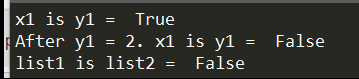
PythonIdentityOperator

Note:
is and is not are used to check if two values (or variables) are located on the same part of the memory.
List可以理解成分配了不同的内存去存储实际成员值所以是不同identity,上面x1 = 1和y1 = 1是located on the same part of the memory就需要理解后续会讲到的[Namespaces概念](http://tonytang1990.github.io/2017/06/12/Python-Study/#Object & Class)

Membership operators:

1
2
3
list3 = [1, 'T', 'H']
print('T' in list3)
print(1 not in list3)

PythonMemberOperator

Note:
in & not in are used to test whether a value or variable is found in a sequence (string, list, tuple, set and dictionary).
in & not in 主要是用于判断特定变量或者值是否存在于特定sequence里。

Flow Control

if,elif,else,while,for这里主要记录一些Python相对于C++,C#,Java这些语言里的一些区别。

Python里是以:结束条件语句,以缩进表示层级。
while和for有一点比较特殊,支持else语句(没有break语句执行时)。

1
2
3
4
5
6
7
8
for i in range(5):
if i >= 5:
print("{0} >= 5".format(i))
break
else:
# No break happends in for loop
# Then execute this block
print("No number is equal or greater than 5!")

FlowControlForUsing

Function

Python的Function定义关键词是def,格式如下:

1
2
3
def func_name(paras):
"""Docstring"""
Statements

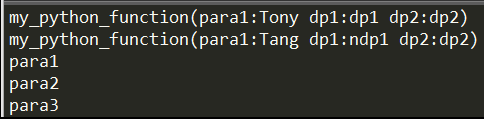
Python支持显示传递参数,也支持默认参数和不限数量参数。

1
2
3
4
5
6
7
8
9
10
11
12
13
14
15
16
17
18
19
# User-defined functions
def my_python_function(para1, dp1="dp1", dp2="dp2"):
"""My Python Function Docstring."""
# Build-in functions
print("my_python_function(para1:{0} dp1:{1} dp2:{2})".format(para1, dp1, dp2))

my_python_function("Tony")

# Keyword para call
my_python_function(dp1="ndp1", para1="Tang")


# Parameters without length limited
def arbitrary_para_function(*paras):
""" Python function without length of parameter limitation."""
for para in paras:
print(para)

arbitrary_para_function("para1", "para2", "para3")

PythonFunctionDefinition

Python也支持匿名函数(Lambda Function),只是不像C++,C#使用(x)=>表示而是lambda x:

1
2
sqrfunc = lambda x: x * 2
print(sqrfunc(2))

PythonAnonymousFunction

Modules

C,C++里有#include。C#有using。Java有import。Python里有Modules。
但Python里的Modules更像C,C++是针对文件为单位。
使用的时候通过import filename即可(也支持指定别名 as newname)

1
2
3
def my_first_python_func():
"""MyFirstPython.py's function."""
print("my_first_python_func() called")
1
2
3
import MyFirstPython as MFP

MFP.my_first_python_func()

PythonModuleImportAndUsing

知道了Python是以文件为单位导入的,那么我们也需要知道Python导入文件时的搜索路径(通过打印sys.path即可)

Note:
Python也支持只导入指定文件里的指定对象
e.g.

1
from math import pi

Package

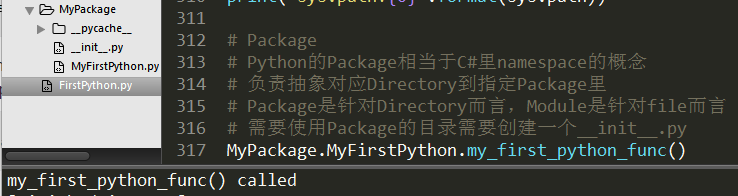
C++,C#里有namespace。Java有package。Python里有Package(相当于Java里package和C#里namespace概念,负责抽象对应Directory到指定Package里)
Steps:

  1. 创建文件夹(文件夹名作为Package Name)
  2. 文件夹目录下创建一个__init__.py文件(默认可以不写任何内容)
  3. 通过import PackageName.Module引入特定文件
    e.g.
1
import MyPackage.MyFirstPython

PythonPackageUsing

Note:
Package是针对Directory而言,Module是针对file而言

Datatypes

Variable变量赋值在Python里简单明了:

1
2
3
p1 = 1
p2, p3, p4 = 2, 3, "Tony"
print(p1, p2, p3, p4)

判断数据类型Python是通过type()这个类似C#GetType()。
判断是否是某个类型实例Python是通过isinstance(),类似于Python里的is关键词。

1
2
3
4
5
6
7
8
9
10
11
class MyClass:
"""My first class."""

name

myclassinstance = MyClass()
myclassinstance.name = "Tony"
mystring = "Tony"
print(myclassinstance, " is typeof ", type(myclassinstance))
print("myclassinstance is typeof MyClass:", isinstance(myclassinstance, MyClass))
print(mystring, " is typeof ", type(mystring))

DataTypeCheck
可以看出在Python是弱语言类型,声明变量是无需显示指定变量类型。
同时通过type和isinstance可以判断实例对象类型。

Note:
这里的Data Type是指实例对象的类型,Python是弱类型语言。

Basic Data Types

Python支持大部分基本数据类型,e.g. int, float等。
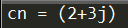
有一点比较特殊的是Python支持complex numbers(复数):x + yj(x为实部,yj为虚部)

1
2
cn = 2 + 3j
print("cn = {0}".format(cn))

ComplexNumber
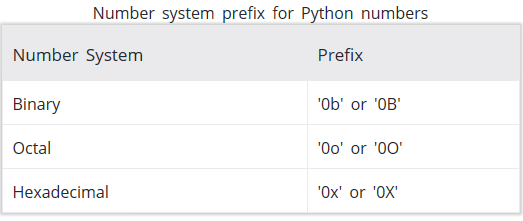
同时表示不同进制的Number只需添加不同前缀即可:
NumberSystem

List

List is an ordered sequence of items. It is one of the most used datatype in Python and is very flexible. All the items in a list do not need to be of the same type.
Python的List好比数组,但是更灵活,可存储不同类型的对象。

1
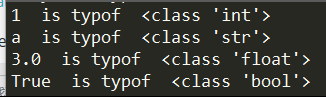
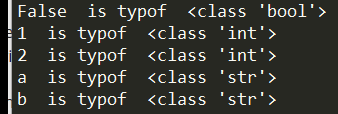
2
3
pythonList = [1, "a", 3.0, True]
for member in pythonList:
print(member, " is typof ", type(member))

PythonList

更多的List处理参见List.Method和其他Build-in Functions(比如len(),sorted()等)

Note:
List是通过[]定义。

Tuple

Tuple is an ordered sequence of items same as list.The only difference is that tuples are immutable. Tuples once created cannot be modified.
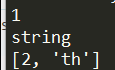
Tuple和List的唯一区别就是创建后不可再被改变,但如果内嵌可变的(e.g. List)那么List的数据是可以被改变的。Tuple是通过()定义内容。

1
2
3
4
5
6
my_tuple = (1, "string", [1, "th"])
my_tuple[2][0] = 2
for tuplemember in my_tuple:
print(tuplemember)
del my_tuple
# my_tuple -- Error: name 'my_tuple' is not defined

TupleUsing
从上面可以看出del关键词可以删除变量的引用。

Note:
Tuple是通过()定义。
Tuple相比List更适合用于存储固定的不同数据类型的数据。
Everything is object in Python.(这一点跟Java,C#一样)

Strings
1
2
3
4
mypythonstring = "我的名字是TonyTang"
print(mypythonstring)
print(mypythonstring[0])
mypythonstring[0] = '你'

PythonStrings

Note:
String is sequence of Unicode characters. Strings are immutable
Python里是采用Unicode编码存储字符串。Strings可以通过[]访问,但是不可被改变的。
We cannot delete or remove characters from a string. But deleting the string entirely is possible using the keyword del.因为string是immutable的,所以我们不能通过del删除string里面的个别character,但是我们可以删除对string的整个引用。

Set

Set is an unordered collection of unique items. Set is defined by values separated by comma inside braces { }. Items in a set are not ordered.
Set也是一系列数据的集合类型,但是是无序的。

1
2
3
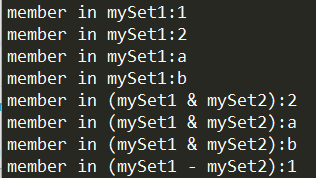
mySet1 = {1, "a", 2, "b", 1}
for member in mySet1:
print("member in mySet1:{0}".format(member))

PythonSet
可以看出因为Set是无序的,连循环遍历出来的结果也是不确定的。所以针对Set,[]访问就是无意义也是不被允许的。

Every element is unique (no duplicates) and must be immutable (which cannot be changed).
Set还有一点特性就是成员是唯一且不可变的同时支持类似于集合与或等操作:

1
2
3
4
5
6
mySet2 = {"a", 2, "b"}
for member in (mySet1 & mySet2):
print("member in (mySet1 & mySet2):{0}".format(member))

for member in (mySet1 - mySet2):
print("member in (mySet1 - mySet2):{0}".format(member))

SetStudy

Note:
Set是通过{}定义。
更多操作参考Set.API

Dictionary

Dictionary is an unordered collection of key-value pairs.
Python里的Dictionary跟C#里的Dictionary差不多,代表无序的Key-Value主键值对。

1
2
3
myDictionary = {1: "Tony", "Tang": 2}
print(myDictionary[1])
print(myDictionary["Tang"])

PythonDictionary
可以看出Python里Dictionary的键值对定义时通过:分割,然后通过[]去方案对应Key得到Value值。

Note:
Dictionary是通过{}定义。
更多操作参考Dictionary.API

Conversion between data types

基础数据类型转换通过int,float,complex显示转换即可:

1
2
3
4
5
myint = int(2.5)
print(myint)
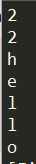
mylist = list('hello')
for member in mylist:
print(member)

PythonDataConversion

Files

File Operation

首先看看最新官方文档给出的API说明:
open(file, mode=’r’, buffering=-1, encoding=None, errors=None, newline=None, closefd=True, opener=None)

1
2
3
4
5
6
7
8
9
10
11
12
13
# try: finally: Make sure f close successfully
# specify encoding='utf-8' is used to avoid platform dependent problems
try:
f = open("./FilesFolder/TonyTangFile.txt", mode='r', encoding='utf-8')
for line in f:
print(line)
finally:
f.close()

# Another way to make sure file close successfully
with open("./FilesFolder/TonyTangFile.txt", mode='w', encoding='utf-8') as f:
# Do file operation here
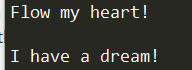
f.write("Flow my heart!\nI have a dream!")

PythonFileOperation
从上面可以看到,open的几个关键参数,mode决定了可读还是可写等模式,encoding决定编码格式是为了确保不同平台脚本的一致性。

Directory

Python提供了os module支持很多文件夹目录操作的API

1
2
3
4
5
6
7
8
9
10
11
12
13
import os

print(os.getcwd())
print(os.listdir())
os.chdir("./FilesFolder")
print(os.getcwd())
if os.path.exists("MyNewFilesFolder") == False:
os.mkdir("MyNewFilesFolder")
print(os.listdir())
if os.path.exists("MyRenameFilesFolder") == True:
os.removedirs("MyRenameFilesFolder")
os.rename('MyNewFilesFolder', 'MyRenameFilesFolder')
print(os.listdir())

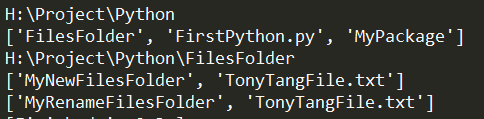
PythonDirectory
从上面可以看出Python的API都很简洁明了,跟bat,shell很像,具体使用过程中主要还是按需求差文档写自己的自动化即可。

Exception

Python Exception
Exception Handling
User-defined Exception

Object & Class

Name

Name (also called identifier) is simply a name given to objects.

1
2
3
4
5
6
7
8
9
10
11
a = 2
print('id(2) = ', id(2))
print('id(a) = ', id(a))

a = a + 1
print('id(a) = ', id(a))
print('id(3) = ', id(3))

b = 2
print('id(2) = ', id(2))
print('id(b) = ', id(b))

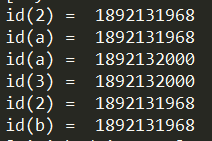
PythonNamespaceOutput
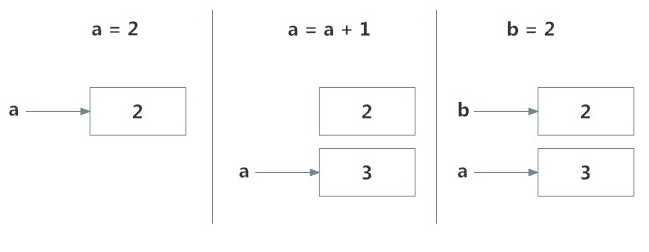
id()适用于打印object地址,从上面的输出可以看到只要Name指向Object的值是一致的,那么他们所指向的地址就是一致的。详情参考下图:
PythonName
This is efficient as Python doesn’t have to create a new duplicate object. This dynamic nature of name binding makes Python powerful; a name could refer to any type of object.

Note:
Everything in Python is an object.

1
import this

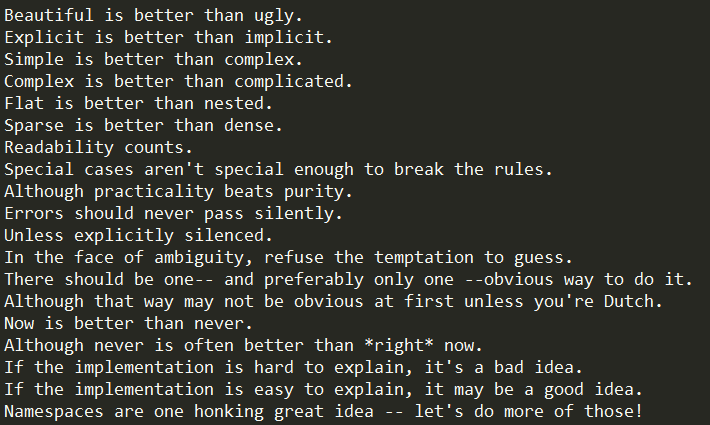
上面这段代码很有意思,会在控制台打印出Python的编程哲学:
TheZenOfPython

Namepsace & Scope

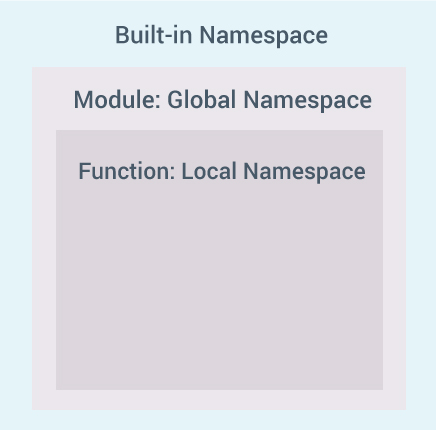
namespace is a collection of names.(前面讲解了什么是Name,接下来要理解的Namespace就好比一系列Name的集合)
我们平时用到的Build-in Functions就属于Build-in Namespace里。
让我们结合下图看看Python里Namespace的层级:
PythonNamespaceHierarchical

讲完Namespace,Python里还有一点跟Namespace密切相关的Scope:
Scope is the portion of the program from where a namespace can be accessed directly without any prefix.(Namespace在Python就好比C++,C#里的namespace。Scope就好比C++,C#里变量的有效区域。)

现阶段主要分为3中Scope:

  1. Scope of the current function which has local names(当前function scope)
  2. Scope of the module which has global names(全局scope)
  3. Outermost scope which has build-in names(最外层Build-in scope)

接下来透过实例学习理解Python里的Scope:

1
2
3
4
5
6
7
8
9
10
11
12
13
14
15
16
def outer_function():
"""Outer Function."""
a = 20

def inner_function():
"""Inner Function."""
global a
a = 30
print("a = ", a)

inner_function()
print("a = ", a)

a = 10
outer_function()
print("a = ", a)

PythonScope
可以看出在Function内的定义因为在不同的Scope不会覆盖Global Scope的a定义。当我们显示指定Function Scope里的a为global的a时,我们可以在Function Scope内引用到Global的a。

Class

接触过面向对象编程的人应该对Class都不陌生,他是我们抽象对象定义的关键类型。
在面向对象编程语言的Python里Class也起着同样的作用,只不过定义的方式有所区别,详情如下:

1
2
3
4
5
6
7
8
9
10
11
12
13
14
15
16
17
18
19
20
21
22
23
24
25
26
27
28
class MyFirstClass(object):
"""docstring for MyClass"""

def __init__(self, arg):
"""Class Constructor."""
super(MyFirstClass, self).__init__()
self.name = arg

def sayhi(self):
"""Class Member Function."""
print("Hello World!")

def printname(self):
"""Print name member."""
print("self.name = ", self.name)

# 这里因为我是定义在MyFirstPython.py文件里的,所以导入的是MyFirstPython
import MyFirstPython
mfp = MyFirstPython.MyFirstClass("Tony")
mfp.sayhi()
mfp.printname()
print(mfp.name)
mfp.age = 10
print(mfp.age)
del mfp.name
# mfp.printname() AttributeError: 'MyFirstClass' object has no attribute 'name'
del mfp
# mfp.sayhi() NameError: name 'mfp' is not defined

PythonClassDefinition
从上面可以看出Python里Class的定义格式如下:

1
2
3
4
5
6
7
8
9
def classname(父类):
"""Docstring Class description."""
def __init__(self,arg):
"""Docstring Constructor description."""
# constructor's body

def functionname(arg):
"""DocString Member Function description."""
# body

__init__就好比C++里的构造函数。
Python里的继承写法:classname()括号里面跟的是父类,在子类可以通过super去访问父类。
值得一提的是Docstring,每一个类或者方法都有Docstring,我们可以通过classname.__doc__的方式去访问。
同时我们看到Python里还可以在运行时动态定义成员变量(e.g. mfp.age)
Python里不是通过new关键词去实例化类对象,但del关键词就好比C++里和new配对的delete,但这里的delete不仅是针对new出来的实例化对象进行回收,还能针对特定实例化成员进行删除。(当我们del mfp实例对象时,我们只是把mfp的对于Object的引用从corresponding namespace里移除而非真的销毁内存里Object。真正的销毁是发生在没有人在绑定到该Object时。)

This automatic destruction of unreferenced objects in Python is also called garbage collection.(真正的销毁就好比C++里的GC对内存进行释放)

Note:
Python is an object oriented programming language.

Inheritance

Like C++, a class can be derived from more than one base classes in Python. This is called multiple inheritance.

关于继承这里就不多讲了,大家参考文档介绍。

Operator Overloading

Operator Overloading翻译过来应该是运算符重载。

在了解Operator Overloading之前,让我们来了解下Python Class里的一些特殊方法。

这里的特殊方法学过lua的同学应该会感到很亲切:

  1. new – New一个Class的实例对象时会被调用
  2. init – Class的构造函数(父类构造函数需要手动调用,默认不递归调用)
  3. del – Class实例对象销毁时调用(类似C#析构函数)
  4. class – 访问类的静态变量的时候(实例对象可以直接通过self访问)
  5. str – str(),format()以及print()函数触发Class获取字符串表达方法
  6. lt – <运算符操作时调用
  7. le – ==运算法操作时调用
  8. hash – hash()方法计算Class实例对象Hash值时
  9. getattr – 访问Class成员不能存在时调用(类似Lua的__index元方法)
  10. setattr – 设置Class成员值时调用(类似Lua的__newindex元方法)
  11. ……

更多特殊方法参考:Special method names

从上面可以看出Python和Lua有很多相似的地方。

接下来让我们看看实战效果:

1
2
3
4
5
6
7
8
9
10
11
12
13
14
15
16
17
18
19
20
21
22
23
24
25
26
27
28
29
30
31
32
33
34
35
36
37
38
39
40
41
42
43
44
45
46
47
48
49
50
51
# MyFirstPython.py
# File Name: MyFirstPython.py
# Description: This file is used to study python
# Author: TangHuan
# Create Date: 2017/6/5

import shutil

class MyFirstClass(object):
"""docstring for MyClass"""
# class Static Member
age = 10

# 构造函数
def __init__(self, name):
"""Class Constructor."""
super().__init__()
print("MyFirstClass:__init__({})".format(name))
self.name = name

# str(),format()以及print()函数触发
def __str__(self):
return "MyFirstClass name:{} age:{}".format(self.name, self.age)

# 获取不存在成员时触发
def __getattr__(self, name):
print("MyFirstClass:__getattr__({}) not exist!".format(name))

# 设置成员值时触发
def __setattr__(self, name, value):
super().__setattr__(name, value)
print("MyFirstClass:__setattr__({}, {})!".format(name, value))

# 加号运算符重载
def __add__(self, other):
newName = self.name + other.name
return MyFirstClass(newName)

def sayhi(self):
"""Class Member Function."""
print("MyFirstClass:sayhi() Hello World!")

def printname(self):
"""Print name member."""
print("MyFirstClass:printname() self.name = ", self.name)


def my_first_python_func():
"""MyFirstPython.py's function."""
print("my_first_python_func() called")

1
2
3
4
5
6
7
8
9
10
11
12
13
# Class e.g.
mfp = MyFirstPython.MyFirstClass("Tony")
print(mfp.__class__.age)
mfp.sayhi()
mfp.printname()
print(mfp.name)
print(mfp.noneexitname)
mfp.age = 10
print(mfp.age)
print(mfp)
mfp2 = MyFirstPython.MyFirstClass("Tang")
tempMfp = mfp + mfp2
print(tempMfp)

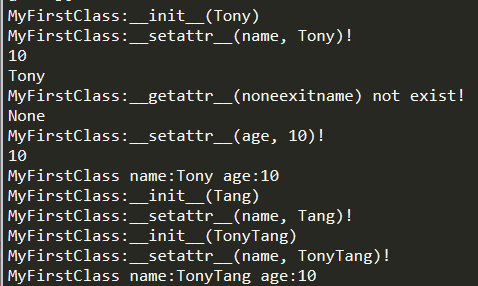
ClassSpecialFunctionsOutput

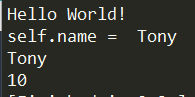
通过上面的学习用例,可以看到我们通过自定义__init__,str,getattr,setattr,__add__等特殊方法实现了类构造,类成员自定义访问设置,类+运算符重载,类print()等方法自定义输出等效果。看到这里,不得不说Python特殊方法和Lua的元方法概念很像。

Iterator

Iterator in Python is simply an object that can be iterated upon. An object which will return data, one element at a time.

这里的Iterator和C#里的迭代器应该是一个概念。实现迭代器需要实现两个特殊方法(iter__和__next)。

1
2
3
4
5
6
7
8
9
10
11
12
13
14
15
16
17
18
19
20
21
22
23
24
25
26
27
28
29
30
31
32
33
# File Name: 		IteratorStudy.py
# Description: This file is used to study python iterator
# Author: TangHuan
# Create Date: 2021/5/25

# 迭代器类
class IteratorClass(object):
"""Class to implement an iterator"""

# 构造函数
def __init__(self, max):
super().__init__()
self.max = max

# 返回迭代器
def __iter__(self):
print("IteratorClass:__iter__()")
self.n = 0
return self

# 迭代器MoveNext
def __next__(self):
print("IteratorClass:__next__()")
if self.n <= self.max:
value = self.n
self.n += 1
return value
else:
raise StopIteration

iteratorClassInstance = IteratorClass(5)
for iter in iteratorClassInstance:
print(iter)

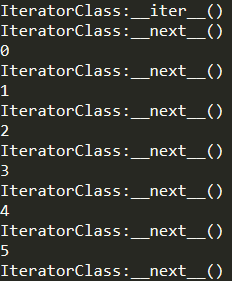
IteratorOuput

Generator

Python generators are a simple way of creating iterators. Simply speaking, a generator is a function that returns an object (iterator) which we can iterate over (one value at a time).

It is fairly simple to create a generator in Python. It is as easy as defining a normal function, but with a yield statement instead of a return statement.

看介绍Generators的概念和C#的携程差不多。

Generator和普通方法的区别:

  1. Generator function contains one or more yield statements.
  2. When called, it returns an object (iterator) but does not start execution immediately.
  3. Methods like __iter__() and __next__() are implemented automatically. So we can iterate through the items using next().
  4. Once the function yields, the function is paused and the control is transferred to the caller.
  5. Local variables and their states are remembered between successive calls.
  6. Finally, when the function terminates, StopIteration is raised automatically on further calls.
1
2
3
4
5
6
7
8
9
10
11
12
13
14
15
16
17
# Generator
GeneratorVariable = 0
def GeneratorFunction():
global GeneratorVariable
print("GeneratorFunction() {}".format(GeneratorVariable))
yield GeneratorVariable
GeneratorVariable += 1
print("GeneratorFunction() {}".format(GeneratorVariable))
yield GeneratorVariable
GeneratorVariable += 1
print("GeneratorFunction() {}".format(GeneratorVariable))
yield GeneratorVariable

GeneratorFunc = GeneratorFunction()
print("GeneratorFunction Start")
for generator in GeneratorFunc:
print(generator)

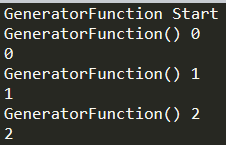
GeneratorOuput

可以看到Generator在Python里还能直接通过for循环的形式便利这一点和C#的携程还不太一样。

通过Generator我们可以简化自定义Iterator的写法,无需自定义__iter__和__next__方法,通过自定义的Generator方法即可实现迭代效果。Generator更多好处参考:Generator

Closure

Closure指类似传统语言里的闭包,但在Python里有几个较大的区别:

  1. 闭包访问外围变量时,默认是只读的,需要通过nonlocal关键字来标识闭包内部可写。
  2. 闭包必须是嵌套函数定义
  3. 嵌套函数必须访问外部成员
  4. 外围函数必须返回嵌套函数自身

Python里用闭包的好处:

Closures can avoid the use of global values and provides some form of data hiding. It can also provide an object oriented solution to the problem.

Decorators

A decorator takes in a function, adds some functionality and returns it.

看介绍Decorator像是设计模式里的修饰器概念,能够做到给现有功能添加额外功能的作用。

看介绍利用万物皆object的概念(类似Lua里第一类值)的概念,实现封装函数调用实现扩展函数功能。

还有更多更复杂的使用方式,详情参考:Decorators

Note:

  1. everything in Python (Yes! Even classes), are [objects].

Property

Property类似于C#里的属性概念。Python通过关键字@property实现属性的快速定义。

PropertyKeywordDefinition

1
2
3
4
5
6
7
8
9
10
11
12
13
14
15
16
17
18
19
20
21
22
23
24
25
26
27
28
29
# File Name: 		PropertyStudy.py
# Description: This file is used to study python property
# Author: TangHuan
# Create Date: 2021/5/25

# 属性类
class PropertyClass(object):
"""Class to implement an property"""

# 构造函数
def __init__(self, propertyvalue):
super().__init__()
print("PropertyClass.__init__()")
self.Property = propertyvalue

@property
def Property(self):
print("Getting Property Value : {}".format(self._Property))
return self._Property

@Property.setter
def Property(self, value):
print("Setting Property Value : {}".format(value))
self._Property = value

propertyClassInstance = PropertyClass(5)
print(propertyClassInstance.Property)
propertyClassInstance.Property = 10
print(propertyClassInstance.Property)

PropertyOutput

更多学习参考:[Property][https://www.programiz.com/python-programming/property]

RegEx

Date and Time

Process

multiprocessing is a package that supports spawning processes using an API similar to the threading module.

threading module constructs higher-level threading interfaces on top of the lower level _thread module.

The subprocess module allows you to spawn new processes, connect to their input/output/error pipes, and obtain their return codes. This module intends to replace several older modules and functions:os.system os.spawn*

从介绍可以看出,multiprocessing包是用于支持多进程类似多线程功能的模块。

threading是多线程的一个上层抽象模块。

multiprocessing是多进程的一个上层抽象模块(相比threading,不受限于**Global Interpreter Lock(多线程锁,限定同时只有一个Thread执行)**可以真正利用多核来跑多进程功能。

subprocess模块是封装的更好的一个创建使用子进程的模块,同时提供了和子进程处理交互相关的接口。

这里我们重点学习process相关即multiprocessing和subprocess相关概念和使用。

1
2
3
4
5
6
7
8
9
10
11
12
13
14
15
16
17
18
19
20
21
22
23
24
25
26
27
28
29
30
31
32
33
34
35
36
37
38
39
40
41
42
43
44
45
46
47
48
49
50
51
#!/usr/bin/python
# -*- coding: utf-8 -*-

"""
File Name: MultiProcessStudy.py
Description: This file is used to study python subprocess
Author: TangHuan
Create Date: 2021/8
"""

import os
import subprocess
import time
import random
from multiprocessing import Pool

def process_task(subProcessName):
print("subProcessName:{0} Process pid:{1}".format(subProcessName, os.getpid()))
start = time.time()
time.sleep(random.random())
end = time.time()
print("SubProcess:{0} Process pid:{1} runs:{2} seconds!".format(subProcessName, os.getpid(), end - start))

if __name__=='__main__':
print("MultiProcessStudy")
# 打印主进程id
print("Current Process pid:{0}".format(os.getpid()))

# 创建4个多进程(子进程)的进程池
p = Pool(4)
for i in range(5):
p.apply_async(process_task, args=("SubProcess{0}".format(i),))
print("Waiting for all subprocesses done.")
# 停止提交更多的任务到p里
p.close()
# 等待p里的所有子线程任务完成
p.join()
print("All subprocesses done.")

# SubProcess的方式开启子进程1
subProcess1 = subprocess.Popen(['python', 'SubProcess1.py'])
print("start SubProcess1")
# SubProcess的方式开启子进程2
subProcess2 = subprocess.Popen(['python', 'SubProcess2.py'])
print("start SubProcess2")
# 等待子进程1完成
subProcess1.wait()
print("SubProcess1 complete")
# 等待子进程2完成
subProcess2.wait()
print("SubProcess2 complete")
1
2
3
4
5
6
7
8
9
10
11
12
13
14
15
16
17
# File Name: 		SubProcess1.py
# Description: This file is used to study python subprocess
# Author: TangHuan
# Create Date: 2021/8/7

#!/usr/bin/python
# -*- coding: utf-8 -*-

import os
import time

print("SubProcess1-1")

print("SubProcess1 parent pid:{0}".format(os.getppid()))
print("SubProcess1 pid:{0}".format(os.getpid()))
time.sleep(1)
print("SubProcess1-2")
1
2
3
4
5
6
7
8
9
10
11
12
13
14
15
16
17
# File Name: 		SubProcess2.py
# Description: This file is used to study python subprocess
# Author: TangHuan
# Create Date: 2021/8/7

#!/usr/bin/python
# -*- coding: utf-8 -*-

import os
import time

print("SubProcess2-1")

print("SubProcess2 parent pid:{0}".format(os.getppid()))
print("SubProcess2 pid:{0}".format(os.getpid()))
time.sleep(1)
print("SubProcess2-2")

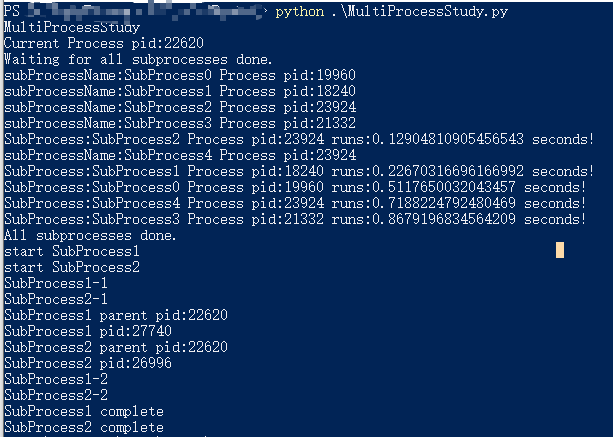
MultiProcessingOutput

从上面的测试代码可以看出,我们通过mutilprocessing模块提供的Pool(用于控制一组子进程的创建使用)成功创建了4个多进程池开启5个多进程任务(其中有一个任务需要等待一个可用的进程才能执行)。

通过SubProcess模块,我们实现了开启多个进程执行不同Python脚本的功能,从而实现多进程执行多Python脚本任务的需求。

更多更细节的学习参考:

多进程

Note:

  1. multiprocessing和subprocess是提供了多进程而非多线程
  2. Unix/Linux操作系统多进程是采用fork()实现真正的进程复制,而Windows不支持fork()函数,Windows上多进程是通过在子进程里创建新的Python解析器来实现的(来源:On Windows, there is no such system call. Python needs to perform the quite heavy task of creating a fresh Python interpreter session in the child, and re-create (step by step) the state of the parent.),所以我们执行多进程时要通过命令行而非Sumblime等软件。

待续……

Tips

encode and decode

字符编码问题,无论是shell,python都是需要考虑的,不然会出现乱码的情况。

encode(编码)和decode(解码)是需要一一对应的,不然同一个二进制数据,通过不同的编码和解码会得出不一样的结果。

首先我们来看看Python官网对于Encode和Decode的介绍:
Strings are stored internally as sequences of code points in range 0x0–0x10FFFF. (See PEP 393 for more details about the implementation.) Once a string object is used outside of CPU and memory, endianness and how these arrays are stored as bytes become an issue. As with other codecs, serialising a string into a sequence of bytes is known as encoding, and recreating the string from the sequence of bytes is known as decoding.

从上面可以看出,我们的string最终都是以字节码形式存储起来的。我们指定如何编码字符串到字节码的方法叫做编码。我们制定如何解析字节码到字符串的方法叫做解码。

关于字符编码的详细学习,这里参考以前转载的一片文章来加深理解:
关于字符编码,你所需要知道的(ASCII,Unicode,Utf-8,GB2312…)

不难看出,编码和解码方式要是不一致,最终字节码数据解析出来就会出现不正确(比如乱码)的情况。

这里需要提一下Python 3.X里有提供codecs的Package专门负责处理encode,decode问题。
codecs深入了解链接

1
2
3
4
5
6
7
8
9
10
11
12
13
14
15
16
17
18
19
20
21
22
23
24
25
26
27
28
29
30
#!/usr/bin/python
# -*- coding: utf-8 -*-
# 指定文件包含非anscii字符

import sys
import codecs

# 打印系统默认编码
print(sys.getdefaultencoding())

# 如果默认编码不是utf-8,强制设置成utf8去支持文本内非anscii字符
# 下面这段代码针对Python 2.X
# Phtyon 3.X默认就是utf-8编码不需要自己设定utf-8编码
#reload(sys)
#sys.setdefaultencoding('utf-8')

s="English-中文"
print(s)

s2=codecs.encode(s,"gb2312")
print(codecs.decode(s2,"gb2312"))
#解码格式与编码格式gb2312不一致,报错,无法解析
#print(codecs.decode(s2,"utf-8"))

# 需要指定和文件一样的编码格式才能正确解析文件里的内容
# 读取解码格式与inputfile.txt保存的编码格式utf-8不一致报错
#f = open('inputfile.txt','r',encoding='gb2312')
f = open('inputfile.txt','r',encoding='utf-8')
content = f.read()
print(content)

EncodeAndDecode

可以看到当我们把通过gb2312编码的字符串通过对应的gb2312解析时能正确显示,但用utf-8去解析时就出现了问题。同理文件读取指定的解码格式与文件自身的编码格式不一致也会出现无法读取的情况。

结论:
编码和解码格式要一一对应才能正确解析显示。
String is sequence of Unicode characters. Strings are immutable. We cannot delete or remove characters from a string. But deleting the string entirely is possible using the keyword del.
Python里是采用Unicode编码存储字符串。Strings可以通过[]访问,但是不可被改变的。
因为string是immutable的,所以我们不能通过del删除string里面的个别character,但是我们可以删除对string的整个引用。

main

'__main__' is the name of the scope in which top-level code executes. A module’s name is set equal to '__main__' when read from standard input, a script, or from an interactive prompt. A module can discover whether or not it is running in the main scope by checking its own __name__, which allows a common idiom for conditionally executing code in a module when it is run as a script or with python -m but not when it is imported:

从上面的介绍可以看出__main__表示是否是从最上层执行(比如直接执行脚本,命令行执行脚本)代码的名字。

如何判定是否是从最上层执行当前python脚本了?

从上面的介绍可以看出,__name__变量标识了当前python脚本是通过什么方式执行的。

1
2
3
4
5
6
7
# File Name: 		MainName.py
# Description: This file is used to study __name__ and __main__ using
# Author: TangHuan
# Create Date: 2021/5/22

print("MainName.py")
print(__name__)

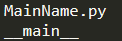
比如上面这段代码,在通过脚本直接执行时,我们会看到打印输出:

DirectExecuteNameOuput

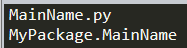
如果我们通过以下代码导入MainName.py会看到打印输出:

1
import MyPackage.MainName

ImportNameOutput

在命令行执行脚本和直接执行脚本同理。

可以看出当我们通过非import方式导入脚本时,__name__的值为__main__这个特殊的值,我们可以通过判定这个值来判定当前python脚本的执行方式,因此我们经常会看到以下代码:

1
2
if __name__ == "__main__":
print("DoSomething()")

这样就能做到只有通过非import方式执行当前python脚本时才执行某些东西。

Command Line Args

os.argv

很多时候作为脚本语言Python,我们写的Python脚本更多是用于自动化流程(比如打包签包等),而调用此Python脚本的方式大多为命令行调用。这里就引出了如何通过命令行将我们所需的参数传递进我们Python脚本的问题。

Python自带了一个os.argv的参数用于获取命令行传入参数数据。

1
2
for arg in sys.argv:
print(arg)

如果我们通过命令执行以下脚本传入参数:

1
***.py param1 param2 param3

我们会看到以下输出:

PythonArgsOutput

可以看到第0个参数表示当前python脚本执行的文件路径。

但上面这种方式,虽然能获得命令行传入的参数,但对于参数的格式以及参数的要求对于用的人来说都还是不透明且未做任何安全检查也未给与任何提示信息的,这样会导致Python脚本内部还需要自行做这些参数检查。这里就要引出接下来要提到的模块功能:argparse

Note:

  1. 如果以-c的参数触发python,os.argv的第一个参数是-c,详情参考:-c

argparse

The argparse module makes it easy to write user-friendly command-line interfaces. The program defines what arguments it requires, and argparse will figure out how to parse those out of sys.argv. The argparse module also automatically generates help and usage messages and issues errors when users give the program invalid arguments.

argparse是Python里帮助我们引导输入参数和快速解析参数的模块。

接下来我们直接上学习Demo,简单学习了解下如何使用argparse帮助我们快速引导输入参数和快速解析参数:
argparsestudy.py

1
2
3
4
5
6
7
8
9
10
11
12
13
14
15
16
17
18
19
20
21
22
23
24
25
26
27
28
29
30
31
32
33
34
35
36
37
38
39
40
41
42
43
44
45
46
47
48
49
#!/usr/bin/python
# -*- coding: utf-8 -*-
# 指定文件包含非anscii字符

import os
import argparse
import sys

# argparse解析参数输入,需要先定义一个ArgumentParser对象
# description - -h的时候显示在最前面的信息
parser = argparse.ArgumentParser(description='Study argparse module.')

# add_argument - 定义如何解析一个参数
# 第一个参数代表参数名
# type - 指定参数数据类型
# help - -h时解释该参数的用意
# dest - 表示该参数最终在parser.parse_args()返回对象里的名字
# default - 表示该参数的默认值
# required - 表示该参数是不是必须填的参数
parser.add_argument('--APKName', type=str,
help='APK名字', dest='APKName',
required=True)

parser.add_argument('--ClientChId', type=str,
help='新的ClientChId值', dest='New_Clientchid',
default='com.default.com')

parser.add_argument('--LEBIAN_VERCODE', type=int,
help='新的LEBIAN_VERCODE值', dest='New_Lebian_Vercode',
default='0')

parser.add_argument('--TemplateValue', type=str,
help='替换AndroidManifest.xml里quicksdk_packName字段为新的*', dest='NewTemplateValue',
default='com.defaulttemplatevalue.com')

parser.add_argument('--ResourcePath', type=str,
help='放入新资源到指定包内目录', dest='NewResourcePath',
default='./default.aba')

# 解析输入的参数
args = parser.parse_args()

# 打印参数的详细信息,通过访问parser.parse_args()的对象去访问
print(args)
print("APKName : {0}".format(args.APKName))
print("New_Clientchid : {0}".format(args.New_Clientchid))
print("New_Lebian_Vercode : {0}".format(args.New_Lebian_Vercode))
print("NewTemplateValue : {0}".format(args.NewTemplateValue))
print("NewResourcePath : {0}".format(args.NewResourcePath))

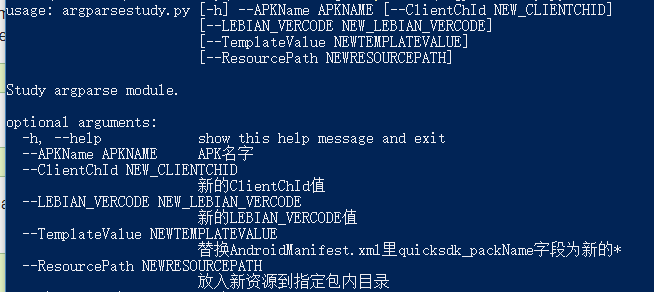
命令行输入:
Python .\argparsestudy.py -h
会看到每个参数的详细信息
ArgparseHelpInfo

真正使用时因为–APKName是必传参数,所以按下面方式调用即可:
Python .\argparsestudy.py –APKName com.tonytang.com
ArgparseUsing
可以看到我们通过argparse模块轻松的完成参数输入引导以及参数解析的任务。

更多详细学习参考:
argparse — Parser for command-line options, arguments and sub-commands

Path

关于Path模块,这里需要先了解一下跟语言无关的一个基础知识。

路径中斜杠/和反斜杠\的区别

从博客介绍中可以看出,斜杠和反斜杠主要是Windows路径和Unix路径里区分,大部分情况(无论是浏览器还是html url都是反斜杠)。

这里就引出了在自动化流程里涉及路径时,我们需要兼容Windows,Mac,Android或者IOS时候路径问题需要处理。而Path模块正是能够处理这一问题的现有模块功能。

os.path

这里只是简单示范几个常规API用法,详情参考:os.path

1
2
3
4
5
6
7
8
9
10
11
12
13
14
15
16
17
18
import os
import sys

FilePath = sys.argv[0]
print("FilePath = {}".format(FilePath))

# 获取当前工作目录
WorkingFolder = os.getcwd()
print("WorkingFolder = {}".format(WorkingFolder))

# 文件所在文件夹名
FileFolderName = os.path.dirname(FilePath)
print("FileFolderName = {}".format(FileFolderName))

if os.path.isdir(WorkingFolder):
print("{} is directory!".format(WorkingFolder))
else:
print("{} is not directory!".format(WorkingFolder))

OSPathAPIOutput

pathlib

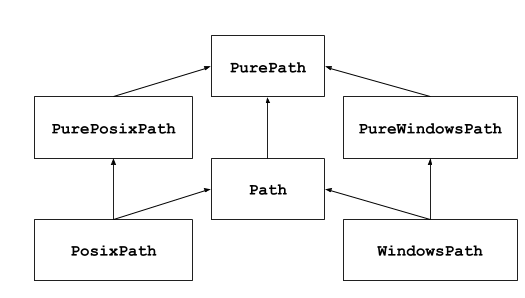
This module offers classes representing filesystem paths with semantics appropriate for different operating systems. Path classes are divided between pure paths, which provide purely computational operations without I/O, and concrete paths, which inherit from pure paths but also provide I/O operations.

上面提到了两种概念PurePath和Concrete Paths,前者只是提供路径概念(比如区分Windows还是Unix文件系统以及路径相关操作)不和文件系统挂钩。后者就是Pathlib提供的OOP文件路径系统抽象,提供了一系列的文件操作接口(Pathlib相当于进阶版的Path抽象模块)。

UMLPathDesgin

1
2
3
4
5
6
7
8
9
10
11
12
13
14
15
16
17
18
19
20
21
22
23
24
25
26
27
28
29
import os
import sys
from pathlib import Path

FilePath = sys.argv[0]
print("FilePath = {}".format(FilePath))

# 获取当前工作目录
WorkingFolder = os.getcwd()
print("WorkingFolder = {}".format(WorkingFolder))

# 文件所在文件夹名
FileFolderName = os.path.dirname(FilePath)
print("FileFolderName = {}".format(FileFolderName))

if os.path.isdir(WorkingFolder):
print("{} is directory!".format(WorkingFolder))
else:
print("{} is not directory!".format(WorkingFolder))

# 这一步可以自动转化成对应平台的路径格式(最后需要str的时候需要转化成str)
PathWorkingFolder = Path(WorkingFolder)
print("PathWorkingFolder = {}".format(PathWorkingFolder))

WorkingFolderJoinPath = PathWorkingFolder.joinpath("joinpath")
print("WorkingFolderJoinPath = {}".format(WorkingFolderJoinPath))

if PathWorkingFolder.exists():
print("{} exists!".format(PathWorkingFolder))

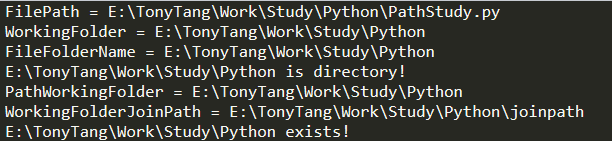
PathLibAPIOutput

这里用Pathlib除了他提供了更多的文件路径操作外,还有就是它继承了PurePath跨平台文件路径处理的特性,让我们可以在处理文件路径时无需关心平台。

Bat and Shell

Bat和Shell在Unity自动化&IOS自动化签包文章中已经了解过了,这里主要是介绍如何在python里和bat,shell交互(比如我们想获取环境变量里的数据,执行shell命令等)。

1
2
3
4
5
6
7
8
9
10
11
12
13
14
15
16
17
18
import os

androidhome = os.getenv("ANDROID_HOME")
if androidhome == None:
print("未配置ANDROID_HOME环境变量路径,请先配置ANDROID_HOME环境变量")
else:
print("ANDROID_HOME = {}".format(androidhome))

WorkingFolder = os.getcwd()
print("WorkingFolder = {}".format(WorkingFolder))

CmdCommand = "echo Hello World"
print("CmdCommand = {}".format(CmdCommand))
# 执行CDM命令
os.system(CmdCommand)

# 确保不自动关闭
input("请按任意键继续...")

SystemInfoOutput

注释和用法都很详细了,这里就不多介绍了。

Python GUI

GUI(Graphic User Interface)可视化用户界面。
Python实现GUI有很多选择,这里参考一位博主的分享:
Python 的图形界面(GUI)编程?

学习需要从需求出发,这里本人主要是想用Python写点简单的GUI来满足可视化即可,所以对GUI要求不高,本人不是以Python为主,只是用Python写点周边小工具,所以这里本人考虑的是学习了解Python自带的TKinter。

如果对GUI要求比较高,有比较常用Python,根据上面那位博主的建议来看,PyQT是个不错的选择。

TKinter

官方介绍:
Tkinter is Python’s de-facto standard GUI (Graphical User Interface) package. It is a thin object-oriented layer on top of Tcl/Tk.

接下来将根据Tkinter 8.5 reference: a GUI for Python去学习了解TKinter的概念以及使用。

待续……

Reference

Conception Part

Python
Guido van Rossum

Tkinter

Encode and Decode in Python

Tutorial Part

Python Tutorial
Python Package Index

Tkinter 8.5 reference: a GUI for Python

codecs

argparse

Python教程

Other Part

Python2orPython3
Python 的图形界面(GUI)编程?

Unity自动化打包

本章节主要是为了学习Unity自动化打包相关知识以及运用。
本文大部分属于本人学习理解的东西,如有不对欢迎指出,学习交流,共同进步。

本章节的流程如下:

  1. 了解什么是打包以及打包过程中的一些相关概念
  2. 了解什么是自动化以及帮助我们快速完成一键打包的工具
  3. 自动化打包工具或编程语言的选取
  4. Unity自动化打包过程中的相关工具
  5. 实战集成运用到Unity构建一键打包
  6. 更多学习程序发布以及相关概念

在了解相关自动化工具之前,我们需要先简单了解下什么是版本控制。在我们的日常开发工作中必不可少。

版本控制

版本控制相关概念学习

打包

平时做游戏开发,在完成整个游戏功能开发后,需要通过打包上真机测试。
把所有游戏资源代码打包成安装包的过程称为打包。

多平台

在多平台的处理上,Unity已经帮我们做了很大一部分工作了。让我们大部分时间只需关心游戏核心开发(Unity部分API在不同平台有差异),在打包这一块只需打选择对应平台即可。

但Unity自带的打包,终究只包含最基本的打包流程,当我们有特殊需求时,我们需要通过Unity以及相关工具完成支持我们自定义的打包流程。

自动化

在了解什么是自动化之前,让我们看看打包的基本流程。
在打包过程中,打包往往包含4个步骤。

  1. Preprocess(打包准备步骤)
    这一步主要是为正式打包编译做准备,比如做一些平台相关设置,资源打包处理,文件复制等
  2. Build(打包编译步骤)
    这一步是程序代码和资源正式打包成安装包的步骤,主要是通过指定打包参数执行打包。
    Unity在打包到Android和IOS平台时有差异。Android是直接就打包出APK,而IOS要先打包成XCode工程,然后在通过编译XCode工程打包出Ipa安装包。
  3. Postprocess(打包结束后期处理步骤)
    这一步是打包完成后负责后续的自动化操作以及善后工作,比如在打包IOS时打包出XCode工程后,可以在这一步进行XCode工程的自动化处理部分(比如动态添加info.plist文件信息,动态插入代码等)
  4. Deploy(安装步骤)
    这一步主要是打包好的安装包安装到真机的步骤

如果没有自动化,我们需要一步一步人工手动去完成上面的步骤。
而自动化就是只需人工设置打包最基本的参数信息,然后通过一步就自动化完成上述步骤的过程。

Jenkins

Introduction
Jenkins是一个用Java编写的开源的持续集成工具。Jenkins提供了软件开发的持续集成服务。它运行在Servlet容器中(例如Apache Tomcat)。它支持软件配置管理(SCM)工具(包括AccuRev SCM、CVS、Subversion、Git、Perforce、Clearcase和RTC),可以执行基于Apache Ant和Apache Maven的项目,以及任意的Shell脚本和Windows批处理命令。Jenkins的主要开发者是川口耕介。

本人使用目的:
做Unity游戏打包机,持续集成自动化打包流程,做到一键打包。

Deployment

  1. Download Jeakins
  2. Open up a terminal in the download directory and run java -jar jenkins.war
  3. Browse to http://localhost:8080 and follow the instructions to complete the installation.(安装插件)

Jenkins实战

自由风格构建系统

主要是采用特定的构建系统去构建自动化。(比如java通过ant||Maven,windows通过bat||python等)
OpenAutomation

如果不想采用Pipeline编写自动化流程,也可以通过直接编写调用Windows Bat或者Python等命令触发自动化流程。
OpenAutomationWithCommands

Unity3d Plugin不支持Pipeline,所以为了使用Unity3d Plugins,这里采用自由风格构建系统来搭建Unity3D的自动化打包。

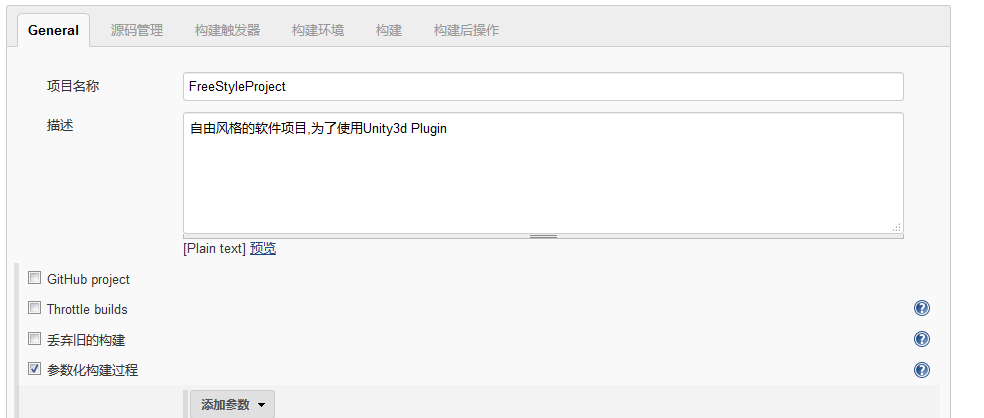
  1. Create Free Style(创建自由风格项目)
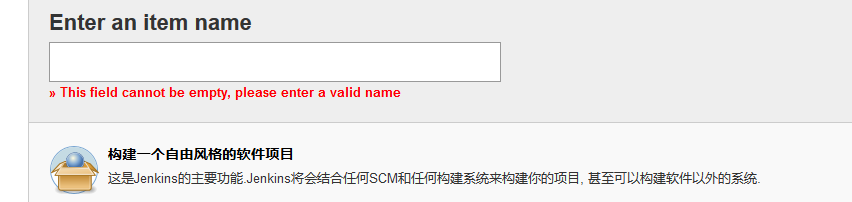
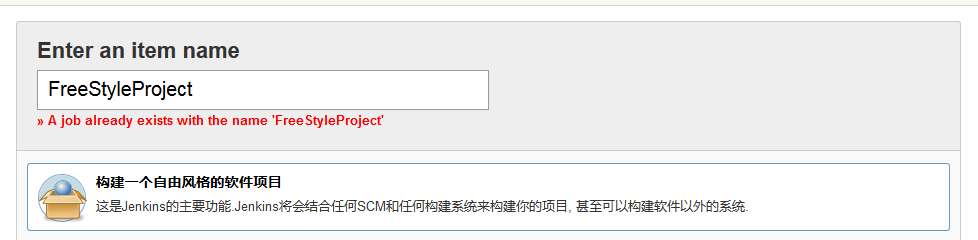
    新建 -> 构建一个自由风格的软件项目
    JenkinsFreeStyleProject
  2. 设置参数构造(用于自定义参数添加)
    FreeStyleWithParametersSetting
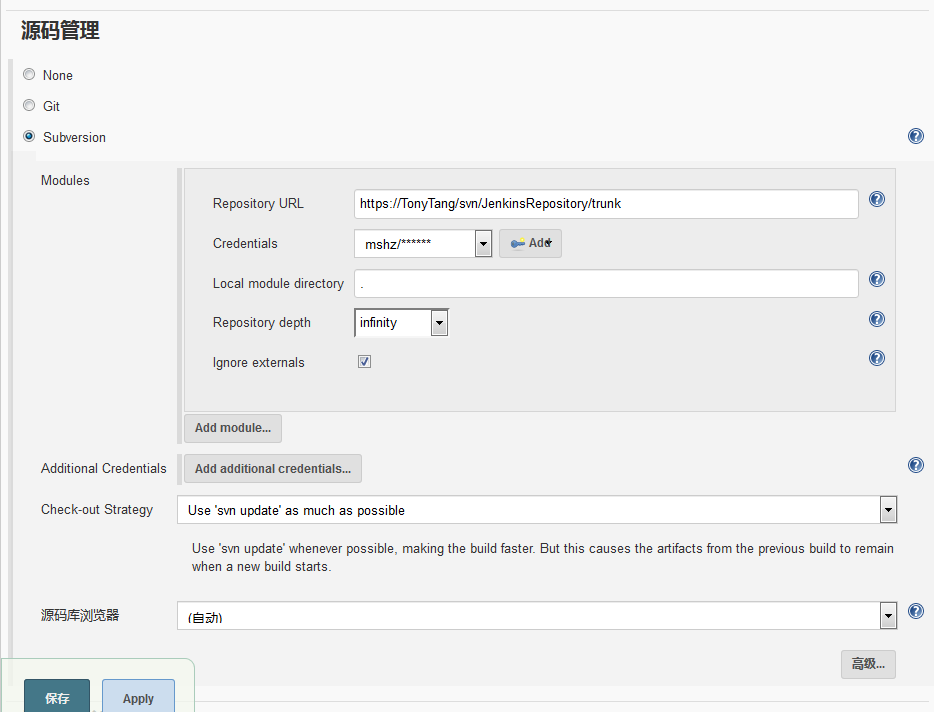
  3. 设置代码来源
    FreeStyleWithSourceSetting
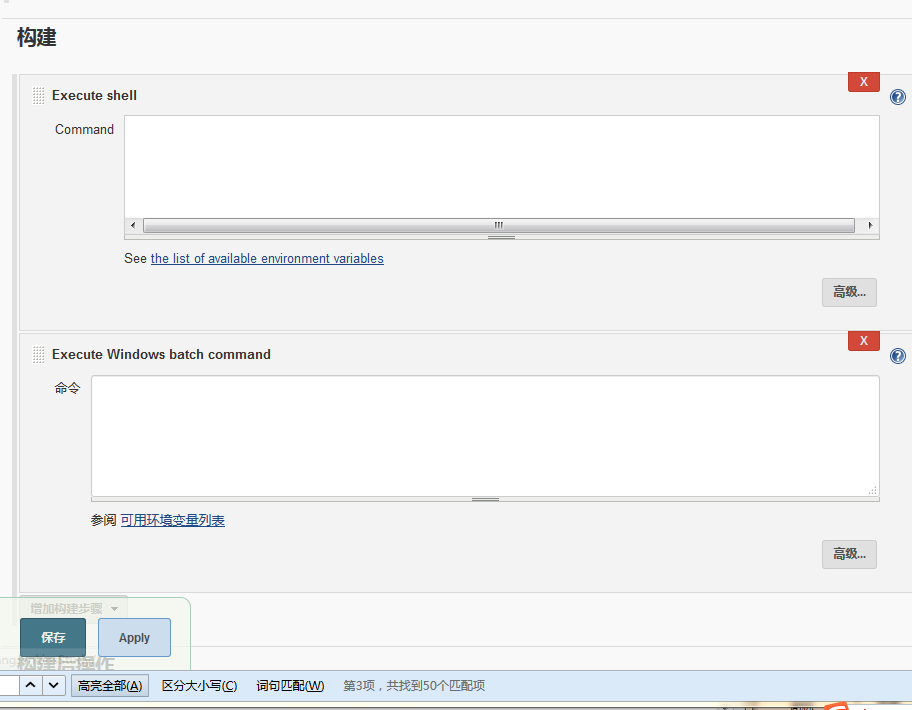
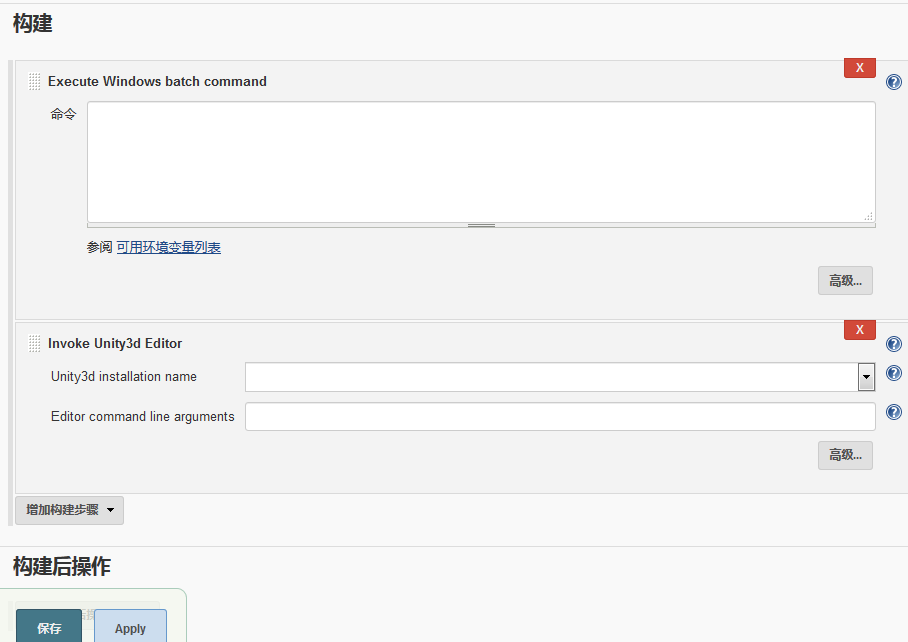
  4. 设置构建命令(bat || python || unity3d……)
    FreeStyleWithCommandsSetting
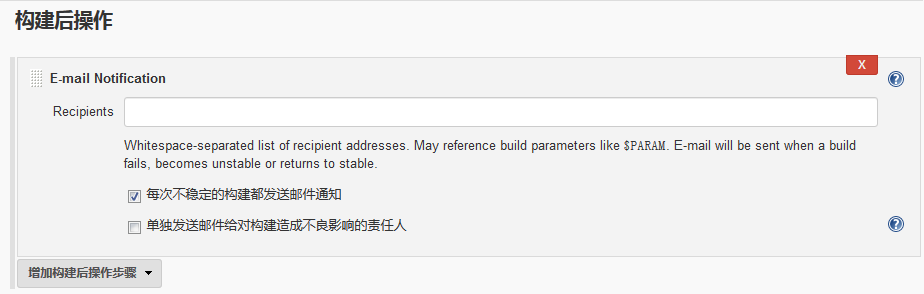
  5. 设置构建完毕后的一些行为(比如邮件通知)
    FreeStyleWithPostProcessing

Note:
想要改变默认的workspace路径的话。
设置->使用自定义的工作空间(只针对当前设置的自由风格项目有效)
FreeStyleWithOwnWorkspace

Pipeline
What

Jenkins Pipeline is a suite of plugins which supports implementing and integrating continuous delivery pipelines into Jenkins. Pipeline provides an extensible set of tools for modeling simple-to-complex delivery pipelines “as code”.(这里的Pipeline是一套插件,用于支持持续自动化集成编写。好比脚本文件定义一系列的自动化流程,但并不等价于脚本。)

那么Pipeline是用什么语言编写了?
Jenkins是基于Java的,Pipeline的编写是基于Groovy。
Groovy是Java平台上设计的面向对象编程语言。这门动态语言拥有类似Python、Ruby和Smalltalk中的一些特性,可以作为Java平台的脚本语言使用。

Why

为什么需要Pipeline?

  1. Code – 可管理可编辑可视化的自动化流程脚本
  2. Durable – 可持续化开发
  3. Pausable – 可以自动也可以停止等待输入
  4. Versatile – 支持复杂的持续交付需求
  5. Extensible – “The Pipeline plugin supports custom extensions to its DSL [5: Domain-Specific
    Language] and multiple options for integration with other plugins.”
How

接下来让我们看看如何创建一个Pipeline。

  1. 下载Pipeline插件
    DownloadPipelinePlugin
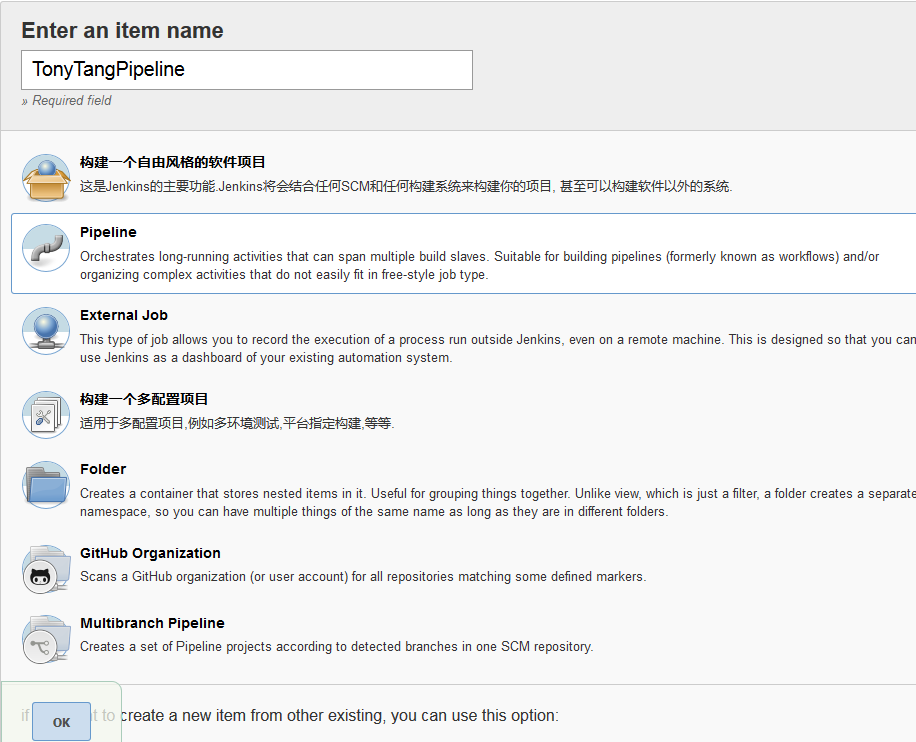
  2. New Item – 新建Pipeline(选择Pipeline类型)
    CreatePipeline
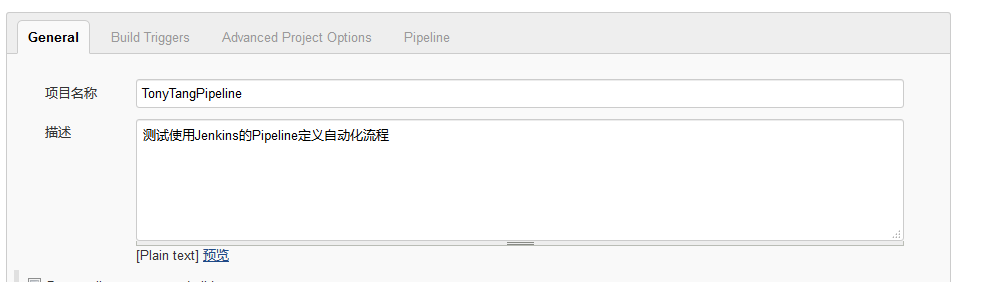
  3. Configure Pipeline
    • 配置Pipeline的名字
      ConfigurePipeline
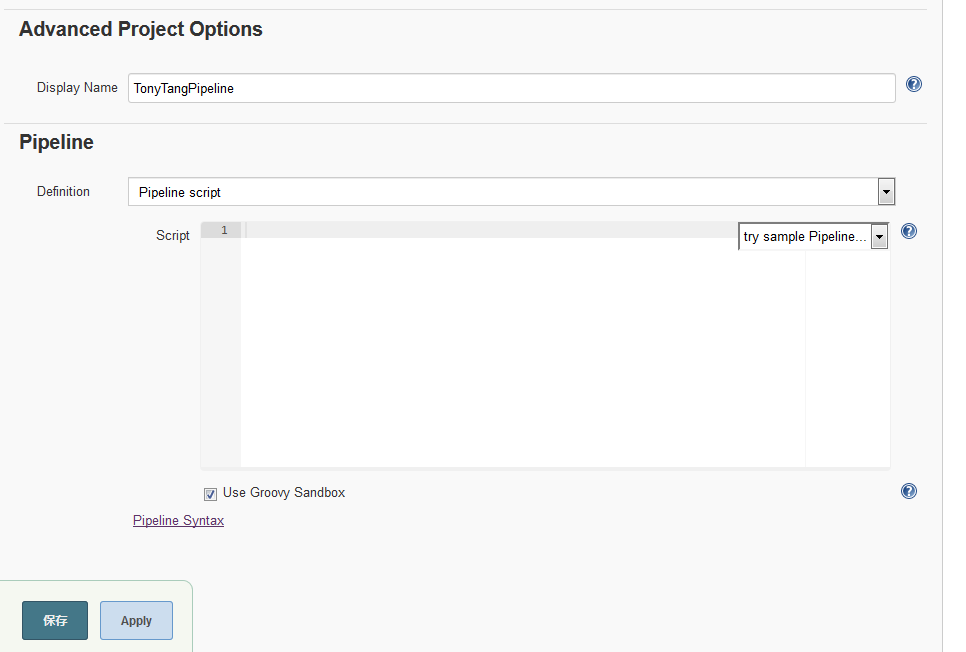
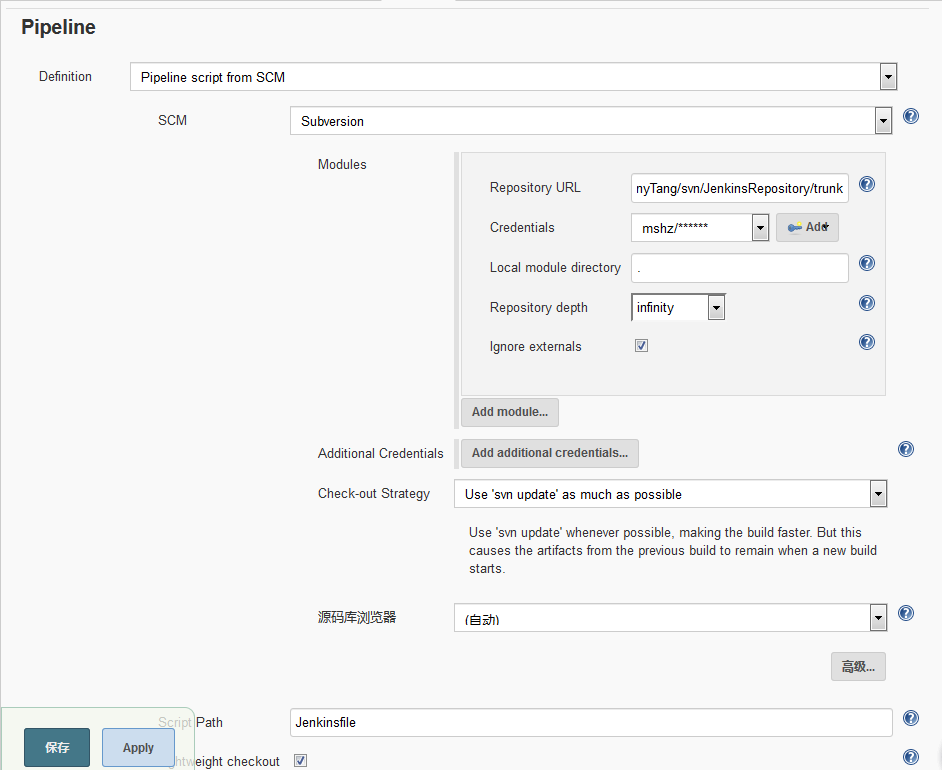
    • 设置Jenkins Pipeline Code的来源
      • 网页版编写
        CreatePipelineSetPipelineSource
      • SVN下含Jenksfile文件
        CreatePipelineSetPipelineSourceSVN
        这里不深入讨论Jenkins的各种设置,详情查看官方文档Jenkins User Handbook

Note:
Pipeline supports two syntaxes, Declarative and Scripted Pipeline

Jenkinsfile

除了直接在网页上编写Pipeline自动化流程。我们也可以指定Jenkinsfile文件作为编写Pipeline的地方。

为什么需要Jenkinsfile?
主要还是为了放入版本管理,方便所有人可视化看到自动化流程代码。

e.g.

1
2
3
4
5
6
7
8
9
10
11
12
13
14
15
16
17
18
19
20
21
22
23
24
25
26
27
28
29
30
31
32
33
34
35
36
37
38
39
40
41
42
43
44
45
46
47
48
49
50
51
52
53
54
55
56
57
58
59
60
61
62
63
64
65
66
67
68
69
70
71
72
73
74
75
76
77
78
79
80
81
82
83
84
85
86
87
88
89
90
91
92
#!groovy
pipeline {
//agent指定jenkins从哪里以及如何执行pipeline
//any表示从any available agent处执行
agent any

//看定义在那一层,就只针对那一层起作用(pipeline一层针对pipeline。stage一层针对特定stage)
//也可以修改已定义的环境变量值
environment {
UNITY_PROJECT_PATH = 'E:\\TonyTang\\Work\\Projects\\TGame_code'
}

//自定义参数
//可以通过pipeline代码编写,也可以直接在web UI界面上添加
parameters{
string(name: 'Platform', defaultValue: 'Android', description: 'Which plaftform is using?')
booleanParam(name: 'DEBUG_BUILD', defaultValue: true, description: 'Is debug version?')
}

stages {
stage('postprocess'){
//when表示执行条件判断
//决定stage是否应该执行
when{
expression
{
return params.DEBUG_BUILD
}
}
steps{
//params是访问pipeline里定义的所有parameters入口
echo "Current platform is ${params.Platform}"
echo 'postprocess'
echo UNITY_PROJECT_PATH
//env是jenkins定义的全局的环境变量
//http://localhost:8080/job/TonyTangPipeline/pipeline-syntax/globals
echo env.WORKSPACE
}
}
stage('build') {
steps {
//Windows调用bat
//Mac Linux采用sh
bat 'TonyTangPipeline'
}
}
stage('deploy'){
steps{
echo 'deploy'
//支持调用python
bat 'python FirstPython.py'
}
}
}

//post表示Pipeline执行完之后执行,做一些clean up操作
post {
//根据pipeline的结果做特定操作
always{
echo 'Always!'
}
success {
echo 'Success!'
}
failure{
echo 'Failed!'
}
}
}

// Script Pipeline(Optional)
//在pipeline执行完成之后执行
//支持大部分Groovy
//Script Pipeline的参数定义需要在properties里
properties([parameters([string(defaultValue: 'Android', description: 'Which platform is using?', name: 'Platform')])])

node {
//定义字符串
def Date = '2017//4//26'
stage('postprocess') {
//要使用${}访问string,需要用""
echo "Date = ${Date}"
echo "Current platform is ${params.Platform}"
echo 'postprocess....'
}
stage('build') {
echo 'build....'
}
stage('deploy') {
echo 'deploy....'
}
}

Note:

  1. 指定使用版本管理后,Jenkinsfile必须放到版本管理里才能找到。
  2. Jenkinsfile必需放到前面设置的本机相对路径下才能找到。
Problems
  1. 构建参数一旦通过代码指定添加后,代码删除了依然存在
  2. No valid crumb was included in the request

Solutions:

  1. 通过Pipeline -> Setting的UI界面手动删除参数
  2. 在系统管理 –> Configure Global Security
    取消“防止跨站点请求伪造(Prevent Cross Site Request Forgery exploits)”的勾选。
Tools
Pipeline Tools

Snippet Generator
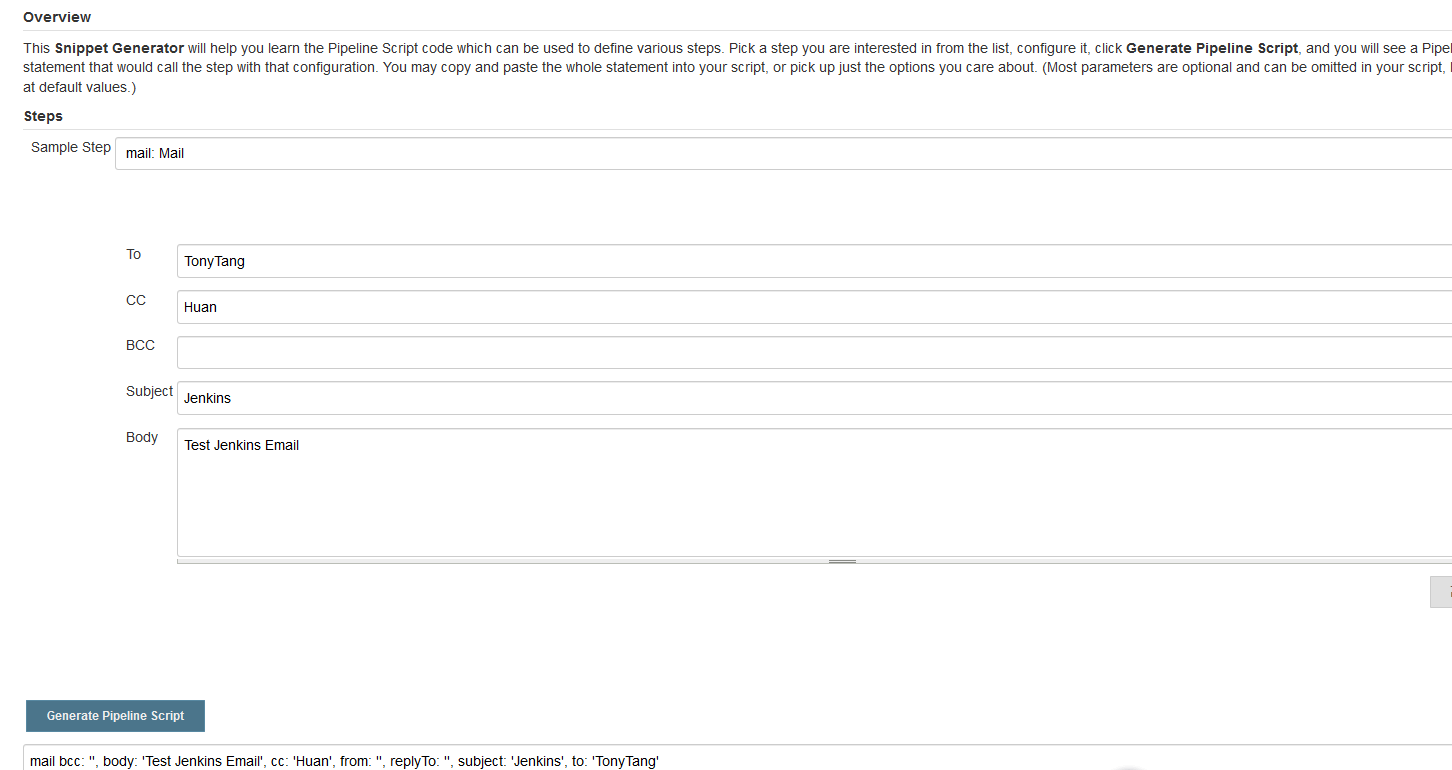
PipelineSnippetGenerator
这是一个很有用帮助快速编写Pipeline的工具,他可以帮助我们把我们熟悉的自动化脚本转换成Pipeline格式的语句,也可以快速生成一些特定功能的脚本(比如邮件功能等)。(Jenkins提供)

Pipiline全局环境变量

Email Plugin

利用现有的SMTP(腾讯,网易等)服务进行搭建邮件提醒,详情参见如下:
Jenkins——应用篇——插件使用——Mailer Plugin
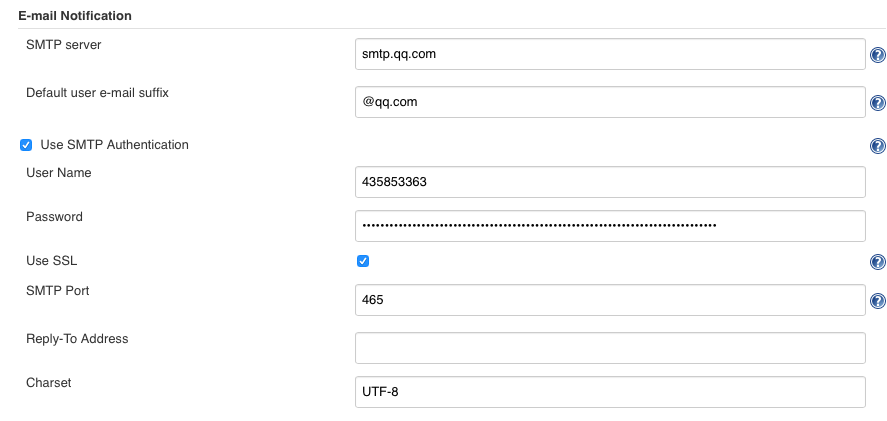
Jenkins自带Email配置如下:
Manage Jenkins -> Configure System -> E-mail Notification
EmailNotificationSetting
Jenkins自带的Mailer提供的功能很有限,为了提供更多更广的功能,这里我们需要用到Jenkins Email Extension Plugin
Jenkins进阶系列之——01使用email-ext替换Jenkins的默认邮件通知
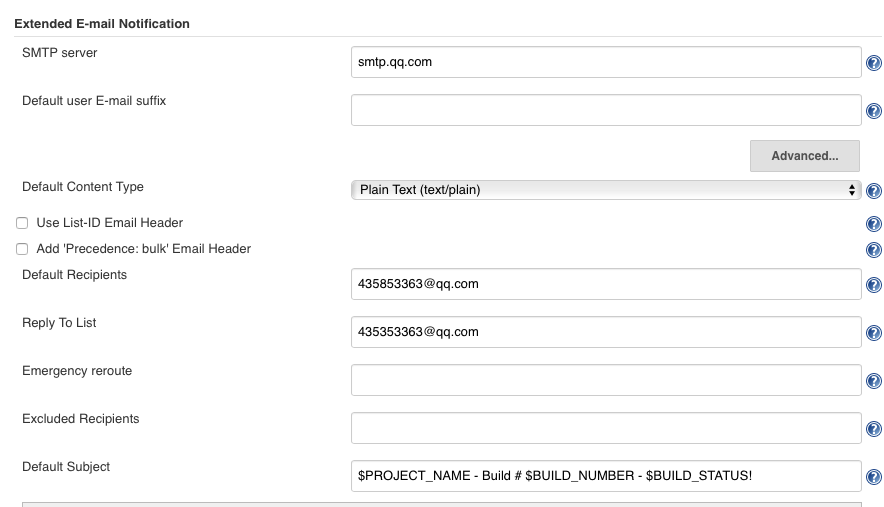
Email Extension Plugin配置详情参见如下:
Manage Jenkins -> Configure System -> Extended E-mail Notification
ExtendedEmailNotificationPart1
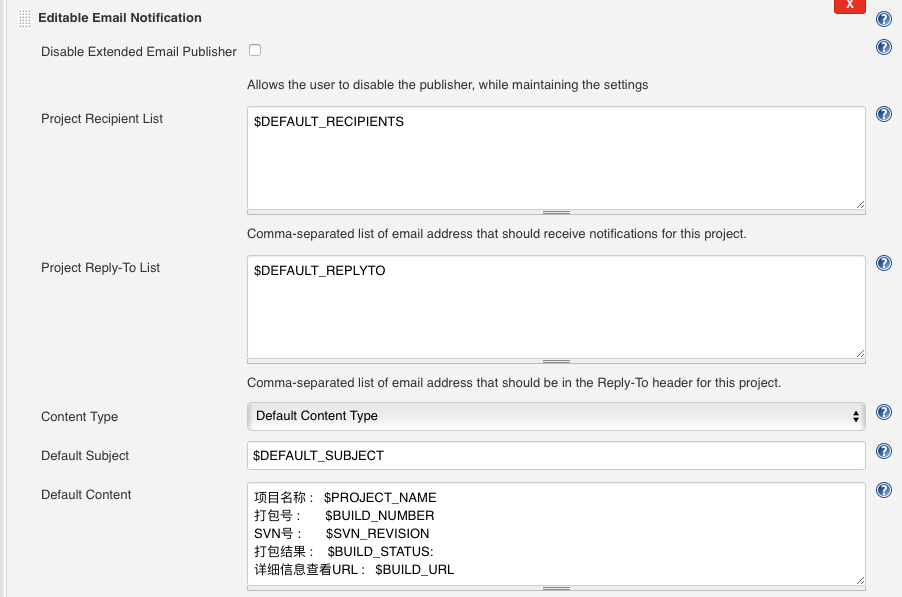
针对workspace自定义邮件内容配置如下:
WorkspaceExtendedEmailSetting
最终收到Email提醒:
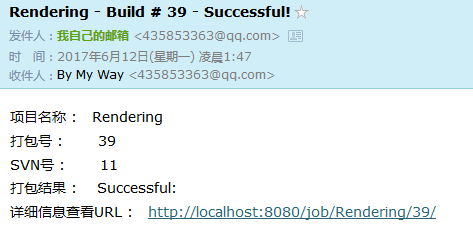
EmailResult

Unity3D Plugin

管理插件->Unity3d Plugin
Unity本身是支持从命令行启动U3D,执行Editor特定方法的。
但Unity3D Plugin是一个针对Jenkins集成Unity命令行的插件,可以帮助我们直接在Jenkins上编写U3D命令,对于Jenkins更加友好。
好处如下:

  1. Log file redirection(Log重定位到Jenkins界面)
  2. Distributed builds(分布式编译)

Unity3D Plugin实战配置

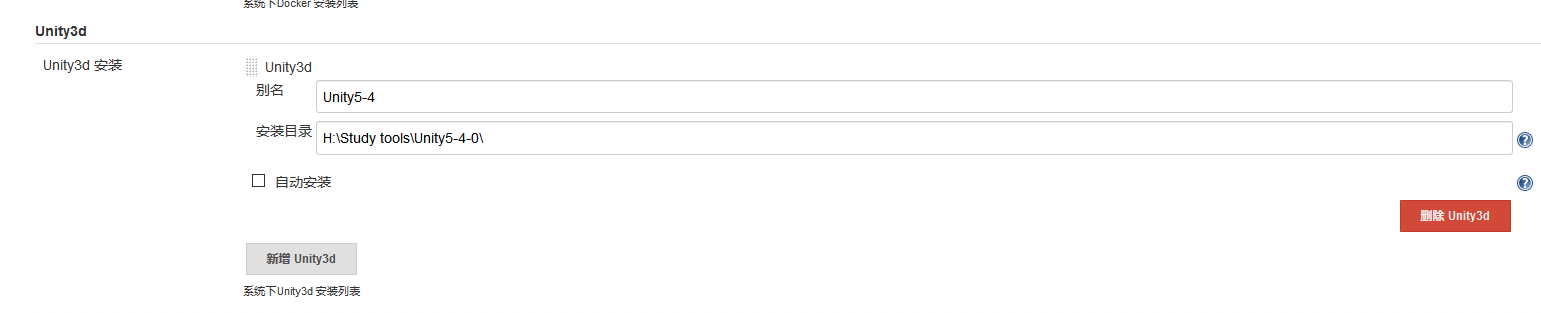
  1. Configure Unity Installation Path
    System Setting -> Global Tool Configuration
    JenkinsUnityPathConfiguration
  2. 编写Unity下可通过命令行调用的代码
1
2
3
4
5
6
7
8
9
10
11
12
using UnityEngine;
using System.Collections;
using UnityEditor;

public class UnityBuild {

[MenuItem("Custom/UnityBuild/OneKeyBuild")]
static void OneKeyBuild()
{
Debug.Log("OneKeyBuild() Called!");
}
}
  1. 配置Unity命令行运行启动以及参数
    JenkinsUnityMethodCall
    JenkinsUnityMethodCallOutput
    从上面可以看出我们成功的配置了Jenkins以及对于Unity打包方法的调用(在这一步我们可以做很多我们自己对于Unity打包的流程设置,资源打包或者其他的预处理等)
  2. 编写完整的打包设置以及相关预处理代码
    待续…….
    接下来是为了在IOS进行Jenkins自动化打包而设置的步骤
  3. 在IOS搭配SmartSVN拉VisualSVN上的文件(Windows上用TortoiseSVN作为SVN客户端即可)
  4. 在IOS上配置Jenkins(和Windows上类似,需要下载Java支持Jenkins运行)
    这里讲几个配置搭建Mac OSX的Jenkins时遇到的坑:
    1. 配置Unity插件Unity安装路径问题
      Windows上是到Editor上一层即可。IOS是到Unity.app这一层(Unity.app(e.g. /Applications/Unity/Unity.app/)在命令行里可以往里访问)
    2. 指定IOS Subversion URL(e.g. https://192.168.1.3/svn/***)时显示无法访问或者不正确的credential(这里是因为默认的Mac SVN版本过低需要更新Mac OSX自带的SVN)
    3. 更新Mac OSX自带SVN时在添加新装的SVN到环境变量里后依然显示是老版的SVN
      在~/目录下touch .bash_profile(创建.bash_profile)
      然后添加环境变量路径export PATH=”/opt/subversion/bin;$PATH”
      使其环境变量路径设置生效source .bash_profile
      查看当前SVN版本svn –version
      如果上一步依然显示是旧版SVN且当前系统是10.11
      那么我们就需要删除Mac OSX上原本的SVN以实现更新SVN的目的
      查看旧版SVN路径which svn
      删除旧版SVN(sudo -s rm -rf /svnpath/svn*)(此时如果出现No Permission to remove,那么恭喜,你是用的10.11系统。10.11推出了SIP(System Integrity Protection)机制去防止root用户对于部分文件的操作权限限制用于防止病毒破坏或修改重要文件)
      为了能够删除旧版SVN,这里我们需要进到Recover Mode去临时关闭SIP(重启电脑一直按住cmd+R,然后在terminal里执行csrutil disable,关闭成功后就可以重启电脑去删除旧版svn了)
      然后将新版SVN链接到旧版SVN执行路径(sudo -s ln -s /opt/subversion/bin/svn* /svnpath)
      最后到Recover Mode里恢复SIP(csrutil enable)
    4. 打包IOS时报错:_RegisterApplication(), FAILED TO establish the default connection to the WindowServer, _CGSDefaultConnection() is NULL.
      这是因为Jenkins默认安装时是以Jenkins作为用户和组。开机自启动时也是以Jenkins用户和组来运行的。而Unity我是默认安装在我自己的用户apple和admin组下。所以在Jenkins需要启动Unity时应该是没有权限调用 Unity Editor 的命令行。所以我们要做的就是确保Unity和Jenkins运行在同一个User和Group下。
      以下采用把Jenkins改到apple和wheel下运行以支持Unity的命令行运行。
      详情参见macOS 安装配置 Jenkins 持续集成 Unity 项目指南
    5. 指定Custom Workspace(自定义到桌面特定目录后每次都报Failed to mkdir,这个跟第四个问题是同一个问题,默认Jenkins用户权限问题)

Note:
很多文件是Unity自动生成的(比如Library目录),我们无需加入版本管理(SVN只要不加入版本管理即可)

Note:
Unity3d Plugin不支持在Pipeline里添加。
同时Unity3d Plugin只在3.4.2 to 5.0.1的版本下测试过。(经本人测试在Unity5.4.0f3的版本也能正常使用)

Jenkins从零搭建

这里的从零搭建,在借助Jenkins插件的基础上,尽量采用Pipeline编写为主,插件UI为辅的方式来实现一整套完整的Jenkins自动化。

1
2
3
4
5
6
7
8
9
10
11
12
13
14
15
16
17
18
19
20
21
22
23
24
25
26
27
28
29
30
31
32
33
34
35
36
37
38
39
40
41
42
43
44
45
46
47
48
49
50
51
52
53
54
55
56
57
58
59
60
61
62
63
64
65
66
67
68
69
70
71
72
73
74
75
76
77
78
79
80
81
82
83
84
85
86
87
88
89
90
91
92
93
94
95
96
97
98
99
100
101
102
103
104
105
#!groovy
pipeline {
//agent指定jenkins从哪里以及如何执行pipeline
//any表示从any available agent处执行
agent any

//看定义在那一层,就只针对那一层起作用(pipeline一层针对pipeline。stage一层针对特定stage)
//也可以修改已定义的环境变量值
environment {
UNITY_PROJECT_PATH = 'E:\\TonyTang\\Work\\Projects\\MyGitHubProjects\\GitStudy2'
GIT_URL = 'git@github.com:TonyTang1990/GitStudy.git'
GIT_AUTH = '7d947f92-1e9c-44ba-9a80-9744f92f2ff6'
}

//自定义参数
//可以通过pipeline代码编写,也可以直接在web UI界面上添加
parameters{
string(name: 'Platform', defaultValue: 'Android', description: 'Which plaftform is using?')
booleanParam(name: 'DEBUG_BUILD', defaultValue: true, description: 'Is debug version?')
}

stages {
stage('postprocess'){
//when表示执行条件判断
//决定stage是否应该执行
when{
expression
{
return params.DEBUG_BUILD
}
}
steps{
//params是访问pipeline里定义的所有parameters入口
echo "Current platform is ${params.Platform}"
echo 'postprocess'
echo "${env.UNITY_PROJECT_PATH}"
echo "${env.GIT_URL}"
echo "${env.GIT_AUTH}"
//env是jenkins定义的全局的环境变量
//http://localhost:8080/job/TonyTangPipeline/pipeline-syntax/globals
echo env.WORKSPACE
}
}
stage('Git') {
steps {
echo 'Git operation'
checkout([$class: 'GitSCM',
userRemoteConfigs: [[url: "${env.GIT_URL}", credentialsId: "${env.GIT_AUTH}"]],
extensions: [[$class: 'CleanBeforeCheckout', $class: 'GitLFSPull']]
])
}
}
stage('build') {
steps {
//Windows调用bat
//Mac Linux采用sh
bat 'BatAutomation'
}
}
stage('deploy'){
steps{
echo 'deploy'
//支持调用python
bat 'python PythonAutomation.py'
}
}
}

//post表示Pipeline执行完之后执行,做一些clean up操作
post {
//根据pipeline的结果做特定操作
always{
echo 'Always!'
}
success {
echo 'Success!'
}
failure{
echo 'Failed!'
}
}
}

// Script Pipeline(Optional)
//在pipeline执行完成之后执行
//支持大部分Groovy
//Script Pipeline的参数定义需要在properties里
properties([parameters([string(defaultValue: 'Android', description: 'Which platform is using?', name: 'Platform')])])

node {
//定义字符串
def Date = '2017//4//26'
stage('postprocess') {
//要使用${}访问string,需要用""
echo "Date = ${Date}"
echo "Current platform is ${params.Platform}"
echo 'postprocess....'
}
stage('build') {
echo 'build....'
}
stage('deploy') {
echo 'deploy....'
}
}

脚本语言

为了快速编写一些自动化任务,我们往往需要用到脚本语言。

bat

批处理文件(英语:Batch file),又称批次档,在DOS、OS/2、微软视窗系统中,是一种用来当成脚本语言运作程序的文件。它本身是文本文件,其中包含了一系列让具备命令行界面的解释器读取并运行的指令。它相当于是类Unix系统下的Shell script。

1
2
3
4
5
6
7
8
9
10
11
12
13
14
15
16
17
18
19
20
21
22
23
24
25
26
27
28
29
30
31
32
33
34
35
36
37
38
39
40
41
42
43
44
45
46
47
48
49
50
51
52
53
54
55
:: 关闭命令输出打印
@echo off
:: UTF8
chcp 65001
:: 清除命令行界面内容
CLS
:: 输出打印信息
echo Tony Tang bat study
:: 设置打印传入参数
set par1=%1
set par2=%2
echo %par1%
echo %par2%
:: 输出打印当前目录路径
echo %cd%
:: 切换到上一层路径
cd ..
:: 输出打印当前目录路径
echo %cd%
:: 切换到BatStudy目录
cd BatStudy
:: 输出打印当前目录路径
echo %cd%
:: 打印帮助信息
::HELP
:: 自定义变量(定义变量时=号两边不能有空格)
set batvariable=tonytang
:: 打印自定义变量
echo %batvariable%
:: 自定义数字变量
set number=3
:: 打印自定义数字变量
echo number = %number%
:: 条件语句
if %number%==2 (echo %number%==2) else (echo %number%!=2)
:: 检查文件是否存在
set filename=batcontent.txt
echo filename=%filename%
if EXIST ./%filename% (echo %filename% exits) else (echo %filename% not exist)
:: 普通循环语句
for %%i in (1 2 3) do echo %%i
:: 当前目录文件循环遍历语句
for %%f in (*) do @echo %%f
:: 启用变量执行时解析
SetLocal EnableDelayedExpansion
for %%i in (1 2 3) do (
set numberVariable=%%i
echo !numberVariable!
set numberVariable=!numberVariable!+!numberVariable!
echo !numberVariable!
)
:: 暂停等待输入
pause
:: 退出命令界面 0代表正常退出
EXIT 0

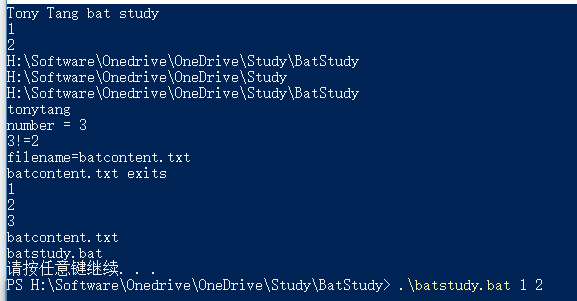
BatStudyOutput

这里只列举一些常用基础的,详细Windows Batch学习参考:
Batch file – Programming tutorial
Batch Script Tutorial

Shell

Windows上的bat,power shell
Linux上的shell
好处:
简单快速的编写一些系统相关的任务(比如文件复制等)
缺点:
有平台差异

在正式学习Shell之前,让我们依然从What,How,Why,When这四个问题着手:
What?
Unix shell,一种壳层与命令行界面,是UNIX操作系统下传统的用户和计算机的交互界面。第一个用户直接输入命令来执行各种各样的任务。

第一个Unix shell是由肯·汤普逊,仿效Multic上的shell所实现出来,称为sh。

后续出了其他的Shell:

  1. Bourne-Again shell - bash
  2. Debian Almquist shell - dash
  3. Korn shell - ksh
  4. Z shell - zsh

上面的几个Shell都可以看作是后续发展功能越来越强大的Shell解析器,至于具体分别包含些什么功能就不在本文讨论的范围内了。这里我们主要以bash和shell作为解析器来学习编写shell脚本。

How?
Shell脚本(英语:Shell script),又称Shell命令稿、程序化脚本,是一种计算机程序与文本文件,内容由一连串的shell命令组成,经由Unix Shell直译其内容后运作。被当成是一种脚本语言来设计,其运作方式与解释型语言相当,由Unix shell扮演命令行解释器的角色,在读取shell脚本之后,依序运行其中的shell命令,之后输出结果。利用shell脚本可以进行系统管理,文件操作等。

可以看出Shell脚本是被当做脚本语言来解释执行,通过调用系统内核的一些工具来实现特定功能任务的。

Why?
Shell并不适合编写复杂的程序任务,因为他只提供了一些比较基础的工具,并且不具备面向对象编程等高级语言的特性。
既然如此那我们为何还要坚持使用Shell了?为何不直接选择Python,Ruby,Perl这些相对高级一点的解释性语言了?
理论上是可以的,但Shell属于原生就具备提供的工具,可以很快捷的编写出一些看似简单但却方便的工具脚本。即使Python可以实现,但针对特定的功能可能没有Shell来的那么快捷方便,根据需求选择合适的脚本语言也是很重要的。后续我会结合Python夸平台的特性,使用Python结合Shell编写一些自动化相关的工具。

Note:
Shell跟操作系统紧密相关,原本并非跨系统平台的,但通过移植很多shell具备了跨系统平台的能力(Windows上通过Cygwin与MinGW可以模拟执行Unix Shell)。

When?
那么什么时候适合用Shell了?从前面三个问题不难看出,Shell只适合用于一些不复杂的功能任务里,无论是语言特性还是跨平台都没有Python那些高级语言支持的好。如果需要实现复杂的且跨平台,需要高级语言特性(面向对象等)时,不应该考虑Shell而是Python,Perl,Ruby这些。

Note:
这里所说的shell和Window的batch并不是同一个东西。

bash
  • 指定解析器
1
2
#!/bin/bash
# Proper header for a Bash script

**#!**是two-byte的magic number
表示这个文本是executable shell script,后面紧跟的/bin/bash表示shell解析器是用的bash

  • 输出打印
    学程序,最初开始的地方肯定是Hello World。
    在bash里打印输出是通过echo指令。
1
2
3
#!/bin/bash
# Proper header for a Bash script
echo "Hello World"

Bash echo

  • 特殊符号
  1. 井号(#) – 注释符号
1
# Proper header for a Bash script(这一行#号开头表示注释)
  1. ; – 命令分隔符(允许同一行多个指令)
1
2
#! /bin.bash
echo "Hello"; echo "World"
![CommandSeparator](/img/Bash/CommandSeparator.png)
  1. ;; – 跳出case语句
1
2
3
4
5
6
#! /bin/bash
variable="TonyTang"
case "$variable" in
TonyTang) echo "TonyTang1";;
TonyTang) echo "TonyTang2";;
esac
![TerminateCommand](/img/Bash/TerminateCommand.png)
  1. .
    • 表示文件是隐藏的
1
2
3
4
#! /bin/bash
touch .hidden-file
ls -l
ls -al
![HidenProfileCommand](/img/Bash/HidenProfileCommand.png)
- 表示当前目录
1
2
3
pwd
cd .
pwd
![CurrentDirectoryCommand](/img/Bash/CurrentDirectoryCommand.png)
- 正则里面表示匹配单个字母
  1. “” - 字符串(保留大部分特殊符号)
  2. ‘’ - 字符串(保留所有特殊符号)
  3. ,
  4. \ - 反斜杠,忽略特殊符号
1
2
#! /bin/bash
echo "\"Hello World"\"
![Backslash](/img/Bash/Backslash.png)
  1. / - 文件路径分隔符
  2. : - 相当于内置true
1
2
3
4
5
6
while :
do
echo "Number 1"
echo "Number 2"
echo "Number 3"
done
![ColonOperator](/img/Bash/ColonOperator.png)
  1. ! - 取反
  2. 星号(*) - 通配符或者乘法
  3. ? - 三目运算符或者表示测试条件
  4. $
    • $ 变量取值符号
    • $? 退出状态码
    • $$ 进程号
1
2
3
4
5
#! /bin/bash
var1=100
echo "var1 = $var1"
echo $?
echo $$
![VariableSubstitution](/img/Bash/VariableSubstitution.png)
  1. &> >& >> < <>

    • &> 重定向输出到指定文件

    • <> 文件读取

1
2
3
4
5
#! /bin/bash
ls -l
echo "Hello World" >HelloWorldFile.txt
ls -l
cat HelloWorldFile.txt
![RedirectionCommand](/img/Bash/RedirectionCommand.png)
  1. ~ ~+ - home目录和当前目录
1
2
3
4
echo ~
echo $HOME
echo ~+
echo $PWD
![FolderCommands](/img/Bash/FolderCommands.png)
  1. ` - 命令执行符号(可以用于快速执行命令并将结果复制)
1
2
Date=`date +%Y%m%d%H%M%S`
echo $Date
![CommandsSubstitution](/img/Bash/CommandsSubstitution.png)
  • Shell小知识
  1. $0 - $9
    $0表示Shell文件名
    $1-$9表示Shell的第一个到第九个参数

  2. ls -l
    查看文件详细信息(比如读写权限等)
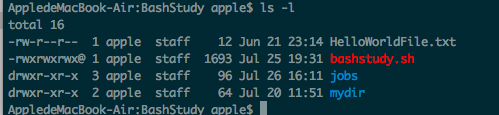
    LSCommand
    具体如何理解最前面的权限信息,参考第六章、Linux 的文件权限与目录配置

  3. chmod
    修改文件权限

  4. cd
    切换目录

  5. pwd or ~+
    当前所在目录

  6. echo
    输出信息

  7. exit
    退出shell

  8. $?
    前一段shell的返回输出值

  9. $ or ${}
    去变量值


  10. 多行shell支持

  11. $SHELL
    从当前Shell执行结束的地方打开一个新的terminal窗口(能保持之前所有的输出信息都在)

待续……

Python(严格意义上不算脚本语言)

好处:

  1. 跨平台
  2. 解释性语言,开发方便快速
  3. 库丰富
    待续……

IOS自动化打包

IOS打包准备
  1. Apple Account(发布到IOS设备上需要)
    任何账号都可以发布到自己的设备测试,但是如果要使用GC or In-App Purchases或者发布到App Store的话需要注册Apple Developer Program。

  2. Xcode(up-to-date version)
    因为Xcode是Mac上的软件,所以这里需要Mac电脑或者是黑苹果。(开发所需的SDK,IDE套装都在这)

  3. Adding your Apple ID to Xcode
    Open Xcode -> Xcode -> Preferences -> Account ->

  4. 在开发之前,Mac需要获得IOS Certificartes(用于对Mac开发授权,程序签名等)
    登陆Apple Developer Program -> Certificates ,identifiers & Profiles -> Certificate Signing Request
    Create CSR(Certificate Signing Request):

    1. Folder -> Utilities Folder -> Keychain Access
    2. Keychain Access -> Certificate Assistant -> Request a Certificate from a Certificate Authority -> 填完内容存储到本地
      CSR里包含了public key和private key。
      当CSR创建以后,需要使用CSR去请求一个Certificate:
    3. 上传CSR
    4. 下载Certificate
    5. 运行安装Certificate
      安装Certificate后public和private key pair就生成了(在Keychain Access下可以查看)而我们的应用程序签名是使用私钥来签名用公钥来进行验证, 而苹果生成的Certificate 只包含了公钥,当你用自己的私钥签名后,苹果会用公钥来进行验证,确保是你自己对程序签名而不是别人冒充的
      通过导出共享公钥和私钥,可以实现共同开发(Mac开发授权,程序签名等)。
  5. 设置App ID(相当于Android包名,用于识别App)
    App ID包含以下组成部分:

    1. Prefix – 作为Team ID
    2. Suffix – 作为Build ID的搜索字符串(可指定通配符)
    3. AppServices – 指定包含的Service(比如Game Center, IAP, iCloud等服务),只有指定了这些,使用包含了此APP ID的Provision Profile才能使用特定服务
  6. 添加设备列表(只有被添加了的设备列表才能用于安装和测试程序)
    需要通过Itunes查看UDID,然后添加到设备列表。

  7. 用上述我们创建的Certificate, Apple ID, Devices List等生成我们的Provision Profile(Unity Cloud Build的时候需要指定)
    不同的Provision Profile有不同的用处,比如iPhone Developer证书用于测试设备上运行,iPhone Distribution证书用于提交应用到App Store。
    让我们来理解一些相关概念,下文引用至IOS开发 证书总结
    Identifier:
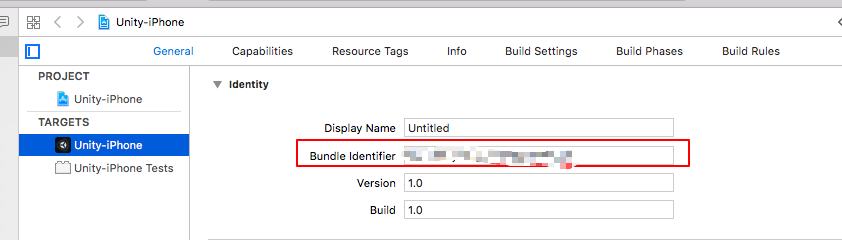
    顾名思义App ID(application id, not apple id), 对于你的一个或者一组app他们的唯一标识, 这个App ID跟你Xcode中的Targets —–> General—–> Identity中的Bundle Identifier是匹配的,(其余的那些推送服务啊什么的都是配置在APP ID下面的) 如下图:

    Provisioning Profile
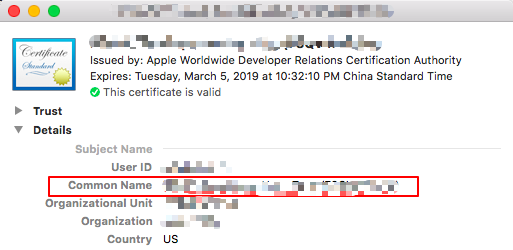
    一个Provisioning Profile包含了上述所有内容 Certificate && App ID && Device, 这个Provisioning Profile文件会在打包时嵌入到.ipa的包里,如下图:

    所以一台设备上运行应用程序的过程如下(以Developer Provisioning Profile为例):
    1 检查app 的 bunld ID 是否 matches Provisioning Profile 的 App ID
    2 检查 app 的 entitements 是否 matches Provisioning Profile 的 entitements
    3 用Certificate来验证签名签名
    4 检查此设备的UDID是否存在于 Provisioning Profiles中 (仅在 非发布证书中)

    如何创建?
    在 Provisioning Profiles 中点加号,然后依次选择App ID, Certificate, Devices(development),再指定名称,最后下载, 双击则安装到Xcode中

    Xcode中的配置
    Project && Target 的 build settings 中搜索Code sign…
    然后分别选好对应的证书,如果选择列表中没有刚才创建的证书可以双击直接复制名字上去

    关于推送服务
    基于上面的操作,如果需要推送服务我们还需要申请一个推送证书
    依次进入 Certificates —>Production —>Apple Push Notification service SSL (Production)
    然后选择需要推送服务的App ID
    再选择前面创建的.cerSigningRequest文件
    最后点击generated生成推送证书
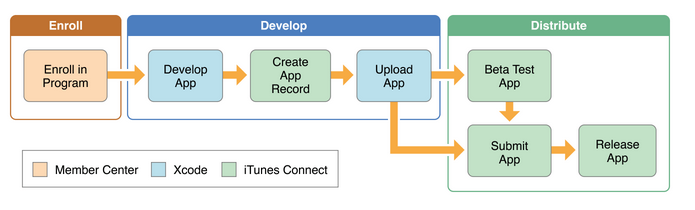
    IOS开发流程大致如下:
    IOSAppDistributionWorkflows

XUPorter or Unity API(PBXFroject)

PBXFroject是Unity 5.X版本加进来的。因为5.X以前没有关于XCode自动化修改的相关接口,所以以前的版本用的都是XUPoter这个第三方插件工具来实现自动化修改info.plist文件,自动添加library之类的功能。

本人只使用过XUPoter还没详细使用PBXProject,但XUPoter的作者在Unity 5.X开始已经不在更新支持了,因为有了PBXProject,所以可以这样说,Unity 5.X版本开始可以直接使用Unity 5.X不需要再使用XUPoter了。

XUPoter

这里直接给出作者工具链接,就不详细讲解如何集成使用了,具体参考官方作者网站。
onevcat/XUPorter

PBXProject

对IOS的打包后的XCode工程做后处理,我们需要在代码里实现IPostProcessBuild接口的OnPostProcessBuild方法。

XcodePostProcess.cs

1
2
3
4
5
6
7
8
9
10
11
12
13
14
15
16
17
18
19
20
21
22
23
24
25
26
27
28
29
30
31
32
33
34
35
36
37
38
39
40
41
42
43
44
45
46
47
48
49
50
51
52
53
54
55
56
57
58
59
60
61
62
63
64
65
66
67
68
69
using UnityEngine;
using System;
using System.Collections.Generic;
UnityEditor.iOS.Xcode

public static class XCodePostProcess : IPostprocessBuild

public void OnPostprocessBuild(BuildTarget target, string path)
{
Debug.Log("XCodePostProcess.OnPostprocessBuild for target " + target + " at path " + path);

//通过PBXProject访问并修改XCode工程相关的设置
string projpath = path + "/Unity-iPhone.xcodeproj/project.pbxproj";
PBXProject proj = new PBXProject();

//读取XCode项目的数据
proj.ReadFromString(File.ReadAllText(projPath));

//获取XCode项目的Unity Target名字
string nativetargetname = PBXProject.GetUnityTargetName();

//获取XCode项目的Unity Target的GUID
string nativeTarget = proj.TargetGuidByName(nativetargetname);

//获取XCode项目的Test Target名字
string testTarget = proj.TargetGuidByName(PBXProject.GetUnityTestTargetName());

//设置需要设定的target列表
string[] buildTargets = new string[] { nativeTarget, testTarget };

//BitCode是用于提交AppStore后优化数据用的,IOS上是optional,但watchOS和tvOS是必须的。动态设置BitCode值
proj.SetBuildProperty(buildTargets, "ENABLE_BITCODE", "NO");

//动态修改UnityAppController.mm文件的arc编译参数
ArcOnFileByProjectPath(proj, nativetargetname, "Classes/UnityAppController.mm", false);

//自动化删除ReleaseForProfiling和ReleaseForRunning两个Configuration
proj.RemoveBuildConfig("ReleaseForProfiling");
proj.RemoveBuildConfig("ReleaseForRunning");

//整个XCode项目数据写回去
File.WriteAllText(projPath, proj.WriteToString());
}

/// <summary>
/// 开启或关闭指定target的指定文件的arc(Automatic Reference Counting)
/// </summary>
/// <param name="proj"></param>
/// <param name="targetname"></param>
/// <param name="filepath"></param>
/// <param name="isenablearc"></param>
private void ArcOnFileByProjectPath(PBXProject proj, string targetname, string filepath, bool isenablearc)
{
string targetguid = proj.TargetGuidByName(targetname);
var fileguid = proj.FindFileGuidByProjectPath(filepath);
Debug.Log("targetguid = " + targetguid);
Debug.Log("fileguid = " + fileguid);
var compileflaglist = new List<string>();
if(isenablearc)
{
compileflaglist.Add("-fobjc-arc");
}
else
{
compileflaglist.Add("-fno-objc-arc");
}
proj.SetCompileFlagsForFile(targetguid, fileguid, compileflaglist);
}
}

这里就不一一截Mac对应的图了,示例代码对XCode的各种参数设置都进行了修改,注释也很清楚了,具体详细的使用,请参考官网API解释。

IOS自动化签包

Xcodebuild是XCode上编译Xcode工程的工具。

所以接下来我们主要是要学习的是使用Xcodebuild去编写自动化签包的工具。

学习XCode Project项目里的一些相关概念。
一下概念来源iOS系统提供开发环境下命令行编译工具:xcodebuild:

  1. Workspace:简单来说,Workspace就是一个容器,在该容器中可以存放多个你创建的Xcode Project, 以及其他的项目中需要使用到的文件。
    使用Workspace的好处有:
    • 扩展项目的可视域,即可以在多个项目之间跳转,重构,一个项目可以使用另一个项目的输出。Workspace会负责各个Project之间提供各种相互依赖的关系;
    • 多个项目之间共享Build目录。
  2. Project:指一个项目,该项目会负责管理生成一个或者多个软件产品的全部文件和配置,一个Project可以包含多个Target。
  3. Target:一个Target是指在一个Project中构建的一个产品,它包含了构建该产品的所有文件,以及如何构建该产品的配置。
  4. Scheme:一个定义好构建过程的Target成为一个Scheme。可在Scheme中定义的Target的构建过程有:Build/Run/Test/Profile/Analyze/Archive
  5. BuildSetting:配置产品的Build设置,比方说,使用哪个Architectures?使用哪个版本的SDK?。在Xcode Project中,有Project级别的Build Setting,也有Target级别的Build Setting。Build一个产品时一定是针对某个Target的,因此,XCode中总是优先选择Target的Build Setting,如果Target没有配置,则会使用Project的Build Setting。

了解了XCode Project中的一些概念,让我们看看Xcodebuild到底是什么样的工具了?
xcodebuild is a command-line tool that allows you to perform build, query, analyze, test, and archive operations on your Xcode projects and workspaces from the command line. It operates on one or more targets contained in your project, or a scheme contained in your project or workspace.

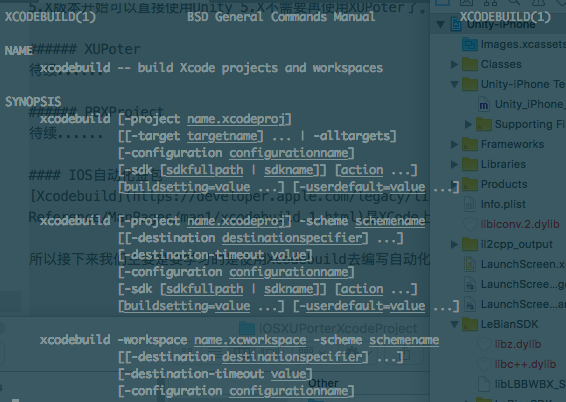
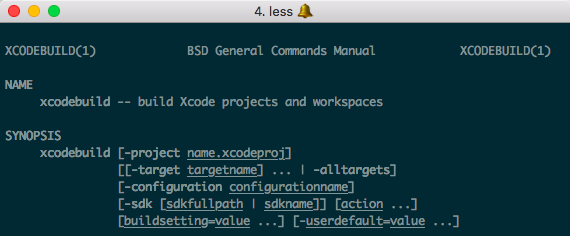
如果想查看xcodebuild的详细说明,我们可以通过命令行输入:man xcodebuild查看即可:
XcodebuildManualPage

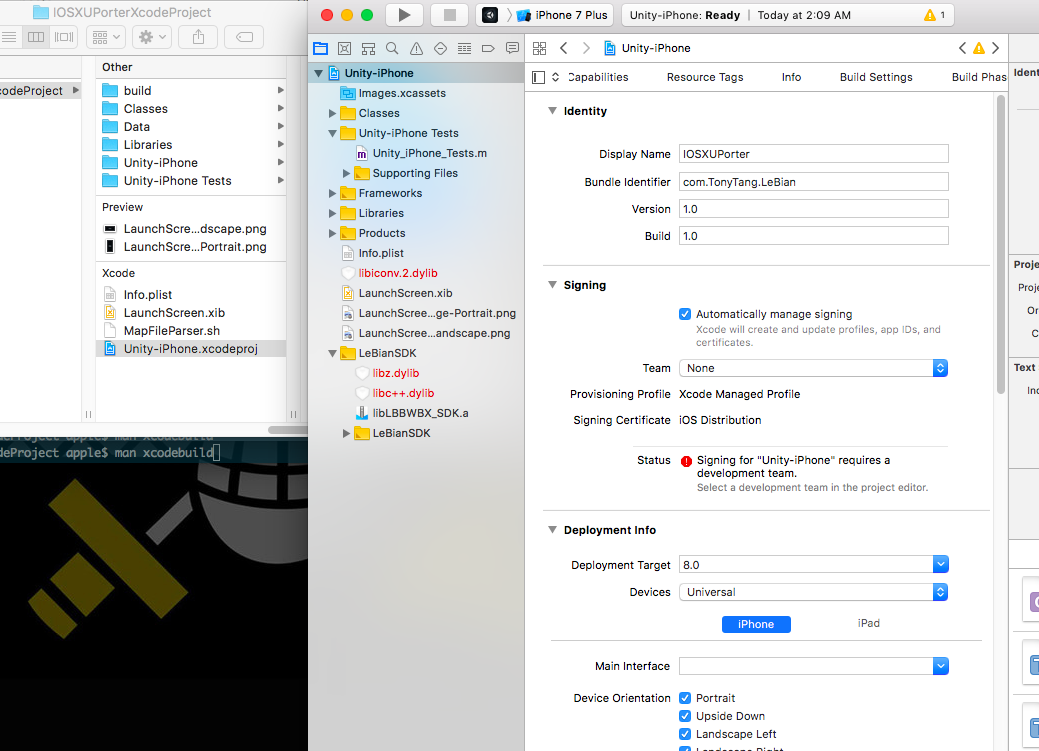
首先以XcodeProject为例,我们来看看上面的概念在实际操作过程中对应的东西:
XcodeProjectDemo
从上面可以看出,我们的Demo Xcode Project是没有workspace的,只有一个叫做Unity-iPhone.xcodeproj的Xcode工程文件,而这个文件对应的就是我们前面提到的Project的概念。

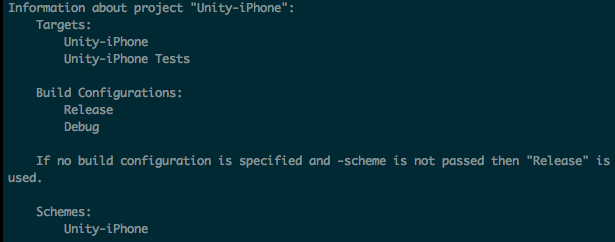
如果我们想查看Xcode Project里面的相关schemes或者target信息,我们可以通过命令行切换到Xcode Project目录下然后输入xcodebuild -list -project *.xcodeproj命令来查看:
XcodeProjectListInfo
从上面的信息我们可以看到,我们的Unity-iPhone.xcodeproj项目里有两个Targets分别为:Unity-iPhone和Unity-iPhone Tests以及一个Schemes:Unity-iPhone。这些都分别对应了我们前面最初所了解的相关Xcode Project的概念。

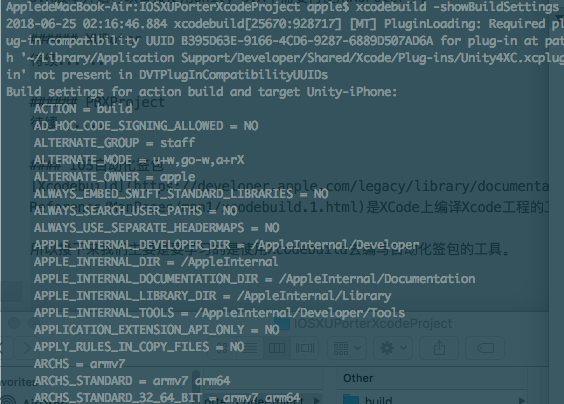
如果想要查看Xcode Project的详细Build Setting设置信息,我们可以通过输入xcodebuild -showBuildSettings来查看:
XcodeProjectBuildSettingsInfo
-showBuildSettings有不少东西,很多概念需要对比着Xcode工程里的设置来看,这里暂时不深究每一个代表什么意思。

了解了Workspace,Project,Target,Scheme,BuildSetting等等概念以及如何通过xcodebuild工具查看Xcode工程相关信息后,接下来我们看一下xcodebuild是如何编译打包导出IPA的。

这里参考网上,我发现Xcode9以后有两种方式来实现自动化打包。

  1. Automatic
  2. Manual

这里我先以Manual的形式来学习打包,后续再学习了解Automatic的形式打包。

首先我们来看看官方对xcodebuild工具的介绍:
xcodebuild is a command-line tool that allows you to perform build, query, analyze, test, and archive operations on your Xcode projects and workspaces from the command line.
可以看出xcodebuild正式苹果官方给出的通过命令行触发打包编译导出一系列操作的工具。

具体想知道xcodebuild的详细使用介绍,可以在shell里输入man xcodebuild查看即可:
ManXcodebuild

Manual:
手动打包之前,我们要用到下面几个比较重要的xcodebuild命令参数:

  1. clean – Remove build products and intermediate files from the build root(SYMROOT)(清楚通过build触发编译的所有中间文件)
  2. build – Build the target in the build root(SYMROOT). This is the default action, and is used if no action is given.(build指定target)
  3. archive – Archive a scheme from the build root(SYMROOT). This requires specifying a scheme.(打包指定scheme)
  4. exportArchive – Specifies that an archive should be exported. Requires -archivePath, -exportPath, and -exportOptionsPlist. Cannot be passed along with an action.(指定Archive文件导出IPA)

下面以工作中完整的命令行编译打包导出IPA为例来讲解学习(敏感信息中文代替):

1
2
3
4
5
6
7
8
9
10
11
12
13
14
15
16
17
18
19
20
21
22
23
24
25
26
27
28
29
30
31
32
33
34
35
36
37
38
39
40
41
42
43
44
45
46
47
48
49
50
51
52
53
54
55
56
57
58
59
60
61
62
63
64
65
66
67
68
69
70
71
72
73
74
75
76
77
78
79
80
81
82
83
84
85
86
87
88
89
90
91
92
93
94
95
96
97
98
99
100
101
102
103
104
105
106
107
108
109
110
111
112
113
114
115
116
117
118
119
120
121
122
123
124
125
126
127
128
129
130
131
132
133
134
135
136
137
138
139
140
141
142
143
144
145
146
147
148
149
150
151
152
153
154
155
156
157
158
159
160
161
162
163
164
165
166
167
168
169
170
171
172
173
174
175
176
177
178
179
180
181
182
183
184
185
186
187
188
189
190
#! /bin/bash
# 检查并创建文件夹
CheckAndCreateFolder()
{
echo "CheckOrCreateFolder parameter1 : $1"
if [ -d $1 ]
then
echo "$1 exits!"
else
echo "$1 not exits!"
mkdir -p $1
fi
}

currentfolder=~+
homefolderpath=~
xcodeexportoptionfolderpath="${homefolderpath}/Desktop/XcodeAutoSign/"
currentdatetime=`date +%Y%m%d%H%M%S`

#签包相关信息(默认大陆Appstore)
# 包名
bundleid="对应包名"
# 大陆
areas="dalu"
#证书类型
provisionprofiletype="AppStore"
# 证书名字
codesignidentity="对应证书名字"
# 描述文件名字
provisioningprofile="对应描述文件名字"
# Deployment最低版本指定
deploymenttarget="对应最低IOS支持版本"
# 打包导出配置文件
# 最终签名相关信息都是以配置文件为准
exportoptionsplist="对应签名配置文件"

echo "--------------------"
echo "1. 大陆Appstore"
echo "2. 大陆AdHoc"
echo "3. 台湾Appstore"
echo "4. 台湾AdHoc"
echo "--------------------"
echo "输入打包类型数字id(默认不输入是大陆AppStore):"
read countrynumber
# 默认大陆
echo "countrynumber = ${countrynumber:=1}"

echo "输入工程文件夹全路径:"
read xcodeprojectfolderpath
xcodeprojectfullpath="${xcodeprojectfolderpath}/Unity-iPhone.xcodeproj"
echo "xcodeprojectfullpath : ${xcodeprojectfullpath}"

# 检查工程Xcode项目文件是否存在
if [ -d ${xcodeprojectfullpath} ]
then
echo "Xcode项目文件存在!"
else
echo "Xcode项目:${xcodeprojectfullpath}文件不存在!签包IPA失败!" > ErrorLog.txt
exit 0
fi

if [ $countrynumber -eq 1 ]
then
#大陆Appstore
echo "大陆AppStore"
areas="dalu"
provisionprofiletype="AppStore"
bundleid="对应包名"
codesignidentity="对应证书名字"
provisioningprofile="对应描述文件名"
deploymenttarget="对应最低IOS支持版本"
exportoptionsplist="对应签名配置文件"
elif [ $countrynumber -eq 2 ]
then
#大陆Ad Hoc
echo "大陆AdHoc"
areas="dalu"
provisionprofiletype="AdHoc"
bundleid="对应包名"
codesignidentity="对应证书名字"
provisioningprofile="对应描述文件名"
deploymenttarget="对应最低IOS支持版本"
exportoptionsplist="对应签名配置文件"
elif [ $countrynumber -eq 3 ]
then
#台湾Appstore
echo "台湾Appstore"
areas="taiwan"
provisionprofiletype="AppStore"
bundleid="对应包名"
codesignidentity="对应证书名字"
provisioningprofile="对应描述文件名"
deploymenttarget="对应最低IOS支持版本"
exportoptionsplist="对应签名配置文件"
elif [ $countrynumber -eq 4 ]
then
#台湾AdHoc
echo "台湾AdHoc"
areas="taiwan"
provisionprofiletype="AdHoc"
bundleid="对应包名"
codesignidentity="对应证书名字"
provisioningprofile="对应描述文件名"
deploymenttarget="对应最低IOS支持版本"
exportoptionsplist="对应签名配置文件"
else
echo "请输入1或者2或者3或者4!签包失败!" > ErrorLog.txt
exit 0
fi

# IPA文件名
ipadname="${areas}_${provisionprofiletype}_$currentdatetime"
# IPA输出目录全路径
ipaexportpath="/Users/Shared/build-ios/${areas}/${provisionprofiletype}/${currentdatetime}"
# Archive文件名
archivefilename="${xcodeprojectfolderpath}/${areas}_archive.xcarchive"

# 切换到对应工程目录下
cd $xcodeprojectfolderpath
echo "切换到对应工程目录后当前目录:"
echo ~+

# 检查输出目录是否存在,不存在则创建一个
CheckAndCreateFolder $ipaexportpath

#检查导出配置文件是否路径正确且存在
echo "导出配置文件路径:"
echo "${xcodeexportoptionfolderpath}/${exportoptionsplist}"
if [ -f ${xcodeexportoptionfolderpath}/${exportoptionsplist} ]
then
echo "导出配置文件存在!"
else
echo "导出配置文件不存在!签包IPA失败!" > ErrorLog.txt
exit 0
fi

# 判定符合条件的Archive文件是否存在,
# 存在则直接Export,
# 不存在则完全重新签包
if [ ! -d ${archivefilename} ]
then
echo "${archivefilename}文件不存在!"
#clean下工程
echo "开始清理工程"
xcodebuild clean \
-project Unity-iPhone.xcodeproj \
-configuration Release -alltargets \
PRODUCT_BUNDLE_IDENTIFIER="$bundleid"

#开始编译
echo "开始编译打包"
xcodebuild -project Unity-iPhone.xcodeproj \
-scheme Unity-iPhone \
-configuration Release \
PRODUCT_BUNDLE_IDENTIFIER="$bundleid" \
CODE_SIGN_STYLE="Manual" \
CODE_SIGN_IDENTITY="$codesignidentity" \
PROVISIONING_PROFILE="$provisioningprofile" \
IPHONEOS_DEPLOYMENT_TARGET="$deploymenttarget" \
-archivePath "${archivefilename}" \
archive
else
echo "${archivefilename}文件存在!"
fi

#开始打包Archive
echo "开始导出IPA"
xcodebuild -exportArchive \
-archivePath "${archivefilename}" \
-exportOptionsPlist "${xcodeexportoptionfolderpath}/${exportoptionsplist}" \
-exportPath "${ipaexportpath}"

#修改最终输出的ipa文件名
mv -f "${ipaexportpath}/Unity-iPhone.ipa" "${ipaexportpath}/${ipadname}.ipa"

echo "xcodeprojectfolderpath : $xcodeprojectfolderpath"
echo "homefolderpath : $homefolderpath"
echo "ipaexportpath : $ipaexportpath"
echo "bundleid : $bundleid"
echo "codesignidentity : $codesignidentity"
echo "provisioningprofile : $provisioningprofile"
echo "deploymenttarget : $deploymenttarget"
echo "exportoptionsplist : $exportoptionsplist"
echo "xcodeexportoptionfolderpath : $xcodeexportoptionfolderpath"
echo "currentdatetime : $currentdatetime"
echo "ipadname : $ipadname"
echo "archivefilename : $archivefilename"

echo "签包结束."
$SHELL

这里针对上面的自动化签包脚本,我们需要理解几个关键概念:

  1. 包名 – 我们平时说的包名,Unity里平台设置那里设置的包名
    Xcode里显示参考下图:
    XcodeBundleId
  2. 证书名字 – IOS开发打包需要的证书文件(比如:Development,Distribution证书)
    因为Apple Developer Account最近刚到期,无法截后台账号的图,这里只放一张Keychain里面显示已经安装在本地的Certificate图:
    KeyChainCertificates
    证书名字通过右键对应Certificate后选择Get Info可查看:
    CertificateDetail
  3. 描述文件 – 是指后台指定了Certificate,Apple Id, Device List等信息的描述文件
    ProvisioningProfile
    如果想详细查看里面的信息,可以通过下面这个命令:
1
security cmd -D -i *.mobileprovision

这里面就包含了很多信息,这里我们暂时需要通过这个找到描述文件的名字:
ProvisionProfileName

  1. IOS最低版本支持 – 这个是对应Xcode里设置Deployment Target的那个参数,表示打包支持的最低IOS版本
    DeploymentTarget
  2. 签名配置文件 – 关于导出IPA时的签名信息以及相关参数等的配置文件
    ExportOptionFile
    让我们看下里面的详细信息:
1
2
3
4
5
6
7
8
9
10
11
12
13
14
15
16
17
18
19
20
21
22
23
<?xml version="1.0" encoding="UTF-8"?>
<!DOCTYPE plist PUBLIC "-//Apple//DTD PLIST 1.0//EN" "http://www.apple.com/DTDs/PropertyList-1.0.dtd">
<plist version="1.0">
<dict>
<key>method</key>
<string>app-store</string>
<key>provisioningProfiles</key>
<dict>
<key>对应包名</key>
<string>对应描述文件名</string>
</dict>
<key>signingCertificate</key>
<string>***</string>
<key>signingStyle</key>
<string>manual</string>
<key>stripSwiftSymbols</key>
<true/>
<key>teamID</key>
<string>***</string>
<key>uploadSymbols</key>
<false/>
</dict>
</plist>

可以看到签名配置文件里面指定了导出类型(app-store or development等),证书名以及包名,描述文件信息等信息。
那么这个配置文件哪里来的了?
手动Archive后,我们会在*.ipa的同层文件目录下得到一个叫ExportOption.plist的文件,这个就是那个配置文件。

Note:
如果我们的程序开启了苹果相关的服务,比如Apple Wallet等,那这些服务会以参数的信息显示在上面的配置文件里,如果后台证书配置了使用特定服务,但该配置文件里没有,就会提示特定字段信息对不上或者遗漏而报错。

可以看出通过上面的自动化,我们可以命令行指定以下内容:

  1. 包名
  2. 证书
  3. 描述文件
  4. IOS最低支持版本号
  5. 签名证书

接下来我们看看xcodebuild编译里是如何指定这些信息并成功导出IPA的:

  1. 清理工程
1
2
3
4
xcodebuild  clean \                              # 指定了清理工程
-project Unity-iPhone.xcodeproj \ # 指定清理哪一个project
-configuration Release -alltargets \ # 指定清理Release下的所有targets
PRODUCT_BUNDLE_IDENTIFIER="$bundleid"# 指定了包名(这一个可能不需要)
  1. 编译打包
1
2
3
4
5
6
7
8
9
10
xcodebuild -project Unity-iPhone.xcodeproj \                # 指定打包哪个project
-scheme Unity-iPhone \ # 指定打包哪个scheme
-configuration Release \ # 指定编译Release
PRODUCT_BUNDLE_IDENTIFIER="$bundleid" \ # 指定包名
CODE_SIGN_STYLE="Manual" \ # 指定手动签名
CODE_SIGN_IDENTITY="$codesignidentity" \ # 指定证书
PROVISIONING_PROFILE="$provisioningprofile" \ # 指定描述文件
IPHONEOS_DEPLOYMENT_TARGET="$deploymenttarget" \# 指定IOS最低版本
-archivePath "${archivefilename}" \ # 指定生成的Archive文件路径
archive # 指定编译打包
  1. 导出IPA
1
2
3
4
xcodebuild -exportArchive \                                         # 指定导出IPA
-archivePath "${archivefilename}" \ # 指定Archive文件路径
-exportOptionsPlist "${xcodeexportoptionfolderpath}/${exportoptionsplist}" \ # 指定签名配置文件路径
-exportPath "${ipaexportpath}" # 指定IPA输出路径

上面的注释已经很详细了,这里就不在详细讲解了。
通过archive命令,我们得到了一个*.xcarchive的文件。
ArchiveFile
通过这个*.xcarchive文件,我们可以通过指定签名配置文件导出我们想要的IPA文件。

Automatic:
待续……

References

http://www.liaoxuefeng.com/wiki/0013739516305929606dd18361248578c67b8067c8c017b000/001374027586935cf69c53637d8458c9aec27dd546a6cd6000)

Jenkins Part

Groovy
Uniy3d Plugin
Jenkins——应用篇——插件使用——Mailer Plugin
Jenkins进阶系列之——01使用email-ext替换Jenkins的默认邮件通知
macOS 安装配置 Jenkins 持续集成 Unity 项目指南
MAC EI Capitan上更新系统自带SVN版本(关闭SIP方能sudo rm)
About System Integrity Protection on your Mac
Email-ext plugin

Shell Part

Unix shell
Shell脚本
Advanced Bash-Scripting Guide

Xcodebuild Part

Xcode 9 最新 最准确 的自动化打包
iOS系统提供开发环境下命令行编译工具:xcodebuild
Building from the Command Line with Xcode FAQ
Build settings reference

Other Part


Editor

Editor Comparison

先如今有很多优秀的编辑器(有些近乎IDE的水准):

  1. Sublime Text 3
  2. Vim
  3. Emacs
  4. VS Code
  5. Notepade++
    ……

每一种都各有各的优势,作为一个小白用户,连Sublime Text 3和VS Code都算不上使用熟悉,所以这里并不能做详细的比较。

Editor Chosen

How to choose editor?
在选择自己的IDE或则编辑器的时候,我很赞同一句话“没有最厉害最优秀的只有最适合。”
所以哪一种最好最适合取决于我们用它做什么。

What do I need?
作为一个前端程序员,大部分时间是在做手游或者PC端的开发,需要和Android,IOS,PC打交道。
在Windows上主要使用VS,Android Studio作为IDE。
在Mac上使用XCode作为IDE。
主要使用C++,C#,Java,Python,bat,Lua等编程语言。
但VS,Android Studio,XCode都属于比较大型的IDE,这里主要是需要一个轻量级的编辑器。
主要希望有下列功能:

  1. 跨平台(跨Mac和Windows开发)
  2. 语法高亮
  3. 代码补充
  4. 调试(option)
  5. 快速切换,查询,跳转等方便快捷的快捷修改
  6. 快速启动
  7. 方便自定义(比如背景,快捷键设置等)
  8. 扩展性强(方便添加支持更多功能)
    ……

Why choose Sublime Text 3?
这里就不一一说明Sublime Text 3的好处了,几乎上面我需要的都可以很方便的扩展支持,这也就是为什么选择Sublime Text 3的原因。

Sublime Text 3

Sublime Text 3官网

Install

Download Sublime Text 3

Useful Package

  1. Package Control
    Sublime Text 3扩展性强就在于通过安装扩展包,可以得到很多有用的功能支持。
    而帮助快速安装和查找有用的Package,就不得不提Package Control,有了它我们可以快速的搜索和安装想要的Package。
    如何安装Package Control:
    Package Control Installation
    如果不知道有哪些Package,可以在下面官网查询:
    Package Control Package
  2. Terminal
    偶尔会需要打开命令行窗口,这个插件可以帮助我们直接在Sublime里通过快捷键快速打开系统自带命令行
    Terminal
    Note:
    虽然Sublime Text 3也有Git相关的插件,但是考虑已经添加了快速打开命令行的插件,并且Git使用不会太频繁,所以不单独添加Git扩展。
  3. Markdown
    Markdown是我们经常会去编写文档的一类格式,语法高亮,快速浏览效果是效率的关键。
    1. Markdown Edit
      Better syntax understanding and good color schemes.

    2. Markdown Preview
      ctrl+shift+p,然后输入Markdown Preview: Preview in Browser
      我们去Preference -> Key Binding里去改快速生成Markdown HTML的快捷键

MarkPreviewShortCut
最后得到我们Markdown的网页版:
MarkDownPreviewOnBrowser

  1. SublimeCodeIntel
    SublimeCodeIntel 作为一个代码提示和补全插件,支持 JavaScript、Mason、XBL、XUL、RHTML、SCSS、Python、HTML、Ruby、Python3、XML、Sass、XSLT、Django、HTML5、Perl、CSS、Twig、Less、Smarty、Node.js、Tcl、TemplateToolkit 和 PHP 等所有语言,是 Sublime Text 自带代码提示功能基础上一个更好的扩展,自带代码提示功能只可提示系统代码,而SublimeCodeIntel则可以提示用户自定义代码。
    这里本人主要是为了配置Python
    因为官网提到Default Settings在更新时会被覆盖,如果要修改设置应该写在User里。
    Preferences -> Package Settings -> SublimeCodeIntel -> Setting User
    配置Python如下:
1
2
3
4
5
6
7
8
9
10
11
12
13
14
15
16
17
18
19
20
21
22
23
24
25
26
27
28
29
30
31
32
 /*
SublimeCodeIntel user settings
*/
{
/*
Defines a configuration for each language.
*/
"codeintel_language_settings": {
"Python": {
// For Windows Python 2.7
"python": "H:/StudyTools/Phyton2_7/python.exe",
"pythonExtraPaths":[
"H:/StudyTools/Phyton2_7",
"H:/StudyTools/Phyton2_7/DLLs",
"H:/StudyTools/Phyton2_7/Lib",
"H:/StudyTools/Phyton2_7/Lib/lib-tk",
"H:/StudyTools/Phyton2_7/Lib/site-packages",
],
},

"Python3": {
"python": "H:/StudyTools/Python3_6/python.exe",
"pythonExtraPaths": [
"H:/StudyTools/Python3_6",
"H:/StudyTools/Python3_6/DLLs",
"H:/StudyTools/Python3_6/Lib",
"H:/StudyTools/Python3_6/Lib/tkinter",
"H:/StudyTools/Python3_6/Lib/site-packages",
],
},
}
}
其中是Python和Python3分别代表Python2.x和Python3.x的安装路径
如果需要配置其他语言,也写在"codeintel_language_settings"里即可。
这个由于还没正式开始学习使用Python,但测试无论配没配置上面,系统提示和自定义方法都会有自动提示和补全功能和函数跳转(Alt+click)(不确定是Sublime Text 3自带的还是SublimeCodeIntel的功能,暂时先按上面的方式设置)
  1. SublimeLinter
    SublimeLinter是一个 framework for linters(静态代码检查的框架)。要支持不同的语言需要额外装对应的扩展包。
    主要是为了装Python的静态代码和代码规范检查。
    现在SublimeLinter上Python的Linter有很多,比如pep8,pylint,flake8,bandit等
    作为Python初学者这里暂时不纠结哪一个更好,暂时使用flake作为尝试。
    因为SublimeLinterFlake8会用到flake,所以需要安装flake先:
    打开terminal,输入pip install flake
    python3自带pip
    低于python2.7.9的好像要自己装pip
    pip可以理解成类似于Package Control帮助快速安装Python工具包的工具。
    确认flake8.exe在环境变量中:
    WhereFlake8
    然后通过PackageControl安装SublimeLinterFlake8即可。
    这样一来就有静态代码和代码规范检查了:
    SublimeLinterFlake8
  2. Git
    Git是程序员经常打交道的东西。为了在Sublime Text 3里快速的使用Git提高效率。安装Git插件可以支持我们在Ctrl+Shift+P里直接调用Git命令。
    安装步骤还是通过Package Control这里就不再重述。
    直接看看安装好后的效果:
    GitPlugin
  3. GitGutter
    GitGutter主要是提供了Git提交时在Sublime Text 3里支持高亮显示增删改查等变化。
    老规矩安装(Packgage Control)
    直接看看使用GitGutter提交时的高亮显示变化效果:
    GitGutter

Custom Sublime Text 3

  1. Key Binding
    自定义快捷键。打开Preference -> Key Binding进行快捷键修改(这里以打开修改方法跳转,文件搜索等快捷键跟VS番茄插件一致为例)
    KeyBinding
    Note:
    改快捷键绑定只是让新的快捷键覆盖相同快捷键但并不关闭原始快捷键设置,要想默认快捷键不起作用还得设置相同的快捷键覆盖。

  2. Sublime Text 3 Setting
    字体大小,行号显示,拼写检查等设置。
    修改默认设置跟自定义快捷键差不多。
    比如我们想默认字体大小改大一点:
    Preference -> Settings
    SublimeText3Setting
    我们希望修改只针对MarkDown文件的语法高亮规则:
    打开*.md文件
    Preference -> Settings - Syntax Specific

  3. Theme

  4. Custom Snippets
    自定义快速填充片段。帮助我们在快速编写重复的代码或者注释。
    Tools -> Developer -> New Snippets
    放在:C:\Users\mshz\AppData\Roaming\Sublime Text 3\Packages\User下
    貌似每一个Snippets文件只能编写一个对应的Snippet。
    所以要想管理不同编程语言之间的Snippets,我们可以通过建立不同的文件夹进行管理分类。
    接下来看看Snippet事例和使用效果:

1
2
3
4
5
6
7
8
9
10
11
12
<snippet>
<content><![CDATA[
# File Name: $TM_FILENAME
# Description: This file is used to ${1:Staff}
# Author: ${2:TangHuan}
# Create Date: ${3:Year}/${4:Month}/${5:Day}
]]></content>
<!-- Optional: Set a tabTrigger to define how to trigger the snippet -->
<tabTrigger>PyFileHeader</tabTrigger>
<!-- Optional: Set a scope to limit where the snippet will trigger -->
<scope>source.python</scope>
</snippet>


这里的内容是触发当前Snippet的输入内容
这里的内容是当前Snippet支持的文件类型
看看使用效果:
SublimeText3SnippetsTrigger
SublimeText3SnippetsUsing

Useful Shortcut

Package

  1. Open Package Control - Ctrl + Shift + P
    PackageControl
  2. Open Console - Ctrl + `
    Console
  3. Open CMD Console - Ctrl + Shift + T
    ShowCommands
    Windows上默认是打开的power shell,如果希望打开普通的cmd窗口,可以在Preferences > Package Settings > Terminal > Settings – Default 里指定terminal路径参数等
    TerminalSetting

Editing

  1. Go Anything - Ctrl + P
    平时打开一个工程或则大的文件目录,我们想要快速定位特定文件里的特定内容。
    这时Go Anything能满足需求。
    比如查找FPSDisplay.cs文件里Init()符号:
    FPSDisplay.cs @Init
    查找FPSDisplay.cs文件里的特定文字:
    FPSDisplay.cs #Hello
    跳转特定文件特定行:
    FPSDisplay.cs :1(行号)
  2. Multiple Selections
    当我们需要在文本中找到特定文本并进行修改时,我们可以通过Multiple Selections进行选中我们想要选中的文本然后进行一次修改多行改变,而不用修改多次。
    Ctrl+D:选中当前光标所在位置的单词。连续使用时,进行多光标选择,选中下一个同名单词。
    Ctrl+K:配合Ctrl+D可以跳过下一个同名单词。
    下面是选择替换FPSDisplay.cs中的mTestSublimeGoAnything为例(只替换第一个和第三个匹配的):
    MutilpleSelection

Usefule Commands

  1. sublime.log_commands(True) – 在console窗口显示当前操作的命令(可以针对特定命令修改成我们自己想要的快捷键)
    ShowCommands

Usefule Setting

  1. Split Editing
    View -> Layout -> **
    很多时候我们需要同时查看多个文件,方便对照查看并修改。
    分割出来的窗口在窗口操作上是独立的,但同样的文件在两个窗口是同一份。
    SplitEdit

User Setting Backup

备份Sublime Text 3所有的Package和个性化设置。
我们只需要保存一下目录即可:
C:\Users\user\AppData\Roaming\Sublime Text 3\Packages
当需要同步的时候,把上面的内容覆盖到新的电脑上Sublime Text 3对应的目录即可。

Reference

Sublime Text 3
一个前端程序猿的Sublime Text3的自我修养
Sublime Text 3 Documentation
开发者最常用的 8 款 Sublime text 3 插件
Sublime Text 使用小结

参考书籍《Unity Shader 入门精要》 – 冯乐乐(一位在图形渲染方面很厉害的女生)

使用的Unity版本:
Unity 5.4.0f3

Rendering

关于图形渲染相关知识以及OpenGL相关学习参见:
Computer_Graphic_Study
OpenGL_Study

Unity Shader

首先让我们通过官网的一张图来看看Unity Shader里面占据重要地位的3D Model,Material,Shader之间的关系:
UnityShaderFundamention
可以看出Material会决定使用哪些Texture和Shader去渲染Model。
Shader是针对Texture和Model去做运算的地方。

Unity Shader最主要的有两种(还有Image Effect Shader,Computer Shader等后续会学习):

  1. Surface shader
    Time to use – “Whenever the material you want to simulate needs to be affected by lights in a realistic way, chances are you’ll need a surface shader. Surface shaders hide the calculations of how light is reflected and allows to specify “intuitive” properties such as the albedo, the normals, the reflectivity and so on in a function called surf.”
    可以看出Unity的Surface Shader帮我们把光照对物体的影响的计算抽象了出来。我们只需设定一些控制系数,然后通过Surface Shader的surf方法就能触发光照作用对表面的运算。
    下面简单看下官网给出的Surface Shader Code:
1
2
3
4
5
6
7
8
9
10
11
12
13
14
CGPROGRAM
// Uses the Lambertian lighting model
#pragma surface surf Lambert

sampler2D _MainTex; // The input texture

struct Input {
float2 uv_MainTex;
};

void surf (Input IN, inout SurfaceOutput o) {
o.Albedo = tex2D (_MainTex, IN.uv_MainTex).rgb;
}
ENDCG
Note:
必须使用#pragma surface去表示是surface shader
Surface Shader的Code是包含在SubShader里的并且必须写在CGPROGRAM和ENDCG标识之间。
  1. Fragment and Vertex Shaders
    Fragment and Vertex Shaders就跟OpenGL里差不多,model的vertex会经历完整的Shader Pipeline,最终通过计算得出最终的颜色。
    让我们来看看官网给出的Fragment and Vertex Shaders Code:
1
2
3
4
5
6
7
8
9
10
11
12
13
14
15
16
17
18
19
20
21
22
23
24
25
Pass {
CGPROGRAM

#pragma vertex vert
#pragma fragment frag

struct vertInput {
float4 pos : POSITION;
};

struct vertOutput {
float4 pos : SV_POSITION;
};

vertOutput vert(vertInput input) {
vertOutput o;
o.pos = mul(UNITY_MATRIX_MVP, input.pos);
return o;
}

half4 frag(vertOutput output) : COLOR {
return half4(1.0, 0.0, 0.0, 1.0);
}
ENDCG
}

可以看出vert方法好比OpenGL里vertex shader的main函数入口。
frag方法好比OpenGL里fragment shader的main函数入口。
这里frag方法return的half4相当于OpenGL FS里的FragColor。
可以看出我们还是需要在VS里先将vertex变换到透视投影坐标系,然后最后传递给FS,FS计算出最终的颜色。
Note:
这里需要注意的一点是,在VS和FS Shader里,code是包含在Pass {…..}里的。

让我们来看看官网给出的Shader的大体结构:

1
2
3
4
5
6
7
8
9
10
11
12
13
14
15
16
17
18
19
20
21
Shader "MyShader"
{
Properties
{
// The properties of your shaders
// - textures
// - colours
// - parameters
// ...
}

SubShader
{
// The code of your shaders
// - surface shader
// OR
// - vertex and fragment shader
// OR
// - fixed function shader
}
}

Properties:
“The properties of your shader are somehow equivalent to the public fields in a C# script; they’ll appear in the inspector of your material, giving you the chance to tweak them.”
从这里看出Properties在Unity里相当于OPENGL Shader里定义的Uniform,Sampler,全局变量等,用于作为可控的输入。
让我们来看看官网给出的例子

1
2
3
4
5
6
7
8
9
10
11
12
Properties
{
_MyTexture ("My texture", 2D) = "white" {}
_MyNormalMap ("My normal map", 2D) = "bump" {} // Grey

_MyInt ("My integer", Int) = 2
_MyFloat ("My float", Float) = 1.5
_MyRange ("My range", Range(0.0, 1.0)) = 0.5

_MyColor ("My colour", Color) = (1, 0, 0, 1) // (R, G, B, A)
_MyVector ("My Vector4", Vector) = (0, 0, 0, 0) // (x, y, z, w)
}

让我们先看看对应显示在Unity面板是什么模样:
UnityShaderProperty
2D代表_MyTexture,_MyNormalMap是texture类型.Color代表颜色。Range代表范围值……
可以看到Properties里定义的变量都显示在了Unity面板里用于控制。但是真正通过Shader去访问,我们还需要在SubShader里重新定义对应的变量。
SubShader:

1
2
3
4
5
6
7
8
9
10
11
12
13
14
15
16
SubShader
{
// Code of the shader
// ...
sampler2D _MyTexture;
sampler2D _MyNormalMap;

int _MyInt;
float _MyFloat;
float _MyRange;
half4 _MyColor;
float4 _MyVector;

// Code of the shader
// ...
}

可以看出Texture在Unity Shader里面的定义和在OpenGL Shader里差不多,也是通过sampler2D,只是不再需要加uniform修饰了。
这里值得注意的是Color对应的不是Vector4而是half4。
还有就是在Properties里定义的变量名在SubShader要一一对应。

接下来让我们看看官网给出的SubShader里Shader具体是怎样的格式:

1
2
3
4
5
6
7
8
9
10
11
12
SubShader
{
Tags
{
"Queue" = "Geometry"
"RenderType" = "Opaque"
}
CGPROGRAM
// Cg / HLSL code of the shader
// ...
ENDCG
}

真正的Shader Code是在CGPROGRAM和ENGCG里。
这里需要先提一下Tags的作用,Tags是为了告诉Unity我们Shader的特定属性(比如RenderType-渲染类型,Queue–渲染顺序)。

Surface Shaders

让我们看看Surface Shader的大体流程:
下图来源
SurfaceShaderFlowChart
从上图可以看出,Surace Shader通过Surface function生成最终参与光照计算所需的数据(rendering properties – e.g. texture……)。

让我们来看看Surface Shader里的关键组成部分:

  1. Surface function
    Surface function把model data作为输入,把rendering properties作为输出,这些rendering properties最后会参与光照的计算得到最终颜色。
  2. Input
    Input structure一般包含了texture相关的信息(比如 UV坐标信息),也可以包含一些额外信息(参见)
    Note:
    定义texture coordinate的时候必须以uv或者uv2开头加texture名字。
  3. SurfaceOutput
    SurfaceOutput描述了surface的属性,这些属性最终会参与光照计算。
1
2
3
4
5
6
7
8
9
struct SurfaceOutput
{
fixed3 Albedo; // diffuse color
fixed3 Normal; // tangent space normal, if written
fixed3 Emission;
half Specular; // specular power in 0..1 range
fixed Gloss; // specular intensity
fixed Alpha; // alpha for transparencies
};
我们可以通过Shader去计算上面参与光照计算的属性去影响Surface的最终效果,从而达到Surface Shader的真正目的。
  1. Light Model
    Light Model是真正通过SurfaceOutput属性去计算光照的地方,通过使用或编写不同的Light Model我们可以实现不同的光照影响效果。
    那么如何定义光照运算函数了?
    1. half4 Lighting (SurfaceOutput s, half3 lightDir, half atten);
      因为没有viewDir所以这里是用于不需要知道观察点的Ambient光照计算
    2. half4 Lighting (SurfaceOutput s, half3 lightDir, half3 viewDir, half atten);
      因为有了viewDir,知道了观察点信息,我们可以计算出需要知道观察点的Diffuse和Specular光照。
    3. half4 Lighting_PrePass (SurfaceOutput s, half4 light);
      这个用于Deferer Shading(但这里我比较好奇的是如果要计算Diffuse和Specular光照还是需要知道lightDir和viewDir等信息才对。)
      Note:
      自定义光照模型的时候,我们不需要定义所有的光照函数,只需定义我们需要的即可。
  2. Vertex Function
    Provide the ability to change vertices before sending them to surf.
    定义方式如下:
1
void vert(inout appdata_full v){......}
appdata_full包含了所有vertex相关的信息
  1. Finalcolor Function
    用于对经过Surface Shader处理后的pixel进行最后的处理。
    格式如下:
1
2
3
4
5
#pragma surface surf Lambert finalcolor:mycolor
void mycolor (Input IN, SurfaceOutput o, inout fixed4 color)
{
color *= _ColorTint;
}

接下来让我们通过创建自己的Surface Shader来感受下Surface Shader实际运用效果(这里我拿了SurviveShooter里的模型做输入):
以下学习参考至Surface shaders in Unity3D
我们删掉默认创建的Shader Code,只简单输出Albedo(Diffuse Color)看看效果:

1
2
3
4
5
6
7
8
9
10
11
12
13
14
15
16
17
18
19
20
21
Shader "Custom/TonyShader" {
SubShader {
// 定义渲染顺序 - RenderType
Tags { "RenderType"="Opaque" }

CGPROGRAM
// #pragma surface指明是surface shader
// surf Lambert指明用的光照模式是Lambert(会决定光照是如何计算的)
#pragma surface surf Lambert

struct Input {
float2 color : COLOR;
};

void surf (Input IN, inout SurfaceOutput o) {
o.Albedo = 1;
}
ENDCG
}
FallBack "Diffuse"
}

SurfaceShaderWithAlbedoSetting
接下来让我们给Hellephant加上纹理图案:

1
2
3
4
5
6
7
8
9
10
11
12
13
14
15
16
17
18
19
20
21
22
23
Shader "Custom/TonyShader" {
Properties{
// 为了在编辑器里提供控制纹理输入,Properties必须和struct Input里的uv_MainTex对应
_MainTex("Texture", 2D) = "white" {}
}

SubShader{
Tags{ "RenderType" = "Opaque"}
CGPROGRAM
#pragma surface surf Lambert
// 提供纹理输入
struct Input{
float2 uv_MainTex
};
sampler2D _MainTex;

void surf (Input IN, inout SurfaceOutputStandard o) {
o.Albedo = tex2D(_MainTex, IN.uv_MainTex).rgb;
}
ENDCG
}
Fallback "Diffuse"
}

SurfaceShaderWithTexture
让我们看看现在对应的Unity Material Editor:
SurfaceShaderMaterialEditorWithTexture
图像看起来还不真实,没有深度感,接下来我们添加Normal Mapping 参见

1
2
3
4
5
6
7
8
9
10
11
12
13
14
15
16
17
18
19
20
21
22
23
24
Shader "Custom/TonyShader" {
Properties{
.....
_BumpMap("Bumpmap", 2D) = "bump" {}
}

SubShader{
......

struct Input{
......
float2 uv_BumpMap;
};
......
sampler2D _BumpMap;

void surf (Input IN, inout SurfaceOutputStandard o) {
......
o.Normal = UnpackNormal(tex2D(_BumpMap, IN.uv_Bumpmap));
}
ENDCG
}
Fallback "Diffuse"
}

UnpackNormal接受一个fixed4的输入,并将其转换为所对应的法线值(fixed3)
比较有无Normal map的效果,见如下:
SurfaceShaderWithNormalMap
SurfaceShaderWithTexture
接下来让我们通过计算Normal和Viedir的情况去高亮物体:
这里需要用到build-in variable viewDir(代表观察者看顶点的方向)

1
2
3
4
5
6
7
8
9
10
11
12
13
14
15
16
17
18
19
20
21
22
23
24
25
26
Shader "Custom/TonyShader" {
Properties{
......
_RimColor("Rim Color", Color) = (1.0, 0.0, 0.0, 0.0)
_RimPower("Rim Power", Range(0.5, 8.0)) = 3.0
}
SubShader {
......

struct Input {
.....
float3 viewDir;
};
......
float4 _RimColor;
float _RimPower;

void surf (Input IN, inout SurfaceOutput o) {
......
half rim = 1.0 - saturate(dot(normalize(IN.viewDir), o.Normal));
o.Emission = _RimColor.rgb * pow(rim, _RimPower);
}
ENDCG
}
FallBack "Diffuse"
}

saturate的作用是把观察者方向和顶点法线夹角Cos值限定在[0,1],再用1减去这个值,表明观察者方向和顶点法线夹角越小rim值越小,当夹角大于等于90度的时候达到rim最大值。从而实现高亮边缘的效果(周边和观察者角度往往比较大)。
SurfaceShaderWithEmssion
接下来我们看看通过vertex function去动态计算新vertex值的效果(这里我们根据顶点法线方向去收缩顶点postion):

1
2
3
4
5
6
7
8
9
10
11
12
13
14
15
16
17
18
19
20
21
22
23
24
25
Shader "Custom/TonyShader" {
Properties{
......
_Amount("Extrusion Amount", Range(-0.5,0.5)) = 0.0
}
SubShader {
......

CGPROGRAM
// vertex:vert定义了vert方法名
#pragma surface surf Lambert vertex:vert

float _Amount;
// vert方法定义,根据顶点法线去计算新的顶点位置
void vert(inout appdata_full v){
v.vertex.xyz += v.normal * _Amount;
}

void surf (Input IN, inout SurfaceOutput o) {
......
}
ENDCG
}
FallBack "Diffuse"
}

SurfaceShaderWithNegativeExtrusion
SurfaceShaderWithPositiveExtrusion
在vert function里我们也可以自定义一些成员在surface shader里传递,但这样的话vert必须有两个参数,一个inout appdata_full v,一个out Input o,这里的out Input o回座位surf function的Input IN参数作为输入。Custom Input Member详细用法参见
接下来让我们看看Light Model对于最终颜色计算的影响:
待学习了解
最后我们来看看Final Color Function是如何影响最终颜色计算的:

1
2
3
4
5
6
7
8
9
10
11
12
13
14
15
16
17
18
19
20
21
22
23
24
25
26
27
28
Shader "Custom/TonyShader" {
Properties{
......
_ColorTint("Tint", Color) = (0.0, 1.0, 1.0, 1.0)
}
SubShader {
Tags { "RenderType"="Opaque" }

CGPROGRAM
// finalcolor:mycolor定义final function name
#pragma surface surf Lambert vertex:vert finalcolor:mycolor

......

fixed4 _ColorTint;
// final color function格式, color会影响所有lightmaps,light probes等的颜色信息
void mycolor(Input IN, SurfaceOutput o, inout fixed4 color)
{
color *= _ColorTint;
}

void surf (Input IN, inout SurfaceOutput o) {
......
}
ENDCG
}
FallBack "Diffuse"
}

SurfaceShaderWithFinalColorFunction

Vertex and Fragment Shaders

见后续Shader学习

Unity Shader入门精要

渲染管线

参考以前的学习:
Computer_Graphic_Study
OpenGL_Study

Unity Shader基础

材质和Unity Shader

结合前面的学习,我们知道了在Unity里Material会决定使用那些Texture和Shader去渲染Model。

这里再简单梳理下他们之间的关系:

  1. Model(模型) – 最终我们需要通过渲染去实现特定效果的模型。(提供模型数据 e.g. 顶点,法线等)
  2. Texture(贴图数据) – 这里没有直接说成纹理是因为Texture不仅能提供纹理数据,还能提供作为其他计算的数据(e.g. 光照方面的数据等)
  3. Material(材质) – 会决定使用哪些Texture作为数据输入(e.g. 纹理数据,光照计算相关数据等)。通过指定Shader去处理Model和Texture等传入的数据进行处理。而材质面板是与Shader沟通的桥梁,允许我们通过面板暴露Shader暴露出的参数进行渲染控制。
  4. Shader – 处理前面传入的Model,Texture等数据加以处理计算实现各式各样的渲染效果。

Unity Shader分类:

  1. Standard Surface Shader – 前面我们提到的提供了一个包含标准光照模型计算的表面着色器。(最终还是会被编译成对应图形API接口的Vertex and Fragment Shader)
  2. Unlit Shader – 不包含光照的Vertex and Fragment 。Shader,需要自己编写完整的渲染管线流程代码。
  3. Image Effect Shader – 主要用于实现各种屏幕后处理效果。
  4. Compute Shader – 利用GPU的并行性进行一些与常规渲染流水线无关的计算。

这里我们主要学习Unlit Shader。

Shader对于Unity而言也是一种资源文件,所以依然有导入设置:
UnityShaderSettingPanel
Note:
Unity Shader最终还是会被编译成对应图形编程接口(e.g. DX,OpenGL……)的Shader代码实现真正的渲染。

ShaderLab

“ShaderLab是Unity提供的编写Unity Shader的一种说明性语言。ShaderLab类似于CgFX和DX Effects语言。
“(引用自《Unity Shader入门精要》)

ShaderLab帮助我们快速定义Shader编写过程中需要资源和设置等。Unity会最终把ShaderLab编写的Shader编译成对应平台的真正代码和Shader文件,实现跨平台。

Unity Shader结构

这里我们创建一个基本的UnlitShader,结合里面的代码来学习理解(详情参考代码里的注释):

1
2
3
4
5
6
7
8
9
10
11
12
13
14
15
16
17
18
19
20
21
22
23
24
25
26
27
28
29
30
31
32
33
34
35
36
37
38
39
40
41
42
43
44
45
46
47
48
49
50
51
52
53
54
55
56
57
58
59
60
61
62
63
64
65
66
67
68
69
70
71
72
73
74
75
76
77
78
79
80
81
82
83
84
85
86
87
88
89
// 材质索引Shader时的路径
Shader "Custom/UnlitShader"
{
// Shader暴露给材质面板的属性用于动态修改控制
// Properties在Unity里相当于OPENGL Shader里定义的Uniform,Sampler,全局变量等,用于作为可控的输入

// 2D代表_MyTexture,_MyNormalMap是texture类型.Color代表颜色。Range代表范围值,更多内容查官网
Properties
{
_MainTex ("Texture", 2D) = "white" {}
}

// 每一个Unity Shader至少要包含一个SubShader(Unity会使用第一个可以在目标平台运行的SubShader用于渲染,如果都不支持则会使用Fallback语义指定的Unity Shader)
// SubShader定义了真正的Shader相关代码(渲染流程,渲染状态设置等)
SubShader
{
// Tags是为了告诉Unity我们Shader的特定属性(比如RenderType - 渲染类型,Queue—渲染顺序)。
// Note:
// Tag也可以在Pass里声明,但SubShader里的Tags相当于针对所有Pass的Tag设置,优先于Tag本身的Tag设置
Tags { "RenderType"="Opaque" }
LOD 100

// Pass代表一次完成的渲染流程
// 这个好比OpenGL里实现Shadow Map效果时需要先通过First Pass生成光源点角度的Depth Texture,
// 然后Second Pass通过比较摄像机角度的Depth Texture得出哪些点是Shadow的结论里的Pass一样
Pass
{
// Pass支持定义名字
// Name "PassName"
// 我们可以通过这个名字去指定使用特定Pass
// UsePass "ShaderName/PassName"
// GrabPass负责抓取屏幕并存储在一张纹理中用于后续Pass处理

// Unity Shader采用的是类似CG的Shader语言编写
// Shader代码被包含在CGPROGRAM和ENDCG之间
// Note:
// 如果想要使用GLSL来编写需要包含在GLSLPROGRAM和ENDGLSL之间
CGPROGRAM
// 真正的Shader代码从这里开始
#pragma vertex vert
#pragma fragment frag
// make fog work
#pragma multi_compile_fog

#include "UnityCG.cginc"

struct appdata
{
float4 vertex : POSITION;
float2 uv : TEXCOORD0;
};

struct v2f
{
float2 uv : TEXCOORD0;
UNITY_FOG_COORDS(1)
float4 vertex : SV_POSITION;
};

// 映射Properties里暴露给Material材质面板的对象
sampler2D _MainTex;
float4 _MainTex_ST;

// Vertex Shader入口
v2f vert (appdata v)
{
v2f o;
o.vertex = mul(UNITY_MATRIX_MVP, v.vertex);
o.uv = TRANSFORM_TEX(v.uv, _MainTex);
UNITY_TRANSFER_FOG(o,o.vertex);
return o;
}

// Fragment Shader入口
fixed4 frag (v2f i) : SV_Target
{
// sample the texture
fixed4 col = tex2D(_MainTex, i.uv);
// apply fog
UNITY_APPLY_FOG(i.fogCoord, col);
return col;
}
ENDCG
}
}

// 在所有Pass都不被支持时,我们可以指定最终使用的Pass
// Fallback "PassName"
}

数学相关知识

参考书籍:
《3D数学基础:图形与游戏开发》
《Fundamentals of Computer Graphics (3rd Edition)》 — Peter Shirley, Steve Marschnner
《Real-Time Rendering, Third Edition》 — Tomas Akenine-Moller, Eric Haines, Naty Hoffman

这里只说几点DX和OpenGL还有Unity之间需要注意的特殊点:

  1. 坐标系
    DX和Unity使用的是左手坐标系。
    OpenGL使用的是右手坐标系。
  2. 行列向量
    DX使用的是行向量(矩阵乘法是右乘)
    OpenGL和Unity使用的是列向量(矩阵乘法是左乘)
  3. 正交矩阵
    因为正交矩阵M(T)=M(-1)
    在提前得知是正交矩阵的前提下可以直接使用M(T)(转置矩阵)快速求的M(-1)(逆矩阵)(e.g. 旋转是正交的)
    逆矩阵可以用于快速回复之前的矩阵变化
  4. 44矩阵
    | M(3
    3) t(31)|
    | 0(1
    3) 1 |
    M(33)代表线性变换(e.g. 旋转,缩放,错切,径向,正交投影…..)
    t(3
    1)代表平移变换
    0(1*3)代表零矩阵
    1代表标量1
  5. 纹理坐标
    OpenGL中(0,0)是左下角
    DX中(0,0)是左上角

关于渲染流程里的坐标系转换相关知识参考之前的学习:
Coordinate Transformations & Perspective Projection

Unity Shader的内置变量参考:
UnityShaderVariables.cginc

Unity Shader学习之旅

本人使用的Unity版本为5.4.0f3 Personal

一个最简单的顶点/片元着色器

依然采用代码实战,跟之前Unity Shader结构讲的类似,但更细节一些,相关解释都写在注释里了:

1
2
3
4
5
6
7
8
9
10
11
12
13
14
15
16
17
18
19
20
21
22
23
24
25
26
27
28
29
30
31
32
33
34
35
36
37
38
39
40
41
42
43
44
45
46
47
48
49
50
51
52
53
54
55
56
57
58
59
60
61
62
63
64
Shader "Custom/SimpleShader"
{
// 定义Material材质与Shader的交流面板
Properties{
// 声明一个Color类型的属性
_Color("Color Tint", Color) = (1.0, 1.0, 1.0, 1.0)
}

SubShader
{
Pass
{
CGPROGRAM
#pragma vertex vert
#pragma fragment frag

// 定义一个与Material面板交流控制的对应属性
fixed4 _Color;

// 自定义结构体定义vertex shader输入
struct a2v {
// POSITION告诉Unity,用模型空间的顶点坐标填充vertex变量
float4 vertex : POSITION;
// NORMAL告诉Unity,用模型空间的法线方向填充normal变量
float3 normal : NORMAL;
// TEXTURE0告诉Unity,用模型的第一套纹理坐标填充texcoord变量
float4 texcoord : TEXCOORD0;
};

// 自定义结构体用于vertex shader和fragment shader之间数据传入
struct v2f {
// SV_POSITION告诉Unity,pos是裁剪空间中的顶点坐标位置信息
float4 pos : SV_POSITION;
// color存储颜色信息
fixed3 color : COLOR0;
};

v2f vert (a2v v)
{
// 声明输出结构体实例
v2f o;
o.pos = mul(UNITY_MATRIX_MVP, v.vertex);
// 将v.normal的顶点法线信息从[-1.0,1.0]到[0.0, 1.0]并存储在颜色信息中
o.color = v.normal * 0.5 + fixed3(0.5, 0.5, 0.5);
return o;
}

// SV_Target告诉渲染器把用户的输出颜色存储到一个渲染目标中,这里默认是帧缓存中
// 因为vertex shader是针对顶点运算,fragment shader是针对fragment
// 所以fragment的输入是顶点数据进行插值后得到的
// 顶点数据只有三角形的三个顶点,中间的fragment信息通过插值得到
// i是vertex shader输出后通过插值传递过来的
fixed4 frag (v2f i) : SV_Target
{
// v.normal映射后的颜色信息
fixed3 c = i.color;
// 使用Material面板控制的_Color参与最终的fragment颜色运算
c *= _Color.rgb;
return fixed4(c, 1.0);
}
ENDCG
}
}
}

Unity内置文件和变量

[Unity Shader内置文件官网下载地址](http://unity3d.com/cn/get-unity/download/
archive)

内置文件包含文件:

1
#include "**.cginc"

内置Shader目录结构:
UnityBuildInShaderFolderStructure

  1. CGIncludes – 包含所有的内置包含文件
  2. DefaultResources – 包含了一些内置组件或者功能需要的Unity Shader
  3. DefaultResourcesExtra – 包含了所有的Unity中内置的Unity Shader
  4. Editor – 只有一个脚本,定义了Unity 5引入的Standard Shader所有的材质面板

常用包含文件介绍:

  1. UnityCG.cginc – 包含了常用的帮助函数,宏和结构体等
  2. UnityShaderVariables.cginc – 包含了许多内置的全局变量,e.g. UNITY_MATRIX_MVP
  3. Lighting.cginc – 包含了各种内置的光照模型
  4. HLSLSupport.cginc – 声明了很多用于跨平台编译的宏和定义

Note:
Unity Shader内置文件如果安装时下载安装了,也可以在Editor\Data\CGIncludes目录下找到所有内置文件

CG/HLSL语义

“语义实际上就是让Shader知道从哪里读取数据,并把数据输出到哪里。”

“SV代表的含义是系统数据(system-value)。DX10以后引入的。大部分时候SV_POSITION和POSITION是等价的。但为了更好的跨平台最好尽量采用SV开头的语义来修饰。”

Shader semantics官网查询

Shader Debugger

欲善其事,必先利其器。
在学习Unity Shader之前我们需要知道如何去调试Unity Shader。

Color Info

在渲染的时候把数据信息以颜色的方式渲染到物体上,用于了解特定数据信息。

Unity Frame Debugger

Unity提供的的帧调试器,是基于Unity API层面。(Window -> Frame Debug)

VS Graphics Debugger

VS提供的基于渲染API层面的调试器。
Unity Shader里要写#pragma enable_d3d11_debug_symbols开启DX11渲染

具体调试方法参考:
Implementing Fixed Function TexGen in Shaders Debugging DirectX 11 shaders with Visual Studio

Note:
Frames can only be captured if Unity is running under DirectX 11(只能基于DX11)

NVIDIA NSight

NVIDIA公司提供的基于渲染API层面的调试器。
之前了解过,好像只支持N卡。具体没有使用过。

Unity中的基础光照

光照知识回顾

关于光照的基本学习参考之前OpenGL中的学习:
Light and Shadow

从上面可以看出Light影响着每一个物体最终颜色的成像计算。

  1. 环境光(Ambient) – 环境光与光照方向无关,只需考虑方向光的颜色和方向光所占比重,决定着物体的基本颜色。
  2. 漫反射(Diffuse) – 与光照的方向和顶点normal有关,决定着不同角度(顶点法线)的顶点反射能力。
  3. 镜面反射(Specular) – 与光照的方向和eye观察还有顶点normal有关,决定了不同观察位置的反射高光系数。

标准光照模型

“光照模型 – 根据材质属性(如漫反射属性等),光源信息(如光源方向,辐照度),使用一个等式去计算沿某个方向的出射度的过程。”

BRDF(Bidirectional Reflectance Distribution Function)光照模型
“当给定射入光线的方向和辐射度后,BRDF可以给出在某个出射方向上的光照能量分布。”

那么什么是标准光照模型了?
“标准光照模型只关心直接光照,也就是那些直接从光源发射出来照射到物体表面后,经过物体表面的一次反射直接进入摄像机的光线。”

标准光照模型有四部分组成:

  1. 自发光(emissive)
  2. 高光反射(specular)
  3. 漫反射(diffuse)
  4. 环境光(ambient)

从这里可以看出之前学习OpenGL的光照计算可以算是基于标准光照模型来计算的,只是没有考虑自发光的光照运算。不难看出所谓的光照模型其实就是不同的光照计算公式。

在之前OpenGL的学习里,都是通过顶点法线插值后在Fragment Shader里计算Specular,Diffuse,Ambient来进行光照运算的,这种技术被称为Phong着色(Phong Shading)。(针对每一个fragment进行光照运算)

我们也可以针对每一个顶点进行光照运算,e.g. 高洛德着色(Gouraud shading)。针对每个顶点计算光照后,通过线性插值后最终输出显示。(因此不适合非线性的光照计算显示)

但上述标准光照模型(这里称为Blinn-Phong模型)无法模拟真实的物理现象的效果。
“Blinn-Phong模型是各项同性(isotropic)的,也就是说,当我们固定视角和光源方向旋转这个表面时,反射不会发生任何改变。各向异性(anisotropic)反射性质的效果需要机遇物理的光照模型来运算。”

漫反射光照模型

兰伯特光照模型

c(light) – 光源颜色信息
m(diffuse) – 漫反射系数
n – 顶点法线
l – 光源方向

兰伯特光照模型:
c(diffuse) = (c(light) * m(diffuse)) * max(0, dot(n,l))

基于顶点的兰伯特光照模型Shader:

1
2
3
4
5
6
7
8
9
10
11
12
13
14
15
16
17
18
19
20
21
22
23
24
25
26
27
28
29
30
31
32
33
34
35
36
37
38
39
40
41
42
43
44
45
46
47
48
49
50
51
52
53
54
55
56
57
58
59
60
61
62
63
64
65
66
67
68
69
70
71
72
73
74
75
76
77
78
79
80
81
82
// Upgrade NOTE: replaced '_World2Object' with 'unity_WorldToObject'

// 逐顶点的漫反射光照计算Shader
// 逐顶点是在vertex shader里针对每一个vert计算Diffuse光照然后通过顶点颜色插值显示出来
Shader "Custom/DiffuseVertexLevelShader"
{
// Diffuse Light Model
// c(light) -- 光源颜色信息
// m(diffuse) -- 漫反射系数
// n -- 顶点法线
// l -- 光源方向_WorldToObject
// c(diffuse) = (c(light) * m(diffuse)) * max(0, dot(n, l))

Properties
{
// 给Material面板暴露漫反射系数c(diffuse)用于动态控制漫反射系数
_Diffuse("Diffuse", Color) = (1, 1, 1, 1)
}
SubShader
{
// 指定Pass用于Forward Rendering中的Light计算
Tags { "LightMode" = "ForwardBase" }

Pass
{
CGPROGRAM
#pragma vertex vert
#pragma fragment frag

#include "Lighting.cginc"

struct a2v
{
float4 vertex : POSITION;
float3 normal : NORMAL;
};

// 因为是计算基于Vertex Level的漫反射光照模型计算
// 所以在vertex shader里已经完成了对光照color的运算
// 这里只需将结果通过插值传递给fragment shader即可
struct v2f
{
float4 pos : SV_POSITION;
float3 color : COLOR;
};

// 对应材质面板的漫反射系数
fixed4 _Diffuse;

v2f vert (a2v v)
{
v2f o;
o.pos = mul(UNITY_MATRIX_MVP, v.vertex);
// 环境光
fixed3 ambient = UNITY_LIGHTMODEL_AMBIENT.xyz;
// 计算漫反射光
// 为了确保法线从物体坐标系转换到世界坐标系正确,这里需要乘以object2world矩阵的逆矩阵的转置矩阵
// _World2Object代表object2world的逆矩阵
// 因为unity使用的是列向量,所以通过mul()_World2Object作为第二个参数相当于左乘_World2Object的转置矩阵
// 之所以只乘以3x3的矩阵是因为平移变换不会影响法线方向
fixed3 worldnormal = normalize(mul(v.normal, (float3x3)unity_WorldToObject));
// 假设只有一个全局direction light
fixed3 worldlightdir = normalize(_WorldSpaceLightPos0.xyz);
// 得到世界坐标系的顶点法线和direction light方向后可以开始计算漫反射
// _LightColor0代表全局唯一的direction light光照的颜色信息
// 点乘世界坐标系的法线和光源方向得到漫反射辐射度
// saturate防止负值
fixed3 diffuse = _LightColor0.rgb * _Diffuse.rgb * saturate(dot(worldnormal, worldlightdir));
o.color = ambient + diffuse;
return o;
}

fixed4 frag (v2f i) : SV_Target
{
// 将vertex shader计算出的环境光加漫反射颜色显示出来
return fixed4(i.color, 1.0);
}
ENDCG
}
}
Fallback "Diffuse"
}

基于片元计算的兰伯特光照模型Shader:

1
2
3
4
5
6
7
8
9
10
11
12
13
14
15
16
17
18
19
20
21
22
23
24
25
26
27
28
29
30
31
32
33
34
35
36
37
38
39
40
41
42
43
44
45
46
47
48
49
50
51
52
53
54
55
56
57
58
59
60
61
62
63
64
65
66
67
68
69
70
71
72
73
74
75
76
77
78
79
80
81
// Upgrade NOTE: replaced '_World2Object' with 'unity_WorldToObject'

// 逐片元的漫反射光照计算Shader
// 逐片元是在fragment shader里针对每一个fragment计算Diffuse光照
Shader "Custom/DiffuseFragLevelShader"
{
// Diffuse Light Model
// c(light) -- 光源颜色信息
// m(diffuse) -- 漫反射系数
// n -- 顶点法线
// l -- 光源方向
// c(diffuse) = (c(light) * m(diffuse)) * max(0, dot(n, l))

Properties
{
// 给Material面板暴露漫反射系数c(diffuse)用于动态控制漫反射系数
_Diffuse("Diffuse", Color) = (1, 1, 1, 1)
}
SubShader
{
// 指定Pass用于Forward Rendering中的Light计算
Tags{ "LightMode" = "ForwardBase" }

Pass
{
CGPROGRAM
#pragma vertex vert
#pragma fragment frag

#include "Lighting.cginc"

struct a2v
{
float4 vertex : POSITION;
float3 normal : NORMAL;
};

// 因为是计算基于Fragment Level的漫反射光照模型计算
// 所以在vertex shader需要把world space的normal传给fragment shader进行diffuse光照运算
struct v2f
{
float4 pos : SV_POSITION;
float3 worldNormal : NORMAL;
};

// 对应材质面板的漫反射系数
fixed4 _Diffuse;

v2f vert(a2v v)
{
v2f o;
o.pos = mul(UNITY_MATRIX_MVP, v.vertex);
// 计算漫反射光
// 为了确保法线从物体坐标系转换到世界坐标系正确,这里需要乘以object2world矩阵的逆矩阵的转置矩阵
// _World2Object代表object2world的逆矩阵
// 因为unity使用的是列向量,所以通过mul()_World2Object作为第二个参数相当于左乘_World2Object的转置矩阵
// 之所以只乘以3x3的矩阵是因为平移变换不会影响法线方向
o.worldNormal = normalize(mul(v.normal, (float3x3)unity_WorldToObject));
return o;
}

fixed4 frag(v2f i) : SV_Target
{
// 环境光
fixed3 ambient = UNITY_LIGHTMODEL_AMBIENT.xyz;
// 假设只有一个全局direction light
fixed3 worldlightdir = normalize(_WorldSpaceLightPos0.xyz);
// 得到世界坐标系的顶点法线和direction light方向后可以开始计算漫反射
// _LightColor0代表全局唯一的direction light光照的颜色信息
// 点乘世界坐标系的法线和光源方向得到漫反射辐射度
// saturate防止负值
fixed3 diffuse = _LightColor0.rgb * _Diffuse.rgb * saturate(dot(i.worldNormal, worldlightdir));
fixed3 color = ambient + diffuse;
// 将计算出的环境光加漫反射颜色显示出来
return fixed4(color, 1.0);
}
ENDCG
}
}
Fallback "Diffuse"
}

问题:
背光区域没有明暗变化看起来像一个平面。

半兰伯特(Half Lambert)光照模型

c(light) – 光源颜色信息
m(diffuse) – 漫反射系数
n – 顶点法线
l – 光源方向
a – a倍漫反射辐射度
b – 漫反射辐射度偏移量

半兰伯特光照模型:
c(diffuse) = c(light) * m(diffuse) * (a * dot(n,l) + b)

基于片元的半拉伯特特光照模型:

1
2
3
4
5
6
7
8
9
10
11
12
13
14
15
16
17
18
19
20
21
22
23
24
25
26
27
28
29
30
31
32
33
34
35
36
37
38
39
40
41
42
43
44
45
46
47
48
49
50
51
52
53
54
55
56
57
58
59
60
61
62
63
64
65
66
67
68
69
70
71
72
73
74
75
76
77
78
79
80
81
82
83
84
85
// Upgrade NOTE: replaced '_World2Object' with 'unity_WorldToObject'

// 逐片元的半兰伯特光照模型没有对漫反射辐射度负值做max处理,
// 而是通过a倍缩放加上b偏移量得出最终的漫反射辐射度,
// 这样一来背面漫反射辐射度也会被映射到不同的值而非0,从而拥有不同的漫反射效果。
Shader "Custom/HalfLambertShader"
{
// Half Labert Model
// c(light) -- 光源颜色信息
// m(diffuse) -- 漫反射系数
// n -- 顶点法线
// l -- 光源方向
// a -- a倍漫反射辐射度
// b -- 漫反射辐射度偏移量
// 半兰伯特光照模型 :
// c(diffuse) = c(light) * m(diffuse) * (a * dot(n, l) + b)

Properties
{
// 给Material面板暴露漫反射系数c(diffuse)用于动态控制漫反射系数
_Diffuse("Diffuse", Color) = (1, 1, 1, 1)
}
SubShader
{
// 指定Pass用于Forward Rendering中的Light计算
Tags{ "LightMode" = "ForwardBase" }

Pass
{
CGPROGRAM
#pragma vertex vert
#pragma fragment frag

#include "Lighting.cginc"

struct a2v
{
float4 vertex : POSITION;
float3 normal : NORMAL;
};

// 因为是计算基于Fragment Level的漫反射光照模型计算
// 所以在vertex shader需要把world space的normal传给fragment shader进行diffuse光照运算
struct v2f
{
float4 pos : SV_POSITION;
float3 worldNormal : NORMAL;
};

// 对应材质面板的漫反射系数
fixed4 _Diffuse;

v2f vert(a2v v)
{
v2f o;
o.pos = mul(UNITY_MATRIX_MVP, v.vertex);
// 计算漫反射光
// 为了确保法线从物体坐标系转换到世界坐标系正确,这里需要乘以object2world矩阵的逆矩阵的转置矩阵
// _World2Object代表object2world的逆矩阵
// 因为unity使用的是列向量,所以通过mul()_World2Object作为第二个参数相当于左乘_World2Object的转置矩阵
// 之所以只乘以3x3的矩阵是因为平移变换不会影响法线方向
o.worldNormal = normalize(mul(v.normal, (float3x3)unity_WorldToObject));
return o;
}

fixed4 frag(v2f i) : SV_Target
{
// 环境光
fixed3 ambient = UNITY_LIGHTMODEL_AMBIENT.xyz;
// 假设只有一个全局direction light
fixed3 worldlightdir = normalize(_WorldSpaceLightPos0.xyz);
// 得到世界坐标系的顶点法线和direction light方向后可以开始计算漫反射
// _LightColor0代表全局唯一的direction light光照的颜色信息
// 点乘世界坐标系的法线和光源方向得到漫反射辐射度
// (dot(i.worldNormal, worldlight) * 0.5 + 0.5)将漫反射辐射度映射到[0,1],背面不再全是0
fixed3 diffuse = _LightColor0.rgb * _Diffuse.rgb * (dot(i.worldNormal, worldlightdir) * 0.5 + 0.5);
fixed3 color = ambient + diffuse;
// 将计算出的环境光加漫反射颜色显示出来
return fixed4(color, 1.0);
}
ENDCG
}
}
Fallback "Diffuse"
}

Note:
半兰伯特光照模型没有对漫反射辐射度负值做max处理,而是通过a倍缩放加上b偏移量得出最终的漫反射辐射度,这样一来背面漫反射辐射度也会被映射到不同的值,从而拥有不同的漫反射效果。

高光反射光照模型

c(light) – 光源颜色信息
m(specular) – 材质高光反射系数
v – 视角方向
r – 反射方向
n – 顶点法线
l – 光源方向
m(gloss) – 发光系数

r可以通过n和l计算出来:
r = 2 * dot(-n,l) * n + l
跟OpenGL一样,Unity提供了直接计算反射光线方向的API:reflect(i,n)

c(specular) = (c(light) * m(specular)) * pow(max(0,dot(v,r)), m(gloss))
上面这个公式和之前在OpenGL之前学习的高光反射并没有太多出入,详情参考

这里主要要区分Phong光照模型和Blinn-Phong光照模型:

  1. Phong光照模型
    c(specular) = (c(light) * m(specular)) * pow(max(0,dot(v,r)), m(gloss))
    dot(v,r) – 是指观察者所在位置和完美反射光线之间夹角
  2. Blinn-Phong光照模型
    h = (v + l) / |v + l|
    c(specular) = (c(light) * m(specular)) * pow(max(0,dot(n,h)), m(gloss))
    dot(n,h) – 是指将v和l向量归一化后的向量与n之间的夹角

可以看出来两者在计算高光反射的发光基准系数时采用了不同的运算方式。虽然两者都是经验模型,但后者是对于前者的一种改进方式。

跟漫反射一样,高光反射的计算依然有基于顶点和基于片元之分。
基于片元的Phhong高光反射光照模型代码:

1
2
3
4
5
6
7
8
9
10
11
12
13
14
15
16
17
18
19
20
21
22
23
24
25
26
27
28
29
30
31
32
33
34
35
36
37
38
39
40
41
42
43
44
45
46
47
48
49
50
51
52
53
54
55
56
57
58
59
60
61
62
63
64
65
66
67
68
69
70
71
72
73
74
75
76
77
78
79
80
81
82
83
84
85
86
87
88
89
90
91
92
93
94
95
96
97
98
99
100
101
102
103
104
105
106
// Upgrade NOTE: replaced '_Object2World' with 'unity_ObjectToWorld'

// Upgrade NOTE: replaced '_Object2World' with 'unity_ObjectToWorld'

// Upgrade NOTE: replaced '_World2Object' with 'unity_WorldToObject'

// 逐顶点的环境光+漫反射+Phong高光反射光照计算Shader
Shader "Custom/LightModel/PhongSpecularFragLevelShader"
{
// Specular Light Model
// c(light) -- 光源颜色信息
// m(specular) -- 材质高光反射系数
// v -- 视角方向
// r -- 光线反射方向
// n -- 顶点法线
// l -- 光源方向
// m(gloss) -- 发光系数
// c(specular) = (c(light) * m(specular)) * pow(max(0, dot(v,r)), m(gloss))

Properties
{
// 给Material面板暴露漫反射系数c(diffuse)用于动态控制漫反射系数
_Diffuse("Diffuse", Color) = (1, 1, 1, 1)
// 给Material面板暴露高光反射系数
_Specular("Specular", Color) = (1, 1, 1, 1)
// 给Material面板暴露高光范围
_Gloss("Gloss", Range(8.0, 256)) = 20
}
SubShader
{
// 指定Pass用于Forward Rendering中的Light计算
Tags{ "LightMode" = "ForwardBase" }

Pass
{
CGPROGRAM
#pragma vertex vert
#pragma fragment frag

#include "Lighting.cginc"

struct a2v
{
float4 vertex : POSITION;
float3 normal : NORMAL;
};

struct v2f
{
float4 pos : SV_POSITION; // 投影坐标系的顶点位置
float3 worldNormal : NORMAL; // 世界坐标系的法线
float3 worldPos : TEXCOORD0; // 世界坐标系的顶点位置
};

// 对应材质面板的漫反射系数
fixed4 _Diffuse;
// 对应材质面板的高光反射系数
fixed4 _Specular;
// 对应材质面板的高光范围
float _Gloss;

v2f vert(a2v v)
{
v2f o;
o.pos = mul(UNITY_MATRIX_MVP, v.vertex);
// 计算漫反射光
// 为了确保法线从物体坐标系转换到世界坐标系正确,这里需要乘以object2world矩阵的逆矩阵的转置矩阵
// _World2Object代表object2world的逆矩阵
// 因为unity使用的是列向量,所以通过mul()_World2Object作为第二个参数相当于左乘_World2Object的转置矩阵
// 之所以只乘以3x3的矩阵是因为平移变换不会影响法线方向
o.worldNormal = normalize(mul(v.normal, (float3x3)unity_WorldToObject));

o.worldPos = mul(unity_ObjectToWorld, v.vertex).xyz;
return o;
}

fixed4 frag(v2f i) : SV_Target
{
// 环境光
fixed3 ambient = UNITY_LIGHTMODEL_AMBIENT.xyz;
// 假设只有一个全局direction light
fixed3 worldlightdir = normalize(_WorldSpaceLightPos0.xyz);
// 得到世界坐标系的顶点法线和direction light方向后可以开始计算漫反射
// _LightColor0代表全局唯一的direction light光照的颜色信息
// 点乘世界坐标系的法线和光源方向得到漫反射辐射度
// saturate防止负值
fixed3 diffuse = _LightColor0.rgb * _Diffuse.rgb * saturate(dot(i.worldNormal, worldlightdir));

// 光线反射方向
fixed3 reflectdir = normalize(reflect(-worldlightdir, i.worldNormal));
// 世界坐标系下的从顶点到观察点的观察方向v
fixed3 viewdir = normalize(_WorldSpaceCameraPos.xyz - i.worldPos.xyz);
// 计算高光反射的颜色信息
// c(specular) = (c(light) * m(specular)) * pow(max(0, dot(v,r)), m(gloss))
fixed3 specular = _LightColor0.rgb * _Specular.rgb * pow(saturate(dot(reflectdir, viewdir)), _Gloss);
// 将高光反射的颜色信息输出到最终的顶点颜色
fixed3 color = ambient + diffuse + specular;

// 将计算出的环境光+漫反射+Phong高光反射颜色显示出来
return fixed4(color, 1.0);
}
ENDCG
}
}
Fallback "Diffuse"
}

基于片元的Blinn-Phhong高光反射光照模型代码:

1
2
3
4
5
6
7
8
9
10
11
12
13
14
15
16
17
18
19
20
21
22
23
24
25
26
27
28
29
30
31
32
33
34
35
36
37
38
39
40
41
42
43
44
45
46
47
48
49
50
51
52
53
54
55
56
57
58
59
60
61
62
63
64
65
66
67
68
69
70
71
72
73
74
75
76
77
78
79
80
81
82
83
84
85
86
87
88
89
90
91
92
93
94
95
96
97
98
99
100
101
102
103
104
105
106
107
// Upgrade NOTE: replaced '_Object2World' with 'unity_ObjectToWorld'

// Upgrade NOTE: replaced '_Object2World' with 'unity_ObjectToWorld'

// Upgrade NOTE: replaced '_World2Object' with 'unity_WorldToObject'

// 逐顶点的环境光+漫反射+BlinnPhong高光反射光照计算Shader
Shader "Custom/LightModel/BlinnPhongSpecularFragLevelShader"
{
// Specular Light Model
// c(light) -- 光源颜色信息
// m(specular) -- 材质高光反射系数
// v -- 视角方向
// r -- 光线反射方向
// n -- 顶点法线
// l -- 光源方向
// m(gloss) -- 发光系数
// h = (v + l) / |v + l|
// c(specular) = (c(light) * m(specular)) * pow(max(0, dot(n,h)), m(gloss))

Properties
{
// 给Material面板暴露漫反射系数c(diffuse)用于动态控制漫反射系数
_Diffuse("Diffuse", Color) = (1, 1, 1, 1)
// 给Material面板暴露高光反射系数
_Specular("Specular", Color) = (1, 1, 1, 1)
// 给Material面板暴露高光范围
_Gloss("Gloss", Range(8.0, 256)) = 20
}
SubShader
{
// 指定Pass用于Forward Rendering中的Light计算
Tags{ "LightMode" = "ForwardBase" }

Pass
{
CGPROGRAM
#pragma vertex vert
#pragma fragment frag

#include "Lighting.cginc"

struct a2v
{
float4 vertex : POSITION;
float3 normal : NORMAL;
};

struct v2f
{
float4 pos : SV_POSITION; // 投影坐标系的顶点位置
float3 worldNormal : NORMAL; // 世界坐标系的法线
float3 worldPos : TEXCOORD0; // 世界坐标系的顶点位置
};

// 对应材质面板的漫反射系数
fixed4 _Diffuse;
// 对应材质面板的高光反射系数
fixed4 _Specular;
// 对应材质面板的高光范围
float _Gloss;

v2f vert(a2v v)
{
v2f o;
o.pos = mul(UNITY_MATRIX_MVP, v.vertex);
// 计算漫反射光
// 为了确保法线从物体坐标系转换到世界坐标系正确,这里需要乘以object2world矩阵的逆矩阵的转置矩阵
// _World2Object代表object2world的逆矩阵
// 因为unity使用的是列向量,所以通过mul()_World2Object作为第二个参数相当于左乘_World2Object的转置矩阵
// 之所以只乘以3x3的矩阵是因为平移变换不会影响法线方向
o.worldNormal = normalize(mul(v.normal, (float3x3)unity_WorldToObject));

o.worldPos = mul(unity_ObjectToWorld, v.vertex).xyz;
return o;
}

fixed4 frag(v2f i) : SV_Target
{
// 环境光
fixed3 ambient = UNITY_LIGHTMODEL_AMBIENT.xyz;
// 假设只有一个全局direction light
fixed3 worldlightdir = normalize(_WorldSpaceLightPos0.xyz);
// 得到世界坐标系的顶点法线和direction light方向后可以开始计算漫反射
// _LightColor0代表全局唯一的direction light光照的颜色信息
// 点乘世界坐标系的法线和光源方向得到漫反射辐射度
// saturate防止负值
fixed3 diffuse = _LightColor0.rgb * _Diffuse.rgb * saturate(dot(i.worldNormal, worldlightdir));

// 世界坐标系下的从顶点到观察点的观察方向v
fixed3 viewdir = normalize(_WorldSpaceCameraPos.xyz - i.worldPos.xyz);
// h = (v + l) / |v + l| v和l向量归一化后的向量
fixed3 halfdir = normalize(worldlightdir + viewdir);
// 计算高光反射的颜色信息
// c(specular) = (c(light) * m(specular)) * pow(max(0, dot(n,h)), m(gloss))
fixed3 specular = _LightColor0.rgb * _Specular.rgb * pow(saturate(dot(i.worldNormal, halfdir)), _Gloss);
// 将高光反射的颜色信息输出到最终的顶点颜色
fixed3 color = ambient + diffuse + specular;

// 将计算出的环境光+漫反射+BlinnPhong高光反射颜色显示出来
return fixed4(color, 1.0);
}
ENDCG
}
}
Fallback "Diffuse"
}

效果图:
LightModelShader

Note:
“如果没有全局光照技术,这些自发光的表面并不会真的着凉周围的物体,而是它本身看起来更亮了而已。”
计算机图形学的第一定律:如果它看起来是对的,那么它就是对的。

上面的运算都是我们通过基础的向量,矩阵运算来实现。在Unity中我们可以使用Unity内置的函数来帮助我们快速的计算得到指定结果。详情查看UnityCG.cginc。

Note:
“如果没有全局光照技术,这些自发光的表面并不会真的着凉周围的物体,而是它本身看起来更亮了而已。”
计算机图形学的第一定律:如果它看起来是对的,那么它就是对的。

Lighting in Unity

Global illumination, or ‘GI’, is a term used to describe a range of techniques and mathematical models which attempt to simulate the complex behaviour of light as it bounces and interacts with the world.(GI代表通过技术或者数学模型模拟光照运算交互。e.g. 半兰伯特(Half Lambert)光照模型

Light在Unity主要分为Realtime(相当于Forward Rendering)和Precomputed(预先生成相关光照贴图数据参与光照计算)

Realtime Lighting

directional, spot and point, are realtime. This means that they contribute direct light to the scene and update every frame.(实时的顾名思义实时计算光照)

有了实时光照计算为什么还需要Precomputed了?
Unfortunately, the light rays from Unity’s realtime lights do not bounce when they are used by themselves. In order to create more realistic scenes using techniques such as global illumination we need to enable Unity’s precomputed lighting solutions.(从官方原文来看,实时光照并没有计算光照被其他物体反弹之后的运算量,要想更加真实的光照所以需要Precomputed Lighting)

Precomputed Lighting

Static Lightmap(Baked GI Lighting):
Lightmap – When ‘baking’ a ‘lightmap’, the effects of light on static objects in the scene are calculated and the results are written to textures which are overlaid on top of scene geometry to create the effect of lighting.(Bake GI Light会生成一张LightMap,这张Lightmap记录了场景里所有静态物体的光照运算结果。)

Note:
静态Lightmap一旦生成就不能再被运行时修改,实现不了场景里光照动态变化的效果

Realtime Lightmap(Baked Realtime GI Lighting):
Realtime GI Lightmap弥补了Static Lightmap的不足,可以实现预先计算所有实时光照(这里的实时光照是指全局光照(含间接光照的影响计算)))需要的数据去参与运行时全局光照计算。

To speed up the precompute further Unity doesn’t directly work on lightmaps texels, but instead creates a low resolution approximation of the static geometry in the world, called ‘clusters’.(Unity为了加快Precompute速度,Lightmap的运算并不是texels级而是clusters级,可以理解成相对粗糙一点的精确度)

具体使用哪种光照策略取决于用户实际情况(显存,内存,GPU,CPU等)。

Baked Light Rules:

  1. Only Static GameObject才会参与Baked Lighting。
  2. Light Bake Mode取决于光照的Bake设置。
  3. Mixed的Bake Mode即会参与Bake也会参与Realtime。
  4. 具体Bake设置见Window -> Lighting(设置Bake Static Lightmap还是Realtime)

Note:
Precomputed Lighting是个典型空间换时间的例子。通过预算生成大量的光照信息Lightmap来避免大量的实时光照运算。

Using both Baked GI and Precomputed Realtime GI together in your scene can be detrimental to performance. A good practise is to ensure that only one system is used at a time, by disabling the other globally. (官方建议,Baked GI和Precomputed Realtime GI两者选其一不建议同时使用,避免性能问题)

Bake Realtime Lighting实战
  1. Realtime Resolution
    Realtime Resolution is the number of realtime lightmap texels (texture pixels) used per world unit.(一个world unit使用多少个纹理贴图的像素)

这个参数会影响最终Bake出来的光照采样计算结果,同时也会影响Precompute的时间消耗。合适的值取决于场景对于光照采样精度的需求与Bake时间之间的平衡。如果场景小(比如室内)且光源很多那么精度高一点Bake时间长一点是有意义的。如果场景大(比如室外)光源变化不大,那么精度高对最终的采样光照计算结果并没有太大影响只会增加Bake时间,那这样是不值得的。

  1. Chart(光照图)
    a Chart is an area of a lightmap texture to which we map the lightmap UVs of a given Scene object. We can think of this as a small tile containing an image of the lighting affecting that object.(Chart表示一个光照贴图,用于映射特定Object的Lightmap UV的信息)

A Chart is made up of two parts: irradiance (lighting) and directionality (encoding the dominant light direction).(Chart由两部分组成:辐射度和光照方向)

LightmapChart

Note:
Unity Unit设置的不同对于Realtime Resolution的选择也会有影响。

Baked GI是生成一张Lightmap Texture用于运行时参与光照计算。Baked Realtime Lighting是将信息存到Lighting Data Asset(包含了运行时生成低分辨率lightmap的相关信息)里用于运行时生成低解析度的光照图。

Chart is a minimum of 4x4 texels(Chart最小是4*4像素)。

Charts are created to encompass the UV lightmap coordinates of a Static Mesh Renderer. The number of Charts that an object requires is therefore largely determined by the number of UV shells (pieces) needed to unwrap the object in question.(光照图(Charts)的目的主要是用来包住静态网格着色器(Static Mesh Renderer)的UV贴图坐标。一个物件所需要的光照图数量主要是看物体有多少片UI Shell需要拆解。)

降低Chart的数量是减少Precompute Time的关键因素之一。
除了选择合适的Realtime Resolution,还有什么方式可以帮助我们降低Chart数量了?

  1. 降低Static物体的UV Shells(相当于减少特定物体所需的Lightmap Chart)
  2. 减少Static物体(用Lighting Probe实现)
  3. 减少Clusters数量(PRGI基础运算单元)

在减少UV Shells数量之前,先了解下背后的原理,以及相关帮助和查看窗口:
官方的UV Shells拆分示例:
MultipleUVShells

SingleUIShell

查看LightmapChart:
Scene -> Draw Mode -> GI -> UV Chart
UVChart

查看特定物件的UV Chart:

  1. 选中要查看的物体
  2. Window -> Lighting -> Obejct
  3. 左上角选择Chart模式

SpecificObjectUVChart
Charting模式的预览视窗会用不同的颜色的格子表示光照图,并用浅蓝色的线表示UV贴图。

更多关于UV Chart生成相关的因素,参考:
Unwrapping and Chart reduction

这里简单提一下:
Mesh Renderer上面的:

  1. Auto UV Max Distance(自動最大UV距離)
  2. Auto UV Max Angle(自動最大UV角度)
  3. Preserve UVs(保留UV)
  4. Ignore Normals(忽略法線)

开启Auto Lighting,然后调节相关数值通过UV Chart Preview帮助我们快速查看UV Chart实时效果。

如何通过UV Chats判定失真程度?
UVChartDistortionAnalysi
当启用UI Charts绘制模式时,失真的程度能从场景里的棋盘圆拉扯状况来评估。

如何正确使用Probe Lighting减少Static物体参与PRGI?
Probe lighting is a fast technique for approximating lighting in realtime rendering applications such as games.(光照探测技术是一个能在游戏里让即时光照更逼真的快速演算法)

原理:
Probe lighting works by sampling the incoming lighting at a specific point in 3D space and encoding this information across a sphere using mathematical functions known as spherical harmonics. These coefficients have low storage cost and can be then be quickly ‘unpacked’ at gameplay and used by shaders within the Scene to approximate surface lighting.(光照探测的原理是透过放在3D空间里的探针来接受照明信息,然后用像球鞋函数(spherical harmonics)的数学算法将结果编码在一个球体上,这些信息暂用空间很小,但在游戏运行时解包很快,并参与表面光照计算)

Note:
我們的目的是取样场景里的间接或反射光照。为了让每个光照探头效能花在刀口上, 尽量确保他们对一些变化明显的地方进行采样

如何减少Cluster数量?
让我们先通过查看贴图了解下Cluster真实情况:
ClusterPicture

Clusters sample the albedo of the Static geometry to which they are mapped. Then, during the Light Transport stage of the precompute, the relationship between these Clusters is calculated so that light can be propagated throughout the Cluster network.
(Cluster会对静态物体表面的反射率(Albedo)进行采样,在光照传递计算阶段计算Cluster之间的关系好让光在整个Cluster网之间传递)

一旦与计算完成后,你就可以修改Skybox或光线的位置,强度和颜色,不需要重新与计算,光线就会透过这些Cluster网信息,联通场景材质和发光材质一并考虑计算光照反射。

Clustering或Lit Clustering Scene Mode模式来观察Cluster分布

了解了Cluster相关知识概念后,那么如何真正降低Cluster数量了?
Lightmap Parameters控制,用于公用。
Asset > Create > Lightmap Parameters
通过GameObejct -> Mesh Renderer -> Lightmao Parameters指定
LightMapParameter

具体参数详细学习参考:
Unity預計算即時GI - 8.微調光照參數

PRGI实战:

  1. 设置需要Bake的物体为Static(规划好层级可快速批量设置Static)
  2. Window -> Lighting -> Build(勾选Auto,自动触发Precompute)
  3. 减少Lightmap Chart数量(部分物体(比如凸起的小物件)用Lighting Probe技术而非Static)
  4. 管理Lighting Probe(创建GameObject > Light > Light Probe Group)
  5. 放置Lighting Probe(GameObject > Light > Light Probe Group -> Edit Light Probes)

Baked Lighting AssetBundle实战:
目标:

  1. Baked Lighting,通过打包AB的形式加载还原Baked Lighting
  2. 支持Reflection Probe的AB加载还原(这个只是单纯加载了依赖的Cubemap没有做任何的还原操作,暂时表现是对的,具体待学习了解)

实战:

  1. 新建一个场景,添加必要的物件与光照
  2. 设置需要Bake的物体为Static
  3. 减少Lightmap Chart数量(部分物体(比如凸起的小物件)用Lighting Probe技术而非Static)
  4. 设置所有需要参与Bake的光照为Baked模式(只用于Baked Lighting)
  5. Window -> Lighting -> Build(勾选Auto,自动触发Precompute Lightmap)
  6. 删除所有完成静态烘焙的Light
  7. 记录场景里所使用的光照信息(LightmapSettings.lightmaps)以及所有参与了静态光照的静态物体所使用的光照图信息(Renderer.lightmapIndex和Renderer.lightmapScaleOffset)
  8. 运行时加载所有依赖的光照贴图信息,并还原所有静态物体使用的光照贴图信息

烘焙之后的场景光照使用信息:
LightmapBake

烘焙之后记录下场景使用的光照信息运行时还原:

打包场景AB以及光照信息记录代码:

1
2
3
4
5
6
7
8
9
10
11
12
13
14
15
16
17
18
19
20
21
22
23
24
25
26
27
28
29
30
31
32
33
34
35
36
37
38
39
40
41
42
43
44
45
46
var sceneasset = AssetDatabase.LoadAssetAtPath<Object>(abfullpath);
AssetImporter assetimporter = AssetImporter.GetAtPath(abfullpath);
var abname = ABPackageHelper.Singleton.getABTypeCorrespondingName(EABType.E_AB_SCENE, sceneasset.name);
assetimporter.assetBundleName = abname;

// 记录Lightmap相关信息,加载场景时用于还原Lightmap
var scenename = Path.GetFileNameWithoutExtension(abfullpath);

//打开需要打包的场景
var scene = EditorSceneManager.OpenScene(abfullpath);

var scenego = GameObject.Find(scenename);
var lmr = scenego.GetComponent<LightMapRestore>();
if (lmr != null)
{
GameObject.DestroyImmediate(lmr);
}
lmr = scenego.AddComponent<LightMapRestore>();

// 记录Lightmap使用信息
Debug.Log(string.Format("LightmapSettings.lightmaps.Length = {0}", LightmapSettings.lightmaps.Length));

// 测试目的,暂时只默认只有一个Lightmap
lmr.LightMapColor = LightmapSettings.lightmaps[0].lightmapColor == null ? string.Empty : LightmapSettings.lightmaps[0].lightmapColor.name;
lmr.LightMapDir = LightmapSettings.lightmaps[0].lightmapDir == null ? string.Empty : LightmapSettings.lightmaps[0].lightmapDir.name;
lmr.LightMapDataList = new List<LightMapData>();

// 打印所有烘焙对象的Lightmap相关信息(测试查看)
var allrootgos = scene.GetRootGameObjects();
for (int m = 0; m < allrootgos.Length; m++)
{
var allmeshcom = allrootgos[m].transform.GetComponentsInChildren<Renderer>();
for (int n = 0; n < allmeshcom.Length; n++)
{
LightMapData lmd = new LightMapData();
lmd.RendererObject = allmeshcom[n];
lmd.LightMapIndex = allmeshcom[n].lightmapIndex;
lmd.LightMapScaleOffset = allmeshcom[n].lightmapScaleOffset;
lmr.LightMapDataList.Add(lmd);
}
}

// 保存场景
EditorSceneManager.SaveScene(scene);

AssetDatabase.Refresh();

还原代码:

1
2
3
4
5
6
7
8
9
10
11
12
13
14
15
16
17
18
19
20
21
22
23
24
25
26
27
28
29
30
31
32
33
34
35
36
using System.Collections;
using System.Collections.Generic;
using UnityEngine;

[System.Serializable]
public class LightMapData
{
public Renderer RendererObject;

public int LightMapIndex;

public Vector4 LightMapScaleOffset;
}

/// <summary>
/// 静态光照烘焙还原
/// </summary>
public class LightMapRestore : MonoBehaviour {

public string LightMapColor;

public string LightMapDir;

public List<LightMapData> LightMapDataList;

void Start()
{
// 还原各静态烘焙物体的lightmap信息
foreach(var lmd in LightMapDataList)
{
Debug.Log(string.Format("还原{0}Lightmap信息:LightMapIndex:{1} LightMapScaleOffset:{2}", lmd.RendererObject.name, lmd.LightMapIndex, lmd.LightMapScaleOffset));
lmd.RendererObject.lightmapIndex = lmd.LightMapIndex;
lmd.RendererObject.lightmapScaleOffset = lmd.LightMapScaleOffset;
}
}
}

光照信息记录:
LightMapData

加载还原后的效果:
LightMapRestore

那如何Bake多份Lightmap进行动态切换了?
Unity 5.X如果想Bake多份Lightmap,需要复制保留之前Bake出的Texture,然后通过修改LightmapSetting的值即可(因为是同一个场景,静态物体的lightmapIndex和lightmapScaleOffset值都没变,所以直接切换LightmapSetting里的lightmaps即可)。

1
2
3
4
var lightmaptex = TextureResourceLoader.getInstance().loadTexture(newlightmapname);
var newlightmapdata = new LightmapData();
newlightmapdata.lightmapColor = lightmaptex;
LightmapSettings.lightmaps = new LightmapData[] { newlightmapdata };

参考文章:
Introduction to Precomputed Realtime GI
Unity預計算即時GI

Render Path

Forward Rendering
实时光照运算,计算量跟灯光数量成正比

Deffered Rendering
实时光照运算,计算量跟Pixels数量成正比而非光照

Edit -> Project Setting -> Player -> Rendering -> Rendering Path

Color Space

Linear Color Space
A significant advantage of using Linear space is that the colors supplied to shaders within your scene will brighten linearly as light intensities increase.

Gamma Color Space
Gamma’ Color Space, brightness will quickly begin to turn to white as values go up, which is detrimental to image quality.

Edit -> Project Setting -> Player -> Rendering -> Color Space

High Dynamic Range

HDR(High Dynamic Range) defines how extremely bright or dark colors are captured by scene cameras.(HDR决定光照颜色信息精度)

Note:
HDR is unsupported by some mobile hardware. It is also not supported in Forward Rendering when using techniques such as multi-sample anti-aliasing (MSAA).(Forward Rendering使用MSAA时不支持HDR)

待续

基础纹理

纹理类型分类

一下以Unity支持的导入设置纹理格式来分(一下只重点关注几个重要的):
Note:
随着Unity版本的变化,以下格式可能有细微变化(比如5.4里面的Adavanced已经没有了,取而代之的是细分到其他几个类型里)

Delfaut(Advanced)

这个是Unity在高版本默认的纹理格式,也是平时我们最常用的纹理格式之一。

如果要想将2D纹理图片作为纹理渲染到3D物体上,我们需要选择Default进行纹理格式的基本导入设置。

这里只提几个比较重要的设置,后续会讲到相关的概念。

  1. Non Power of 2(用于将不是2的倍数的纹理图片进行优化处理成2的倍数的宽高)
  2. Generate Mip Maps(预生成多个不同大小的纹理图片,用于不同距离是显示,解决很大的纹理在显示很小的时候失真和浪费的问题)
  3. Wrap Mode(用于设置处理在tiled纹理图片时的方式)

Normal Map

在之前的OpenGL学习中已经接触过Normal Map了,这里只是简单说一下什么是和为什么需要Normal Map。

什么是Normal Map?
Normal Mapping也叫做Dot3 Bump Mapping,它也是Bump Mapping的一种,区别在于Normal Mapping技术直接把Normal存到一张NormalMap里面,从NormalMap里面采回来的值就是Normal,不需要像HeightMap那样再经过额外的计算。
值得注意的是,NormalMap存的Normal是基于切线空间的,因此要进行光照计算时,需要把Normal,Light Direction,View direction统一到同一坐标空间中。

至于什么是Bump Mapping,为什么normal map的normal值是存在tangent space,什么是tangent space,详情参考:
Normal Map

为什么需要Normal Map?
如果要在几何体表面表现出凹凸不平的细节,那么在建模的时候就会需要很多的三角面,如果用这样的模型去实时渲染,出来的效果是非常好,只是性能上很有可能无法忍受。Bump Mapping不需要增加额外的几何信息,就可以达到增强被渲染物体的表面细节的效果,可以大大地提高渲染速度,因此得到了广泛的应用。

Sprite

这个是我们制作UI和2D游戏最常用的格式。

这里也将几个Sprite比较重要的设置:

  1. Packing Tag(Unity自带的打包图集工具所使用用于决定哪些图片时打在同一个图集里的标识。采用TexturePacker单独处理图片格式以及图集见后面)
  2. Pixels Per Unit(用于决定图片在屏幕上的映射显示大小,这个以及Camera Orthographic Size会影响我们制作Sprite时的大小标准以及Pixel Perfect显示。详情参考之前的学习Unity Unit & Pixel Per UnitNGUI 2.7屏幕自适应)
  3. Generate Mip Maps(这个概念和前面Default提到的一样,但大部分时候UI和2D游戏都不需要设置这个,因为UI一般不会有太大的大小变化,2D游戏里的图片同理)

Lightmap

待学习

更多的纹理格式还有Editor GUI and Legacy, Cursor, Cookier, Single Channel这里就不一一详解了,详情参见[TextureTypes]](https://docs.unity3d.com/Manual/TextureTypes.html)

纹理大小

Ideally, Texture dimension sizes should be powers of two on each side (that is, 2, 4, 8, 16, 32, 64, 128, 256, 512, 1024, 2048 pixels (px), and so on). The Textures do not have to be square; that is the width can be different from height.

上面是Unity官方给出的建议,Texture纹理大小宽高最好是2的N次方倍数。

那么为什么会有Power Of 2这个原则了?

  1. 硬件GPU(以前的GPU还不支持Non Power Of 2大小的Texture加载。现在虽然支持了但Power Of 2的加载速度始终要比Non Power Of 2快)
  2. 内存使用(None Power Of 2的Texture在分配内存时始终会分配最近的Power Of 2大小,如果不采用Power Of 2的Texture会浪费部分内存分配)
  3. 纹理压缩格式支持(有些纹理压缩格式只支持特定宽高的纹理图片,比如DXT1只支持mutilple of 4的Texture Size压缩)

Texture的最大Size受限于渲染API(相当于硬件所支持的API)等级有关:
TextureMaxSize

Note:
如果我们想在Unity里使用Non Power Of 2的Texture,我们需要在导入Texture时手动设置成NPO2,不然Unity会自动帮我们转换成Power Of 2的Texture。

参考文章:
OpenGL* Performance Tips: Power of Two Textures Have Better Performance

图片格式

图片是游戏里使用最基础也是最频繁的资源,图片的格式是决定内存占用多少的关键。

所以这里需要了解为什么图片格式会影响最终的内存占用以及如何选择正确的图片格式达到最低的内存占用实现我们所需的效果。以及相关工具帮助我们优化图片内存占用的问题。

图片加载内存计算方式?
图片宽度 * 图片高度 * 每个像素点的位数 = 内存大小

图片格式决定了每个像素点的位数的多少,比如RGBA8888(32-bit图)代表每个像素点存储了8 bit的R,G,B,A(分别代表红绿蓝透明通道),总共32 bit即4 byte大小。

所以1024 * 1024大小的RGBA8888的图片所需内存占用计算如下:
1024 * 1024 * 4byte = 4M

图片格式有哪些?
以下引用至图片格式及内存占用:
(1)RGBA8888(32-bit)
RGBA 4个通道各占8位,如果想获得最好的图片质量,使用这种格式最靠谱,但他占用的内存会比16位的纹理多一倍,加载速度相对较慢。
(2)RGBA4444(16-bit)
RGBA 4个通道各占4位,他对每个通道都有不错的支持,还能保证相对良好的图片质量,以及加载速度和内存占用。
(3)RGB5A1 (16-bit)
RGB 3个通道各占5位,A通道仅占一位,RGB通道表现良好,A通道只有透明和不透明两种,加载速度和内存占用表现良好。
(4)RGB565 (16-bit)
RGB 3个通道分别占5、6、5位,没有A通道,在16为纹理中,图片质量最好。

如何选择正确的图片格式?
了解各个图片格式的详细信息后,图片格式的选取根据具体需求而定。取舍主要在于内存占用和显示质量。待深入度研究。

参考文章:
图片格式及内存占用

纹理压缩方式

While Unity supports many common image formats as source files for importing your Textures (such as JPG, PNG, PSD and TGA), these formats are not used during realtime rendering by 3D graphics hardware such as a graphics card or mobile device. 3D graphics hardware requires Textures to be compressed in specialized formats which are optimised for fast Texture sampling. The various different platforms and devices available each have their own different proprietary formats.

从上述官网描述可以看出,我们游戏最终使用的纹理格式并非最初我们导入的JPG,PNG,PSD or TGA,而是经过特定压缩方式(ETC,PVRTC,ATC,DXT……)压缩后的指定纹理格式的Texture,目的是为了运行使用Texture时更高效,内存占用和显示质量上可以做取舍。

各平台主流通用的纹理压缩方式:
PC – DXT
Android – ETC
IOS – PVRTC

Unity纹理使用

下面是个人总结的部分知识点:
Unity最终使用的不是我们最初导入到项目工程里的JPG,PNG等,而是通过根据指定压缩方式(e.g. ETC)得到的特定纹理格式(e.g. RGBA8888)的纹理图片,目的是为了减少内存开销以及加快GPU的纹理采样速度。

如何选择正确的纹理格式?
了解各个纹理格式的详细信息后,纹理格式的选取根据具体需求而定。取舍主要在于内存占用和显示质量之间。

那么有什么相关工具可以帮助我们优化图片使用过程中的内存占用问题吗?
答案是:SpritePacker(Unity官方自带工具,最新的Unity 2017貌似推出了Sprite Atlas,打包图集更加灵活) 和 TexturePacker(第三方工具,打包图集(优化空白处减少内存开销,指定图集导出格式减少内存占用,减少drawcall等好处))

那么使用哪一个(Sprite Packer or Texture Packer)用于Unity图集打包工具更好了?
Unity通过SpritePacker模糊了图集的概念,通过Sprite Packer设置Tag打包的图集只有在最后打包的时候才会被打进包里。Sprite Packer虽然与Unity开发结合的比较紧密,但灵活度上有所欠缺,Unity 2017推出的Sprite Atlas在灵活度上加强了不少。
TexturePacker作为第三方工具,结合Unity使用灵活度更高,可以自定义图集打包的各项参数等,最终放到Unity里的图集是已经打包好的图集。
就当前5.4版本的Unity而言,在没有Sprite Altas的前提下,个人觉得采用Texture Packer会更灵活一些,通过Texture Packer我们可以预先打出图集,然后直接将图集打包成ab。

纹理的基础使用

纹理最基础的应用是用于模型外观。

我们直接来看看BlinnPhong光照模型结合纹理贴图的使用代码:

1
2
3
4
5
6
7
8
9
10
11
12
13
14
15
16
17
18
19
20
21
22
23
24
25
26
27
28
29
30
31
32
33
34
35
36
37
38
39
40
41
42
43
44
45
46
47
48
49
50
51
52
53
54
55
56
57
58
59
60
61
62
63
64
65
66
67
68
69
70
71
72
73
74
75
76
77
78
79
80
81
82
83
84
85
86
87
88
89
90
91
92
93
94
95
96
97
98
99
// Upgrade NOTE: replaced '_Object2World' with 'unity_ObjectToWorld'

// Upgrade NOTE: replaced '_Object2World' with 'unity_ObjectToWorld'

// Blinn-Phong光照模型结合单独的纹理使用Shader
Shader "Custom/Texture/SingleTextureShader"
{
Properties
{
// 给Material面板暴露高光反射系数
_Specular("Specular", Color) = (1, 1, 1, 1)
// 给Material面板暴露高光范围
_Gloss("Gloss", Range(8.0, 256)) = 20
// 给Material面板暴露纹理图片
_MainTex ("Texture", 2D) = "white" {}
}
SubShader
{
// 指定Pass用于Forward Rendering中的Light计算
Tags{ "LightMode" = "ForwardBase" }

Pass
{
CGPROGRAM
#pragma vertex vert
#pragma fragment frag

#include "UnityCG.cginc"
#include "Lighting.cginc"

struct a2v
{
float4 vertex : POSITION; // 物体坐标系顶点位置
float3 normal : NORMAL; // 物体坐标系法线
float4 texcoord : TEXCOORD0; // 纹理
};

struct v2f
{
float4 pos : SV_POSITION; // 投影坐标系顶点位置
float3 worldnormal : TEXCOORD0; // 世界坐标系法线
float3 worldpos : TEXCOORD1; // 世界坐标系顶点位置
float2 uv : TEXCOORD2; // 纹理映射信息
};

// 对应材质面板的高光反射系数
fixed4 _Specular;
// 对应材质面板的高光范围
float _Gloss;
// 对应材质面板的纹理贴图
sampler2D _MainTex;
// 纹理材质的纹理属性(e.g. 纹理缩放值,偏移值)
float4 _MainTex_ST;

v2f vert (a2v v)
{
v2f o;
o.pos = mul(UNITY_MATRIX_MVP, v.vertex);
o.worldnormal = normalize(UnityObjectToWorldNormal(v.normal));
o.worldpos = mul(unity_ObjectToWorld, v.vertex).xyz;
// 通过纹理基础信息和纹理属性得出纹理映射UV坐标
// TRANSFORM_TEX() == (tex.xy * name##_ST.xy + name##_ST.zw)
o.uv = TRANSFORM_TEX(v.texcoord, _MainTex);
return o;
}

fixed4 frag (v2f i) : SV_Target
{
// 使用纹理贴图的颜色信息作为漫反射系数
fixed3 albedo = tex2D(_MainTex, i.uv).rgb;

// 环境光
fixed3 ambient = UNITY_LIGHTMODEL_AMBIENT.xyz * albedo;

//漫反射
// 顶点光线入射向量
fixed3 worldlightdir = normalize(UnityWorldSpaceLightDir(i.worldpos.xyz));
// 得到世界坐标系的顶点法线和direction light方向后可以开始计算漫反射
// _LightColor0代表全局唯一的direction light光照的颜色信息
// 点乘世界坐标系的法线和光源方向得到漫反射辐射度
// saturate防止负值
fixed3 diffuse = _LightColor0.rgb * albedo * saturate(dot(i.worldnormal, worldlightdir));

// 高光反射
// 世界坐标系下的从顶点到观察点的观察方向v
fixed3 viewdir = normalize(UnityWorldSpaceViewDir(i.worldpos.xyz));
// h = (v + l) / |v + l| v和l向量归一化后的向量
fixed3 halfdir = normalize(worldlightdir + viewdir);
// 计算高光反射的颜色信息
// c(specular) = (c(light) * m(specular)) * pow(max(0, dot(n,h)), m(gloss))
fixed3 specular = _LightColor0.rgb * _Specular.rgb * pow(saturate(dot(i.worldnormal, halfdir)), _Gloss);
// 将高光反射的颜色信息输出到最终的顶点颜色
return fixed4(ambient + diffuse + specular, 1.0);
}
ENDCG
}
}
Fallback "Specular"
}

BlinnPhong光照模型的纹理使用

Mipmap

说到纹理的使用,这里不得不提的就是Mipmap的应用:
mipmap主要是由于物体在场景中因为距离的缘故会在屏幕显示的大小有变化,如果我们在物体很远,只需要显示很小一块的时候还依然采用很大的纹理贴图,最终显示在屏幕上的纹理会很不清晰(失真)。为了解决这个问题,mipmap应运而生,通过事先生成或指定多个级别的同一纹理贴图,然后在程序运作的过程中通过计算算出应该使用哪一个等级的纹理贴图来避免大纹理小色块失真的问题。

在Unity为Texture开启Mipmap,我们需要把纹理类型设置成Advanced,然后勾选Generate Mip Map即可:
TextureMipmapImportSetting

需要注意的是,Unity开启Mipmap后会导致资源纹理内存占用增加。关于Advanced纹理的各个详细参数信息参考Texture Import Setting

Note:
注意纹理在DX和OpenGL里的起点不一样,DX是左上角(0,0),OpenGL和Unity是左下角(0,0)。

凹凸映射

这里的凹凸映射指的就是之前OpenGL学习的Normal Mapping和Bump Mapping,这里直接使用之前的总结:高模normal map用于低模模型上,即不增加渲染负担又能增加渲染细节。

还有一个凹凸映射叫做高度纹理(Height Map),一般用于存储地形高度信息。

Height Map

用于存储高度信息,通常用于地形的Height Map。

Normal Mapping

关于Normal Mapping要注意的地方主要是两点:

  1. 存储的法线信息是基于切线空间的,需要转换计算位于世界坐标系的法线信息。
  2. 纹理贴图的信息范围是[0,1],而法线信息时[-1,1]需要通过映射转换。

Normal Mapping详细信息参考

这里直接给出使用Unity编写Normal Mapping的使用代码和效果(以下代码采用的是将切线空间的法线转换到世界坐标系参与光照计算的方法):

1
2
3
4
5
6
7
8
9
10
11
12
13
14
15
16
17
18
19
20
21
22
23
24
25
26
27
28
29
30
31
32
33
34
35
36
37
38
39
40
41
42
43
44
45
46
47
48
49
50
51
52
53
54
55
56
57
58
59
60
61
62
63
64
65
66
67
68
69
70
71
72
73
74
75
76
77
78
79
80
81
82
83
84
85
86
87
88
89
90
91
92
93
94
95
96
97
98
99
100
101
102
103
104
105
106
107
108
109
110
111
112
113
114
115
116
117
118
119
120
121
122
123
124
125
126
127
128
129
130
131
132
133
134
135
136
137
138
139
140
141
142
143
144
145
146
// Upgrade NOTE: replaced '_Object2World' with 'unity_ObjectToWorld'

Shader "Custom/Texture/NormalMappingShader"
{
Properties
{
// 给Material面板暴露主纹理
_MainTex("Texture", 2D) = "white" {}
// 给Material面板暴露法线贴图
// bump是Unity自带的法线纹理
_NormalMap("Normal Map", 2D) = "bump" {}
// 法线贴图的有效程度,用于控制凹凸程度
_BumpScale("Bump Scale", Float) = 1.0
// 给Material面板暴露高光反射系数
_Specular("Specular", Color) = (1, 1, 1, 1)
// 给Material面板暴露高光范围
_Gloss("Gloss", Range(8.0, 256)) = 20
}
SubShader
{
// 指定Pass用于Forward Rendering中的Light计算
Tags{ "LightMode" = "ForwardBase" }

Pass
{
CGPROGRAM
#pragma vertex vert
#pragma fragment frag

#include "UnityCG.cginc"
#include "Lighting.cginc"

struct a2v
{
float4 vertex : POSITION; // 物体坐标系顶点位置
float3 normal : NORMAL; // 物体坐标系法线
float4 tangent : TANGENT; // 切线空间的顶点切线(用于计算切线空间的坐标系)
float4 texcoord : TEXCOORD0; // 纹理位置信息(用于通过采样获取纹理的UV信息)
};

struct v2f
{
float4 pos : SV_POSITION; // 投影坐标系顶点位置
float4 uv : TEXCOORD0; // 主纹理和法线纹理的UV坐标信息(xy为主纹理的UV,zw为法线纹理的UV,用于后续的纹理采样)
float4 ttow0 : TEXCOORD1; // 切线空间y轴转换到世界坐标系后的y轴
float4 ttow1 : TEXCOORD2; // 切线空间x轴转换到世界坐标系后的x轴
float4 ttow2 : TEXCOORD3; // 切线空间z轴转换到到世界坐标系后的z轴
};

// 对应材质面板的纹理贴图
sampler2D _MainTex;
// 纹理材质的纹理属性(e.g. 纹理缩放值,偏移值)
float4 _MainTex_ST;
// 对应材质面板法线贴图
sampler2D _NormalMap;
// 法线贴图材质的纹理属性(e.g. 纹理缩放值,偏移值)
float4 _NormalMap_ST;
// 对应材质面板法线贴图有效程度参数
float _BumpScale;
// 对应材质面板的高光反射系数
fixed4 _Specular;
// 对应材质面板的高光范围
float _Gloss;

v2f vert(a2v v)
{
// 通过tangent和normal值计算出将tangent转换到世界坐标系的矩阵(世界坐标系下的XYZ轴)
v2f o;
o.pos = mul(UNITY_MATRIX_MVP, v.vertex);

// **_ST
// x contains X tiling value
// y contains Y tiling value
// z contains X offset value
// w contains Y offset value
// 主纹理的UV信息
o.uv.xy = v.texcoord.xy * _MainTex_ST.xy + _MainTex_ST.zw;
// 法线纹理的UV信息
o.uv.zw = v.texcoord.xy * _NormalMap_ST.xy + _NormalMap_ST.zw;

float3 worldpos = mul(unity_ObjectToWorld, v.vertex).xyz;
// 世界坐标系下的normal(相当于y轴)
fixed3 worldnormal = UnityObjectToWorldNormal(v.normal);
// 世界坐标系下的tangent(相当于x轴)
fixed3 worldtangent = UnityObjectToWorldDir(v.tangent.xyz);
// 世界坐标系下的normal和tangent计算出binormal
// 世界坐标系下的binormal(相当于z轴)
fixed3 worldbinormal = cross(worldnormal, worldtangent) * v.tangent.w;

// 填充从tangent space转换到world space的矩阵
// 注意因为是列向量,所以注意填充方式
// worldpos填充在w后续使用
o.ttow0 = float4(worldtangent.x, worldbinormal.x, worldnormal.x, worldpos.x);
o.ttow1 = float4(worldtangent.y, worldbinormal.y, worldnormal.y, worldpos.y);
o.ttow2 = float4(worldtangent.z, worldbinormal.z, worldnormal.z, worldpos.z);

return o;
}

fixed4 frag(v2f i) : SV_Target
{
// 世界坐标系顶点位置
fixed3 worldpos = float3(i.ttow0.w,i.ttow1.w,i.ttow2.w);

// 计算世界坐标系的法线信息
// bump为切线空间的法线信息
fixed3 bump = UnpackNormal(tex2D(_NormalMap, i.uv.zw));

bump.xy *= _BumpScale;
bump.z = sqrt(1.0 - saturate(dot(bump.xy, bump.xy)));

// 将切线空间空间的法线信息转换到世界坐标系下
bump = normalize(half3(dot(i.ttow0.xyz, bump), dot(i.ttow1.xyz, bump), dot(i.ttow2.xyz, bump)));

// 利用转换到世界坐标系的法线信息,正式开始光照计算
// 使用纹理贴图的颜色信息作为漫反射系数
fixed3 albedo = tex2D(_MainTex, i.uv).rgb;

// 环境光
fixed3 ambient = UNITY_LIGHTMODEL_AMBIENT.xyz * albedo;

// 漫反射
// 顶点光线入射向量
fixed3 worldlightdir = normalize(UnityWorldSpaceLightDir(worldpos));
// 得到世界坐标系的顶点法线和direction light方向后可以开始计算漫反射
// _LightColor0代表全局唯一的direction light光照的颜色信息
// 点乘世界坐标系的法线和光源方向得到漫反射辐射度
// saturate防止负值
fixed3 diffuse = _LightColor0.rgb * albedo * saturate(dot(bump, worldlightdir));

// 高光反射
// 世界坐标系下的从顶点到观察点的观察方向v
fixed3 viewdir = normalize(UnityWorldSpaceViewDir(worldpos));
// h = (v + l) / |v + l| v和l向量归一化后的向量
fixed3 halfdir = normalize(worldlightdir + viewdir);
// 计算高光反射的颜色信息
// c(specular) = (c(light) * m(specular)) * pow(max(0, dot(n,h)), m(gloss))
fixed3 specular = _LightColor0.rgb * _Specular.rgb * pow(saturate(dot(bump, halfdir)), _Gloss);
// 将高光反射的颜色信息输出到最终的顶点颜色
return fixed4(ambient + diffuse + specular, 1.0);
}
ENDCG
}
}
Fallback "Specular"
}

BlinnPhong光照模型的Normal Mapping纹理使用

Ramp Texture(渐变纹理)

比较普遍的用法是使用渐变纹理来控制漫反射光照运算。
让我们直接看代码和效果图。

1
2
3
4
5
6
7
8
9
10
11
12
13
14
15
16
17
18
19
20
21
22
23
24
25
26
27
28
29
30
31
32
33
34
35
36
37
38
39
40
41
42
43
44
45
46
47
48
49
50
51
52
53
54
55
56
57
58
59
60
61
62
63
64
65
66
67
68
69
70
71
72
73
74
75
76
77
78
79
80
81
82
83
84
85
86
87
88
89
90
91
92
Shader "Custom/Texture/RampTextureShader"
{
Properties
{
// 给Material面板暴露渐变纹理贴图
_RampTex("Ramp Texture", 2D) = "white" {}
// 给Material面板暴露高光反射系数
_Specular("Specular", Color) = (1, 1, 1, 1)
// 给Material面板暴露高光范围
_Gloss("Gloss", Range(8.0, 256)) = 20
}
SubShader
{
// 指定Pass用于Forward Rendering中的Light计算
Tags{ "LightMode" = "ForwardBase" }

Pass
{
CGPROGRAM
#pragma vertex vert
#pragma fragment frag

#include "UnityCG.cginc"
#include "Lighting.cginc"

struct a2v
{
float4 vertex : POSITION; // 物体坐标系顶点位置
float3 normal : NORMAL; // 物体坐标系法线
float4 texcoord : TEXCOORD0; // 纹理位置信息(用于通过采样获取纹理的UV信息)
};

struct v2f
{
float4 pos : SV_POSITION; // 投影坐标系顶点位置
float3 worldnormal : TEXCOORD0; // 世界坐标系下的法线
float3 worldpos : TEXCOORD1; // 世界坐标系下的顶点位置
float2 uv : TEXCOORD2; // 渐变纹理的UV坐标信息
};

// 对应材质面板渐变纹理贴图
sampler2D _RampTex;
// 渐变纹理贴图的纹理属性(e.g. 纹理缩放值,偏移值)
float4 _RampTex_ST;
// 对应材质面板的高光反射系数
fixed4 _Specular;
// 对应材质面板的高光范围
float _Gloss;

v2f vert(a2v v)
{
// 通过tangent和normal值计算出将tangent转换到世界坐标系的矩阵(世界坐标系下的XYZ轴)
v2f o;
o.pos = mul(UNITY_MATRIX_MVP, v.vertex);
o.worldnormal = UnityObjectToWorldNormal(v.normal);
o.worldpos = mul(unity_ObjectToWorld, v.vertex).xyz;
o.uv = TRANSFORM_TEX(v.texcoord, _RampTex);
return o;
}

fixed4 frag(v2f i) : SV_Target
{
fixed3 worldnormal = normalize(i.worldnormal);
fixed3 worldlightdir = normalize(UnityWorldSpaceLightDir(i.worldpos));

// 环境光
fixed3 ambient = UNITY_LIGHTMODEL_AMBIENT.xyz;
// 半兰伯特反漫射光照模型
fixed halflambert = dot(i.worldnormal, worldlightdir) * 0.5 + 0.5;
// 利用半兰伯特得到的[0,1]范围值渐变纹理采样
fixed3 diffusecolor = tex2D(_RampTex, fixed2(halflambert, halflambert)).rgb;

// _LightColor0代表全局唯一的direction light光照的颜色信息
fixed3 diffuse = _LightColor0 * diffusecolor;

// 高光反射
// 世界坐标系下的从顶点到观察点的观察方向v
fixed3 viewdir = normalize(UnityWorldSpaceViewDir(i.worldpos));
// h = (v + l) / |v + l| v和l向量归一化后的向量
fixed3 halfdir = normalize(worldlightdir + viewdir);
// 计算高光反射的颜色信息
// c(specular) = (c(light) * m(specular)) * pow(max(0, dot(n,h)), m(gloss))
fixed3 specular = _LightColor0.rgb * _Specular.rgb * pow(saturate(dot(i.worldnormal, halfdir)), _Gloss);

// 将高光反射的颜色信息输出到最终的顶点颜色
return fixed4(ambient + diffuse + specular, 1.0);
}
ENDCG
}
}
Fallback "Specular"
}

渐变纹理
可以看出利用半兰伯特把法线映射到[0,1]后,作为渐变纹理采样的uv,这样一来面向光照方向的顶点会更靠纹理采样的1,反之完全与光照相反方向的顶点会更靠近纹理采样的0的位置,然后把渐变纹理的采样信息作为漫反射的基础颜色信息参与光照运算。

Mask Texture(遮罩纹理)

“遮罩允许我们可以保护某些区域,使它们免于修改。遮罩纹理已经不止限于保护区域避免修改,而是存储我们希望逐像素控制的表面属性。”
让我们直接看代码和效果图:

1
2
3
4
5
6
7
8
9
10
11
12
13
14
15
16
17
18
19
20
21
22
23
24
25
26
27
28
29
30
31
32
33
34
35
36
37
38
39
40
41
42
43
44
45
46
47
48
49
50
51
52
53
54
55
56
57
58
59
60
61
62
63
64
65
66
67
68
69
70
71
72
73
74
75
76
77
78
79
80
81
82
83
84
85
86
87
88
89
90
91
92
93
94
95
96
97
98
99
100
101
102
103
104
105
106
107
108
109
110
111
112
113
114
115
116
117
118
119
120
121
122
123
124
125
126
127
128
129
130
131
132
133
134
135
136
137
138
139
140
141
142
// Upgrade NOTE: replaced '_Object2World' with 'unity_ObjectToWorld'
Shader "Custom/Texture/MaskTextureShader"
{
Properties
{
// 给Material面板暴露主纹理
_MainTex("Texture", 2D) = "white" {}
// 给Material面板暴露法线贴图
// bump是Unity自带的法线纹理
_NormalMap("Normal Map", 2D) = "bump" {}
// 法线贴图的有效程度,用于控制凹凸程度
_BumpScale("Bump Scale", Float) = 1.0
// 给Material面板暴露高光反射遮罩纹理
_SpecularMask("Specular Mask", 2D) = "white" {}
// 给Material面板暴露高光反射系数
_Specular("Specular", Color) = (1, 1, 1, 1)
// 给Material面板暴露高光范围
_Gloss("Gloss", Range(8.0, 256)) = 20
}
SubShader
{
// 指定Pass用于Forward Rendering中的Light计算
Tags{ "LightMode" = "ForwardBase" }

Pass
{
CGPROGRAM
#pragma vertex vert
#pragma fragment frag

#include "UnityCG.cginc"
#include "Lighting.cginc"

struct a2v
{
float4 vertex : POSITION; // 物体坐标系顶点位置
float3 normal : NORMAL; // 物体坐标系法线
float4 tangent : TANGENT; // 切线空间的顶点切线(用于计算切线空间的坐标系)
float4 texcoord : TEXCOORD0; // 纹理位置信息(用于通过采样获取纹理的UV信息)
};

struct v2f
{
float4 pos : SV_POSITION; // 投影坐标系顶点位置
float2 uv : TEXCOORD0; // 主纹理和法线纹理和遮罩纹理公用一个UV坐标信息
float4 ttow0 : TEXCOORD1; // 切线空间y轴转换到世界坐标系后的y轴
float4 ttow1 : TEXCOORD2; // 切线空间x轴转换到世界坐标系后的x轴
float4 ttow2 : TEXCOORD3; // 切线空间z轴转换到到世界坐标系后的z轴
};

// 对应材质面板的纹理贴图
sampler2D _MainTex;
// 纹理材质的纹理属性(e.g. 纹理缩放值,偏移值)
float4 _MainTex_ST;
// 对应材质面板法线贴图
sampler2D _NormalMap;
// 对应材质面板法线贴图有效程度参数
float _BumpScale;
// 对应材质面板的高光反射遮罩纹理
sampler2D _SpecularMask;
// 对应材质面板的高光反射系数
fixed4 _Specular;
// 对应材质面板的高光范围
float _Gloss;

v2f vert(a2v v)
{
// 通过tangent和normal值计算出将tangent转换到世界坐标系的矩阵(世界坐标系下的XYZ轴)
v2f o;
o.pos = mul(UNITY_MATRIX_MVP, v.vertex);

// 公用的纹理UV信息
o.uv = TRANSFORM_TEX(v.texcoord, _MainTex);

float3 worldpos = mul(unity_ObjectToWorld, v.vertex).xyz;
// 世界坐标系下的normal(相当于y轴)
fixed3 worldnormal = UnityObjectToWorldNormal(v.normal);
// 世界坐标系下的tangent(相当于x轴)
fixed3 worldtangent = UnityObjectToWorldDir(v.tangent.xyz);
// 世界坐标系下的normal和tangent计算出binormal
// 世界坐标系下的binormal(相当于z轴)
fixed3 worldbinormal = cross(worldnormal, worldtangent) * v.tangent.w;

// 填充从tangent space转换到world space的矩阵
// 注意因为是列向量,所以注意填充方式
// worldpos填充在w后续使用
o.ttow0 = float4(worldtangent.x, worldbinormal.x, worldnormal.x, worldpos.x);
o.ttow1 = float4(worldtangent.y, worldbinormal.y, worldnormal.y, worldpos.y);
o.ttow2 = float4(worldtangent.z, worldbinormal.z, worldnormal.z, worldpos.z);

return o;
}

fixed4 frag(v2f i) : SV_Target
{
// 世界坐标系顶点位置
fixed3 worldpos = float3(i.ttow0.w,i.ttow1.w,i.ttow2.w);

// 计算世界坐标系的法线信息
// bump为切线空间的法线信息
fixed3 bump = UnpackNormal(tex2D(_NormalMap, i.uv));

bump.xy *= _BumpScale;
bump.z = sqrt(1.0 - saturate(dot(bump.xy, bump.xy)));

// 将切线空间空间的法线信息转换到世界坐标系下
bump = normalize(half3(dot(i.ttow0.xyz, bump), dot(i.ttow1.xyz, bump), dot(i.ttow2.xyz, bump)));

// 利用转换到世界坐标系的法线信息,正式开始光照计算
// 使用纹理贴图的颜色信息作为漫反射系数
fixed3 albedo = tex2D(_MainTex, i.uv).rgb;

// 环境光
fixed3 ambient = UNITY_LIGHTMODEL_AMBIENT.xyz * albedo;

// 漫反射
// 顶点光线入射向量
fixed3 worldlightdir = normalize(UnityWorldSpaceLightDir(worldpos));
// 得到世界坐标系的顶点法线和direction light方向后可以开始计算漫反射
// _LightColor0代表全局唯一的direction light光照的颜色信息
// 点乘世界坐标系的法线和光源方向得到漫反射辐射度
// saturate防止负值
fixed3 diffuse = _LightColor0.rgb * albedo * saturate(dot(bump, worldlightdir));

// 高光反射
// 世界坐标系下的从顶点到观察点的观察方向v
fixed3 viewdir = normalize(UnityWorldSpaceViewDir(worldpos));
// h = (v + l) / |v + l| v和l向量归一化后的向量
fixed3 halfdir = normalize(worldlightdir + viewdir);
// 高光遮罩纹理采样信息(这里只是用了r红色通道信息作为mask)
fixed specularmask = tex2D(_SpecularMask, i.uv).r;
// 计算高光反射的颜色信息(高光遮罩纹理参与过滤)
// c(specular) = (c(light) * m(specular)) * pow(max(0, dot(n,h)), m(gloss))
fixed3 specular = _LightColor0.rgb * _Specular.rgb * pow(saturate(dot(bump, halfdir)), _Gloss) * specularmask;
// 将高光反射的颜色信息输出到最终的顶点颜色
return fixed4(ambient + diffuse + specular, 1.0);
}
ENDCG
}
}
Fallback "Specular"
}

高光遮罩纹理
可以看到我们利用遮罩纹理的R颜色信息作为高光的过滤依据,也就是说遮罩纹理里R信息为0的顶点将不会计算高光反射。

透明效果

Reference Website

Surface shaders in Unity3D
[Unity Shader内置文件官网下载地址](http://unity3d.com/cn/get-unity/download/
archive)
Shader semantics官网查询
Unity Shader入门精要勘误
Unity Shader入门级你要源代码
Gouraud Shading

原生知识

Plugins分类

Unity Plugins主要分为两类:

  1. Managed Plugins
  2. Native Plugins

Managed Plugins

Managed plugins are managed .NET assemblies created with tools like Visual Studio or MonoDevelop. They contain only .NET code which means that they can’t access any features that are not supported by the .NET libraries
可以看出Managed Plugins是基于.NET的,只含有.NET code(因为Unity只支持.net 2.0,所以并非所有的.NET库和特性都支持)。

Natiev Plugins

Native plugins are platform-specific native code libraries. They can access features like OS calls and third-party code libraries that would otherwise not be available to Unity.
Native Plugins可以理解成.NET以外的平台相关的本地代码库(比如c++(unmanaged code),java等等编写的库),通过编译使用这些平台相关的bendi 代码我们可以去得到一些Unity不支持的一些功能特性,同时Native Plugins允许我们去重用那些平台相关的库。

Note:
if you forget to add a managed plugin file to the project, you will get standard compiler error messages. If you do the same with a native plugin, you will only see an error report when you try to run the project.(Managed Plugin是基于.NET的,Unity
直接识别,所以在编译时就会报错。而Native Plugin只会在运行时报错。)

Plugins文件扩展名和支持平台

Unity支持的Plugins文件扩展名如下:
.dll(这里要分Managed还是Native,支持多个平台)
.so(Android上使用的代码库文件类型)
.a(IOS上使用的代码库文件类型)
.jar(java文件打包(不包含Android资源文件)
.swift(IOS上新语言swift)
.aar(打包Android包含代码文件和所有Android资源文件)
.framework
.bundle
.plugin
……(这里只列举了比较典型的一些插件文件扩展名)

Unity支持的平台:
Unity是支持多平台的:

  1. Editor(Unity Editor)
  2. Windows
  3. IOS
  4. Android
    ……(上述只列举了一部分)

那么为什么需要了解这么多不同扩展名和不同的支持平台了?
因为不同的文件扩展名是针对不同的平台而运用的。
比较典型的就是:
.dll(多平台)
.so .jar .aar(Android)
.a .m .mm .swift .framework(IOS)

那么是不是只要随便编译一个.so文件就能在所有的Android机器上运行了了?
答案是否定的。因为不同的CPU处理器所支持的指令集是不一样的

处理器与Plugins

不同的CPU处理器所支持的指令集是不一样的,也就是说要想我们编译的Plugins要在对应机器上运行起来,我们必须确保我们编译的Plugins支持该设备处理器所支持的指令集。

接下来以Android平台.so为例来学习:
Android系统目前支持以下七种不同的CPU架构:ARMv5,ARMv7 (从2010年起),x86 (从2011年起),MIPS (从2012年起),ARMv8,MIPS64和x86_64 (从2014年起),每一种都关联着一个相应的ABI。
应用程序二进制接口(Application Binary Interface)定义了二进制文件(尤其是.so文件)如何运行在相应的系统平台上,从使用的指令集,内存对齐到可用的系统函数库。在Android系统上,每一个CPU架构对应一个ABI:armeabi,armeabi-v7a,x86,mips,arm64-v8a,mips64,x86_64。

从上面的引用可以看出,要想在编译的.so文件在不同的Android处理器上运行起来,我们必须保证编译的.so支持该设备的指令集。

但有一点要注意,并不是说每一种CPU都只支持一种架构:
armeabi. By contrast, a typical, ARMv7-based device would define the primary ABI as armeabi-v7a and the secondary one as armeabi, since it can run application native binaries generated for each of them.(ARMv7的机器的第一选择是armabi-v7a,但ARMv7也同时支持armeabi(第二选择))

Many x86-based devices can also run armeabi-v7a and armeabi NDK binaries. For such devices, the primary ABI would be x86, and the second one, armeabi-v7a.(大部分x86机器都支持armeabi-v7a和armeabi,但x86的第一选择是x86)

那么接下来我们通过学习编译和使用.so来加深理解。

.so文件

首先让我们认识一下什么是.so文件?
Linux中的.so文件类似于Windows中的DLL,是动态链接库,也有人译作共享库

为什么我们需要编译成.so文件?
当多个程序使用同一个动态链接库时,既能节约可执行文件的大小,也能减少运行时的内存占用。
Squeeze extra performance out of a device to achieve low latency or run computationally intensive applications, such as games or physics simulations. (压榨机器性能)
Reuse your own or other developers’ C or C++ libraries. (重用C和C++库)

.so与ELF

在了解.so文件结构之前,我们需要了解一下什么是ELF文件?
ELF(Executable and Linking Format)是一种对象文件的格式,用于定义不同类型的对象文件(Object files)中都放了什么东西、以及都以什么样的格式去放这些东西。它自最早在 System V 系统上出现后,被 xNIX 世界所广泛接受,作为缺省的二进制文件格式来使用

ELF文件主要分为三类:

  1. Relocatable file(可重定位对象文件 e.g. 汇编生成的.o文件)
  2. Executable file(可执行文件)
  3. Shared object file(动态库文件 e.g. .so文件)

接下来让我们看看ELF Object file的构成:
ELFFileStructure
为什么会有左右两个很类似的图来说明ELF的组成格式?这是因为ELF格式需要使用在两种场合:
a) 组成不同的可重定位文件,以参与可执行文件或者可被共享的对象文件的链接构建;
b) 组成可执行文件或者可被共享的对象文件,以在运行时内存中进程映像的构建。

如果想知道ELF文件属于哪一类ELF,并且采用了大端还是小段模式,以及支持的架构等信息的话可以通过fiel命令(貌似属于Linux上的命令,Windows上可以通过Cygwin来模拟Linux环境)
ELFFileCommand
可以看到libBugly.so是属于shared objectt,target架构是ARM,是小端(LSB)32位结构

接下来我们关注一下ELF文件具体的组成部分:
ELFFileStructureDetail

主要由三部分组成:

  1. the ELF header
  2. the Program Header Table
  3. the Section Header Table

ELF header除了包含前面file命令打印出的一些信息外,还包括更多描述ELF各文件部分的相关信息。
我们可以通过readelf命令来查看(Windows上除了通过Cygwin,这里我们还可以使用NDK里的arm-linux-androideabi-readelf.exe来查看ELF Header信息)
ELFHeaderReadelfCommand
具体每一个字段的含义可以查看ELF
这里我比较关注的是:
Machine – 表示当前的ELF文件支持的架构。从上面可以看出libBugly.so支持ARM架构
Entry point address – 描述程序入口的虚拟地址,如果没有入口则为0x0(这里因为libBugly.so是提供再链接,所以不存在入口点)
Start of *** – 描述了特定headers内容的内存偏移
Size of *** – 描述了特定header所占字节大小
……

从上面的readelf输出结果可以看出libBugly.so包含了9个program headers,25个section headers。

这里暂时不深入去了解ELF文件了,如需了解,可以查看下面给出的链接。
可执行文件(ELF)格式的理解:

这里因为我在Android 7.0(API 24)遇到了一个问题:
Missing Section Headers
后来了解到在Android 7.0开始,Google做了很多改动和要求,包括下面这一项:
Missing Section Headers (Enforced since API 24)
而因为Section Headers在.so中被移除了所以报出了这个问题。(好像是为了增加破解难度)

这里让我们来了解一个命令工具strip – 用于移除ELF文件中一些不必要的信息。(比如 debug symbol, section headers……)

首先让我们通过readelf –section-headers查看section headers的信息:
SectionHeadersInfo
可以看到libSubly.so有24个section headers

然后通过strip –remove-sections=.* libBugly.so尝试移除所有sections(这里注意Cygwin strip无法识别.so,但NDK strip却可以,不知道是不是需要)
StripSectionsAfter
可以看到我们成功的移除了所有section header(除了.shstrtab)。

我想这应该就是前面遇到Missing Section Headers的原因,Android 7.0上强制要求不能Missing Section Header。(待确认)

这里主要知道如何去查看.so文件的架构等信息以及ELF文件的大概组成以及如何通过strip命令去移除一些ELF文件里不必要的信息即可。

编译和使用.so

结合以前学习的一些知识:
JNI和NDK交叉编译进阶学习
NDK&JNI&Java&Android初步学习总结归纳

要想在Windows上编译出在Android处理器使用的.so文件,我需要通过NDK(一系列工具的集合,帮助开发者快速开发C(或C++)的动态库。集成了交叉编译器)或者Android Studio配合CMake进行编译。

待续…..

.so架构的抉择

还记得前面提到的关于.so架构兼容的问题吗。
按照前面的理论是不是说我们只需要支持armeabi或者armeabi-v7架构,就能在大部分机器上跑了了?
答案是肯定的,这也是为什么有些人通过减少.so的种类来达到减少APK大小。但值得注意的一点是兼容并不是说100%不会出问题,同时兼容的.so并不一定能使使用性能达到最佳。

所以最好的方法还是通过想办法使用正确架构的.so才是上上之策。

至于即想减少APK大小又想完美使用正确的.so架构的方式,可以参考下面这位博主的一些提议:
ANDROID动态加载 使用SO库时要注意的一些问题

Unity Android & IOS Plugin

接下来让我们结合Unity对Android和IOS平台架构的支持来学习理解CPU架构与Unity之间的关系。
Android:
AndroidSupportedArchitectures

IOS(mono):
IOSMonoSupportedArchitectures

IOS(IL2CPP):
IOSIL2CPPSupportedArchitectures

可以看到Android上只支持ARMv7和x86
IOS上支持的情况要根据编译后端设置而定(这里提一下Mac上查看.a文件架构的命令是lipo):
Mono只支持IOS ARMv7
IL2CPP支持IOS ARMv7和ARM64

Android因为前面提到的armeabi-v7和x86几乎兼容了所有Android机器,所以只支持这两个是说的过去的。

armv7支持了IOS 4 - 5的大部分机器
但IOS 5之后基本都要求arm64,也就是说要支持IOS新机器我们必须使用IL2CPP作为后端编译工具(Unity 4.6之后开始支持的)

对应平台的Plugin需要放到对应文件目录下。
Android:
Assets/Plugins/Android
IOS:
Assets/Plugins/IOS
Windows:
Assets/Plugins

Android实战

实战Android前,让我们先了解下Android重要的IDE以及代码相关知识。

Android Studio

以前设计到Android开发的时候,都是使用的Eclipse配合ADT插件来弄得。但Eclipse已经被Google放弃了,Google推出了Android Studio作为新一代Android的IDE,所以学习Android Studio用于Android开发是有必要的。

先让我们来了解下什么是Android Studio:
Android Studio 是基于 IntelliJ IDEA 的官方 Android 应用开发集成开发环境 (IDE)。

这里本人使用Android Studio的需求是为了做移动平台游戏开发时用于Android原生开发。
接下来以使用Android Studio配合Unity开发Android为例来学习。

这里放一张Android官网的Android构建流程图加深印象:
AndroidBuildFlowChart

JNI(Java交互)

Unity开发搞Android原生开发,主要是通过JNI(Java Native Interface)去访问JVM和Java代码交互。(更多内容见后面的实战学习)
详细的JNI,JVM,Java,Android,NDK等概念学习,参考以前的学习:
JNI和NDK交叉编译进阶学习
NDK&JNI&Java&Android初步学习总结归纳

Android项目相关概念

接下来让我们看看Android Studio创建Android工程之后的基本结构:
AndroidStudioAndroidProjectStucture

接下来我们需要理解一个Android Studio里很重要的同一个概念:
模块
模块是源文件和构建设置的集合,允许您将项目分成不同的功能单元。您的项目可以包含一个或多个模块,并且一个模块可以将其他模块用作依赖项。每个模块都可以独立构建、测试和调试。

Android Studio提供了一下集中不同类型的模块:

  1. Android应用模块(就是上面我们创建Android Project时看到的app就是我们的Android应用模块)
  2. 库模块(unityandroidlib就是我单独创建的Android库模块–目的是为了单独导出jar或者aar)
  3. Google Cloud模块
Android库模块实战

在通过Android库模块导出AAR或者Jar前,我们需要弄学习了解一个自动化构建工具:Gradle

Gradle

Gradle is an open-source build automation tool focused on flexibility and performance. Gradle build scripts are written using a Groovy or Kotlin DSL.

Gradle是一个基于Apache Ant和Apache Maven概念的项目自动化建构工具。

这里直接引用别人的对Gradle的总结,来简单了解下Gradle:
Gradle是一种构建工具,它可以帮你管理项目中的差异,依赖,编译,打包,部署……,你可以定义满足自己需要的构建逻辑,写入到build.gradle中供日后复用.

这里暂时需要了解知道的是,Gradle有两大概念:

  1. Project
    Every Gradle build is made up of one or more projects. What a project represents depends on what it is that you are doing with Gradle. For example, a project might represent a library JAR or a web application. It might represent a distribution ZIP assembled from the JARs produced by other projects.
  2. Tasks
    Each project is made up of one or more tasks. A task represents some atomic piece of work which a build performs. This might be compiling some classes, creating a JAR, generating Javadoc, or publishing some archives to a repository.

详细的Gradle学习,参考官网内容:
Build Script Basics

Android库模块

Android 库在结构上与 Android 应用模块相同。它可以提供构建应用所需的一切内容,包括源代码、资源文件和 Android 清单。不过,Android 库将编译到您可以用作 Android 应用模块依赖项的 Android 归档 (AAR) 文件,而不是在设备上运行的 APK。

这里简单理解下aar和jar的区别就是,AAR是带了所有资源(包括res,AndroidManifest.xml等APK需要的资源+代码Jar的集合)。

Jar库模块

Studio如何导出库模块作为学习对象,因为我们的目标就是通过Android Studio导出AAR或者Jar给Unity使用:
来看看Android库模块是如何新建的:
Project右键->New->Module->Android Library
AndroidStuidoAndroidModule

通过查看Android应用模块和Android库模块的build.gradle,我们可以通过Gradle是如何定义的:
Android应用模块:

1
apply plugin: 'com.android.application'

Android库模块:

1
apply plugin: 'com.android.library'

接下来我们目标是在如何把我们想要的java代码通过Android模块导出成Jar:
让我们看下Android模块的结构:
AndroidStudioAndroidModule
把相关jar和java代码导入到我们的:
AndroidStudioAndroidMudleImportCode

我们现在需要做的就是通过编写我们unityandroidlib这个Android库模块下的build.gradle去支持导出我们想要的jar:
在写出我们需要的Android模块build.gradle构建文件之前,我们先来了解下Android模块构建的build.gradle里每一个标签的意义:
详细的Android模块构建gradle标签学习
详细的Android DSL标签参考
Android Gradle的详细学习参考Building Android Apps

实战Android模块的build.gradle:

1
2
3
4
5
6
7
8
9
10
11
12
13
14
15
16
17
18
19
20
21
22
23
24
25
26
27
28
29
30
31
32
33
34
35
36
37
38
39
40
41
42
43
44
45
46
47
48
49
50
51
52
53
54
55
56
57
58
59
60
61
62
63
64
65
66
67
68
69
70
71
72
73
74
75
76
77
78
79
80
81
82
83
84
85
86
87
88
89
/*
* 表示使用Android插件进行gradle的Android自动化构建
* com.android.library表示是构建成一个Android模块
*/
apply plugin: 'com.android.library'

// android {}指定如何配置android相关编译构建
android {
// 指定Android API编译版本
compileSdkVersion 27

//defaultConfig {}指定Android部分默认设置,可以通过这里的指定覆盖AndroidManifest.xml里的部分内容
defaultConfig {
minSdkVersion 15 // 最低支持的Android API版本
targetSdkVersion 27 // 目标Android API版本
versionCode 1 // App的version number
versionName "1.0" // App的version name

testInstrumentationRunner "android.support.test.runner.AndroidJUnitRunner"
}

// buildTypes {}指定编译类型的详细信息,比如release和debug的详细编译设定
buildTypes {
// release的编译设定
release {
minifyEnabled false // 是否开启代码精简
proguardFiles getDefaultProguardFile('proguard-android.txt'), 'proguard-rules.pro' // 代码混淆相关设置
}
}
}

// dependencies {}指定编译依赖信息(比如我们的项目需要依赖unity的classes.jar库)
dependencies {
// fileTree - 指定目录(libs)下符合条件(*.jar)的文件添加到编译路径下
implementation fileTree(include: ['*.jar'], dir: 'libs')
// com.android.support:appcompat-v7:27.1.1 - 添加Android兼容模式库到项目,用于支持更多的theme和兼容老的部分功能
implementation 'com.android.support:appcompat-v7:27.1.1'
testImplementation 'junit:junit:4.12'
androidTestImplementation 'com.android.support.test:runner:1.0.2'
androidTestImplementation 'com.android.support.test.espresso:espresso-core:3.0.2'
// files - 猜测是指定需要依赖的jar库(没找到官方解释)
implementation files('libs/classes.jar')
}

// task - 添加自定义的构建任务
// 这里是增加一个删除旧的jar的任务
// type:指定任务的类型delete删除
task deleteOldJar(type: Delete) {
// 指定删除release/AndroidPlugin.jar文件
delete 'build/libs/classes.jar'
delete 'release/AndroidPlugin.jar'
}

// task - 添加自定义的构建任务
// 这里增加一个从新打包jar的任务,目的是为了去除默认build里打包的BuildConfig.class(会导致Unity使用jar时报错)
// type: 指定任务类型是Jar打包
task makeJar(type: Jar) {
// 指定jar来源(文件或者目录)
from file('build/intermediates/classes/release')
// 指定需要重新打包后的jar名字
archiveName = 'classes.jar'
// 输出目录
destinationDir = file('build/libs/')
// 过滤不需要的class文件
exclude('com/tonytang/unityandroidproject/BuildConfig.class')
exclude('com/tonytang/unityandroidproject/BuildConfig\$*.class')
exclude('com/tonytang/unityandroidproject/R.class')
exclude('com/tonytang/unityandroidproject/R\$*.class')
// 需要包含打包到jar中的文件
include('com/tonytang/unityandroidproject/**')
}

// 指定makeJar任务依赖的任务build(依赖的任务先执行)
makeJar.dependsOn(build)

// task - 添加自定义的构建任务
// 这里是增加一个到处jar的任务
// type:指定任务类型为Copy复制
task exportJar(type: Copy) {
// 从哪里复制
from('build/libs/')
// 复制到哪里
into('release/')
/// 重命名文件
rename('classes.jar', 'AndroidPlugin.jar')
}

// 指定exportJar任务依赖的任务deleteOldJar,build,makeJar(依赖的任务先执行)
exportJar.dependsOn(deleteOldJar, makeJar)

完成build.gradle编写后,我们打开Gradle Project就可以选中我们新写的exportJar任务,双击执行:
AndroidStudioGradleProjectView
AndroidStudioGraduleBuildProccess

上面的注释很详细了,就不过多描述了,直接来看下我们在release下生成的新得AndroidPlugin.jar吧:
AndroidModuleJar
我们成功得到了过滤掉BuildConfig.class,R.class等文件的jar代码包。
得到jar包后,我们还需要把我们的Android相关的资源以及jar包放到我们的Unity对应项目目录才行(Plugins/Android/):
UnityAndroidFolderStructure

接下来我们需要的是通过Unity封装的JNI去访问Java代码:
AndroidNativeManager.cs

1
2
3
4
5
6
7
8
9
10
11
12
13
14
15
16
17
18
19
20
21
22
23
24
25
26
27
28
29
30
31
32
33
34
35
36
37
38
39
40
41
42
43
44
45
46
47
48
49
50
51
52
53
54
55
56
57
58
59
60
61
62
63
/*
* Description: AndroidNativeManager.cs
* Author: TONYTANG
* Create Date: 2018/08/10
*/

using System;
using System.Collections;
using System.Collections.Generic;
using UnityEngine;

#if UNITY_ANDROID
/// <summary>
/// AndroidNativeManager.cs
/// Android原生管理类
/// </summary>
public class AndroidNativeManager : NativeManager
{
/// <summary>
/// Android主Activity对象
/// </summary>
private AndroidJavaObject mAndroidActivity;

/// <summary>
/// 初始化
/// </summary>
public override void init()
{
base.init();
Debug.Log("init()");
if (Application.platform == RuntimePlatform.Android)
{
//这里使用using的目的是确保AndroidJavaClass对象尽快被删除
using (AndroidJavaClass jc = new AndroidJavaClass("com.unity3d.player.UnityPlayer"))
{
//获得当前Activity(这里是为了获得MainActivity)
mAndroidActivity = jc.GetStatic<AndroidJavaObject>("currentActivity");
if (mAndroidActivity == null)
{
Debug.Log("获取UnityMainActivity::mAndroidActivity成员失败!");
}
else
{
Debug.Log("获取UnityMainActivity::mAndroidActivity成员成功!");
}
}
}
}

/// <summary>
/// 调用原生方法
/// </summary>
public override void callNativeMethod()
{
base.callNativeMethod();
Debug.Log("callNativeMethod()");
if (mAndroidActivity != null)
{
mAndroidActivity.Call("javaMethod", "cs param");
}
}
}
#endif

NativeMessageHandler.cs

1
2
3
4
5
6
7
8
9
10
11
12
13
14
15
16
17
18
19
20
21
22
23
24
25
/*
* Description: NativeMessageHandler.cs
* Author: TONYTANG
* Create Date: 2018/08/10
*/

using System.Collections;
using System.Collections.Generic;
using UnityEngine;

/// <summary>
/// NativeMessageHandler.cs
/// 原生消息相应处理器
/// </summary>
public class NativeMessageHandler : MonoBehaviour {

/// <summary>
/// 接收原生消息
/// </summary>
/// <param name="msg"></param>
public void resUnityMsg(string msg)
{
Debug.Log(string.Format("resUnityMsg : {0}", msg));
}
}

MainActivity.java

1
2
3
4
5
6
7
8
9
10
11
12
13
14
15
16
17
18
19
20
21
22
23
24
25
26
27
28
29
30
31
32
33
34
35
36
37
38
39
40
41
42
package com.tonytang.unityandroidproject;

import android.app.Activity;
import android.content.Context;
import android.content.res.Configuration;
import android.os.Bundle;
import android.util.DisplayMetrics;
import android.util.Log;

import com.unity3d.player.UnityPlayer;
import com.unity3d.player.UnityPlayerActivity;

public class MainActivity extends UnityPlayerActivity {

// Unity那一侧相应Java回调的GameObject名字
public final static String mUnityCallBackHandler = "GameLauncher";

// Android上下文
public Context mContext = null;

// 主Activity
public Activity mCurrentActivity = null;

@Override
protected void onCreate(Bundle savedInstanceState) {
super.onCreate(savedInstanceState);

Log.d("JNI", "onCreate()");
mContext = this.getApplicationContext();
mCurrentActivity = this;
******
}

******

//Unity call part
public void javaMethod(String csparam)
{
Log.d("JNI", "javaMethod() with parameter:" + csparam);
UnityPlayer.UnitySendMessage(mUnityCallBackHandler,"resUnityMsg", "java param");
}
}

UnityJNICall

至此我们成功完成了使用Android Studio通过编写Gradule导出我们需要的jar代码包,然后通过Unity封装的JNI访问java方法并通过Unity的方法UnityPlayer.UnitySendMessage()方法成功返回调用了CS代码。

关于Unity使用AAR的学习:
待续……

详细的Android DSL标签学习:
Android Plugin DSL Reference
详细的Gradle task学习:
Gradle Task

待续……

AAR库模块

这里再次说一下AAR和Jar的区别:
AAR是带了所有资源(包括res,AndroidManifest.xml等APK需要的资源+代码Jar的集合)。

Unity是可以使用AAR作为资源的使用的,导出AAR和Jar没有太多区别,这里注重讲下Unity使用Android Studio导出的Jar需要注意的地方和坑点。

导出Jar的同时其实已经导出了AAR,AAR存在下面这个目录:
AndroidAAROutput

但如果我们直接把res和aar以及AndroidManifest拷贝到Plugins插件目下,打包会发现报错:
错误的意思大致是classes.jar代码已存在有重复。

classes.jar代码重复是因为我们前面导出jar的build.gradle配置了:

1
2
3
4
5
6
7
8
// dependencies {}指定编译依赖信息(比如我们的项目需要依赖unity的classes.jar库)
dependencies {
// fileTree - 指定目录(libs)下符合条件(*.jar)的文件添加到编译路径下
implementation fileTree(include: ['*.jar'], dir: 'libs')
******
// files - 指定需要依赖的库文件(没找到官方解释)
implementation files('libs/classes.jar')
}

这里的两句implementation,前者是表示libs下的jar作为引用并一起打包输出到aar里,后者表示要引用并一起打包classes.jar库。

所以这里就是导致我们的AAR里有一份classes.jar库代码存在的原因。

改写build.gradle避免classes.jar被一起打包到AAR里:

1
2
3
4
5
6
7
8
9
10
11
// dependencies {}指定编译依赖信息(比如我们的项目需要依赖unity的classes.jar库)
dependencies {
// fileTree - 指定目录(libs)下符合条件(*.jar)的文件添加到编译路径下
// 因为项目依赖了Unity的class.jar但又不希望classes.jar跟着aar一起导出(会导致unity打包报错 -- classes.jar包重复问题)
// 所以这里不能使用fileTree包含lib目录下所有jar,需要修改成不包含classes.jar的形式
implementation fileTree(include: ['*.jar'], dir: 'libs/include')
******
// files - 猜测是显示指定依赖文件(没找到官方解释)
// 这里专门用compileOnly是为了避免classes.jar进aar包
compileOnly files('libs/exclude/classes.jar')
}

implementation – Gradle 会将依赖项添加到编译类路径,并将依赖项打包到构建输出
compileOnly – Gradle 只会将依赖项添加到编译类路径(即不会将其添加到构建输出)
通过修改build.gradle和调整目录:
AndroidGradleLibsFolderStructure
我们避免了classes.jar被打进AAR里,这样一来就不会在Unity打包时有classes.jar代码重复的问题了。

Note:
AAR可以通过修改后缀成.zip通过解压软件插件内部详情
dependencies模块详细说明参考

IOS实战

IOS实战学习前,我们需要了解IOS的开发语言,以前是Objective-C,后来苹果推出了switf。
这里针对Unity而言,我们主要用到的还是以Objective-C为主。

Objective-C语法

*.h

1
2
3
4
5
6
7
8
9
10
11
12
13
14
15
16
17
18
19
20
21
22
23
24
25
26
27
28
29
///所需其他头文件
#import "*.h"

//<Protocol> OC里的Protocol相当于Interface,需要实现接口方法
//但有一点不同的是Protocol里并不是所有的接口方法都必须实现
//@required -- 必须实现的部分
//@optional -- 可选实现的部分
@interface *:NSObject<*>{

// 类变量声明
//......
}

//类属性声明
@property (nonatomic, strong) * *属性名;
//Unity回调GameObject名字
@property (nonatomic, strong) NSString *mGameObjectHandler;

//类方法声明
//+代表属于类方法,相当于静态
//-代表属于对象,相当于类成员
//方法定义格式如下:
//(+ or -)(return 返回类型)方法名:(参数1类型) 参数1名 : (参数2类型) 参数2名;
+(类型*) Instance;

-(void)方法名;

-(void)方法名:(参数类型 *)参数名;
@end

*.mm

1
2
3
4
5
6
7
8
9
10
11
12
13
14
15
16
17
18
19
20
21
22
23
24
25
26
27
28
29
30
31
32
33
34
35
36
37
38
39
40
41
42
43
44
45
46
47
48
49
50
51
52
53
54
55
56
57
58
59
60
61
62
#import "*.h"

//定义全局的静态变量
static 类型名* 变量名 = nil;

//声明UnitySendMessage为外部方法,用于native code和C#发消息交互
#if defined(__cpluscplus)
//确保函数的编译方式
//确保找到正确的函数名
//这一点好比C++指定不同的调用约定(stdcall(C++默认使用)和cdecl(C默认使用))
//会决定函数名生成,参数入栈顺序,堆栈维护等
//在读取的时候也需要指定同样编译方式
extern "C"{
#endif
extern void UnitySendMessage(const char *, const char *, const char *);

#if defined(__cpluscplus)
}
#endif

//指定实现的类型
@implementation 类型名

//获取单例对象
+(返回类型*) Instance
{
return *;
}

-(void)方法名
{
//方法实现
NSLog(@"initSDK");
self.mGameObjectHandler = @"响应原生消息的GameObejct名字";
}

-(void)方法名:(参数1类型 *)key value:(参数2类型 *)value
{
//Log打印方式
NSLog(@"参数设置:key = %@ value = %@", key,value);
//字符串拼接方式
NSString *msg = [NSString stringWithFormat:@"%@ %@ %s", key, value, issuccess ? "true" : "false"];
//原生发送消息给CS一侧
UnitySendMessage([self.mGameObjectHandler UTF8String], "CS回调响应方法名", [msg UTF8String]);
}

//用于C#和Objective C交互的代码
extern "C"{
void CS方法名()
{
[[类型名 类型静态变量] 成员方法];
}

void CS方法名(char* key, char* value)
{
//CS char*到NSString转换方式
NSString* parameterkey = [NSString stringWithUTF8String:key];
NSString* parametervalue = [NSString stringWithUTF8String:value];
[[类型名 类型静态变量] 成员方法:参数1值 参数2名字:参数2值];
}
}
@end

Unity与IOS的交互

了解Unity与IOS交互前,让我们先了解部分IOS相关概念:
UIView是一个视图,UIViewController是一个控制器,每一个viewController管理着一个view。

IOS和UIViewController的交互就好比Android里和Activity的交互。

结合Unity官方讲解:
Customizing an iOS Splash Screen Other Versions Leave feedback Structure of a Unity XCode Project

我们可以知道IOS里,UnityAppController.mm是整个程序的入口。如果我们想要自定义入口,我们需要继承至UnityAppController。
AppController.h

1
2
3
4
5
6
7
8
// 自定义Unity AppCOntroller
//导入Unity的UnityAppController.h,自定义AppController需要继承至UnityAppController
#import "UnityAppController.h"

@interface AppController : UnityAppController
@property(nonatomic,strong) UINavigationController *naVC;
-(void) createUI;
@end

AppController.mm

1
2
3
4
5
6
7
8
9
10
11
12
13
14
15
16
17
18
19
20
21
22
23
24
25
26
27
28
29
30
//自身的头文件
#import "AppController.h"
//导入我们自己写接口的类的.h文件,用于实现自定义的UIViewController
#import "UnityViewController.h"
//其他文件
#import <Foundation/Foundation.h>

@implementation AppController
-(void) createUI
{
NSLog(@"AppController:createUI()");
_rootController = [[UIViewController alloc]init];
_rootView = [[UIView alloc]initWithFrame:[UIScreen mainScreen].bounds];
_rootController.view = _rootView;

//自定义viewcontroller添加到现有的viewcontroller上
UnityViewController *vc = [[UnityViewController alloc]init];
self.naVC =[[UINavigationController alloc]initWithRootViewController:vc];

//添加自定义view到rootView上
[_rootView addSubview:self.naVC.view];

_window.rootViewController = _rootController;
[_window bringSubviewToFront:_rootView];
[_window makeKeyAndVisible];
}
@end

//这是一个固定写法,因为这个代码,所以启动界面是从这里启动
IMPL_APP_CONTROLLER_SUBCLASS(AppController);

通过上面的代码,我们完成了下面两件事:

  1. 自定义Unity IOS程序入口
  2. 添加了自定义的View(绑定到自定义UIViewController上)到rootView上

成功绑定到自定义UIViewController上后,我们就能通过自定义的UIViewController去和IOS打交道了。
接下来看看自定义的UIViewController是如何定义的,结合权限申请实战学习:
UnityViewController.h

1
2
3
4
5
6
7
//自定义的UIViewController
#import "UnityAppController.h"

@interface UnityViewController : UIViewController
//权限申请
- (void)audioAuthAction;
@end

UnityViewController.mm

1
2
3
4
5
6
7
8
9
10
11
12
13
14
15
16
17
18
19
20
21
22
23
24
25
26
27
28
29
30
31
32
33
34
35
36
37
38
39
40
41
42
43
44
45
//包含自身头文件
#import "UnityViewController.h"

//其他头文件
#import "UnityAppController+ViewHandling.h"
#import <UI/UnityView.h>
#import <Foundation/Foundation.h>
#import <AVFoundation/AVFoundation.h>

@implementation UnityViewController

- (void)viewDidLoad
{
NSLog(@"UnityViewController:viewDidLoad()");
[super viewDidLoad];
[self.view addSubview:GetAppController().unityView];
GetAppController().unityView.frame = self.view.frame;

// Do any additional setup after loading the view.
// 权限申请相关
[self audioAuthAction];
}

//权限申请
- (void)audioAuthAction
{
//麦克风权限申请
NSLog(@"UnityViewController:audioAuthAction()");
[AVCaptureDevice requestAccessForMediaType:AVMediaTypeAudio completionHandler:^(BOOL granted) {
NSLog(@"%@",granted ? @"麦克风准许":@"麦克风不准许");
}];
}

-(void)viewWillAppear:(BOOL)animated{
//隐藏导航条view
NSLog(@"UnityViewController:viewWillAppear()");
self.navigationController.navigationBar.hidden = YES;
}

-(void)viewDidDisappear:(BOOL)animated
{
NSLog(@"UnityViewController:viewDidDisappear()");
self.navigationController.navigationBar.hidden = NO;
}
@end

可以看到通过自定义的UIViewController,我们就可以直接编写对应原生功能(e.g. 权限申请)代码了。

引用

Customizing an iOS Splash Screen Other Versions Leave feedback Structure of a Unity XCode Project
Unity-IOS交互整理
iOS 系统权限

待续……

Reference

Unity Official Website Part

Unity Plugin

Knowledge Part

关于Android的.so文件你所需要知道的
动态库(.so)
Getting Started with the NDK
readelf elf文件格式分析
ABI Management
Android changes for NDK developers
可执行文件(ELF)格式的理解
ARM ELF File Format

Unity第三方插件

本章节主要讲解学习Unity第三方工具插件(比如NGUI,Dotween,2DToolkit……)。

NGUI

NGUI是C#写的第三方插件,堪称Unity 4.6之前最完美的GUI解决方案(NGUI 2.7及之前貌似是免费),复杂的UI都能在一个Draw Call完成渲染。
出于学习目的下载NGUI 2.7试试:
NGUI 2.7 Download
一下学习都是基于NGUI 2.7版本学习的,新的版本特性这里没有涉及到。

Tutorials

以下学习参考

Creating Your UI

这里就不再一一讲述步骤了,主要记录一些重要的概念。
先来看看我们创建出UI之后的UI层次结构:
NGUIUIHierachy
看看各组成部分的作用:

  1. UI Root
    上面挂载UIRoot Script,这个脚本的主要目的是把所有挂载在UI Root下的object 所在屏幕比例根据屏幕大小变化而变化
    When attached to the root object of the UI, it will scale that object by the inverse of the screen’s height, thus maintaining a 1 pixel = 1 unit ratio, ensuring pixel-perfect UIs.
    UIStretch – This script is capable of stretching the widget relative to the size of the screen (or, if specified — panel or widget size).
    UIStretch是自适应的关键,根据屏幕或特定panel长宽变化去做适应。但后来的NGUI版本好像对自适应这一块做了很大修改,UIStretch貌似不再支持。
  2. Camera
    上面挂载了UICamera Script,这个脚本的主要目的是”contains NGUI’s event system”,至于消息是如何传递的这里先暂时不管,以后会深入学习。
  3. Anchor
    上面挂载了UIAnchor Script,这个脚本的主要目的是”apply a half-pixel offset on Windows machines, for pixel-perfect results.”(把UI限定在窗口特定位置,当窗口变化的时候会依然处于相对窗口的位置)
  4. Panel
    上面挂载了UIPanel,这个脚本的主要目的是”container that will collect all UI widgets under it and will combine them into as few draw calls as possible.”(这里相当于UI的管理容器,负责以最少的draw call去管理UI)

Sprite

创建了UI,那么接下来就是增加我们的UI组件。
通过Widget Tool可以创建一系列不同类型的组件,这里有两个概念比较重要。
Atlas(图集) – Atlas好比我们的图片库,因为组件会需要选择图案,而Atlas定义了切割好的图集可供选择
Font(字体库) – 正如其名,字体库,至于字体库是怎么制作的这里暂时不得而知(待学习)
让我们简单看一下创建一个Sprite后的显示面板:
SpriteControlPanel
这里Sprite有深度的概念,通过调节Depth我们可以实现层次排序。
还值得注意的一点是Sprite有个属性Sprite Type,这里的Sprite Type不仅可以决定Sprite如何显示,还会影响Sprite如何去适应显示区域。

9-Sliced Sprite

Sliced技术会决定如何去拉伸图案去适应显示区域而不至于看起来变形。
9-Sliced详解

Tiled Sprite

Tiled Sprite是用原始sprite大小去铺满显示区域

Note:
这里有一个官网说是显示Debug Info的东西,通过把Panel的Debug Info设置成Geometry,场景里会增加一个叫_UIDrawCall的对象。
UIDrawCall
(这里还不太明白是什么,但看起来是把UI更新整合到一个Draw Call里了)

Label

Lable里的字来源于我们之前选的字库。
在Label里填写文本有个比较方便的设定,可以通过[hex color]改变后续文本的颜色e.g. [FF0000]代表红色。

1
2
[FF0000]NGUI's [FFFFFF]lables can have [00FF00]embedded 
[0000FF]colors.

LabelFont

Button

当我们添加了Button后,如何响应事件了?
“anything with a collider on it will receive all of the events.”

还记得之前说UICamera负责发送所有事件吗?所有在Camera(绑定了UICamera)下的UI都会接受到Event(前提是设置了event发送到UI层)。
让我们来看下UICamera的一些public可控变量:
UICameraPanel
让我们关注一些比较重要的点:
Event Receive Mask – 控制了接受events的layer层
Debug – debug模式下可以让我们看到哪一个game objec
t接收到了event
Range Distance – 控制raycast的有效范围
Scroll Axis Name – 设定横向控制来源
Vertical Axis Name – 设定纵向控制来源
……

接下来让我们看看UICamera都负责发送哪些事件?(具体可以参见UICamera源码)
OnHover (isOver) is sent when the mouse hovers over a collider or moves away.
OnPress (isDown) is sent when a mouse button gets pressed on the collider.
OnSelect (selected) is sent when a mouse button is first pressed on a game object. Repeated presses on the same object won’t result in a new OnSelect.
OnClick () is sent with the same conditions as OnSelect, with the added check to see if the mouse has not moved much. UICamera.currentTouchID tells you which button was clicked.
OnDoubleClick () is sent when the click happens twice within a fourth of a second. UICamera.currentTouchID tells you which button was clicked.
OnDragStart () is sent to a game object under the touch just before the OnDrag() notifications begin.
OnDrag (delta) is sent to an object that’s being dragged.
OnDragOver (draggedObject) is sent to a game object when another object is dragged over its area.
OnDragOut (draggedObject) is sent to a game object when another object is dragged out of its area.
OnDragEnd () is sent to a dragged object when the drag event finishes.
OnInput (text) is sent when typing (after selecting a collider by clicking on it).
OnTooltip (show) is sent when the mouse hovers over a collider for some time without moving.
OnScroll (float delta) is sent out when the mouse scroll wheel is moved.
OnKey (KeyCode key) is sent when keyboard or controller input is used.

那么知道了发送哪些事件,那么我们如何通过添加的控件去响应事件了?

  1. 控件要处于Camera(含UICamera脚本)之下
  2. Layer处于UICamera的Event Receiver Mask
  3. 接受事件的控件必须包含Collider
  4. 自定义响应方法
    1. 定义对应事件响应的方法并挂载到需要响应的Game Object上
1
2
3
4
5
6
7
8
9
10
11
void OnPress(bool isPressed)
{
if(isPressed)
{
Debug.Log("Exit button is pressed!");
}
else
{
Debug.Log("Exit button is unpressed!");
}
}
2. 通过UIListener,直接添加delegate去监听事件

首先现在需要实现delegate监听事件的控件上添加一个UIListener脚本(Component -> NGUI -> Internal -> Event Listener)。

1
2
3
4
5
6
7
8
9
10
11
12
13
14
15
16
17
18
19
20
21
22
23
24
25
26
27
28
29
30
31
32
33
34
35
36
37
38
39
40
41
42
43
44
45
46
47
48
49
50
51
52
53
54
55
56
57
58
59
60
61
// UIListener Soure Code
//----------------------------------------------
// NGUI: Next-Gen UI kit
// Copyright © 2011-2013 Tasharen Entertainment
//----------------------------------------------

using UnityEngine;

/// <summary>
/// Event Hook class lets you easily add remote event listener functions to an object.
/// Example usage: UIEventListener.Get(gameObject).onClick += MyClickFunction;
/// </summary>

[AddComponentMenu("NGUI/Internal/Event Listener")]
public class UIEventListener : MonoBehaviour
{
public delegate void VoidDelegate (GameObject go);
public delegate void BoolDelegate (GameObject go, bool state);
public delegate void FloatDelegate (GameObject go, float delta);
public delegate void VectorDelegate (GameObject go, Vector2 delta);
public delegate void StringDelegate (GameObject go, string text);
public delegate void ObjectDelegate (GameObject go, GameObject draggedObject);
public delegate void KeyCodeDelegate (GameObject go, KeyCode key);

public object parameter;

public VoidDelegate onSubmit;
public VoidDelegate onClick;
public VoidDelegate onDoubleClick;
public BoolDelegate onHover;
public BoolDelegate onPress;
public BoolDelegate onSelect;
public FloatDelegate onScroll;
public VectorDelegate onDrag;
public ObjectDelegate onDrop;
public StringDelegate onInput;
public KeyCodeDelegate onKey;

void OnSubmit () { if (onSubmit != null) onSubmit(gameObject); }
void OnClick () { if (onClick != null) onClick(gameObject); }
void OnDoubleClick () { if (onDoubleClick != null) onDoubleClick(gameObject); }
void OnHover (bool isOver) { if (onHover != null) onHover(gameObject, isOver); }
void OnPress (bool isPressed) { if (onPress != null) onPress(gameObject, isPressed); }
void OnSelect (bool selected) { if (onSelect != null) onSelect(gameObject, selected); }
void OnScroll (float delta) { if (onScroll != null) onScroll(gameObject, delta); }
void OnDrag (Vector2 delta) { if (onDrag != null) onDrag(gameObject, delta); }
void OnDrop (GameObject go) { if (onDrop != null) onDrop(gameObject, go); }
void OnInput (string text) { if (onInput != null) onInput(gameObject, text); }
void OnKey (KeyCode key) { if (onKey != null) onKey(gameObject, key); }

/// <summary>
/// Get or add an event listener to the specified game object.
/// </summary>

static public UIEventListener Get (GameObject go)
{
UIEventListener listener = go.GetComponent<UIEventListener>();
if (listener == null) listener = go.AddComponent<UIEventListener>();
return listener;
}
}

可以看出通过UIListener,该控件已经具备了响应UI Event的能力,而且每一个UI Event都定义了对应的delegate,这样一来我们就可以通过动态的添加修改每一个UI event的delegate实现控制UI Event响应了。
那么接下来我们只需在任何一个Game Object挂载下列代码就能响应特定控件的特定UI事件了。

1
2
3
4
5
6
7
8
9
10
11
12
13
14
15
16
17
18
19
20
21
22
23
24
25
26
27
28
29
using UnityEngine;
using System.Collections;

public class RemoveExitButtonListener : MonoBehaviour {

// Use this for initialization
void Start () {
GameObject exitbutton = GameObject.Find("UI Root (2D)/Camera/Anchor/Panel/Exit");
// 这里的回调方法要和delegate签名一致
UIEventListener.Get(exitbutton).onPress = RemoteExitButtonClick;
}

// Update is called once per frame
void Update () {

}

void RemoteExitButtonClick(GameObject go, bool state)
{
if (state)
{
Debug.Log("RemoteExitButtonClick button is pressed!");
}
else
{
Debug.Log("RemoteExitButtonClick button is unpressed!");
}
}
}

UIEventCall
同时NGUI还为Button控制添加了很多可自定义的脚本:

  1. UIButton – 自定义控件被点击或处于控件之上等颜色信息
  2. UIButtonScale – 自定义焦点处于控件之上时的scale变换
  3. UIButtonOffset – 自定义控件被点击后的位移
  4. UIButtonSound – 自定义控件被点击时播放的声音
  5. UIButtonMessage – 自定义控件触发事件
  6. UIButtonTween – 自定义控件触发tween
  7. UIButtonPlayAnimation – 自定义控件触发动画

Slider

通过传递接受Slider Event的Game Object,我们可以去对应物体上定义OnSliderChange(float stepvalue)去响应slider事件,这样一来响应了Slider Event的物体就可以根据Slider的拖拽去做对应的事情了。

1
2
3
4
5
6
7
8
9
10
11
12
13
14
15
16
17
18
19
20
21
22
23
24
25
using UnityEngine;
using System.Collections;

public class DisplayTextListener : MonoBehaviour {

private Vector3 m_OriginalPosition;

// Use this for initialization
void Start () {
// 这里获取的postion不是世界坐标系的,不知道为什么
m_OriginalPosition = transform.position;
}

// Update is called once per frame
void Update () {

}

void OnSliderChange(float stepvalue)
{
Vector3 temp = m_OriginalPosition;
temp.y *= stepvalue;
transform.position = temp;
}
}

OnSliderChangeBegin
OnSliderChangeEnd

Checkbox

通过把一组Checkbox放到同一个Game Object,然后设定所有UICheckbox的Radio Button Root到同一个Game Object可以实现一组单选按钮。
然后通过添加UICheckboxControlledComponent到Checkbox上,我们可以指定当该Checkbox激活或未激活时去enable的Game Object(做到根据Checkbox状态响应)。
CheckBoxWithWrongAnswer
CheckBoxWithCorrectAnswer

Input

Label要具有而输入的特性需要确保以下几点:

  1. 父节点或自身包含Box Collider
  2. 父节点或自身包含UIInput Script(所有的Input相关的东西都抽象到这里了e.g. IME,键盘弹出,平台相关输入等)
  3. 指定需要增加Input功能的Laybel到UIInput的Laybel属性
    Note:
    两者必须都在同一个Game Object上才能起作用,因为UIInput要通过Box Collider去接收OnSelect等事件。

NGUI为我们提供了方便的控件类,Input – 直接用于创建可接收输入的Laybel模板
InputUsing

3D

将2D UI变换到3D UI很容易。
步骤如下:

  1. 去掉Anchor,直接把panel挂载在UIRoot(2D)上
    还记得最初创建NGUI UI的时候Anchor上面挂载的UIAnchor Script的作用吗?因为变换到3D后我们不需要在控制相对窗口的位置,所以不需要UIAnchor了。
  2. 设置Camera的投影方式到Perspective(为了3D显示)
    就这么简单,通过这样设置后,UI就完全当做3D Game Object显示在scene里了。
    3DUI

Atlas Maker

声明:后续用到的UI素材来源于COC,仅用于学习目的。
首先要知道为什么要使用图集?
减少纹理的使用,比如当多个材质只是纹理不同的时候,我们可以合并纹理到一个大的纹理,给材质指定对应的UV坐标即可。另外合并多个小的纹理到大的纹理图集也可以减少Memory使用。详情见Texture atlas
这一节讲一下图集的制作。

  1. 准备好所有图片素材(可以通过PS等工具制作)
  2. 打开NGUI Atlas Maker
    NGUI -> Open the Altas Maker
  3. 设置一个Atlas名字,点击Create,选中要放到一张图集里的所有纹理图片,然后等Altas Maker切割完成后点击Add/Update All
    AtlasMaker
    UIAtlas
    Note:
    NGUI也支持导入Texture Packer导出的文件
    NGUI Atlas Maker支持多种图片格式(e.g. PNG, psd……)
    一旦Sprite导入并生成UI Atlas后,我们可以直接在Atlas Maker里添加并更新该Atlas即可。

Font Maker

Font Maker里的字体是由什么制作而来的了?
“All fonts are created using the free BMFont program, or the more advanced Glyph Designer.”(NGUI使用的Font是由BMFont program或Glyph Designer制作的)

那么BMFont program又是什么了?
This program will allow you to generate bitmap fonts from TrueType fonts. The application generates both image files and character descriptions that can be read by a game for easy rendering of fonts.BMFont program通过TrueType fonts生成bitmap fonts(一个是Font的image file文件,一个是描述了每一个字符渲染所需的信息文件))

那么这里提到了两个概念:

  1. TrueType Font
    TrueType is an outline font
    Outline fonts (also called vector fonts) use Bézier curves, drawing instructions and mathematical formulae to describe each glyph, which make the character outlines scalable to any size.
    可以看出TrueType是outline font,outline font是一种vector font(可以理解成矢量字体,放大缩小不会出现锯齿和模糊。之所以称作vector font是因为TrueType记录每一个字符的轮廓信息,通过这些信息可以计算出如何绘制字符)
    以下引用至What are TrueType fonts?
    TrueType technology actually involves two parts:
    The TrueType Rasterizer
    TrueType fonts – “The fonts themselves contain data that describes the outline of each character in the typeface. “

  2. Bitmap Font
    Bitmap fonts consist of a matrix of dots or pixels representing the image of each glyph in each face and size.
    可以看出Bitmap Font是记录的每一个字符的像素和位置等信息。
    以下引用至What is a Bitmap Font?
    A bitmap font is essentially an image file containing a bunch of characters and a control file detailing the size and location of each character within the image. Each character is represented by a number of dots or pixels, rendered in a particular font and size.
    可以看出Bitmap Font包含两部分:

  3. Image file – 包含了所有文字的纹理图片

  4. Control file – 包含了字体大小,每一个字符所在位置等信息
    Bitmap Font因为不是outline font(vector font),所以在字体拉伸变换的时候会出现失真的情况。
    既然这样我们为什么还要使用Bitmap Font了?
    OpenGL itself doesn’t even understand fonts(e.g. vector font), so in order to display text in your game you would need to use whats known as a bitmap font.
    当计算去利用vector font渲染字体的时候,不会失真。但是在游戏里,如果我们还想对vector font做进一步的处理就显得心有余而力不足了。
    The major benefit of using bitmap fonts is that each character can be pre-rendered using multiple effects, loaded into OpenGL as a texture, and rendered to the screen using very little resources.
    但Bitmap Font不一样,Bitmap Font存储的就是字体的纹理图片,纹理图片在OpenGL里做额外的效果处理就容易的多了。

说了这么多让我们看看BMFon program是如何制作Bitmap Font的?

  1. 下载BitMap Font Program
    Bitmap Font Program Download Link
  2. 通过Font Settings我可以选择我们要导入的ttf字库,是否采用unicode编码等。
  3. 然后选中我们要导出的字符集(这里主要选择了英文和中文字符集)
    BMFontMakerFontSetting
  4. 设置export option,为导出的文件设置相关配置
    BMFontExportOptions
    Note:
    If you’re importing colored icons, or planning on using post processing to add colors to the characters, then you’ll want to choose the 32bit format, otherwise the 8bit format may be sufficient.
    官网提到如果要后期再对字符做颜色等处理,需要选择32bit的存储模式(应该是为了能存储颜色信息)
    同时File Format会决定我们导出的字符集纹理图片和Font descriptor的格式。
    为了将字符都导出到一张纹理图片我们需要定义合适的Texture Size。
  5. 最后点击存储为Bitmap导出字符集(Option -> Save Bitmap Font As)
    这里就会生成对应的字符集纹理图片和Font Descriptor文件。
    MyAtlasFont
    Note:
    但我发现由于包含了大量中文字符,字符纹理比较大,包括中文和英文就有10M了,如果文字比较多比如做本地化,静态字体(我们这里提前生成字符集纹理就是静态字体)不适合。

NGUI支持动态字体的生成:
让我们先看看什么是动态字体?
“When you set the Characters drop-down in the Import Settings to Dynamic, Unity will not pre-generate a texture with all font characters. Instead, it will use the FreeType font rendering engine to create the texture on the fly.”(https://docs.unity3d.com/Manual/class-Font.html)
可以看出动态字体不需提前生成字符集纹理,而是通过导入的ttf动态的在游戏里生成对应字体纹理。这样做的好处就是减少了像静态字体这样的纹理内存开销,我们只需指定使用哪些ttf并确保用户包含了该ttf就能正确显示所有语言。
个人认为动态字体是本地化的一个解决方案。
动态字体直接从ttf文件生成。
DynamicFont
Note:
值得注意的是动态字体下写的那个警告”Please note that dynamic fonts can’t be made a part of an atlas, and they will always be draw in a speparate draw call. You will need to adjust transform position’s Z rather than depth.”
使用动态字体后会增加一个draw call,而且动态字体的深度不再是有depth来控制而是z值。

Bitmap Font制作好了,那么接下来我就应该用制作好的Bitmap Font去通过Font Maker制作我们的字符集(Atlas)了。

  1. 打开Font Maker
  2. 选定我们刚才制作的Font Texture和Font Descriptor作为输入,指定生成的字符集名字
  3. 点击创建
    FontMakerProcess

这里看一下用自己制作的字体集和UI图片集做的登陆界面:
LoginScene

NGUI 2.7屏幕自适应

下文主要参考:
NGUI所见即所得之UIRoot
Unity3d + NGUI 的多分辨率适配
Unity3D开发(一):NGUI之UIRoot屏幕分辨率自适应
NGUI研究院之自适应屏幕(十)
Unity3d + NGUI 的多分辨率适配
屏幕自适应是UI在所难免会遇到的问题。
那么为什么需要做屏幕自适应了?
美术在做UI的时候,程序需要确定我们资源的最基本的分辨率,比如我们是基于1024 * 768(1.3333比例)。
在屏幕分辨率为1024 * 768(1.333比例)的时候完美显示如下:
1024Multiple768
当我们把屏幕分辨率设置成800 * 800(1.0比例)的时候显示如下:
800Multiple800
当我们把屏幕分辨率设置成960 * 640(1.5比例)的时候显示如下:
960Multiple640
Note:
UIRoot的Manual Height设置为768,Scaling Stype为FixedSize(后续会讲到UIRoot的缩放自适应原理)
从上面可以看出当分辨率比例降低的时候,会出现图像显示不全,这是因为NGUI是基于高度去缩放的。(后续会详细讲解)
所以当比例从1.33变到1.0的时候,768/800=0.96的缩放比例,宽度应该是1024/0.96=1066.66大于800这也就是为什么会出现图像显示不全的原因了。
再来看看从1.33变到1.5的时候,同理768/640=1.2缩放比例,宽度应该是1024/1.2=853.33小于960这也就是为什么会出现宽度铺不满的情况。
所以在这个时候为了不去做多套不同分辨率的资源去适应各种分辨率的机型,我们需要使用NGUII里的自适应。
当下移动设备的主流分辨率,数据来源腾讯分析移动设备屏幕分辨率分析报告

1
2
3
4
5
6
7
8
9
10
11
12
13
14
15
16
17
iOS设备的分辨率主要有:
宽  高 宽高比
960 640 1.5
1136 640 1.775
1024 768 1.3333
2048 1536 1.3333

Android设备的分辨率则相对纷杂,主流的分辨率有:
宽 高 宽高比
800 480 1.6667
854 480 1.7792
1280 720 1.7778
960 540 1.7778
1280 800 1.6
960 640 1.5
1184 720 1.6444
1920 1080 1.7778

那么让我们进入正题,NGUI是如何实现屏幕自适应的了?
这里有三个最重要的脚本需要学习:

  1. UIRoot
  2. UIStretch
  3. Anchor
    让我们先来看看UIRoot的界面:
    UIRootPanel
    还记得之前提到UIRoot的功能吗?
    This script rescales the object it’s on to be 2/ScreenHeight in size, letting you specify widget coordinates in pixels and still have them be relatively small when compared to the rest of your game world.
    可以看出UIRoot通过scale UIRoot到2/ScreenHeight比例后,使得所有控件的坐标与像素一一对应。那么为什么这样能实现控件坐标与像素一一对应了?这个问题后面会讲到。
    让我们先分别看看具体参数的含义:
    Scaling Style
1
2
3
4
5
6
public enum Scaling
{
PixelPerfect,
FixedSize,
FixedSizeOnMobiles,
}

而已看出NGUI 2.7给我们提供了3种scale方式。
那么三种方式是如何起作用的了?

1
2
3
4
5
6
7
8
9
10
11
12
13
14
15
16
17
18
19
20
21
22
23
24
25
26
27
28
29
30
31
32
33
34
35
36
37
38
public int activeHeight
{
get
{
int height = Mathf.Max(2, Screen.height);
if (scalingStyle == Scaling.FixedSize) return manualHeight;

#if UNITY_IPHONE || UNITY_ANDROID
if (scalingStyle == Scaling.FixedSizeOnMobiles)
return manualHeight;
#endif
if (height < minimumHeight) return minimumHeight;
if (height > maximumHeight) return maximumHeight;
return height;
}
}

void Update ()
{
if (mTrans != null)
{
float calcActiveHeight = activeHeight;

if (calcActiveHeight > 0f )
{
float size = 2f / calcActiveHeight;

Vector3 ls = mTrans.localScale;

if (!(Mathf.Abs(ls.x - size) <= float.Epsilon) ||
!(Mathf.Abs(ls.y - size) <= float.Epsilon) ||
!(Mathf.Abs(ls.z - size) <= float.Epsilon))
{
mTrans.localScale = new Vector3(size, size, size);
}
}
}
}

从上面可以看出PixelPerfect,FixedSize(FixedSizeOnMobile是移动平台的FixedSize设置)主要是缩放标准的选取。
当设置为PixelPerfect的时候会根据ScreenHeight与minmumHeight和maxmumHeight的比较来决定是以ScreenHeight为基准按2/ScreenHeight比例缩放还是2/minmumHeight or 2/maxmumHeight为比例缩放。
当设置FixedSize的时候只根据我们设定的manualHeight作为参考标准去缩放UIRoot,缩放比例为2/manualHeight。
根据缩放标准的选取去设定UIRoot localScale的值以实现UI缩放。
那么这里就有个疑问,为什么是2/manualHeight而不是1/manualHeight了?
要明白2这个常数的含义,我们先要看看Camera设定为Orthographic类型中的Orthographic Size的含义。
Camera’s half-size when in orthographic mode. This is half of the vertical size of the viewing volume. Horizontal viewing size varies depending on viewport’s aspect ratio. Orthographic size is ignored when camera is not orthographic (see orthographic). See Also: camera component.
可以看出Orthographic Size是指摄像机所观察垂直区域的一半。(前提是设置了orthographic camera)。如果Size设置为1,那么Camera所看到的高度为2 Unit。摄像机所看到的垂直区域一半也就是屏幕高度的一半,Orthographic Size所指示的1个Unit的高度为Screen.Height/2。(结合Orthographic Size和Pixel Per Unit设置,我们可以实现Sprite的Pixels Perfect显示)
如果屏幕高度为1000个像素,Size设置的值为1表示1000/2=500个像素。所以,我们通过整个关系计算UIRoot下的GameObject的实际对应屏幕的高度:从GameObject向上一直到UIRoot,将它们的loaclScal相乘得到的乘积除以Size乘以屏幕高度的一半,即(localScale*….localScale)/Size*Screen.height/2。
如果屏幕分辨率为1024 * 768,那么如果我们把Size设置为1,那么1 Unit就对应屏幕分辩率高度的一半即384,也就是说UIRoot下Gameobject实际对应屏幕的高度应该按照384来计算即Screen.height/2来计算,因为Size的大小会使物体所占比例成倍缩小,所以我们还需要除以Size。
最终得出UIRoot下GameObject的实际对应屏幕的高度计算如下:
(localScale *…….*localScale)Screen.height/2/Size
(这也就是为什么UIRoot缩放比例是2/manuaHeight里常数为2的原因,这样一来localScale的值就和屏幕所占比例一一对应了(前提是Size为1))
这可以解释UIRoot的localStyle为啥都是很小的小数,因为这样可以保证UIRoot的子节点都可以以原来的大小作为localScale,比如一张图片是20*20的,我们可以直接设置localScale为(20,20,1)不用进行换算,直观方便。(NGUI3.0(or 2.7)以后的版本已经不再使用localScale来表示UISprite ,UILable(UIWidget的子类)的大小了,而是在UIWidget的width和height来设置,这样做的好处就是一个gameObject节点可以挂多个UISprite或UILabel了,而不会受localScale的冲突影响 2013/11/16增补)。
这样一来控件坐标与像素一一对应了。这也就是为什么在缩放UIRoot的时候采用2f / calcActiveHeight的原因。
那么如何让我们的制作的Sprite的像素完美一一对应显示在屏幕上了?
我们知道了屏幕分辨率为1024
768且Orthographic Size设置为1时,1个Unit对应的高度是384,那么也就是说要想让Sprite像素完美一一对应屏幕显示,我们要确保Sprite的Pixel Per Unit设定为Screen.height/2/Size。
之前提到当我们的常数是2来除以Screen.height的时候需要把Camera的Orthographic Size设置成1才能实现控件坐标与像素的一一对应,让我们看看UIRoot的源码:

1
2
3
4
5
6
7
8
9
10
11
12
protected virtual void Start ()  
{
UIOrthoCamera oc = GetComponentInChildren<UIOrthoCamera>();
if (oc != null)
{
Debug.LogWarning("UIRoot should not be active at the same time as UIOrthoCamera. Disabling UIOrthoCamera.", oc);
Camera cam = oc.gameObject.GetComponent<Camera>();
oc.enabled = false;
if (cam != null) cam.orthographicSize = 1f;
}
else Update();
}

看得出NGUI并没有为我们强制设置为1,只是警告我们不能把UIRoot和UIOrthoCamera一起使用,如果使用了会自动剔除UIOrthoCamera,并设置orthographicSize为1。我们可以去设置orthographicSize实现不同的效果。
了解了UIRoot的实现,那么回到我们原始的话题,如何通过UIRoot实现屏幕自适应了?
当屏幕分辨率变化的时候UIRoot下的UI会出现显示不全或者两边有黑边的问题,因为FixedSize结合Manual Height而已控制UIRoot的按比例缩放,所以我们只需把两边未能显示全的UI以宽为基准按比例缩放即可(通过动态计算Manual Height的值)。
UIRoot分辨率自适应代码
ManualWidth和ManualHeight是我们最初美术设计所针对的分辨率,修改到对应的即可。

1
2
3
4
5
6
7
8
9
10
11
12
13
14
15
16
17
18
19
20
21
22
23
using UnityEngine;
using System.Collections;

public class UIRootExtend : MonoBehaviour {

public int ManualWidth = 640;
public int ManualHeight = 960;

private UIRoot _UIRoot;

void Awake()
{
_UIRoot = this.GetComponent<UIRoot>();
}

void FixedUpdate()
{
if (System.Convert.ToSingle(Screen.height) / Screen.width > System.Convert.ToSingle(ManualHeight) / ManualWidth)
_UIRoot.manualHeight = Mathf.RoundToInt(System.Convert.ToSingle(ManualWidth) / Screen.width * Screen.height);
else
_UIRoot.manualHeight = ManualHeight;
}
}

自适应后在屏幕分辨率为1024768(1.333比例)的时候完美显示如下:
1024Multiple768SelfAdaption
自适应后在屏幕分辨率为800
800(1.0比例)的时候显示如下:
800Multiple800SelfAdaption
自适应后在屏幕分辨率设置为960*640(1.5比例)的时候显示如下:
960Multiple640SelfAdaption
这样一来就实现了保持比例自适应。因为UIRoot是基于高度来缩放的,所以在低分辨率变到高分辨率的时候会出现左右黑边,这在横版游戏里是肯定不行的,所以我们需要做到以宽为基准的自适应。
那么基于宽度缩放的代码如下:

1
2
3
4
5
6
7
8
9
10
11
12
13
14
15
16
17
18
19
20
public int activeHeight
{
get
{
int height = Mathf.Max(2, Screen.height);

// Base on width instead of height
manualHeight = Screen.height * UIRootExtend.ManualWidth / Screen.width;

if (scalingStyle == Scaling.FixedSize) return manualHeight;

#if UNITY_IPHONE || UNITY_ANDROID
if (scalingStyle == Scaling.FixedSizeOnMobiles)
return manualHeight;
#endif
if (height < minimumHeight) return minimumHeight;
if (height > maximumHeight) return maximumHeight;
return height;
}
}

但上述在低分辨率变到高分辨率的时候会因为以宽为基准导致高度的自适应超出范围,见下图:
960Multiple640BaseOnWidth
这种情况只能通过拉伸背景来铺满屏幕,但会失去原始比例(UIStretch可以实现基于屏幕或容器的自适应,不建议使用,后续NGUI都放弃了)。
我们肯定不希望我们的主要的UI都被拉伸变形,所以这里需要提到的是UIAnchor,
让我们在回忆下UIAnchor的作用:
“apply a half-pixel offset on Windows machines, for pixel-perfect results.”(把UI限定在窗口特定位置,当窗口变化的时候会依然处于相对窗口的位置)
待续……

关于UI制作尺寸的选择以及UI自适应相关设置:
前面的学习结合Unity Unit Pixel Per Unit的学习,可以看出,UI自适应和Pixel显示我們需要考虑的点有以下几个:
UI需要考虑的点:

  1. Canvas Render Mode(Canvas) – Screen Space Camera(一般来说不是作为3D UI摄像机的话,都会选择Screen Space Camera去自己指定一個UI Camera)
  2. UI Scale Mode(Canvas Scaler) – Scale With Screen Size(一般来说为了根据不同设备分辨率进行自适应,我們都会选择这种模式(跟物理size无关))
  3. Project(Camera) – 不是用于3D UI的话,一般来说UI Camera都是设置成Orthographic(正交投影)
  4. Screen Match Mode(Canvas Scaler) – 一般都选择Match Width Or Height指定是以宽为主还是以高为主(影响最终黑边情况 – 是上下黑边还是左右黑边)
  5. Reference Size(Canvas Scaler) – 影响不同机器上的自适应情况(分辨率降低或者升高会影响自适应结果 – 比如居中满屏显示的UI,以高分辨Reference Size在低分辨率Screen Size上以高度自适应会导致左右两侧的UI超出显示范围)(主流手机分辨率比例都在1.333 - 1.778,大部分是1.778)
  6. UI Anchors – 主要影響UI的自適應佈局方式(是自适应缩放还是相对位置)

Note:
横版2D和竖版2D游戏选择时,主要要考虑Screen Match Mode和Reference Size的选择,因为前者是不允许左右黑边,后者是不允许上下黑边的,两者同时也不允许超出的情况,所以个人认为横版2D应该选择Match Width Or Height值为0(以宽为主不让左右有黑边),同时Reference Size选择高分辨率,在低分辨率机器上显示时不至于超出高度(只是上下有黑边,这个问题可以通过用背景结合UI Anchors自适应的方式避免)。普通的2D UI,我们最主要要考虑的是Refrence Size的选择(选择高分辨率Reference Size和以宽度为基准自适应,然后结合UI Anchor
s布局和拉升背景即可),这样居中的物体不会被切割显示不全,在低分辨率Screen Size上只是显示高度缩小而已,UI Anchor靠边布局的UI依然正常显示。

Pixel Perfect显示考虑的点:

  1. Reference Size(Canvas Scaler) – 我们作为基准计算PPU的分辨率
  2. Orthographic Size(Camera) – 参与Pixel Perfect显示计算,同时把屏幕划分成Orthographci Size * 2个高Unit
  3. Reference Pixels Per Unit(Canvas Scaler) – 参与SpriteRectSize显示计算的参数(SpriteRectSize = SpriteSize * SpritePPU / CanvaReferencePPU),一般设置跟Sprite PPU一样保证Sprite按原始大小显示即可
  4. Pixels Per Unit(Asset) – Asset相对一个屏幕Unit显示的Pixels,用于确保Asset Pixel Perfect显示

Pixel Perfect显示公式:
Orthographic Size = Screen.height / 2 / PPU;
从前面的学习我们知道了,要想Pixel Perfect显示,除了动态修正Orthographic Size以外就是针对不同分辨率机器做多套PPU的资源去使用。
如果想Pixel Perfect显示,那么UI尺寸的选择就要参考计算出的PPU来设计。

DOTween

DOTween Instroduction

DOTween is a fast, efficient, fully type-safe object-oriented animation engine for Unity, optimized for C# users, free and open-source, with tons of advanced features

简单看一下官网提到的Features(这里只Copy一部分):
Speed and efficiency:
Not only very fast, but also very efficient: everything is cached and reused to avoid useless GC allocations.
Shortcuts:
Shortcut extensions that directly extend common objects
Extremely accurate:
Time is calculated in a very precise way. This means that 1000 loops of 1 second each will play exactly as long as a single loop of 1000 seconds.
Animate everything (almost)
DOTween can animate every numeric value and also some non-numeric ones. It can even animate strings, with support for rich-text.
Full control
Play, Pause, Rewind, Restart, Complete, Goto and tons of other useful methods to control your tweens.
Grouping
Combine tweens into Sequences to create complex animations (which don’t need to be in a, uh, sequence: they can also overlap each other).
Blendable tweens
Some tweens can blend between each other in realtime, thanks to powerful DOBlendable shortcuts.
Paths
Animate stuff along both linear and curved paths, with additional options for the orientation of your traveling agents.
Change values and duration while playing
Change a tween’s start/end values or duration at any moment, even while playing.
Yield for coroutines
Various “WaitFor…” methods to use inside coroutines, that allow you to wait for a tween to be completed, killed, started, or for it to reach a given position or loops.
Plugins
DOTween is built with an extensible architecture in mind, which allows you to create your own tween plugins as separate files.
Extras
Extra virtual methods to do stuff like calling a function after a given delay.
…….
总的来说DOTween可以满足我们做动画的任何要求且高效快速方便使用。

DOTween Install

看得出DOTween的定位是一个动画引擎。
首先是DOTween下载
其次是DOTween加入到我们的工程项目里(Assets下),然后DOTween被自动加载。
DOTween加载进来后会弹出设置界面:
DOTweenSetting
点击Setup DOTween进行设置,设置DOTween好使DOTween根据我们的Unity版本去导入一些特定库。
接下来我们就可以使用DOTween里的库函数做动画了。

DOTween Nomenclature and Prefixes

深入学习DOTween之前,让我们先了解下DOTween里的命名方式和一些关键术语:
以下学习源于DOTween官网
Nomenclature:
Tweener – A tween that takes control of a value and animates it.(Tweener是控制动画细节参数和播放的)
Sequence – A special tween that, instead of taking control of a value, takes control of other tweens and animates them as a group.(Sequence可以理解成负责对tweens进行动画而非对属性比如position做动画)
Tween – A generic word that indicates both a Tweener and a Sequence.
Nested tween – A tween contained inside a Sequence.

Prefixes:
DO – Prefix for all tween shortcuts (operations that can be started directly from a known object, like a transform or a material). Also the prefix of the main DOTween class.

1
2
3
transform.DOMoveX(100, 1);
transform.DORestart();
DOTween.Play();

Set – Prefix for all settings that can be chained to a tween (except for From, since it’s applied as a setting but is not really a setting).(tween的setting函数)

1
myTween.SetLoops(4, LoopType.Yoyo).SetSpeedBased();

On – Prefix for all callbacks that can be chained to a tween.(tween的一些回调设定函数)

1
myTween.OnStart(myStartFunction).OnComplete(myCompleteFunction);

DOTween使用学习

在使用DOTween之前,我们需要在项目添加命名空间并对DOTween的初始化(初始化这一步不是必须的,不手动初始化也会自动初始化,官网推荐手动初始化设定):

1
2
3
using DG.Tweening;

DOTween.Init();

让我们来看看DOTween里的函数定义:

1
2
3
4
public static Tweener DOMove(this Transform target, Vector3 endValue, float duration, bool snapping = false);
public static Sequence DOJump(this Transform target, Vector3 endValue, float jumpPower, int numJumps, float duration, bool snapping = false);
public static int DOKill(this Component target, bool complete = false);
......

可以看出DOTween里面的大量方法都是通过C#里extend method的方式添加进去的。
所以我们要使用特定DOTween方法,我只需要在对应类的实例调用扩展方法即可。
接下来看看我们如何创建自定义的Tween。
有三中方式可供选择:

  1. The generic way
    DOTween.TO(getter, setter, to float duration)
    Changes the given property from its current value to the given one.
    getter A delegate that returns the value of the property to tween. Can be written as a lambda like this: ()=> myValue
    where myValue is the name of the property to tween.
    setter A delegate that sets the value of the property to tween. Can be written as a lambda like this: x=> myValue = x
    where myValue is the name of the property to tween.
    to The end value to reach.
    duration The duration of the tween.
1
2
3
4
// Tween a Vector3 called myVector to 3,4,8 in 1 second
DOTween.To(()=> myVector, x=> myVector = x, new Vector3(3,4,8), 1);
// Tween a float called myFloat to 52 in 1 second
DOTween.To(()=> myFloat, x=> myFloat = x, 52, 1);
  1. The shortcuts way(Extension method)
1
transform.DOMove(new Vector3(2,3,4), 1);
在shortcuts方法后面调用From()的话,就会初始位置当做dest,把dest当做初始绘制来做动画。
1
transform.DOMove(new Vector3(2,3,4), 1).From();
  1. Additional generic ways
    这种没太看明白
1
2
3
4
5
static DOTween.Punch(getter, setter, Vector3 direction, float duration, int vibrato, float elasticity)
static DOTween.Shake(getter, setter, float duration, float/Vector3 strength, int vibrato, float randomness, bool ignoreZAxis)
static DOTween.ToAlpha(getter, setter, float to, float duration)
static DOTween.ToArray(getter, setter, float to, float duration)
static DOTween.ToAxis(getter, setter, float to, float duration, AxisConstraint axis)

貌似是会对Tween做特殊的限制,比如DOTween.Shake延axis轴变化vector3。

接下来让我们看看如何使用Sequence:
The sequenced tweens don’t have to be one after each other. You can overlap tweens with the Insert method.(sequence可包含其他sequence,可以通过Insert把tween插入到特定时间执行)
A tween (Sequence or Tweener) can be nested only inside a single other Sequence, meaning you can’t reuse the same tween in multiple Sequences. (同一个tween不能被多个sequence使用)
创建一个Sequence:

1
DOTween.Sequence();

我们可以通过添加tweens,callback到sequence里去做一些特别的动画。
Note:
“ all these methods need to be applied before the Sequence starts (usually the next frame after you create it, unless it’s paused), or they won’t have any effect.”(添加tweens,callback这些都必须在Sequence开始之前,可以理解为同一帧里)

接下来我们看看Tween的一些设置:
这些设置分为针对全局,tweens,sequence,tweener设置。
举个简单的例子,比如我们在初始化DOTween的时候设置了tween在同一时刻激活的最大数量。我超过这个数量后想要修改,我们可以通过:

1
DOTween.SetTweensCapacity(***);

上述这个方法就是针对全局设置的

接下来我们看看如何动态的控制tween动画的:
有三种方式:

  1. Via Static methods and filters
    DOTween class给我们提供了大量的静态方法去控制tween动画。
    比如我们想暂停某个tween动画或暂停所有tween:
1
2
DOTween.Pause(tweenname);
DOTween.PauseAll();
  1. Directly from the tween
    我们也可以通过保存的tween动画引用去调用控制相关的动画
1
myTween.Pause();
  1. From a shortcut-enhanced reference
    直接通过扩展方法去停止对应的物体上的tween(这里要注意的是,所有控制tween的扩展方法都带DO前缀)
1
transfrom.DOPause();

Note:
“IMPORTANT: remember that to use these methods on a tween after it has ended, you have to disable its autoKill behaviour, otherwise a tween is automatically killed at completion.”(对tween设置的时候一定要disable automatically kill,否则在tween完成的时候tween会被销毁)
同时DOTween还给我们提供了很多静态方法去获取tween的信息(比如Delay(),Duration()等)

Tween结合Coroutines的使用:
Tween提供了一些YieldInstructions的方法,可以让我们结合Coroutines去方便快速的实现一些对调用时机有讲究的动画:

1
2
3
4
5
6
7
8
// 需要等到tween结束
IEnumerator SomeCoroutine()
{
Tween myTween = transform.DOMoveX(45, 1);
yield return myTween.WaitForCompletion();
// This log will happen after the tween has completed
Debug.Log("Tween completed!");
}

总结:
给我的感觉,DOTween是一个基于Unity扩展的强大的数学动画库。
通过DOTween我们可以快速的去针对Unity里的一些属性比如位置,材质,UI等做动画,可以说是属于程序员的动画制作工具。

TexturePacker官网

待续……

Reference

TexturePacker官网

前言

写这一篇文章的目的是出于自己一直以来基础都比较弱,特别是数据结构和算法,但数据结构和算法确实程序里很核心的部分,只有了解各种数据结构和算法的基本思想,才能针对实际问题做出最好的选择,写出最优的程序。工作两年多了,但感觉自己再这方面还是依然原地踏步,了解的一知半解。为了避免多年以后还来学习这些本应该在学校学好的知识,从而有了这一次学习计划。

在看了这位博主的我的算法学习之路之后,深深的感受到了数据结构和算法的魅力和重要性。虽然不知道自己还能为游戏梦想坚持多久,但当下,制定一个完整的数据结构和算法的学习计划是当务之急。

现在有点理解别人说过的”编程语言只是工具,编程思想,数据结构和算法才是核心。”

以下学习主要是对于数据结构和算法的回顾和进阶学习计划。准备用C++来写。

参考书籍:
编程语言:
《C++ Primer》Fifth Edition – Stanley B.Lippman Josee Lajoie Barbara E.Moo
《Effective C++》Third Edition – Scott Meyers
最初学习C++是看的《Thinking in C++》和《Professional C++》,但后来看了部分《C++ Primer》之后觉得,这本书在细节方面讲解的更细致到位。而《Effective C++》是从我们平时容易忽略或错误理解的点,以一条条规则的形式,讲述背后的道理,可以作为C++编程指南。

数据结构和算法:
《数据结构与算法 - C语言描述》 – Mark Allen Weiss
数据结构与算法 - C语言描述课后习题在线答案参考
《算法设计与分析》 Third Edition – 王晓东
《Introduction To Algorithm》(算法导论) Third Edition– Thomas H.Cormen & ……
Introduction To Algorithm MIT课程视频

前两者是我在大学时候学习的关于数据结构和算法的书籍,作为基础知识回顾来学习。
第三个在网络上的评价褒贬不一,但作为国外的优秀教材来使用,可以看出是很有分量的,作为进阶学习书籍。最后一个是麻省理工对于算法导论教材的上课视频可以作为学习《Introduction To Algorithm》的学习资料。

编程艺术和思考:
《The Progmatic Programmer》(程序员修炼之道) – Andrew Hunt & David Thomas
此书并非将编程技巧而是讲程序员应该如何去思考,如何高效的开发。

STL深入学习:
《C++标准程序库》
此书虽然比较老,但貌似是C++标准库学习的经典书籍,里面对STL进行基本的讲解学习。
《STL源码剖析》
此书乃侯捷所著,对于STL进行了深入的讲解学习,属于对STL的深入学习的一本参考书籍。

欲善其事必先利其器

单纯学习数据结构和算法是比较枯燥的,算法可视化的神奇网站,这个网站可以让我们在学习数据结构和算法的时候可视化的看到每一步的变化,更加形象生动。

数学知识

指数

Power(X,A) X Power(X,B) = Power(X,A+B)
Power(X,A) / Power(X,B) = Power(X,A-B)

对数

LogA(B) = LogC(B) / LogC(A); C > 0
Log(AB) = Log(A) + Log(B)
Log(A/B) = Log(A) - Log(B)
Log(Power(A,B)) = B X Log(A)
Log(X) < X(X > 0)

级数

1
2
3
4
5
6
 N
∑ (Power(2, i)) = Power(2, N+1) - 1;
i=0
N
∑ (Power(A, i)) = (Power(2, N+1) - 1) / (A - 1)
i=0

模运算

如果N整除A-B,那么A与B模N同余,记为A≡B(mod N)

证明方法

  1. 归纳法
    第一步证明基准情形(对于某些小的值的正确性,比如1)
    第二步,假设直到k也成立
    最后,证明k+1的时候也成立即可
  2. 反证法
    首先假设定力不成立
    然后证明该假设导致的某个已知的性质不成立,从而证明原假设是错误的。

递归简论

基本法则:

  1. 基准情形
    必须要有某些基准的情形,它们不用递归就能求解
  2. 不断推进
    对于那些递归求解的情形,递归调用必须总能够朝着产生基准情形的方向推进
  3. 设计法则
    假设所有的递归调用都能运行
  4. 合成效益法则
    在求解一个问题的同一个实例时,切勿在不同的递归调用中做重复性的工作

数据结构

抽象数据类型(Abstract data type, ADT)是一些操作的集合。

链表

链表是由一系列不必在内存中相邻的结构组成。每一个结构均含有表元素和指向包含该元素后下一个元素的结构的指针。最后一个单元的后继元指向NULL。

链表分类:

  1. 单向链表
    只能从前往后访问节点
    以下实现了简单的单向链表,允许头插入Node,删除第一个满足条件的Node,打印所有成员,判断是否为空,得到Node节点数等。
1
2
3
4
5
6
7
8
9
10
11
12
13
14
15
16
17
18
19
20
21
22
23
24
25
26
27
28
29
30
31
32
33
34
35
36
37
38
39
40
41
42
43
44
45
46
47
48
49
50
51
52
53
54
55
56
57
58
59
60
61
62
63
64
65
66
67
68
69
70
71
72
73
74
75
76
77
78
79
80
81
82
83
84
85
86
87
88
89
90
91
92
93
94
95
96
97
98
99
100
101
102
103
104
105
106
107
108
109
110
111
112
113
114
115
116
117
118
119
120
121
122
123
124
125
126
127
128
129
130
131
132
133
134
135
136
137
138
139
140
141
142
143
144
145
146
147
148
149
150
151
152
153
154
155
156
157
158
159
160
161
162
163
164
165
166
#include "stdafx.h"

template<typename T>
struct SingleLinkNode
{
T mElement;
SingleLinkNode* Next;
};

template<typename T>
class SingleLinkList
{
public:
SingleLinkList()
{
mHeadNode = NULL;

mLength = 0;
}

~SingleLinkList()
{
SingleLinkNode<T> *tempnode;
while (mHeadNode != NULL)
{
tempnode = mHeadNode->Next;
delete mHeadNode;
mLength--;
mHeadNode = tempnode;
}
}

//ADT
void FrontInsert(T v)
{
SingleLinkNode<T> *tempnode = new SingleLinkNode<T>();

tempnode->mElement = v;

tempnode->Next = mHeadNode;

mHeadNode = tempnode;

mLength++;
}

bool IsEmpty()
{
return mLength;
}


void Delete(T v)
{
if (mHeadNode == NULL)
{
return;
}

SingleLinkNode<T> *tempnode = mHeadNode;

SingleLinkNode<T> *prenode = NULL;

bool find = false;

while (tempnode != NULL)
{
//remove first v element
if (tempnode->mElement == v)
{
//when remove first node, move forward mHeadNode
if (tempnode == mHeadNode)
{
mHeadNode = tempnode->Next;
}
else
{
prenode->Next = tempnode->Next;
}
delete tempnode;
mLength--;
find = true;
break;
}
//Record pre node for later operation
prenode = tempnode;
tempnode = tempnode->Next;
}

if (find)
{
cout << "Delete " << v << " successfully!" << endl;
}
else
{
cout << "Delete " << v << " failed! Not find it in list!" << endl;
}
}

int Find(T v)
{
int position = 0;
SingleLinkNode<T> *tempnode = mHeadNode;
while (tempnode != NULL)
{
position++;
if (tempnode->mElement == v)
{
return position;
}
else
{
tempnode = tempnode->Next;
}
}
return -1;
}

SingleLinkNode<T>* GetNodeAt(int position)
{
if (position < 1 || position > mLength)
{
cout << position << " Out of range of link list!" << endl;
cout << "Current length of link list = " << mLength << endl;
cout << "Insert failed!" << endl;
return NULL;
}
else
{
//链表是非连续的存储方式,所以需要通过循环访问到特定位置
SingleLinkNode<T> *tempnode = mHeadNode;

if (position == 1)
{
return mHeadNode;
}
else
{
for (int i = 1; i < position; i++)
{
tempnode = tempnode->Next;
}
return tempnode;
}
}
}

void TraversAll()
{
SingleLinkNode<T> *tempnode = mHeadNode;
while (tempnode != NULL)
{
cout << tempnode->mElement << endl;
tempnode = tempnode->Next;
}
}

int Length()
{
return mLength;
}
private:
SingleLinkNode<T> *mHeadNode;

int mLength;
};
测试程序:
1
2
3
4
5
6
7
8
9
10
11
12
13
14
15
16
17
18
19
20
21
22
23
24
25
26
27
#include "stdafx.h"
#include <vld.h>

#include "SingleLinkList.h"

int _tmain(int argc, _TCHAR* argv[])
{
//Single Link List part
SingleLinkList<int> *singlelinklist = new SingleLinkList<int>();

singlelinklist->FrontInsert(3);
singlelinklist->FrontInsert(1);
singlelinklist->FrontInsert(4);
singlelinklist->FrontInsert(2);

singlelinklist->TraversAll();

singlelinklist->Delete(1);
singlelinklist->Delete(5);

singlelinklist->TraversAll();

delete singlelinklist;

system("pause");
return 0;
}
可以看到链表的节点是通过SingleLinkNode抽象出来。

SingleLinkList

  1. 双向链表
    可以从前往后也可以从后往前访问节点
    为了从后往前访问,我们需要改写SingleLinkNode支持从当前Node访问前一Node
1
2
3
4
5
6
7
8
9
template<typename T>
struct DoubleLinkNode
{
T mElement;

DoubleLinkNode *Pre;

DoubleLinkNode *Next;
};
同时为了快速从尾部访问,SingleLinkList需要增加mTailNode去指向链表尾部Node,同时支持从尾部插入
1
2
3
4
5
6
7
8
9
10
11
12
13
14
15
16
17
18
19
20
21
22
23
24
25
26
27
28
29
30
31
32
33
34
35
36
37
38
39
40
41
42
43
44
45
46
47
48
49
50
51
52
53
54
55
56
57
58
59
60
61
62
63
64
65
66
67
68
69
70
71
72
73
74
75
76
77
78
79
80
81
82
83
84
85
86
87
88
89
90
91
92
93
94
95
96
97
98
99
100
101
102
103
104
105
106
107
108
109
110
111
112
113
114
115
116
117
118
119
120
121
122
123
124
125
126
127
128
129
130
131
132
133
134
135
136
137
138
139
140
141
142
143
144
145
146
147
148
149
150
151
152
153
154
155
156
157
158
159
160
161
162
163
164
165
166
167
168
169
170
171
172
173
174
175
176
177
178
179
180
181
182
183
184
185
186
187
188
189
190
191
192
193
194
195
196
197
198
199
200
201
202
203
204
205
206
207
208
209
210
211
212
213
214
215
216
217
218
219
220
221
222
223
224
225
226
227
228
229
230
231
232
233
234
235
236
237
238
239
240
241
242
243
244
245
246
247
248
249
250
251
252
253
254
255
256
257
258
259
260
261
262
263
264
265
266
267
268
269
270
271
272
273
274
275
276
277
278
#include "stdafx.h"

//DoubleLinkNode definition
//.....

template<typename T>
class DoubleLinkList
{
public:
DoubleLinkList()
{
mHeadNode = NULL;

mTailNode = NULL;

mLength = 0;
}

~DoubleLinkList()
{
DoubleLinkNode<T> *tempnode;
while (mHeadNode != NULL)
{
tempnode = mHeadNode->Next;
delete mHeadNode;
mLength--;
mHeadNode = tempnode;
}
}

//ADT
void FrontInsert(T v)
{
DoubleLinkNode<T> *tempnode = new DoubleLinkNode<T>();

tempnode->mElement = v;

//when insert first element, tail node equals to head node
if (mLength == 0)
{
tempnode->Pre = NULL;
tempnode->Next = NULL;
mHeadNode = tempnode;
mTailNode = mHeadNode;
}
else
{
mHeadNode->Pre = tempnode;
tempnode->Next = mHeadNode;
mHeadNode = tempnode;
}

mLength++;
}

void InsertAtPosition(int position, T v)
{
if (position < 1 || position > mLength + 1)
{
cout << position << " Out of range of link list!" << endl;
cout << "Current length of link list = " << mLength << endl;
cout << "Insert failed!" << endl;
}
//when insert element as first element.
else if (position == 1)
{
FrontInsert(v);
}
//when insert at final position
//when position is larger than length of link list,
//we insert it at the end of the link list
else if (position == mLength + 1)
{
TailInsert(v);
}
//insert element between head and last element
else
{
DoubleLinkNode<T> *tempnode = new DoubleLinkNode<T>();

tempnode->mElement = v;

DoubleLinkNode<T> *prenode = GetNodeAt(position - 1);

if (prenode != NULL)
{
tempnode->Pre = prenode;

tempnode->Next = prenode->Next;

prenode->Next->Pre = tempnode;

prenode->Next = tempnode;

mLength++;
}
}
}

void TailInsert(T v)
{
DoubleLinkNode<T> *tempnode = new DoubleLinkNode<T>();

tempnode->mElement = v;

//when insert first element, tail node equals to head node
if (mLength == 0)
{
tempnode->Pre = NULL;

tempnode->Next = NULL;

mHeadNode = tempnode;

mTailNode = mHeadNode;
}
else
{
tempnode->Pre = mTailNode;

tempnode->Next = NULL;

mTailNode->Next = tempnode;

mTailNode = tempnode;
}

mLength++;
}

DoubleLinkNode<T>* GetNodeAt(int position)
{
if (position < 1 || position > mLength)
{
cout << position << " Out of range of link list!" << endl;
cout << "Current length of link list = " << mLength << endl;
cout << "Insert failed!" << endl;
return NULL;
}
else
{
//链表是非连续的存储方式,所以需要通过循环访问到特定位置
DoubleLinkNode<T> *tempnode = mHeadNode;

if (position == 1)
{
return mHeadNode;
}
else if (position == mLength)
{
return mTailNode;
}
else
{
for (int i = 1; i < position; i++)
{
tempnode = tempnode->Next;
}
return tempnode;
}
}
}

bool IsEmpty()
{
return mLength;
}

void Delete(T v)
{
if (mHeadNode == NULL)
{
return;
}

DoubleLinkNode<T> *tempnode = mHeadNode;

DoubleLinkNode<T> *prenode = NULL;

bool find = false;

while (tempnode != NULL)
{
//remove first v element
if (tempnode->mElement == v)
{
//when remove first node, move forward mHeadNode
if (tempnode == mHeadNode)
{
if (mLength <= 1)
{
mHeadNode = NULL;
mTailNode = NULL;
}
else
{
mHeadNode = tempnode->Next;
mHeadNode->Pre = NULL;
}
}
else if (tempnode == mTailNode)
{
if (mLength <= 1)
{
mHeadNode = NULL;
mTailNode = NULL;
}
else
{
mTailNode = prenode;
mTailNode->Next = NULL;
}
}
else
{
prenode->Next = tempnode->Next;
tempnode->Next->Pre = prenode;
}
delete tempnode;
mLength--;
find = true;
break;
}
//Record pre node for later operation
prenode = tempnode;
tempnode = tempnode->Next;
}

if (find)
{
cout << "Delete " << v << " successfully!" << endl;
}
else
{
cout << "Delete " << v << " failed! Not find it in list!" << endl;
}
}

int Find(T v)
{
int position = 0;
DoubleLinkNode<T> *tempnode = mHeadNode;
while (tempnode != NULL)
{
position++;
if (tempnode->mElement == v)
{
return position;
}
else
{
tempnode = tempnode->Next;
}
}
return -1;
}

void TraversAll()
{
DoubleLinkNode<T> *tempnode = mHeadNode;
while (tempnode != NULL)
{
cout << tempnode->mElement << endl;
tempnode = tempnode->Next;
}
}

int Length()
{
return mLength;
}
private:
DoubleLinkNode<T> *mHeadNode;

DoubleLinkNode<T> *mTailNode;

int mLength;
};
测试程序
1
2
3
4
5
6
7
8
9
10
11
12
13
14
15
16
17
18
19
20
21
22
23
24
25
26
27
28
29
30
31
32
33
34
35
36
37
38
39
40
41
42
43
44
45
46
#include "stdafx.h"
#include <vld.h>

#include "SingleLinkList.h"

int _tmain(int argc, _TCHAR* argv[])
{
//Double link list part
DoubleLinkList<int> *doublelinklist = new DoubleLinkList<int>();

doublelinklist->TailInsert(2);
doublelinklist->FrontInsert(3);
doublelinklist->TailInsert(4);
doublelinklist->TailInsert(1);

doublelinklist->TraversAll();

doublelinklist->Delete(4);

cout << "Complete doublelinklist->Delete(4);" << endl;

doublelinklist->TraversAll();

doublelinklist->InsertAtPosition(3, 6);

cout << "Complete doublelinklist->InsertAtPosition(3, 6);" << endl;

doublelinklist->TraversAll();

doublelinklist->InsertAtPosition(5, 7);

cout << "Complete doublelinklist->InsertAtPosition(5, 7);" << endl;

doublelinklist->TraversAll();

doublelinklist->InsertAtPosition(9, 10);

cout << "Complete doublelinklist->InsertAtPosition(9, 10);" << endl;

doublelinklist->TraversAll();

delete doublelinklist;

system("pause");
return 0;
}
测试结果:

DoubleLinkList

  1. 循环链表
    双向链表的基础上,可以从头直接访问尾也可以从尾直接访问头
    出于测试目的,为了验证是否至此从尾访问到头部,在TraversAll的方法里,我从第二个节点开始访问进行打印数据直到回到头节点
1
2
3
4
5
6
7
8
9
10
11
void TraversAll()
{
CircleLinkNode<T> *tempnode = mHeadNode;
tempnode = tempnode->Next;
cout << mHeadNode->mElement << endl;
while (tempnode != mHeadNode)
{
cout << tempnode->mElement << endl;
tempnode = tempnode->Next;
}
}
因为Head节点的Pre指向Tail节点,Tail节点的Next指向Head,所以这里在析构释放内存的时候需要注意判断条件:
1
2
3
4
5
6
7
8
9
10
11
~CircleLinkList()
{
CircleLinkNode<T> * tempnode = mHeadNode;
while (mLength != 0)
{
mHeadNode = mHeadNode->Next;
delete tempnode;
tempnode = mHeadNode;
mLength--;
}
}
其他情况主要注意在Head和Tail的极端顶点时的判断处理:
1
2
3
4
5
6
7
8
9
10
11
12
13
14
15
16
17
18
19
20
21
22
23
24
25
26
27
28
//ADT
void FrontInsert(T v)
{
CircleLinkNode<T> *tempnode = new CircleLinkNode<T>();

tempnode->mElement = v;

//when insert first element, tail node equals to head node
if (mLength == 0)
{
tempnode->Pre = tempnode;
tempnode->Next = tempnode;
mHeadNode = tempnode;
mTailNode = mHeadNode;
}
else
{
mHeadNode->Pre = tempnode;
tempnode->Pre = mTailNode;
tempnode->Next = mHeadNode->Next;
mHeadNode = tempnode;
mTailNode->Next = mHeadNode;
}

mLength++;
}

//......
测试结果:

CircleLinkList

栈是限制插入和删除只能在一个位置上进行的表,该位置是表的末端,叫做栈的顶。
栈的ADT:
Push(进栈)
Pop(出栈)

栈是LIFO(后进先出)

栈的实现:
栈是一个表,因此任何实现表的方法都能实现栈(比如数组,链表)。
下面以前面实现的链表为例来实现栈:
因为栈只允许顶端Push,Pop以及Top查看顶端元素并返回值,所以这里采用单向链表即可。

待续……

算法

算法与程序

算法是由若干条指令组成的又有穷序列,且满足下述4条性质:

  1. 输入:有零个或多个由外部提供的量作为算法的输入。
  2. 输出:算法产生至少一个量作为输出。
  3. 确定性:组成算法的每条指令是清晰的,无歧义的。
  4. 有限性:算法中每条指令的执行次数是有限的,执行每条指令的时间也是有限的。

区分程序和算法:
程序与算法不同。程序是算法用某种程序设计语言的具体实现。

算法复杂性

算法复杂性体现在运行该算法所需的计算机资源(时间和空间)的多少上。

所以算法复杂性主要是体现的时间复杂度和空间复杂度上。
C表示复杂度,N表示问题的规模,I表示算法的输入,A表示算法本身。
C = F(N,I,A)
T表示时间复杂度,S表示空间复杂度。
T = F(N,I,A)
S = F(N,I,A)

时间复杂度

时间复杂度 — 指执行算法所需要的计算工作量
时间复杂度分为下列三种:

  1. 平均时间复杂度 — 理论上一般情况的时间复杂度
  2. 最坏时间复杂度 — 特殊情况下(导致时间耗费最多的数据输入)
  3. 最优时间复杂度 — 特殊情况下(导致时间耗费最少的数据输入)

空间复杂度

空间复杂度 — 指执行算法所需要的内存空间

程序算法思想

递归

定义:
直接或间接地调用自身的算法称为递归算法。
用函数自身给出定义的函数称为递归函数。

基本思想:
每个递归函数都必须有非递归定义的初始值,否则,递归函数就无法计算。
递归式的第二式用较小自变量的函数值来表示较大自变量的函数值的方式来定义。

事例:
无穷数列1,1,2,3,5,8,13,,2,34,55……,称为Fibonacci数列。

1
2
3
       {  1                         n = 0
F(n) = { 1 n = 1
{ F(n - 1) + F(n - 2) n > 1

代码实现:

1
2
3
4
5
6
7
8
9
10
11
12
13
14
15
16
17
18
19
20
21
22
23
24
25
26
27
28
29
30
// AlgorithmStudy.cpp : 定义控制台应用程序的入口点。
//

#include "stdafx.h"
#include <iostream>

using namespace std;

int Fibonacci(int n)
{
if( n <= 2)
{
return 1;
}
else
{
return Fibonacci(n - 1) + Fibonacci(n - 2);
}
}

int _tmain(int argc, _TCHAR* argv[])
{
int n;
cout<<"Please Enter the Fibonacci's n:"<<endl;
cin>>n;
cout<<"Fibonacci("<<n<<") = "<<Fibonacci(n)<<endl;

system("pause");
return 0;
}

FabonacciRecursion

还有一个典型的问题,汉诺塔问题。
问题描述:
a,b,c三个塔座。塔座a上共n个圆盘,圆盘至下而上从大到小的叠放在一起,圆盘编号从小到大为1,2,3……n。要求将塔座a上的这一叠圆盘移动到塔座b上,并按同样顺序叠放。移动规则如下:

  1. 每次只能移动一个圆盘
  2. 任何时时刻都不允许将较大的圆盘压在较小的圆盘会上
  3. 在满足移动规则1和2的前提下,将圆盘至a,b,c中任意塔座上。

解题思想:
若是奇数次移动,则将最小的圆盘移到顺时针方向的下一座塔上。若是偶数次移动,则保持最小的圆盘不动,而在其他两个塔座之间,将较小的圆盘移动到另一个塔座上。

那么如何用递归来实现这个解题思想了。
当n = 1时,将编号1的圆盘从塔座a移动到塔座b即可。
当n > 1时,需要利用塔座c作为辅助塔座。此时要设法将n - 1个较小的圆盘依照移动规则从塔座a移至塔座c上,然后,将剩下的最大圆盘从塔座a移至塔座b上,最后,再设法将n - 1个较小的圆盘你依照移动规则从塔座c移至塔座b上。(由此可见,n个圆盘的移动问题分解成为了两次n - 1个圆盘的移动问题,这就可以通过递归的方式解决)

1
2
3
4
5
6
7
8
9
void Hanoi(int n, int a, int b, int c)
{
if(n > 0)
{
Hanoi(n - 1, a, c, b); // 将n - 1个圆盘按移动规则从a移动到c
move(a,b); // 将圆盘n从a移动到b
Hanoi(n -1, c, b, a); // 将n - 1个圆盘按移动规则从c移动到b
}
}

递归算法好处:
结构清晰,可读性强,且容易用数学归纳法证明算法的正确性,方便调试。

递归算法坏处:
运行效率低,时间复杂度和空间复杂度都很大。

针对Fabonacci方法,我们可以写一个非递归的方法,

1
2
3
4
5
6
7
8
9
10
11
12
13
14
15
16
17
18
19
20
int FibonacciNoRecursion(int n)
{
int temp[2];
temp[0] = 1;
temp[1] = 1;
if(n <= 2)
{
return 1;
}
else
{
for(int i = 2; i < n; i++)
{
int tp = temp[0] + temp[1];
temp[1]= temp[0];
temp[0] = tp;
}
}
return temp[0];
}

这样一来,递归调用导致的调用栈深度问题就没有了,而是通过临时变量把数据存储了起来。

分治

基本思想:
将一个规模为n的问题分解为k个(一般划分成n/2 – 二分细分)规模较小的子问题,这些子问题互相独立且与原问题相同。递归的解这些子问题,然后将各子问题的解合并得到原问题的解。

在排序算法学习中,快速排序(Quick Sort)和归并排序(Merge Sort)就用到了分治的思想。

动态规划

基本思想:
动态规划与分治思想类似,但动态规划里经分解得到的子问题往往不是互相独立的。如果我们能够保存已解决的子问题的答案,而在需要时再找出已求得的答案,会这样就可以避免大量的重复计算,从而得到多项式时间算法。

动态规划适用于解最优化问题。一般有4个步骤设计:

  1. 找出最优解的性质,并刻画其结构特征。
  2. 递归地定义最优值。
  3. 以自底向上的方式计算出最优值。
  4. 根据计算最优值时得到的信息,构造最优解。

动态规划的基本要素:

  1. 最优子结构
    当问题的最优解包含其子问题的最优解时,称该问题具有最优子结构性质
  2. 重叠子问题
    在递归算法自顶向下解此问题时,每次产生的子问题并不总是新问题,有些子问题被反复运算。
  3. 备忘录方法
    备忘录方法是动态规划的变形,唯一不同的是递归方式是至顶向下。

接下来以求解最长公共子序列来分析动态规划算法。
问题描述:
X = {x1, x2, x3,…..xn}
Z = {z1, z2, z3,…..zn}
存在一个递增序列,即Z是X的子序列。

X = {x1, x2, x3,….. xm}
Y = {y1, y2, y3,….. yn}
求解X和Y的最长公共子序列Z:
Z = {z1, z2, z3,…zk}

分析最优子结构性质:
若X(m) = Y(n),则Z(k) = X(m) = Y(n),且Z(k-1)是X(m-1)和Y(n-1)的最长公共子序列
若X(m) != Y(n)且Z(k) != X(m),则Z是X(m-1)和Y的最长公共子序列
若X(m) != Y(n)且Z(k) != Y(n),则Z是X和Y(n-1)的最长公共子序列

c[i][j]记录序列X(i)和Y(j)的最长公共子序列的长度
从上面的最优子结构性质我们可以得出下列结论:

1
2
3
          {         0                       i = 0, j = 0
c[i][j] = { c[i-1][j-1] + 1 i,j > 0; X(i) = Y(j)
{ Max(c[i][j-1], c[i-1][j]) i,j > 0; X(i) != Y(j)

从上面而已看出,在递归求的时候,很多子问题是重叠的。

b[i][j]用于记录c[i][j]的值是由哪一个子问题的解得到的。b最后会用于构建最优解。
我们把上面的情况分别分为1,2,3。在递归求解的时候存储的b[i][j]里。

1
2
3
4
5
6
7
8
9
10
11
12
13
14
15
16
17
18
19
20
21
22
23
24
25
26
27
28
29
30
31
32
33
34
35
36
37
38
39
40
41
42
43
44
45
46
47
48
49
50
51
52
53
54
55
56
57
58
59
60
61
62
63
64
65
66
67
68
69
70
71
72
73
74
75
76
77
78
79
80
81
82
83
84
85
86
87
88
89
90
91
92
93
94
#include "stdafx.h"
#include <iostream>
using namespace std;

template<typename T>
int GetArrayLength(T &array)
{
return sizeof(array) / sizeof(array[0]);
}

void LCSLength(int m, int n, char *x, char *y, int **c, int **b)
{
int i,j;
// i = 0, j = 0的情况
c[0][0] = 0;

for(i = 1; i <= m; i++)
{
c[i][0] = 0;
}

for(i = 1; i <= n; i++)
{
c[0][i] = 0;
}
//自底向上的填充最优解
for(i = 1; i <= m; i++)
{
for(j = 1; j <= n; j++)
{
// X(i) == Y(j)的情况
if(x[i] == y[j])
{
c[i][j] = c[i-1][j-1] + 1;
b[i][j] = 1;
}
// X(i) != Y(j) 且 Max{}取c[i][j-1]
else if(c[i-1][j] >= c[i][j - 1])
{
c[i][j] = c[i-1][j];
b[i][j] = 2;
}
// X(i) != Y(j) 且 Max{}取c[i-1][j]
else
{
c[i][j] = c[i][j-1];
b[i][j] = 3;
}
}
}
}

void LCS(int i, int j, char *x, int **b)
{
if(i == 0 || j == 0)
{
return ;
}
//根据前面LCSLength的分解情况,自底向上的递归构建最长公共子序列
if(b[i][j] == 1)
{
LCS(i-1, j-1, x, b);
cout<<x[i]<<endl;
}
else if(b[i][j] == 2)
{
LCS(i-1, j, x, b);
}
else
{
LCS(i, j-1, x, b);
}
}

int _tmain(int argc, _TCHAR* argv[])
{
//LCS,因为LCSLength里面都是以1作为索引来访问x和y的第一个字母,
//所以这里增加一个额外的" "便于1作为第一个字母的索引
char x[] = {' ', 'A', 'B', 'D', 'B', 'C', 'A', 'E', 'F'};
char y[] = {' ', 'A', 'C', 'B', 'A', 'F'};
int **c = new int*[GetArrayLength(x)];
int **b = new int*[GetArrayLength(x)];
for(int i = 0; i < GetArrayLength(x); i++)
{
c[i] = new int[GetArrayLength(y)];
b[i] = new int[GetArrayLength(y)];
}
//因为前面我们额外增加了一个" ",所以这里要减少一个长度计算
LCSLength(GetArrayLength(x) - 1, GetArrayLength(y) - 1, x, y, c, b);
LCS(GetArrayLength(x) - 1, GetArrayLength(y) - 1, x, b);

system("pause");
return 0;
}

LCSLength

算法时间复杂度分析:
计算最长公共序列的LCSLength耗时O(m x n);
构建最长公共序列的LCS递归调用自身使i和j - 1,时间复杂度为O(m + n)

算法改进:
c[i][j]可以由c[i-1][j-1],c[i-1][j]和c[i][j-1]推断出来,所以可以节省数组b的空间,但数组c仍需要m x n的空间,所以空间复杂度仍然是O(m x n)

另一个很典型的动态规划事例是0-1背包问题:
问题描述:
给定n种物品和一背包。物品i的重量是w(i),其价值为v(i),背包容量为c。应如何选择装入背包中的物品,使得装入背包中物品的总价值最大?

形式化描述:
给定c > 0,w(i) > 0, v(i) > 0, i <= i <=n,要求找出一个n元0-1向量(x1,x2,x3…..,xn), x(i) ∈ {0, 1}, 1 <= i <= n,使得∑(i= 1 - n)(w(i) x x(i)) <= c,而且∑(i= 1 - n)(v(i) x x(i))达到最大。
转换成式子如下:
max(∑( 1 <= i <= n)(v(i) x x(i)))
{ ∑(i= 1 - n)(w(i) x x(i)) <= c
{ x(i) ∈ {0, 1}, 1 <= i <= n

分析:
最优子结构性质:
设(y1,y2……yn)是所给0-1背包问题的一个最优解,则(y2,y3…..yn)是下面相应子问题的一个最优解:
max(∑(2 <= i <= n)(v(i) x x(i)))
{ ∑(2 <= i <= n)(w(i) x x(i)) <= c - w(1) x y(1)
{ x(i) ∈ {0, 1}, 2 <= i <= n

递归关系:
0-1背包问题的子问题:
max(∑(i <= k <= n)(v(k) x x(k)))
{ ∑(i <= k <= n)(w(k) x x(k)) <= j
{ x(k) ∈ {0, 1}, i <= k <= n
m(i,j)是背包容量为j,可选物品为i,i+1…..n时0-1背包问题的最优解。
x(i)表示背包i的选择∈ {0, 1}
根据最优子结构性质,可以建立就按m(i,j)的递归式如下:
{ max{m((i+1,j), m(i+1, j - w(i)) + v(i))} j >= w(i)
m(i,j) = {
{ m(i+1,j) 0 <= j <= w(i)

     {  v(n)   j >= w(n)

m(n,j) = {
{ 0 0 <= j < w(n)

计算出所有m[i][j]后,我们可以通过判断m[i][c]和m[i+1]c是否相同来判断x(i)的值。

算法:

1
2
3
4
5
6
7
8
9
10
11
12
13
14
15
16
17
18
19
20
21
22
23
24
25
26
27
28
29
30
31
32
33
34
35
36
37
38
39
40
41
42
43
44
45
46
47
48
49
50
51
52
53
54
55
56
57
58
59
60
61
62
63
64
65
66
67
68
69
70
71
72
73
74
75
76
77
78
79
80
81
82
83
84
85
86
87
88
89
90
91
92
93
94
95
96
97
98
99
100
101
102
103
104
105
106
#include "stdafx.h"
#include <vld.h>
#include <iostream>
#include <math.h>
using namespace std;

template<typename T>
int GetArrayLength(T &array)
{
int length = sizeof(array) / sizeof(array[0]);
return length;
}

void Knapsack(float *v, int *w, int c, int n, float **m)
{
int jmax = fmin(w[n] - 1,c);
//根据最优子结构性质,m[n - 1][j]的最优解是m[n][j]最优解的子集,
//我们先构建出m[n][j]时的数据,然后利用m[n][j]的数据去构建m[i][c] 1 <= i < n
for (int j = 0; j <= jmax; j++)
{
m[n][j] = 0;
}

for (int j = w[n]; j <= c; j++)
{
m[n][j] = v[n];
}

//利用m[n][j]去构建m[i][j] 1 <= i < n
for (int i = n - 1; i > 1; i--)
{
jmax = fmin(w[i] - 1, c);
for (int j = 0; j <= jmax; j++)
{
m[i][j] = m[i + 1][j];
}

for (int j = w[i]; j <= c; j++)
{
m[i][j] = fmax(m[i + 1][j], m[i + 1][j - w[i]] + v[i]);
}
}

//Finally, we can get m[1][c] from c[2][c]
m[1][c] = m[2][c];
if (c >= w[1])
{
m[1][c] = fmax(m[2][c], m[2][c - w[1]] + v[1]);
}
}

void Traceback(float **m, int *w, int c, int n, int *x)
{
for (int i = 1; i < n; i++)
{
if (m[i][c] == m[i + 1][c])
{
x[i] = 0;
}
else
{
x[i] = 1;
c -= w[i];
cout << "Put " << i << " into the bag!" << endl;
}
}
//check for last one
x[n] = m[n][c] ? 1 : 0;
if (x[n] == 1)
{
cout << "Put " << n << " into the bag!" << endl;
}
}

int _tmain(int argc, _TCHAR* argv[])
{
//0-1背包问题
//因为我们从v[1]开始访问当做第一个背包的价值,
//所以这里加一个0在最前面方便从1开始索引
float v[] = { 0, 1, 5, 2, 3, 6, 8, 3 };
int w[] = { 0, 4, 3, 6, 7, 2, 3, 1 };
int c = 20;
//减掉我们额外增加的第一个
int n = GetArrayLength(v) - 1;
float **m = new float*[GetArrayLength(v)];
//为了从1开始索引
int *x = new int[n + 1];
for (int i = 0; i < GetArrayLength(v); i++)
{
//m[i][j] 1 <= j <= n用于表示背包容量为j,可选物品为i,i+1....n是0-1背包问题的最优解
//为了m[i][c]来访问背包重量为c的时候的最优解,这里需要额外增加数组长度1
m[i] = new float[c + 1];
}
Knapsack(v, w, c, n, m);
Traceback(m, w, c, n, x);

for (int i = 0; i < GetArrayLength(v); i++)
{
delete m[i];
}

delete x;

system("pause");
return 0;
}

01Knapsack

算法复杂度分析:
计算m[i][j]的递归式可以看出,算法Knapsack需要O(nc)计算时间,Traceback需要O(n)计算时间

算法缺点:

  1. w[i]要求是整数
  2. 当c很大的时候,算法Knapsack时间复杂度很大

算法改进:
详情参考计算机算法设计与分析(第3版)

贪心算法

基本思想:
贪心算法通过一系列的选择来得到问题的解。它所做的每一个选择都是当前状态下局部最好选择,即贪心选择。

基本要素:

  1. 贪心选择性质
    贪心选择性质是指所求问题的整体最优解可以通过一系列局部最优的选择,即贪心选择来达到。(贪心算法以自顶向下的方式进行,以迭代的方式做出相继的贪心选择,每做一次贪心选择就将所求问题简化为规模更小的子问题)
  2. 最优子结构性质
    最优解包含其子问题的最优解时,称此问题具有最优子结构性质。

下面结合背包问题来区分动态规划和贪心算法在实际应用中的区别:
问题描述:
背包问题与0-1背包问题类似,所不同的是在选择物品i装入背包时,可以选择物品i的一部分,而不一定要全部装入背包,1 <= i <= n。

最优子结构性质分析:
若它的一个最优解包含物品j,则从该最优解中拿出所含的物品j的那部分重量w,剩余的将是n-1个原重量物品1,2,…,j-1,j+1,…,n及重为w(j)-w的物品j中可装入容量为c-w的背包且具有最大价值的物品。

贪心选择性质分析:
按单位价值为依据(局部最优)进行选择(贪心选择),可使最终装满背包时,价值最大。

贪心算法解背包问题的基本步骤:

  1. 计算每种物品单位重量的价值v(i)/w(i)
  2. 依贪心选择策略,将尽可能多的单位重量价值最高的物品装入背包。
  3. 若将这种物品全部装入背包后,背包内的物品总重量未超过c,则选择单位重量价值次高的物品并尽可能多的装入背包。
  4. 依次策略,直到背包装满为止。

贪心选择对于0-1背包问题就不能得到最优解,因为它无法保证最终背包能装满,部分闲置的背包空间使每千克背包空间的价值降低了。所以在考虑0-1背包问题时,应比较选择该物品和不选择该物品所导致的最终方案,然后做出最好选择,而不是按最优单位价值(局部最优)来选。

回溯法算法

回溯法的算法框架:

  1. 问题的解空间
    解空间包含所有可能的答案
  2. 回溯法的基本思想
    在问题的解空间树种,按深度优先策略,从根节点触发搜索解空间树。算法搜索到任一节点时,先判断该节点是否包含问题的解,如果不包含,则以该节点为根节点以深度优先搜索。直到搜索到叶节点也没找到问题解时,回溯到最近一个非叶节点继续搜索,知道所有节点都搜索完成为止。

接下来以0-1背包问题为例来学习理解回溯法:
假设0-1背包n = 3,w = [16, 15, 15] v = [45, 25, 25] c= 30
解空间为:
{(0,0,0), (0,1,0), (0,0,1), (1,0,0), (0,1,1), (1,0,1), (1,1,0), (1,1,1)}
Backtracking
因为是以深度优先搜索,所以是延A -> B -> D -> H -> D -> I -> D -> B -> E -> J -> K的顺序来搜索,直到回溯完所有的解空间节点或找到答案为止。

问题:
上述回溯法把所有的解空间都搜索了一遍,时间和空间复杂度大。

优化:
回溯法通常采用两种策略避免无效搜索,提高回溯法的搜索效率:

  1. 用约束函数在扩展结点处剪去不满足约束条件的子树。
  2. 用限界函数剪去得不到最优解的子树。(两个函数统称为剪枝函数)

在0-1背包里左子树表示装载当前背包,右子树表示不装载当前背包。
所以在针对剪枝函数的优化上,我们可以在判断只有在右子树中有可能包含最优解时才进入。设r是当前剩余物品价值总和;cp是当前价值;bestp是当前最优价值。当cp + r <= bestp时,可剪去右子树。

正确的选取r是优化的关键之一:
我们可以通过按背包问题里贪心算法的方式计算出当前剩余物品的最优值(算出当前剩余物品最多还能增加的价值)作为上界剪枝。

代码实现:
Utilites.h

1
2
3
4
5
6
7
8
#include "stdafx.h"

template<typename T>
static int GetArrayLength(T &array)
{
int length = sizeof(array) / sizeof(array[0]);
return length;
}

Knap.h

1
2
3
4
5
6
7
8
9
10
11
12
13
14
15
16
17
18
19
20
21
22
23
24
25
26
27
28
29
30
31
32
33
#include "stdafx.h"

class Knap
{
public:
Knap(float *v, int *w, int c, int n);

~Knap();

void Backtrack(int i);

float GetBestp();

private:
float Bound(int i);

//把物品按单位价值降序排列
void Sort();

int mC; //背包容量

int mN; //物品数量

int *mW; //物品重量

float *mV; //物品价值

int mCW; //当前重量

float mCV; //当前价值

float mBestp; //当前最优价值
};

Knap.cpp

1
2
3
4
5
6
7
8
9
10
11
12
13
14
15
16
17
18
19
20
21
22
23
24
25
26
27
28
29
30
31
32
33
34
35
36
37
38
39
40
41
42
43
44
45
46
47
48
49
50
51
52
53
54
55
56
57
58
59
60
61
62
63
64
65
66
67
68
69
70
71
72
73
74
75
76
77
78
79
80
81
82
83
84
85
86
87
88
89
90
91
92
93
94
95
96
97
98
99
100
101
102
103
104
105
106
107
108
#include "stdafx.h"
#include "Knap.h"
#include "Utilties.h"

Knap::Knap(float *v, int *w, int c, int n)
{
assert(c > 0);
assert(n > 0);
mC = c;
mN = n;
mW = w;
mV = v;
mCW = 0;
mCV = 0;
mBestp = 0;
Sort();
}

void Knap::Backtrack(int i)
{
//到达叶节点
if (i > mN)
{
//到了叶节点后记录最优值
mBestp = mCV;
return;
}

//进入左子树
if (mCW + mW[i] <= mC)
{
mCW += mW[i];
mCV += mV[i];
//深度优先扩张
Backtrack(i + 1);
//回溯到i时,我们需要在判断是否进入右子树之前把mCW和mCV的值回复到正确的值。
mCW -= mW[i];
mCV -= mV[i];
}

//进入右子树
if (Bound(i + 1) > mBestp)
{
//继续深度优先扩张
Backtrack(i + 1);
}
}

float Knap::GetBestp()
{
return mBestp;
}

//计算cp + r <= bestp中r的值
//通过把剩余物品按贪心算法的背包问题来计算出最优值上界
float Knap::Bound(int i)
{
int cleft = mC - mCW; //剩余容量

float b = mCV; //当前价值

//以物品单位重量价值递减序装入物品
while (i <= mN && mW[i] <= cleft)
{
cleft -= mW[i];
b += mV[i];
i++;
}

//装满背包
if (i <= mN)
{
b += mV[i] * cleft / mW[i];
}

return b;
}

void Knap::Sort()
{
assert(mN > 0);
float *pervalue = new float[mN];
pervalue[0] = 0;
for (int i = 1; i <= mN; i++)
{
pervalue[i] = mV[i] / mW[i];
}

//双重循环都跟数据大小有关
//所以冒泡排序平均时间复杂度是O(square(n))
for (int i = 1; i <= mN; i++)
{
for (int j = i + 1; j <= mN; j++)
{
if (pervalue[i] < pervalue[j])
{
swap(mV[i], mV[j]);
swap(mW[i], mW[j]);
swap(pervalue[i], pervalue[j]);
}
}
}
}

Knap::~Knap()
{

}

main.cpp

1
2
3
4
5
6
7
8
9
10
11
12
13
14
15
16
17
18
19
20
21
int _tmain(int argc, _TCHAR* argv[])
{
//0-1背包回溯算法
//因为我们从v[1]开始访问当做第一个背包的价值,
//所以这里加一个0在最前面方便从1开始索引
float v[] = { 0, 1, 5, 2, 3, 6, 8, 3 };
int w[] = { 0, 4, 3, 6, 7, 2, 3, 1 };
int c = 20;
//减掉我们额外增加的第一个
int n = GetArrayLength(v) - 1;
Knap *knap = new Knap(v, w, c, n);

knap->Backtrack(1);

cout << "knap->GetBestp() = " << knap->GetBestp() << endl;

delete knap;

system("pause");
return 0;
}

BacktrackingResult

时间复杂度分析:
Knap::Sort()排序采用冒泡排序,时间复杂度为:
平均时间复杂度:O(square(n))
最坏时间复杂度:O(square(n)) (每一次比较都需要交换)
最优时间复杂度:O(n) (第一次循环就完成所有排序而无需进行后面的,需要判断结束条件)

Knap::Bound()计算上界剪枝需要O(n)
最坏情况下有O(Pow(2,n))个右节点,所以回溯算法的最坏时间复杂度为O(n x Pow(2,n))
跟动态规划解0-1背包的O(nc)时间复杂度相比,回溯算法的时间复杂度大得多。

Note:
剪枝函数(约束函数和上界函数)的选取是回溯法性能的关键。

分支限界法

待续…..

STL

C++里将数据结构和算法运用的比较好的就不得不提STL了。

STL

STL(标准模板库)是C++标准程序库的核心,是一个泛型程序库,利用先进,高效的算法来管理数据。

STL组件

  1. 容器(Containers)
    用来管理某类对象的集合。
  2. 迭代器(Iterators)
    用来在一个对象群集(Collection of objects)的元素上进行遍历动作
  3. 算法(Algorithoms)
    用来处理群集内的元素。(比如搜寻,排序,修改,使用等)

“STL的基本观念就是将数据和操作分离。数据由容器类加以管理,操作则由可定制的算法定义。迭代器在两者之间充当粘合剂是的任何算法都可以和任何容器运作。”
STLComponentsRelationship

STL将数据和算法分开对待,这和面向对象设计(OOP)的思想是矛盾的。
但这么做的好处是:
可以将各容器与各算法结合起来。

STL的特性一:
泛型,可以针对任意类型运作

Note:
“STL甚至提供更泛型化的组件。通过特定的适配器(adapters)和仿函数(functors),你可以补充,约束或定制算法,以满足特别需求。”

容器(Containers)

容器可分为两类:

  1. Sequence Containers
    “可序(ordered)群集,每个元素均有固定位置–取决于插入时机和地点,和元素值无关。”
    vector,deque,list
    Vectors特点(Vector将其元素置于一个dynamic array):
    1. 允许随机存储。
    2. 非尾部插入会比较费时(要保持原本的相对次序,导致元素移动)
    3. 动态扩容
      Deques特点(double-ended queue是一个dynamic array,可以向两端发展):
    4. 允许随机存储
    5. 头部和尾部插入迅速
    6. 中间部分插入费时(导致元素移动)
    7. 动态扩容
      Lists特点(doubly linked list,分散存储内存):
    8. 不提供随机存取(因为是分散存储的)
    9. 访问元素费时(沿着链表节点访问)
    10. 插入和删除快速(因为只需要改变链接点即可)
    11. 动态扩容
  2. Associative Containers
    “已序(sorted)群集,元素位置取决于特定的排序准则。”
    set,multiset,map,multimap
    Sets特点:
    1. 依据值自动排序
    2. 每个元素值只允许出现一次
    3. 动态扩容
      Multisets特点:
    4. 依据值自动排序
    5. 允许重复元素
    6. 动态扩容
      Maps特点:
    7. 采用键值对存储,根据键值排序
    8. 键值不允许重复
    9. 动态扩容
      Multimaps特点:
    10. 采用键值对存储,根据键值排序
    11. 允许键值重复
    12. 动态扩容

除了上述容器,C++标准成宿还提供了一些特别的Container Adapters。
Container Adapaters:

  1. Stacks
    LIFO(后进先出)
  2. Queues
    FIFO(先进先出)
  3. Priority Queues
    元素按优先级排序

Note:
“通常关联式容器由二叉树(binary tree)实现。”

容器的共同能力:

  1. 所有容器提供的都是“Value语意”而非“Reference语意”
    Value语意 VS Reference语意
    “STL只支持value语意,不支持reference语意”
    好处:
    1. 元素拷贝简单
    2. 使用references时容易导致错误
      缺点:
    3. “拷贝元素”可能导致不好的性能
    4. 无法在数个不同的容器中管理同一份对象
  2. 所有元素形成一个次序(返回iterator的接口用于访问所有元素)
  3. 各项操作并非绝对安全。调用者必须确保传给操作函数的参数符合需求。

Note:
实现Reference语意需要通过智能指针(e.g. share_ptr)

容器的共同操作:

  1. 初始化
  2. 大小相关操作函数(size(),empty(),max_size())
  3. 比较(==,!=,<,<=,>,>=)

Value语意也就引出了容器元素的条件:

  1. 必须可透过copy构造函数进行复制
  2. 必须可以透过assignment操作符完成赋值动作
  3. 必须可以透过析构函数完成销毁动作

如何选择合适的Container?
根据以下规则:

  1. 缺省情况下使用vector,vector内部结构简单,支持随机存储
  2. 如果经常要在头部和尾部安插和移除元素,采用deque
  3. 如果需要经常在容器的中段执行元素的插入,移除和移动,可以考虑使用list
  4. 如果经常需要根据某个准则来搜寻元素,那么应当使用“以该排序准则对元素进行排序”的set或multiset(hash table比二叉树更快,对于无需排序的元素,推荐用hash table)
  5. 如果想处理key/value pair,采用map或multimap
  6. 如果需要关联式数组,应用map
  7. 如果需要字典结构,应用multimap

STL Container能力详情参见:
STLContainerCapabilities

容器内的类型和成员

容器内的类型:
container::value_type – 元素类型
container::reference –元素的引用类型
container::const_reference – 常数元素的引用类型
container::iterator – 迭代器类型
container::const_iterator – 常数迭代器的类型
container::const_reverse_iteator – 常数反向迭代器的类型
container::size_type – 无符号整数类型,用以定义容器大小
container::difference_type – 正整数类型,用以定义距离
container::key_type – 用以定义关联式容器的元素内的key类型
container::mapped_type – 用以定义关联式容器的元素内的value类型
container::key_compare – 关联式容器内的“比较准则”的类型
container::value_compare – 整个元素”比较准则”的类型
container::allocator_type – 配置器类型

生成,复制,销毁,非变动性操作,赋值,元素存储,返回迭代器操作,元素insert和remove:
……
……

迭代器(Iterators)

什么是迭代器(Iteratos)?
“迭代器是一个“可遍历STL容器内全部或部分元素”的对象。”

Note:
“迭代器奉行一个村抽象概念:任何东西,只要行为类似迭代器,就是一种迭代器。不同的迭代器具有不同的“能力”(指行进和存储能力)”

迭代器分类:
STLIteratorClassification

迭代器的能力取决于容器的内部结构,所以根据能力来分类的话:

  1. 双向迭代器(Bidirectional iterator)
    支持双向行进(++ –)(list, set, multiset, map, multimap)
  2. 随机存取迭代器(Random access iterator)
    支持双向行进同时具备随机访问(< >等)(vector, deque)

“为了编写与容器类型无关的泛型程序编码,最好不要使用随机存取迭代器。(因为不是所有的容器都支持随机迭代器)”

比如如下代码:

1
2
3
4
for(pos = coll.begin(); pos < col.end(); ++pos)
{
.......
}

上面使用的<就是随机存储迭代器才支持的。

Note:
是否支持特定迭代器跟迭代器的能力和容器的内部结构挂钩(比如List因为是链接形式所以肯定不支持Random access iterator的随机访问的)。

迭代器操作:

  1. Operator *
    返回当前元素值
  2. Operator ++
    访问下一个元素
  3. Operators ==
    判断迭代器是否指向同一位置
  4. Operators !=
    判断迭代器是否指向同一位置
  5. Operator =
    为迭代器赋值

“迭代器是个所谓的smart pointers,具有遍历复杂数据结构的能力。其下层运行机制取决于其所遍历的数据结构。因此,每一种容器类型都必须提供自己的迭代器。”

容器类提供的迭代器访问相关函数:

  1. begin()
    返回一个迭代器,指向容器的起始点
  2. end()
    返回一个迭代器,指向容器结束点(最后一个元素之后)

读写方式区分:

  1. iterator
    支持读/写模式
  2. const_iterator
    只读模式

这里通过简单的使用Set container为例,对iterator和自定义比较函数做个了解:

1
2
3
4
5
6
7
8
9
10
11
12
13
14
15
16
17
18
19
20
21
22
23
24
25
26
27
28
29
30
31
32
33
34
// STLStudy.cpp : Defines the entry point for the console application.
//

#include "stdafx.h"

template<typename T>
bool Greater(const T& p1, const T& p2)
{
return p1 > p2;
}

int _tmain(int argc, _TCHAR* argv[])
{
//Associative Container
bool(*fn_pt)(const int&,const int&) = Greater<int>;
set<int, bool(*)(const int&,const int&)> s(fn_pt);

s.insert(4);
s.insert(3);
s.insert(2);
s.insert(6);
s.insert(5);
s.insert(1);

set<int>::const_iterator set_const_iterator;
for (set_const_iterator = s.begin(); set_const_iterator != s.end(); ++set_const_iterator)
{
cout << *set_const_iterator<<endl;
}

system("pause");

return 0;
}

SetIteratorAndCompareFunction
从上面可以看到set有自己对应的iterator去访问set container里的元素,同时我们也可以传递一个自定义的比较函数作为set container排序的依据。

迭代器相关辅助函数:

  1. advance() – 可令迭代器前进
  2. distance() – 计算两个迭代器之间的距离
  3. iter_swap() – 交换两个迭代器所指内容

Iterator Adapter:

  1. Insert iterators
    使算法以安插(insert)方式而非覆写(overwrite)方式运作
    1. Back inserters(安插于容器最尾端)
    2. Front inserters(安插于容器最前端)
    3. General inserters(安插到指定位置)
  2. Stream iterators
    用于读写stream的迭代器。
  3. Reverse iterators
    以逆方向进行所有操作(++相当于– –相当于++)
    通过容器的rbegin(),rend()可以获得Reverse iterators

迭代器特性(Iterator Traits):
“迭代器可以区分为不同类型,每个类型都具有特定的迭代器功能。如果能根据不同的迭代器类型,将操作行为重载,将会很有用,甚至很必要。透过迭代器标记(tags)和特性(traits)可以实现这样的重载。”

首先来看看迭代器标志的定义:
STLIteratorTags

接下来是迭代器特性(包含迭代器相关的所有信息)的定义:
STLIteratorTraits
“有了上面这个template,T表示迭代器类型,我们就可以撰写任何运用“迭代器类型或其元素类型”等特征的泛型程序代码”

iterator_traits结构描述了迭代器相关的类型信息。
针对特定的迭代器(一般指针作为迭代器时)需要特化版本:

1
2
3
4
5
6
7
8
9
10
11
12
namespace std{
template <class T>
struct iterator_traits<T*>{
typedef T value_type;
typedef ptrdiff_t difference_type;
typedef random_access_iterator_tag iterator_category
typedef T* pointer;
typedef T& reference;
}
}

}

比如元素环形移动:

1
2
3
4
5
6
7
8
9
10
11
12
13
14
15
template<class Forwarditerator>
void shift_left(Forwarditerator beg, Forwarditerator end)
{
//temporary variable for first element
typedef typename std::iterator_traits<Forwarditerator>::value_type value_type;

if(beg != end)
{
//save value of first element
value_type temp(*beg);

//shift following values
......
}
}

通过把迭代器类型作为模板参数通过iterator_traits访问该迭代器类型的value_type。

iterator_traits里的iterator_category可以帮助我们写出针对不同迭代器类型的函数。
接下来结合distance()的实现来学习理解

1
2
3
4
5
6
7
8
9
10
11
12
13
14
15
16
17
18
19
20
21
22
23
template<class iterator>
typename std::iterator_traits<iterator>::difference_type distance(iterator pos1, iterator pos2)
{
return distance(pos1, pos2, std::iterator_traits<iterator>::iterator_category());
}

template<class Raiterator>
typename std::iterator_traits<Raiterator>::difference_type foo(Raiterator pos1, Raiterator pos2, std::random_access_iterator_tag)
{
return pos2 - pos1;
}

template<class Initerator>
typename std::iterator_traits<Initerator>::difference_type foo(Initerator pos1, Initerator pos2, std::input_iterator_tag)
{
typename std::iterator_traits<Initerator>::difference_type d;
for(d = 0; pos1 != pos2; ++pos1, ++d)
{
;
}

return d;
}

根据传递迭代器类型iterator_category()作为第三个参数,我们可以写出针对不同迭代器类型的distance方法实现。根据迭代器是否支持随机访问,我们写出了不同的distance计算实现。
Note:
difference_type代表迭代器距离类型。同时std::tag对于子类同时有效。

如何自定义迭代器?
可以看出迭代器必须具有iterator_traits结构所描述的类型定义,用于描述迭代器相关类型信息。

  1. 提供必要的五种类型定义(iterator_traits里定义的)
  2. 提供一个特化版本(用于一般指针迭代器)的iterator_traits结构
1
2
3
4
5
6
7
8
9
10
11
12
13
14
15
16
17
18
19
20
21
22
23
24
25
26
27
28
29
30
31
32
33
34
35
36
37
38
39
40
41
42
#include "stdafx.h"

template<typename Container>
class MyInsertIterator : public std::iterator<std::output_iterator_tag, void, void, void, void>
{
protected:
Container& container;

public:
explicit MyInsertIterator(Container& c) : container(c)
{

}

MyInsertIterator<Container>& operator= (const typename Container::value_type& value)
{
container.insert(value);
return *this;
}

MyInsertIterator<Container>& operator* ()
{
return *this;
}

MyInsertIterator<Container>& operator++ ()
{
return *this;
}

MyInsertIterator<Container>& operator++ (int)
{
return *this;
}
};

//convenience function to create the MyInsertIterator
template<class Container>
inline MyInsertIterator<Container> MyInsert(Container& c)
{
return MyInsertIterator<Container>(c);
}

测试程序

1
2
3
4
5
6
7
8
9
10
11
12
13
14
15
16
17
18
19
20
21
22
23
24
25
26
27
#include "stdafx.h"
#include "MyInsertIterator.h"

int _tmain(int argc, _TCHAR* argv[])
{
//My own Iterator part
set<int> coll;

//create MyInsertIterator for coll
MyInsertIterator<set<int>> iter(coll);
*iter = 1;
iter++;
*iter = 2;
iter++;
*iter = 3;

PrintAll(coll);

MyInsert(coll) = 44;
MyInsert(coll) = 55;

PrintAll(coll);

system("pause");

return 0;
}

STLOwnIterator
把iterator作为父类,通过设定模板参数设置iterator_traits里需要设定的类型相关信息。
通过重载各个运算符实现我们自己的迭代器支持的操作。

Note:
“Iterator traits是掌握STL编程技术的关键。”

算法(Algorithms)

“算法并非容器类的成员函数,而是一种搭配迭代器使用的全局函数。”

这样做的好处:
“不必为每一种容器量身定制算法,所有算法只需一份。”

先来看看实战使用:

1
2
3
4
5
6
7
8
9
10
11
12
13
14
15
16
17
18
19
20
21
22
23
24
25
26
#include "stdafx.h"

int _tmain(int argc, _TCHAR* argv[])
{
//cout << MyClass::mID << endl;

//Sequence container
vector<int> v;

for (int i = 0; i < 10; i++)
{
v.push_back(i);
}

reverse(v.begin(), v.end());

vector<int>::const_iterator vector_const_iterator;
for (vector_const_iterator = v.begin(); vector_const_iterator != v.end(); ++vector_const_iterator)
{
cout << *vector_const_iterator << endl;
}

system("pause");

return 0;
}

STLAlgorithems
从上面reverse的调用可以看出,用户需要负责传入两个iterator作为访问区间。
但这样做的话接口虽然灵活,但是确需要用户去保证传入的两个iterator的有效性。

算法分类:

  1. Manipulating Algorithms
    是指会“删除或重排或修改元素”的算法
    remmove,resort,modify……
    下面以remove算法为例:
1
2
3
4
5
6
7
8
9
10
11
12
13
14
15
16
17
18
19
20
21
22
23
24
25
26
27
28
29
30
31
32
33
34
35
36
37
38
39
40
41
42
43
44
45
46
47
48
49
50
51
52
53
#include "stdafx.h"


template<typename T>
void PrintAll(T container)
{
typename T::const_iterator const_iterator;
for (const_iterator = container.begin(); const_iterator != container.end(); ++const_iterator)
{
cout << *const_iterator << endl;
}

cout << "-------------------------------------" << endl;
}

int _tmain(int argc, _TCHAR* argv[])
{
//cout << MyClass::mID << endl;

//Sequence container
vector<int> v;
vector<int> v2;

for (int i = 0; i < 10; i++)
{
v.push_back(i);
}

reverse(v.begin(), v.end());

//PrintAll<vector<int>::const_iterator>(v.begin(), v.end());

copy(v.begin(), v.end(), inserter(v2, v2.begin()));

//PrintAll<vector<int>::const_iterator>(v2.begin(), v2.end());

//注意remove不会改变container数量,只是用后面的覆盖符合规则的元素
//同时返回新的最尾端元素iterator
vector<int>::iterator v2end = remove(v2.begin(), v2.end(), 3);

PrintAll<vector<int>>(v2);

PrintAll<vector<int>>(v2);

//要想删除container里的元素,需要使用容器的erase
v2.erase(v2end, v2.end());

PrintAll<vector<int>>(v2);

system("pause");

return 0;
}

STLRemove
从上面看到,我们无法通过迭代器本身去删除容器的元素而需要通过容器本身去删除。
为什么会这样了?
“STL将数据结构和算法分离开来。然而,迭代器只不过是“容器中某一位置”的抽象概念而已。一般来说,迭代器对自己所属容器一无所知。任何“以迭代器访问容器元素”的算法,都不得透过迭代器条用容器类提供的任何成员方法。”
但正因为这样的设计,算法只需要操作与迭代器上而不需要了解容器细节。
那么这里有一个问题,Manipulating Algorithms会修改或移除或重排容器元素,那么他们可以作用于Associative Containers(按特定规则对元素进行了排序)上吗?
答案是不能,为了保证Associative Containers已序的特性,Associative Containers只提供了const_iterator的迭代器,从而防止了Manipulating Algorithms的使用。
算法 VS 容器成员函数?
算法只是做一些通用的工作,本不能完美针对各个容器使用最优的方式。
比如针对list,如果采用算法remove,会导致删除第一个元素后,后面所有的元素都分别设给前一个元素,这就违背了list的通过修改链接而非实值来安插,移动,移除元素的优点。在这种情况下,使用list自身的成员函数更优于通用算法。

自定义泛型函数:
参见前面我们自定义的PrintAll泛型模板函数,把container作为参数传递,从而打印出所有元素。

以函数作为算法的参数:
一些算法可以接受用户定义的辅助性函数,由此提高其灵活性和能力。这些函数将在算法内部被调用。
下面以for_each为例:
1
2
3
4
5
6
7
8
9
10
11
12
13
14
15
16
17
18
19
#include "stdafx.h"

template<typename T>
void Print(T elem)
{
cout << elem << endl;
}

int _tmain(int argc, _TCHAR* argv[])
{
......

cout << "foreach-------------------------" << endl;
for_each(v2.begin(), v2.end(), Print<int>);

system("pause");

return 0;
}

STLForEach
“运用这些辅助函数,我们可以指定搜寻准则,排序准则或定义某种操作等。”
Predicates:
“Predicates是一种特殊的辅助函数。返回bool的函数,通常被用来指定排序准则和搜寻准则。(STL要求,面对相同的值,predicates必须得出相同的结果)”
下面以find_if为例:

1
2
3
4
5
6
7
8
9
10
11
12
13
14
15
16
17
18
19
20
21
22
23
24
25
26
27
28
29
30
31
32
33
34
35
36
37
38
#include "stdafx.h"

template<typename T>
bool IsEven(T number)
{
number = abs(number);

if (number % 2 == 0)
{
return true;
}
else
{
return false;
}
}

int _tmain(int argc, _TCHAR* argv[])
{
......

for_each(v2.begin(), v2.end(), Print<int>);

vector<int>::iterator pos = find_if(v2.begin(), v2.end(), IsEven<int>);

if (pos != v2.end())
{
cout << *pos << " is first even number in v2!" << endl;
}
else
{
cout << "No even number found!" << endl;
}

system("pause");

return 0;
}

STLPredicates
更多的predicates参考STL Algorithms的使用。
2. Nonmodifying Algorithms
是指不会变动元素值,也不会改变元素次序的算法。
e.g. count, min_element, max_element, find……

仿函数(Functors):
什么是Functors?
“Functors是泛型编程强大为例和纯粹抽象概念的又一个例证。你可以说,任何东西,只要其行为像函数,它就是函数。因此,如果你定义了一个对象,行为像函数,它就可以被当做函数来用。”

那么什么才算是具备函数行为了?
“是指可以“使用小括号传递参数,籍以调用某个东西”。”
e.g.
function(arg1,arg2);

如何实现?
通过自定义operator()即可

1
2
3
4
5
6
7
8
9
10
11
12
13
14
15
16
17
18
19
20
21
22
23
24
#include "stdafx.h"

//functors
template<typename T>
class FunctorClass
{
public:
void operator()(T elem) const{
cout << elem << endl;
}
};

int _tmain(int argc, _TCHAR* argv[])
{
......

FunctorClass<int> func;

for_each(v2.begin(), v2.end(), func);

system("pause");

return 0;
}

STLFunctors
让我们看看for_each源码:

1
2
3
4
5
6
7
8
9
template<class InputIterator, class Function>
Function for_each(InputIterator first, InputIterator last, Function fn)
{
while (first!=last) {
fn (*first);
++first;
}
return fn; // or, since C++11: return move(fn);
}

可以看出我们传递的FunctorClass实例对象通过fn(*first)的方式调用了我们定义的operator()函数

Functor好处:

  1. smart functions(智能型函数)
    ““行为类似指针”的对象。拥有成员函数和成员变量,意味着functor拥有状态。”
  2. 每个functor都有自己的类型
  3. functor通常比一般函数速度快
    “就template概念而言,由于更多细节在编译器就已确定,所以通常可能进行更好的最佳化。”

预定义的Functor:
C++标准库里包含了一些预先定义的仿函数:
less<>,negate<>……

什么是Function Adaptors?
所谓的Function Adaptors是指能够将仿函数和另一个仿函数(或某个值,或某个一般函数)结合起来的仿函数。
比如:
bind2nd(greater(),42) – 检查某个int值大于42.bind2nd把二元仿函数转换为一元仿函数。
“通过Function Adaptors,我们可以把多个仿函数结合起来,形成强大的表达式,这种编程方式称为functional composition。”

那么成员函数能当做Function Adaptors使用吗?
答案是可以。C++里提供了将成员函数转换成Function Adaptors的方法(mem_fun_ref()和mem_fun())
Note:
mem_fun_ref和mem_fun调用的成员函数必须是const。

那么非成员函数是否能当做Function Adaptors了?
答案是可以的。C++里提供了ptr_fun将非成员函数转换为Functor Object。
详细内容参见《C++标准程序库》第8章

接下来让我们看看如何使自定义的Functor也可以使用Function Adaptors。
要想使自定义Functor使用Function Adaptors需要满足下列条件:

  1. 必须提供一些类型成员来反映其参数和返回值的类型。
    C++标准程序库提供了一些结构如下:
    STLFunctionAdaptorsStructor
    如果自定义Functor想要支持Functor Adaptors,我们只需要定义struct继承至unary_function或binary_function,同时定义operator()的Functor行为即可。

更多一元,二元组合函数配接器参见《C++标准程序库》第8章

Note:
算法参数传递的区间是半开区间[begin, end)(包含begin,不包含end)

STL内部的错误处理和异常处理

错误处理

“STL的设计原则是效率优先,安全次之。错误检查相当花时间,所以几乎没有。”
原因:

  1. 错误检验会降低效率,而速度始终是程序的总体目标。
  2. 不加入的话,用户可以通过封装自己写错误检查的版本,但反过来却不行。

使用STL需要注意的点:

  1. 迭代器务必合法而有效
  2. 一个迭代器如果只想”end”位置,它并不指向任何对象,因而不能对它调用operator*或operator->
  3. 区间必须是合法的
  4. 如果涉及的区间不止一个,第二区间及后继各区间必须拥有“至少和第一区间一样多”的元素
  5. 覆盖动作中的“目标区间”必须拥有足够的元素,否则就必须采用insert iterators

Note:
含错误处理版本的STL,STLport

异常处理

……

扩展STL

“STL被涉及成一个框架,可以向任何方向扩展。你可以提供自己的容器,迭代器,算法,Functor…..,只要你满足条件即可。”

待续……

前言

在最初学习Unity的时候,对于资源管理没有系统的概念,只知道放到Assets下即可。
本章节主要是对于Unity在资源管理方面的进一步学习了解。

这里简单提及正确的利用Unity资源管理的好处:

  1. 高效的管理资源
  2. 合理的分配内存(避免不必要的内存开销 – 比如同一个Asset被打包到多个AssetBundle里,然后分别被游戏加载)
  3. 做到增量更新(无需下载更新整个游戏程序,通过Patch的形式动态更新部分游戏内容)
  4. 以最少及最合理的方式减少程序大小(避免所有资源一次性打到游戏程序里)
  5. 帮助快速开发(动态和静态的资源方式合理利用,高效开发)

资源管理

资源形式

Asset

在Unity里所有我们使用的资源都是以Asset的形式存在的。
我们要想在Unity里使用特定的资源文件(比如.ogg .png .fbx等(Unity支持的资源格式)),我们需要放到Assets目录下。
见下图:
AssetsDirectory

在进一步了解我们导入Assets的时候,会发生些什么之前,先让我们来学习了解一些相关的概念。
首先,什么是Asset?
Asset – “An Asset is a file on disk, stored in the Assets folder of a Unity Project. e.g. texture files, material files and FBX files……”(Asset代表的所有存储在Assets目录下的文件资源)

Unity如何区分每一个Asset?
Unity通过赋予每一个Asset一个Unique ID来区分每一个Asset。
每一个放在Asset目录下的资源都会对应生成一个同样名字的.meta文件,前面提到的Unique ID就被存储在这里。
下面我已导入一张Projectile.png并设置导入设置为Sprite等相关信息为例。
ImportProjectilePNG
ProjectilePNGImportSetting
Projectile.png.meta

1
2
3
4
5
6
7
fileFormatVersion: 2
guid: 8764571b0416f90488390d0114c49afd
timeCreated: 1476349445
licenseType: Free
TextureImporter:
fileIDToRecycleName: {}
......

可以看到对应生成了一个叫Projectile.png.meta的文件,里面存储了guid(前面提到的那个Unique ID)和资源导入配置的数据。
这样一来无论我们如何移动Asset(在Assets目录下),我们都不会影响其他资源对该Asset的引用(因为Unity通过Unique ID去标识该Asset)
Note:
所以我们一旦在Unity外部移动或改名Asset文件,一定要把对应的Asset.meta文件名也对应移动和改名。(在Unity窗口修改可以不必管这些,因为Unity会对应生成新的.meta文件)
如果script脚本的.meta文件丢失,那么所有挂载了该script的GameObject都会显示unassaigned script(因为找不到该Script Asset的ID标识)

知道了Asset在Unity是如何区分的,那么接下来的问题是,Unity是直接使用这些Asset资源文件作为游戏资源吗?
答案是否定的,所有导入的Asset都会被Unity转化成特定的格式在游戏中使用,被存储在Library目录下,而原有资源保持不变,依然放在原始位置。(这样一来,我们可以通过修改原始文件,快速的在Unity中看到变化。比如.png作为UI,我们在Photoshop里修改源文件,直接就能在Unity看到变化)
UnityAssetInternalFormatInLibraryFolder
Note:
因为Library目录是通过动态转换Asset资源成Unity识别的数据,所以我们不会去主动修改该目录文件,同时也不会对该目录做版本控制,我们放心的删除该目录(但会导致所有Asset重新导入声称一次Unity识别的数据)

知道了Unity如何利用原始文件生成最终的可利用的资源数据,那么是不是所有的Asset都是通过直接放置在Assets目录下得到的了?
答案是否定的,Unity支持从一些资源文件里细分出多个Assets。(比如.png文件可以作为Multiple Sprite导入到Unity里,然后通过Sprite Editor细分出多个Sprite,然后每一个Sprite都作为Asset存在于Unity里)

知道了Asset在Unity里的概念以及存储方式,那么Unity支持哪些常见的Asset格式了?

  1. Image File(e.g. .bmp, .tif, .tga, .jpg, .psd……)
  2. 3D Model Files(.fbx)
  3. Meshes & Animations
  4. Audio files
  5. Other Asset Types

遇到Unity不支持的格式,Unity需要通过import process导入资源文件(e.g. PNG, JPG)
“The import process converts source Assets into formats suitable for the target platform selected in the Unity Editor.”(Import process主要是为了将不支持的资源格式转换到Unity对应平台设置的对应格式)

Unity不可能每一次都去重新Import这些资源,那么Unity是如何将import结果存储在哪里了?
为了避免重复的import导入,” the results of Asset importing are cached in the Library folder.”(Asset导入的结果被缓存在了library folder – 我想这也就是为什么每次删掉Library文件会导致一些asset重新导入的原因)

“the results of the import process are stored in a folder named for the first two digits of the Asset’s File GUID. This folder is stored inside the Library/metadata/ folder. The individual Objects are serialized into a single binary file that has a name identical to the Asset’s File GUID.”(可以看出import的结果存储在Library/metadata/文件夹下,并且把File GUID的前两位bit作为文件夹名,以File GUID作为文件名字)
以前面Projectile.png导入为例:
因为Projectile.png.meta的File ID为8764571b0416f90488390d0114c49afd
所以导入的结果就存储在Library\metadata\87\文件夹下,文件名为8764571b0416f90488390d0114c49afd(由于是二进制文件,无法查看具体内容)
AssetImportResult
Note:
Non-Native asset type需要通过asset importer去导入Unity。(自动调用,也可以通过AssetImporter API去调用)

明白了Asset在Unity里的概念和存储方式,那么我们如何去访问,使用,创建Asset了?
在了解如何访问Asset之前,我们需要明确的是,我们访问的目的是什么。
如果只是在编辑器里单纯访问Asset去创建和删除一些Asset,那么通过AssetDatabase就可以实现。

先来看看什么是AssetDatabase:
“AssetDatabase is an API which allows you to access the assets contained in your project. Among other things, it provides methods to find and load assets and also to create, delete and modify them. The Unity Editor uses the AssetDatabase internally to keep track of asset files and maintain the linkage between assets and objects that reference them.”(可以看出,AssetDatabase在Unity对于Asset管理上起了关键性作用,AssetDatabase里存储了Asset相关的很多信息(e.g. Asset Depedency, Asset Path…..))

所以如果我们想通过代码去实现一些关于Assset的操作,我们应该使用AssetDatabase而非Filesystem(Filesystem只是单纯的删除或移动文件,但对于Asset在Unity里的导入设置,Asset访问等还是得通过AssetDatabase的接口来操作)

这里我以之前导入的Projectile.png为纹理图片,通过程序创建3个颜色分别是Red,Blue,Green的Material和分别使用其作为材质的3个Cude Prefab为例:
先看一下效果图:
CreateCubePrefabs
CreateCubeMaterials

1
2
3
4
5
6
7
8
9
10
11
12
13
14
15
16
17
18
19
20
21
22
23
24
25
26
27
28
29
30
31
32
33
34
35
36
37
38
39
40
41
42
43
44
45
46
47
48
49
50
51
52
53
54
55
56
57
58
59
60
61
62
63
64
65
66
67
68
69
70
71
72
73
74
using UnityEngine;
using System.Collections;
#if UNITY_EDITOR
using UnityEditor;
#endif

public class CreateCubeAssetMenu {
//Only works under editor
#if UNITY_EDITOR
[MenuItem("AssetDatabase/CreateCubeAsset")]
static void CreateCudeAsset()
{
//load Projectile.png as texture
Texture2D texture = (Texture2D)AssetDatabase.LoadAssetAtPath("Assets/Sprites/Projectile.png", typeof(Texture2D));

//create material and cube assets
string matassetname;
string cubename;
string materialfoldername = "Materials";
string cubefoldername = "Prefabs";

Color[] colors = { Color.red, Color.blue, Color.green };
for (int i = 0; i < colors.Length; i++)
{
//Create material first
Material mat = new Material(Shader.Find("Transparent/Diffuse"));
mat.mainTexture = texture;
mat.color = colors[i];

//create a new cube and set material for it
GameObject obj = GameObject.CreatePrimitive(PrimitiveType.Cube);
MeshRenderer meshrender = obj.GetComponent<MeshRenderer>();
if (meshrender != null)
{
meshrender.material = mat;
}
else
{
Debug.Log("meshrender == null!");
break;
}

matassetname = mat.color.ToString() + "Material.mat";
cubename = mat.color.ToString() + "Cube.prefab";
//create material folder
//check whether material folder exist
if (AssetDatabase.Contains(mat))
{
Debug.Log("Material asset has been created before!");
}
else
{
if (!AssetDatabase.IsValidFolder("Assets/" + materialfoldername))
{
AssetDatabase.CreateFolder("Assets", materialfoldername);
}

if (!AssetDatabase.IsValidFolder("Assets/" + cubefoldername))
{
AssetDatabase.CreateFolder("Assets", cubefoldername);
}

AssetDatabase.CreateAsset(mat, "Assets/" + materialfoldername + "/" + matassetname);

//Create prefab
PrefabUtility.CreatePrefab("Assets/" + cubefoldername + "/" + cubename, obj);

//inform the change
AssetDatabase.Refresh();
}
}
}
#endif
}

Note:
AssetDatabase只适用于Editor,所以上述代码都用#if UNITY_EDITOR #endif判断了平台

那么是不是只需存储Asset的.meta文件(Unique ID和导入配置信息)就足够了了?
答案是否定的,要知道在Unity里很多Asset不只是单纯的通过原始资源导入构成的(比如一个Bullet Prefab,上面会挂载Component,我们不仅要去标识Asset,我们还需要对Asset上的各个Component进行标识和相关信息存储,这样Unity才能正确的找到特定Asset上的特定Component的)。

Object

在进一步了解还应该存储哪些信息之前,这里需要理解一个概念UnityEngine.Object
那么Object在Unity里是什么概念了?
UnityEngine.Object – “Object with a capitalized ‘O’, is a set of serialized data collectively describing a specific instance of a resource. This can be any type of resource which the Unity Engine uses, such as a mesh, a sprite, and AudioClip …..”(Object是指描述了Asset上使用的所有resources的序列化数据。比如制作一个2D Bullet Prefab,上面会挂载Transform,Sprite Renderer,Box Collider 2D,Rigidbody 2D, Bullet Script,Animator等Object,这里我们需要分别标识和记录这些Object的信息)

前面我们提到了Asset是通过Unique ID(File GUID)来标识,那么这里的Object用什么来标识了?并且又存储在哪里了?
答案是使用Local ID来标识并存储在Asset文件里(需要设置Asset Serialization到Force Text才能查看(默认是Mixed(Text和Binary)))
Local ID – identifies each Object within an Asset file because an Asset file may contain multiple Objects.

那么Asset和Object之间是什么样的关系了?
“There is a one-to-many relationship between Assets and Objects: that is, any given Asset file contains one or more Objects.”(Asset file可以包含一个或多个Objects)

那么如何查看Object的具体信息了?
通过设置Edit -> Project Setting -> Editor -> Asset Serialization -> Force Text
我们可以去查看所有Object索引的相关信息。
这里我们以一个创建一个Bullet Prefab的Asest file为例(Bullet Prefab包含很多Component):
当创建一个Bullet Prefab的时候,我在上面挂载了Transform,Sprite Renderer,Box Collider 2D,Rigidbody 2D, Bullet Script,Animator等Object。
BulletInspector
这里的Bullet.prefab文件就是我们说的Asset File。
而上述挂载的所有Components就是之前说的Object。(这就印证了Asset File和Object一对多的关系)
下面让我们看看在包含多个Obejct的Prefab里是如何通过File GUID和Local ID来定位各个Object的。
Bullet.prefab

1
2
3
4
5
6
7
8
9
10
11
12
13
14
15
16
17
18
19
20
21
22
23
24
25
26
%YAML 1.1
%TAG !u! tag:unity3d.com,2011:
--- !u!1001 &100100000
Prefab:
......
--- !u!1 &1000012041017010
GameObject:
......
--- !u!4 &4000011268538122
Transform:
......
--- !u!50 &50000011296845006
Rigidbody2D:
......
--- !u!61 &61000010120606286
BoxCollider2D:
......
--- !u!95 &95000013277359834
Animator:
......
--- !u!114 &114000011185120874
MonoBehaviour:
......
--- !u!212 &212000011673545760
SpriteRenderer:
......

Bullet.prefab.meta

1
2
3
4
5
6
7
8
fileFormatVersion: 2
guid: 9c4834a7b611ce848b2d182d5057bcbb
timeCreated: 1476367984
licenseType: Free
NativeFormatImporter:
userData:
assetBundleName:
assetBundleVariant:

从Bullet.prefab里可以看出每一个Object都有定义对应的Local ID
而在Bullet.prefab.meta里定义了Bullet Prefab这个Asset File的File GUID
结合File GUID和Local ID我们就能定位到Bullet Prefab Asset File里的某某Object

那么为什么要采用File GUID和Local ID了?
“The File GUID provides an abstraction of a file’s specific location. As long as a specific File GUID can be associated with a specific file, that file’s location on disk becomes irrelevant. The file can be freely moved without having to update all Objects referring to the file.”(通过指定唯一个File GUID和Local ID,使文件的位置变的无关紧要,我们可以随意的移动文件位置而无需更新所有的Object reference信息)

所以一旦File GUID丢失,那么所有引用该文件里的Object的引用都会丢失,因为无法定位位于哪一个Asset File里。(所以不要随意乱改.meta文件)

File GUID和Local ID虽然好,但是一味的比较File GUID和Local ID会导致slow performance,所以Unity为了快速访问标识的各个Asset,内部维护了一个Instance ID的映射缓存(通过File GUID和Local ID计算得出的唯一的integer)来标识各个Asset。
通过Instance ID Unity可以快速的访问到被加载了的对应的Object。(如果target object还没被加载,那么通过File GUID和Local ID,Unity会去把Object加载进来)

那么Instance ID是如何运作的了?
“At startup, the Instance ID cache is initialized with data for all Objects that are built-in to the project (i.e. referenced in Scenes), as well as all Objects contained in the Resources folder. Additional entries are added to the cache when new assets are imported at runtime(3) and when Objects are loaded from AssetBundles. Instance ID entries are only removed from the cache when they become stale. This happens when an AssetBundle providing access to a specific File GUID and Local ID is unloaded.”(当游戏启动的时候,Instance ID的cache开始初始化所有在项目场景里引用到的Object。额外的Instance ID Cache只有在通过运行时导入或则AssetBundle动态加载Object的时候添加。Instance ID只有在Instance ID标识的Object被Unloaded的时候才会被removed from cache)

那么什么时候Object才会被Unloaded了?Object的Instance ID与AssetBundle之间又是如何关联起来的了?
“When the unloading of an AssetBundle causes an Instance ID to become stale, the mapping between the Instance ID and its File GUID and Local ID is deleted to conserve memory. If the AssetBundle is re-loaded, a new Instance ID will be created for each Object loaded from the re-loaded AssetBundle.”(当AssetBundle(后面会详细讲到)被unload后,通过AssetBundle加载的Object的Instance ID会被删除以节约内存。当AssetBundle再次加载进来后,当AssetBundel里的Obejct被再次加载时,会为该Object生成新的Instance ID到cache里)

上面算是提到了Resource(Asset里的Object)的lifecycle。关于Resource Lifecycle和Instance ID相关的学习在了解了Unity里与资源加载相关的Resource和AssetBundle后会再次讨论,见后面。

Note:
Implementation note: At runtime, the above control flow is not literally accurate. Comparing File GUIDs and Local IDs at runtime would not be sufficiently performant during heavy loading operations. When building a Unity project, the File GUIDs and Local IDs are deterministically mapped into a simpler format. However, the concept remains identical, and thinking in terms of File GUIDs and Local IDs remains a useful analogy during runtime.

接下来看看两种特殊的Object类型:

  1. ScriptableObject
    “Provides a convenient system for developers to define their own data types.”(用于定义自定义类型数据)
  2. MonoBehaviour
    “Provides a wrapper that lins to a MonoScript. A MonoScript is an internal data type that Unity uses to hold a reference to a specific scripting class within a specific assembly and namespace. The MonoScript does not contain any actual executable code.”

Monoscripts:
“a MonoBehaviour has a reference to a MonoScript, and MonoScripts simply contain the information needed to locate a specific script class. Neither type of Object contains the executable code of script class.”
“A MonoScript contains three strings: an assembly name, a class name, and a namespace.”(正如前面MonoBehavior提到的,MonoScript包含了定位script class需要的信息。 e.g. assembly name, class name, namspace……)

我们编写的scripts最终会被Unity编译到Assembly-CSharp.dll里。
在Plugins目录下的插件会被编译到Assembly-CSharp-firstpass.dll里。
UnityAssembly

那么我们的Asset资源被打包到哪里去了了?
接下来我们设置场景如下:

  1. 放置一个Bullet.prefab实例(上面挂载了Bullet script和一系列Component,使用Assets/Sprites/Projectile.png作为sprite(设置了打包到图集1里))
  2. 创建一个Cude的3D GameObject(Unity Primitive Cube)
  3. 创建UI Image使用Background.png作为Sprie(/Assets/Resources/Textures/UI/Background.png)
  4. 放置一张未使用的AddImage.png在Assets/Sprites下,并设置打包到图集2里。
  5. 放置一张未使用的Coin.png在Assets/Resources/Textures/UI下,并设置打包到图集3里。

然后通过Unity提取查看IOS打包后的各个资源分别存储在哪里。
首先看看我们在场景里创建的GameObject情况:
ResourceManagerStudyScene
接下来查看下打包的IOS的资源文件夹下的.asset文件:
ResourceManagerStudyIOSResource
可以看到Data下有三个.assets文件(globalgamemanager.assets和sharedassets0.assets和resources.assets)
然后通过UnityStudio我们分别打开这三个文件进行查看:
globalgamemanager.assets
globalgamemanagerassets
sharedassets0assets
resourcesassets
通过查看里面的资源可以发现,我们放在Assets/Sprites下的Projectile.png被打包到了SpriteAtlasTexture-1-32x32-fmt33(Texture2D)图集里,而作为UI背景放置在Assets/Resoures/Textures/UI下的backgroudn.png被单独打包在了名为backgroudn(Texture2D)里
而没有在游戏里使用且放置在Assets/Resources/Textures/UI下的Coin.png被单独打包到了名为resources.assets的资源文件里。

从上面可以看出Resources下的资源文件并没有被打包到图集里,而是作为单独的Texture2D资源存在。同时没有放置在Resources目录下的资源,如果没有被游戏使用,最终是不会被打包到游戏里(反之放在Resources目录下即使未被使用也会被打包到游戏里)。

如果我们使用UnityStudio加载整个Data文件夹,我们还能查看到场景Level里的树状结构:
SeneHierarchy

说了这么多Asset和Object相关的知识和概念,下面提一个与之相关却又常常遇到的问题。
Unity Store可以下载很多Asset Package资源,那么这里的问题就是,Asset Package是个什么概念?为什么通过导入Asset Package我们就能导入别人做好的Asset资源?如何制作自己的Asset Package?
Asset Package概念:
“Packages are collections of files and data from Unity projects, or elements of projects, which are compressed and stored in one file, similar to Zip files.”(可以看出Asset Package只是相当于Unity对于一系列Assets的打包,单记录了Assets原始的目录结构和Asset信息,好比压缩包)

正如我们前面学习理解的,要想使Asset能够使用,我们需要把Asset源文件和Asset.meta文件一起保存下来(为了确保原始的Asset和Object引用正确)。那么Asset Package是否保存了Asset源文件和Asset.meta文件了?接下来通过自制Asset Package我们来验证这个问题。

如何制作自己的Asset Package:
这里以导出前面制作的Bullet.prefab(Bullet.prefab以Projectile.png作为Sprite,同时挂载了Rigidbox 2D,Boxcollider 2D,Bullet script……)为例:
Asset -> Export Package -> 只勾选Bullet.prefab -> Export
不勾选Include Dependencies:
ExportPackageWithoutDependency
勾选Include Dependencies:
ExportPackageWithDependency
这里不知道为什么CreateCubeAssetMenu.cs会作为Bullet.prefab的dependencies!
接下来在新的项目里导入该Asset Package:
Assets -> Import Package -> custom package
这样一来就得到了我们所导出的Assets Package
AssetPackageCompare
可以看出Bullet.prefab和Bullet.meta原封不动的以原始的形式保留了下来。
Note:
当导出Asset Package的时候,勾选Include dependencies,那么所有Asset依赖的Asset都会被导出到最终的Package

资源来源

Unity自动打包

Unity自动打包资源是指在Unity场景中直接使用到的资源会随着场景被自动打包到游戏中,这些资源会在场景加载的时候由unity自动加载。这些资源只要放置在Unity工程目录的Assets文件夹下即可,程序不需要关心他们的打包和加载,这也意味着这些资源都是静态加载的。但在实际的游戏开发中我们一般都是会动态创建GameObject,资源是动态加载的,因此这种资源其实不多

Resources

所有放在Assets/Resources目录下的资源都当做Resources。无论游戏是否使用,都会被打包到最终的程序里。(这也就说明为什么前面的例子在Resources下没有被使用的Coin.png最终被打包到了resources.assets里)
那么如何判断Resources下的资源是被打包到resources.assets里还是其他的assets里了?
答案取决于我们是否在Unity对Resources目录下的资源进行了索引引用。
正如前面我们测试的结果一样,同样是放在Resources目录下的backgroudn.png和Coin.png,前者因为在游戏里有引用,所以被打包到了sharedassets0.assets里,后者因为无人使用,而打包到了resources.assets里。(Resources下被引用的资源是存储在.sharedAsseets file里,而没被引用的是存储在resources.assets里)

那么为什么我们需要把资源放置在Resources下了?放在Assets下单独去引用使用不就可以了吗?
Resources主要是为了帮助我们去动态加载一些资源去创建Asset。(通过Resource API可以动态加载Resource里的资源)

但Unity官网讲解提到的我们应该尽量去避免使用Resources。
原因如下:

  1. Use of the Resources folder makes fine-grained memory management more difficult.(使用Resources folder会使内存管理更困难)
  2. Improper use of Resources folders will increase application startup time and the length of builds.(不合理的使用Resources folders会使程序启动和编译时间变长)
    As the number of Resources folders increases, management of the Assets within those folders becomes very difficult.(随着Resources folders数量的增加,Assets管理越来越困难)
  3. The Resources system degrades a project’s ability to deliver custom content to specific platforms and eliminates the possibility of incremental content upgrades.(Resources System降低了项目对于各平台和资源的动态更新能力,因为Resources目录下的资源无论如何都会被打包到游戏程序里)
    AssetBundle Variants are Unity’s primary tool for adjusting content on a per-device basis.(AssetBundle是Unity针对设备动态更新的主要工具)

正确的使用Resources system就显得尤为重要:
以下两种情况比较适合使用Resource System:

  1. Resources is an excellent system for during rapid prototyping and experimentation because it is simple and easy to use. However, when a project moves into full production, it is strongly recommended to eliminate uses of the Resources folder.(快速开发,但到了真正发布还是应该减少Resources Folder的使用)
  2. The Resources folder is also useful in trivial cases, when all of the following conditions are met(当下列情况都满足的时候,Resource folder比较有用):
    1. The content stored in the Resources folder is not memory-intense
    2. The content is generally required throughout a project’s lifetime(该资源在项目生命周期里都需要)
    3. The content rarely requires patching(很少需要改动patch)
    4. The content does not vary across platforms or devices.(在各个平台设备都一致)
      比如一些第三方配置文件等asset。

那么接下来让我们了解下Resources是如何被保存到Unity里的:
Serialization of resources:
“The Assets and Objects in all folders named “Resources” are combined into a single serialized file when a project is built.”(当项目编译的时候,所有放到Resources目录下的Assets和Object最终会被序列化到一个单独的文件,根据前面的测试应该是resources.assets)

“This file also contains metadata and indexing information, similar to an AssetBundle. This indexing information includes a serialized lookup tree that is used to resolve a given Object’s name into its appropriate File GUID and Local ID. It is also used to locate the Object at a specific byte offset in the serialized file’s body.”(Resource会去维护一个映射表,用于查询特定Object

“As the lookup data structure is (on most platforms) a balanced search tree(1), its construction time grows at an O(N log(N)) rate.”(Lookup是通过平衡二叉树来查找,所以时间复杂度为N x Log(N))

“This operation is unskippable and occurs at application startup time while the initial non-interactive splash screen is displayed.”(在程序启动的时候会去初始化index info(Lookup data)的时候,Resources里assets数量过多的话会导致花费大量时间)

AssetBundle

接下来让我们前面一直提到的一个很重要的点AssetBundle。
什么是AssetBundle?
The AssetBundle system provides a method for storing one or more files in an archival format that Unity can index. The purpose of the system is to provide a data delivery method compatible with Unity’s serialization system. AssetBundles are Unity’s primary tool for the delivery and updating of non-code content after installation.(AssetBundle system提供了一个被Unity支持索引的格式文件(被Unity serialization system支持)。主要用于非代码资源的动态更新。)

为什么需要AssetBundle?
This permits developers to reduce shipped asset size, minimize runtime memory pressure, and selectively load content that is optimized for the end-user’s device.(AssetBundle的好处是减少了发布的Asset大小,降低了运行时内存压力,动态更新非代码资源)

AssetBundle包含些什么信息?
主要包含两部分信息:

  1. A header
    The header is generated by Unity when the AssetBundle is built.(header是在Unity编译AssetBundle的时候生成)主要包含下列内容:
    1. The AssetBundle’s identifier
    2. Whether the AssetBundle is compressed or uncompressed
    3. A manifest(“The manifest is a lookup table keyed by an Object’s name. Each entry provides a byte index that indicates where a given Object can be found within the AssetBundle’s data segment.”(manifest把Object的名字作为key,用于查询特定object是否存在于AssetBundle的数据字段里))
      (manifest里通过std::multimap实现,不同平台multimap的实现有些许差别,Windows和OSX采用red-black tree,所以在构造manifest的时候,时间复杂度是N x Log(N))
  2. A data segment.
    “Contains the raw data generated by serializing the Assets in the AssetBundle.”(data segment包含了序列化Assets的原始数据)
    data segment最后还会通过LZMA algorithm压缩。
    “Prior to Unity 5.3, Objects could not be compressed individually inside an AssetBundle. “(Unity 5.3之前Object不支持被单独压缩到AssetBundle里,所以在去访问一个被包含在压缩了的AssetBundle里的Object时,Unity需要去解压整个AssetBundle)
    “Unity 5.3 added a LZ4 compression option. AssetBundles built with the LZ4 compression option will compress individual Objects within the AssetBundle, allowing Unity to store compressed AssetBundles on disk.”(Unity 5.3加入了LZ4压缩选项,支持单独的Object压缩到AssetBundle里,这样一来就可以通过单独解压特定的Object来实现访问该Object)

AssetBundle能包含哪些Assets?
Models,Materials,textures and secenes.AssetBundle can not contain scripts.

如何去加载AssetBundles?
下列四种方式主要是根据AssetBundle的压缩算法和平台支持来划分。
API加载AssetBundles:

  1. AssetBundle.LoadFromMemoryAsync(Unity’s recommendation is not use this API)
    AssetBundle.LoadFromMemoryAsync详情
  2. AssetBundle.LoadFromFile
    “A highly-efficient API intended for loading uncompressed AssetBundle from local storage, such as a hard disk or an SD card.”(可以高效的加载本地未压缩的AssetBundle,也支持加载LZ4压缩的AssetBundle,但不支持LZMA压缩的AssetBundle)
    Mobile和Editor表现不一样,详情参见
  3. WWW.LoadFromCacheOrDownload
    “A useful API for loading Objects both from remote servers and from local storage.”(主要用于加载远程服务器端和本地的Object)
    使用建议:
    “Due to the memory overhead of caching an AssetBundle’s bytes in the WWW object, it is recommended that all developers using WWW.LoadFromCacheOrDownload ensure that their AssetBundles remain small”(尽量保证AssetBundle很小,避免内存消耗过大)
    “Each call to this API will spawn a new worker thread. Be careful of creating an excessive number of threads when calling this API multiple times.”(避免同时调用多次,导致大量的Thread执行,确保同一时间很少的thread执行)
  4. UnityWebRequest’s DonwloadHandleAssetBundle(on Unity 5.3 or newer)
    “UnityWebRequest allows developers to specify exactly how Unity should handle downloaded data and allows developers to eliminate unnecessary memory usage.”(UnityWebRequest支持更细致的AssetBundle加载的内存使用,可以通过配置UnityWebRequest达到使用最少内存的目的得到我们想要加载的Obejct)
    “Note: Unlike WWW, the UnityWebRequest system has an internal pool of worker threads and an internal job system to ensure that developers cannot start an excessive number of simultaneous downloads. The size of the thread pool is not currently configurable.”(UnituWebRequest system内部有自身的线程管理,避免同一时间大量的线程同时加载)

使用建议:
尽可能的使用AssetBundle.LoadFromFile(使用异步版本LoadFromFileAsync)
当项目需要下载和patch AssetBundle时,尽量使用UnityWebRequest(Unity 5.3),老版本的话使用WWW.LoadFromCacheOrDownload.
可能的话最好在项目安装的时候,预先缓存AssetBundle

Loading Assets from AssetBundles:
Synchronous API:

  1. LoadAsset
  2. LoadAllAssets
  3. LoadAssetWithSubAsset

Asynchronous API:

  1. LoadAssetAsync
  2. LoadAllAssetsAsync
  3. LoadAssetWithSubAssetAsync

使用建议:
“LoadAllAssets should be used when loading multiple independent UnityEngine.Objects.”(当需要加载大量独立的Objects的时候,使用LoadAllAssets。当需要加载的Object数量很多,又少于AssetBundle里的2/3的时候,我们可以采用制作多个小的AssetBundle,然后再通过LoadAllAssets加载)
“LoadAssetWithSubAssets should be used when loading a composite Asset which contains multiple embedded Objects. If the Objects that need to be loaded all come from the same Asset, but are stored in an AssetBundle with many other unrelated Objects.”(当加载由多个obejct构成的Object的时候,建议使用LoadAssetWithSubAssets。当加载的Objects都来之同一个Asset,但存储的AssetBundle里包含很多其他无关的Obejcts时,采用LoadAssetWithSubAssets)
“For any other case, use LoadAsset or LoadAssetAsync.”(其他情况都是用LoadAsset和LoadAssetAsync)

Low-Level Loading details:
“UnityEngine.Object loading is performed off the main thread: an Object’s data is read from storage on a worker thread. Anything which does not touch thread-sensitive parts of the Unity system (scripting, graphics) will be converted on the worker thread.”(Object的加载是在main thread上,而object data的数据读取是在worker thread。所有线程不敏感的数据都是在worker thread进行。)

加载AssetBundle里的Object需要注意些什么?
“An Object is assigned a valid Instance ID when its AssetBundle is loaded, the order in which AssetBundles are loaded is not important. Instead, it is important to load all AssetBundles that contain dependencies of an Object before loading the Object itself. Unity will not attempt to automatically load any child AssetBundles when a parent AssetBundle is loaded.”(当AssetBundle被加载的时候,Object会被assigned一个valide instance ID,因为这个instance ID是唯一的,所以AssetBundle的加载顺序并不重要,重要的是我们要确保所有Object依赖的Objects都被加载(Unity不会自动加载所有Child AssetBundles当Parent AssetBundle被加载的时候))
下面以Material A引用Texture B为例。Material A被Packaged到了AssetBundle1,而Texture B被packaged到了AssetBundle2。
AssetBundleDependencies
所以我们要使用Material A,我们不仅要加载AssetBundle1,还得确保在此之前我们加载了AssetBundle2里的Texture B

AssetBundle的dependencies信息存储在哪里?
AssetBundleManifest存储了AssetBundle’s dependency information(AssetBundle里的依赖关系信息)

AssetBundleManifest存放在哪里?
This Asset will be stored in an AssetBundle with the same name as the parent directory where the AssetBundles are being built.(AssetBundleManifest存放在AssetBundle同级目录,并且包含一样的名字)

Note:
The AssetBundle containing the manifest can be loaded, cached and unloaded just like any other AssetBundle.(AssetBundleManifest可以像AssetBundle一样被加载,缓存,释放)

如何查询AssetBundle里的Dependecy信息?
Depending on the runtime environmen:

  1. Editor
    AssetDatabase API(Query AssetBundle dependencies)
    AssetImporter API(Access and change AssetBundle assignments and dependencies)
  2. Runtime
    AssetBundleManifest API(load the dependency information of AssetBundle)
    AssetBundleManifest.GetAllDependencies
    AssetBundleManifest.GetDirectDependencies
    Note:
    “Both of these APIs allocate arrays of strings. Use them sparingly, and preferably not during performance-sensitive portions of an application’s lifetime.”(因为上述API会分配大量的string字符串,所以要尽量少用并且避开性能敏感的时期)

接下来通过制作2个UI prefab:
一个包含全屏显示的Background image(打到uitextures AssetBundle里)
一个包含Backgroundimage但大小只有背景的一半(打到backgroundimage AssetBundle里)
同时设置background图片都打包到uitextures AssetBundle里
通过AssetBundleManifest API查询两个AssetBundle里的Dependencies信息。
首先如何制作AssetBundle?

  1. 选择需要制作成AssetBundle的资源(Texture,Prefab),设置相应的AssetBundle名字
    AssetBundleUIBackground1
    BackgroundImagePrefabAssetBundle
    UIBackgroundPrefabAssetBundle
  2. 调用BuildPipeline.BuildAssetBundles()打包AssetBundle
    Unity5.4官网给出了两个方法:
1
2
3
public static AssetBundleManifest BuildAssetBundles(string outputPath, BuildAssetBundleOptions assetBundleOptions, BuildTarget targetPlatform); 

public static AssetBundleManifest BuildAssetBundles(string outputPath, AssetBundleBuild[] builds, BuildAssetBundleOptions assetBundleOptions, BuildTarget targetPlatform);
前者是以UnityEditor设置的AssetBundle name为准进行所有AssetBundle打包,后者是根据自定义的打包规则打包特定AssetBundle。
这里我尝试使用前者针对PC进行测试。
1
2
3
4
5
6
7
8
9
10
11
12
13
14
15
16
17
using UnityEngine;
using System.Collections;
using UnityEditor;

public class AssetBundleMenu {
[MenuItem("Assets/Build AssetsBundle")]
static void BuildAllAssetBundles()
{
if (!AssetDatabase.IsValidFolder("Assets/StreamingAssets"))
{
AssetDatabase.CreateFolder("Assets", "StreamingAssets");
}

Caching.CleanCache();
BuildPipeline.BuildAssetBundles("Assets/StreamingAssets", BuildAssetBundleOptions.None, BuildTarget.StandaloneWindows);
}
}
第一个参数是输出目录
第二参数控制AssetBundle打包设定,比如是否压缩等
第三个参数可设置打包平台
打包AssetBundle之后的目录结构:
![AssetBundleFolder](/img/Unity/AssetBundleFolder.PNG)
.manifest文件里存储了dependencies信息和AssetBundle里所打包的Assets相关信息
StreamingAssets.manifest
1
2
3
4
5
6
7
8
9
10
11
ManifestFileVersion: 0
CRC: 931964529
AssetBundleManifest:
AssetBundleInfos:
Info_0:
Name: uitextures
Dependencies: {}
Info_1:
Name: backgroundimage
Dependencies:
Dependency_0: uitextures
uibackground.manifest
1
2
3
4
5
6
7
8
9
10
11
12
13
14
15
16
17
18
ManifestFileVersion: 0
CRC: 1667709317
Hashes:
AssetFileHash:
serializedVersion: 2
Hash: 452c307ebc11a6155a4bdc61d8a0e39f
TypeTreeHash:
serializedVersion: 2
Hash: a13e216067ae14bd74f1f5dcc7c211d7
HashAppended: 0
ClassTypes:
- Class: 1
Script: {instanceID: 0}
......
Assets:
- Assets/Resources/Textures/UI/backgroudn.png
- Assets/Prefabs/UIBackground.prefab
Dependencies: []
backgroundimage.manifest
1
2
3
4
5
6
7
8
9
10
11
12
13
14
15
16
17
18
ManifestFileVersion: 0
CRC: 4279971007
Hashes:
AssetFileHash:
serializedVersion: 2
Hash: c15d1d4fd0fc89ad672fd6a94e16d981
TypeTreeHash:
serializedVersion: 2
Hash: 4583000a582d4aadcaf8400b20641bd6
HashAppended: 0
ClassTypes:
- Class: 1
Script: {instanceID: 0}
......
Assets:
- Assets/Prefabs/BackgroundImage.prefab
Dependencies:
- Assets/ABs/uitextures
从StreamingAssets.manifest可以看出,我们总共制作了两个AssetBundle,名字分别为uitextures和backgroundimage,并且backgroundimage AssetBundle依赖于uitextures。
从uibackground.manifest和backgroundimage.manifest中可以看出,uibackground AssetBundle里包含了UIBackground.prefab和backgroudn.png,而backgroundimage AsssetBundle只包含BackgroundImage.prefab。
由于BackgroundImage.prefab使用background.png作为背景,但backgroundimage被打包到了uitextures AssetBundle里,所以backgroundimage AssetBundle是依赖于uitextures AssetBundle的。
  1. 通过AssetBundle API下载并加载主AssetBundle,然后通过AssetBundleManifest API查看所有AssetBundle的依赖信息并加载依赖的AssetBundle,最后通过AssetBundle API加载AssetBundle里的特定资源并实例化
1
2
3
4
5
6
7
8
9
10
11
12
13
14
15
16
17
18
19
20
21
22
23
24
25
26
27
28
29
30
31
32
33
34
35
36
37
38
39
40
41
42
43
44
45
46
47
48
49
50
51
52
53
54
55
56
57
58
59
60
61
62
63
64
65
66
67
68
69
70
71
72
73
74
75
76
77
78
79
80
81
82
83
84
85
86
87
88
89
90
91
92
93
94
95
96
97
98
99
100
101
102
103
104
105
106
107
108
109
using UnityEngine;
using System.Collections;
#if UNITY_EDITOR
using UnityEditor;
#endif
using System.IO;

public class AssetBundleLoad : MonoBehaviour {

// Use this for initialization
void Start () {
StartCoroutine(LoadAssetBundles());
}

IEnumerator LoadAssetBundles()
{
#if UNITY_EDITOR
var names = AssetDatabase.GetAllAssetBundleNames();

foreach (string name in names)
{
Debug.Log("Current Alive Asset Bundle name: " + name);
}
#endif

string bundlename = "StreamingAssets";
var assetbundlerequest = AssetBundle.LoadFromFileAsync(Path.Combine(Application.streamingAssetsPath, bundlename));
yield return assetbundlerequest;

var assetbundle = assetbundlerequest.assetBundle;
if (assetbundle == null)
{
Debug.Log("Failed to load " + bundlename);
yield break;
}

AssetBundleManifest manifest = assetbundle.LoadAsset<AssetBundleManifest>("AssetBundleManifest");

if (manifest == null)
{
Debug.Log(string.Format("Failed to load {0}.manifest!", bundlename));
yield break;
}

//try to instantiate backgroundimage assetbundle
//but need to load dependencies assetbundle first
Debug.Log("Instantiate BackgroundImage.prefab");

var backgroundbundlename = "backgroundimage";
var backgroundimagerequest = AssetBundle.LoadFromFileAsync(Path.Combine(Application.streamingAssetsPath, backgroundbundlename));

yield return backgroundimagerequest;

if (backgroundimagerequest == null)
{
Debug.Log(string.Format("Load {0} falied!", "backgroundimagerequest"));
}

var backgroundimageassetbundle = backgroundimagerequest.assetBundle;
if(backgroundimageassetbundle == null)
{
Debug.Log(string.Format("Load {0} falied!", backgroundimageassetbundle));
yield break;
}

var backgrounddependencies = manifest.GetAllDependencies(backgroundbundlename);
if (backgrounddependencies.Length == 0)
{
Debug.Log("dependencies.length == 0");
}

//Load dependencies assetbundle first
foreach (string dependency in backgrounddependencies)
{
Debug.Log("Dependency : " + dependency);
var dependencyabrequest = AssetBundle.LoadFromFileAsync(Path.Combine(Application.streamingAssetsPath, dependency));
yield return dependencyabrequest;
AssetBundle dependencyab = dependencyabrequest.assetBundle;
if (dependencyab == null)
{
Debug.Log(string.Format("Load {0} failed!", dependency));
yield break;
}
}

//Once load all dependencies assetbundle, we can instantiate the gameobject in assetbundle
var backgroundprefabrequest = backgroundimageassetbundle.LoadAssetAsync("BackgroundImage.prefab");
yield return backgroundprefabrequest;
if(backgroundprefabrequest == null)
{
Debug.Log(string.Format("Load {0} faled!", "BackgroundImage.prefab"));
}

GameObject backgroundimage = backgroundprefabrequest.asset as GameObject;
if(backgroundimage == null)
{
Debug.Log("backgroundimage == null");
}
else
{
GameObject bggo = Instantiate(backgroundimage);
bggo.transform.SetParent(gameObject.transform, false);
}

//After complete using AssetBundle, always remember unload it,
//otherwise you can not load it again due to it has exists in memory
assetbundle.Unload(false);
}
}

从上面可以看出,通过主的StreamingAssets,我们获取到了里面所包含的所有AssetBundle信息。然后通过加载指定AssetBundle以及dependencies AssetBundle后,我们就能成功初始化出AsestBundle里的资源。
上述代码实例化了Background.prefab(使用的backgroudn.png存储在uitextures AssetBundle里)
效果图:
BackgroundImageAssetBundleLoad

上面使用的CreateFromFile后续Unity更新成了LoadFromFile,这个方法只支持uncompressed asset bundles,这里主要是因为利用了streaming assets,所以直接用这个方法可以加载本地的AssetBundle。
官方的建议在正式的时候是使用UnityWebRequest。
Note:
Note that bundles built for standalone platforms are not compatible with those built for mobiles and so you may need to produce different versions of a given bundle. (针对不同平台打包的AssetBundle不通用,需要各自打包对应平台的版本)

上面仅仅是以本地读取作为事例,了解了如何去访问AssetBundle以及manifest里的信息以及如何实例化AssetBundle里的资源。
那么如何判断AssetBundle是否需要更新了?
这里我们可以利用Built-in caching去实现版本更新判断。
“AssetBundle caching system that can be used to cache AssetBundles downloaded via the WWW.LoadFromCacheOrDownload or UnityWebRequest APIs.”(AssetBundle caching system可以帮助我们缓存加载了的AssetBundle而无需每次都重新加载)
而AssetBundle caching system是根据AssetBundle的version number来决定时是否下载新的AssetBundle。(AssetBundleManifest API支持通过MD5算法去计算出AssetBundle的version
number,这样一来每次AssetBundle有变化都会得到一个新的Hash version number)

“AssetBundles in the caching system are identified only by their file names, and not by the full URL from which they are downloaded.”(AssetBundles在Caching system里是通过文件名来标识的跟URL无关,所以无论AssetBundle放在服务器哪里都没有关系)

Cach相关的API控制:

  1. Caching.expirationDelay
    “The minimum number of seconds that must elapse before an AssetBundle is automatically deleted. If an AssetBundle is not accessed during this time, it will be deleted automatically.”(AssetBundle可允许被删除的未使用时间,只有未被使用的时间达到了才能才被删除)
  2. Caching.maximumAvailableDiskSpace
    “The amount of space on local storage that the cache may use before it begins deleting AssetBundles that have been used less recently than the expirationDelay. It is counted in bytes.”(Caching内存使用上限)

Note:
“As of Unity 5.3, control over the built-in Unity cache is very rough. It is not possible to remove specific AssetBundles from the cache. They will only be removed due to expiration, excess disk space usage, or a call to Caching.CleanCache. (Caching.CleanCache will delete all AssetBundles currently in the cache.) “(Caching System还不完善,所以还不允许删除特定AssetBundle,而只能通过Caching.CleanCache去删除所有的AssetBundle)

Cache Priming:
Steps:

  1. Store the initial or base version of each AssetBundle in /Assets/StreamingAssets/
  2. Loading AssetBundles from Application.streamingAssetsPath the first time the application is run
  3. Call WWW.LoadFromCacheOrDownload or UnityWebRequest normally.

Custom downloaders:
Custom downloaders More
……

一般AssetBundle都是通过WWW.LoadFromCacheOrDownload(老版本)或者UnityWebRequest指定url和版本号信息去决定是否下载更新到本地。
然后我们利用AssetBundle.CreateFromFile()去读取AssetBundle,从而实现动态更新AssetBundle。

那么在使用AssetBundle的过程中,我们应该遵循后续讲到的内容(大部分翻译至官网,翻译不太对的地方欢迎指出):
Managing Loaded Assets:
“If an AssetBundle is unloaded improperly, it can cause Object duplication in memory. Improperly unloading AssetBundles can also result in undesirable behavior in certain circumstances.”(不合理的释放Object会导致在内存中重复创建Object。同时也可能导致非预期的问题(比如texture丢失))

对于AssetBundle里Assets管理,这里需要强调的一个API是AssetBundle.Unload(bool);
Unloads all assets in the bundle.
Unload frees all the memory associated with the objects inside the bundle.
当传递true的时候所有从AssetBundle里实例化的Object都会被unload。传递false则只释放AssetBundle资源。

那么这里释放的AssetBundle资源是哪些了?
还记得之前提到的AssetBundle的组成吗(header & data segment)

下面通过AssetBundleAB里的Material Object M实例化的M为例:
AssetBundleUnload
AssetBundleAfterUnloadFalse
AssetBundleReload
AssetBundleLoadObjectAgain
如果AB.Unload(true),那么实例化的M会被destroyed。
如果AB.Unload(false),那么AB里的信息会被unloaded,但M还存在于Scene里,但M和AB之间关联就断开了。
当我们重新加载AB后,我们只是再次加载了AB里的信息,但M和AB还是没有关联。
当我们通过重新加载的AB再去实例化Material Object M的时候,我们是创建了一个关联到当前AB的新的M而非把就的关联到AB(Scene里当前存在两个M)

当我们想unloaded旧的M的时候,只能通过下列方式:

  1. Eliminate all references to an unwanted Object, both in the scene and in code. After this is done, call Resources.UnloadUnusedAssets.(取消所有引用,并调用Resources.UnloadUnusedAssets)
  2. Load a scene non-additively. This will destroy all Objects in the current scene and invoke Resources.UnloadUnusedAssets automatically.(切换Scene,触发Resources.UnloadUnusedAssets)

“Another problem can arise if Unity must reload an Object from its AssetBundle after the AssetBundle has been unloaded. In this case, the reload will fail and the Object will appear in the Unity Editor’s hierarchy as a (Missing) Object.”(当AssetBundle被释放后,如果再从该AssetBundle里加载Object会加载失败,出现missing object)

Distribution:
Two basic ways to distribute a project’s AssetBundles to clients:

  1. Installing them simultaneously with the project
  2. Downloading them after installation.
    使用哪一种方式,主要取决于平台需求。
    “Mobile projects usually opt for post-install downloads to reduce initial install size and remain below over-the-air download size limits. Console and PC projects generally ship AssetBundles with their initial install.”(手机上为了减少安装程序大小,通常选择post-installation。而PC不担心硬盘不够,所以通常选择initial install)

Shipped with Project:
“To reduce project build times and permit simpler iterative development. If these AssetBundles do not need to be updated separately from the application itself, then the AssetBundles can be included with the application by storing the AssetBundles in Streaming Assets.”(和程序一起更新的AssetBundle可以放在streaming assets伴随程序一起打包发布)

Streaming Assets:
“The easiest way to include any type of content within a Unity application at install time is to build the content into the /Assets/StreamingAssets/ folder, prior to building the project. Anything contained in the StreamingAssets folder at build time will be copied into the final application. This folder can be used to store any type of content within the final application, not just AssetBundles.”(可以看出Streaming Assets被存放在/Assets/StreamingAssets/目录下,最终会被打包到应用程序里)

Note:
“Android Developers: On Android, Application.streamingAssetsPath will point to a compressed .jar file, even if the AssetBundles are compressed. In this case, WWW.LoadFromCacheOrDownload must be used to load each AssetBundle.”(在Android上,streamingAssetsPath指向的是压缩后的.jar文件,所以我们需要采用LoadFromCacheOrDonwload去解压读取(5.3及以后可以采用UnityWebRequest’s DonwloadHandleAssetBundle))

“Streaming Assets is not a writable location on some platforms. If a project’s AssetBundles need to be updated after installation, either use WWW.LoadFromCacheOrDownload or write a custom downloader. “(因为Streaming Assets在一些平台上是一个不可写的位置,所以我们如果还需要更新该AssetBundle,我们而已通过WWW.LoadFromCacheOrDonwload或则自己编写custom downloader)

Donwloaded post-install:
手机上出于程序安装大小考虑多采用这个方案。
同时AssetBundle通过WWW.LoadFromCacheOrDownload or UnityWebRequest的更新可以快速方便的更新一些经常变化的资源。
更多内容参见

Asset Assignment Strategies:
The key decision is how to group Objects into AssetBundles. The primary strategies are:

  1. Logical entities
  2. Object Types
  3. Concurrent content
    详情参见

Guidelines to follow:

  1. Split frequently-updated Objects into different AssetBundles than Objects that usually remain unchanged
  2. Group together Objects that are likely to be loaded simultaneously

Patching with AssetBundles:
“Patching AssetBundles is as simple as downloading a new AssetBundle and replacing the existing one.”(Patching AssetBundles用于实现动态替换一些资源很方便)

AssetBundle Variants:
什么是AssetBundle Variants?
AssetBundle Variants可以指定AssetBundle里Asset的别名。(两个不同的名字可以指代同一个Asset)

AssetBundle Variants可以用来做什么?
[The purpose of Variants is to allow an application to adjust its content to better suit its runtime environment. Variants permit different UnityEngine.Objects in different AssetBundle files to appear as being the “same” Object when loading Objects and resolving Instance ID references.It permits two UnityEngine.Objects to appear to share the same File GUID & Local ID, and identifies the actual UnityEngine.Object to load by a string Variant ID.(AssetBundle Variants的主要目的是用于动态适应一些运行时的设置。AssetBundle Variants允许两个Asset Object拥有同样的File GUID …& Local ID,但可以通过string Variant ID加载特定的Asest Object)

什么情况下适合使用AssetBundle Variants?

  1. Variants simplify the loading of AssetBundles appropriate for a given platform(用于加载特定平台的对应AssetBundle)
  2. Variants allow an application to load different content on the same platform, but with different hardware.(针对不同硬件相同平台加载对应的content资源)

那么AssetBundle Variants有哪些限制?
A key limitation of the AssetBundle Variant system is that it requires Variants to be built from distinct Assets.(最大的限制就是AssetBundle Variant要求不同的Variants必须编译到不同的Asset。这样一来会导致重复的资源打包(e.g比如两个不同的Texture Variant只是import设置不一样也必须编译两份))

另一个AssetBundle需要关注的点就是Compressed or Uncompressed?
那么如何在Compressed和Uncompressed之间抉择了?主要关注以下几点:

  1. 加载速度。
    压缩与否影响AssetBundle的资源大小,同时也影响加载的时候的加载速度。
  2. AssetBundle编译时间。
    同时压缩的话也会导致Build AssetBundle的时间变长。
  3. 程序大小
    一些AssetBundle是伴随Application打包发布,会影响程序初始大小
  4. 内存使用
    不同的压缩算法对加载时对内存的影响也不一样,LZ4压缩算法和未压缩的方式允许AssetBundle无需解压缩就能访问使用(节约内存)。
  5. AssetBundle下载时间
    AssetBundle资源的大小也同时影响AssetBundle的下载时间。

更多学习参考
AssetBundles

具体现有的完美AssetBundle使用方案,AssetBundle Manager on Bitbucket
接下来以学习使用AssetBundle Manager来理解AssetBundle里的一些相关知识和概念。
首先来看看什么是AssetBundle Manager?
The AssetBundle Manager is a downloadable package that can be installed in any current Unity project and will provide a High-level API and improved workflow for managing AssetBundles.(可以看出AssetBundle Manager为我们提供了更高层的AssetBundle管理的抽象,更方便使用和管理AssetBundle,作为免费的第三方插件在Unity Asset Store可以下载使用)
AssetBundle Manager Download

那么AssetBundle Manager能做到什么?
The AssetBundle Manager helps manage the key steps in building and testing AssetBundles. The key features provided by the AssetBundle Manager are a Simulation Mode, a Local AssetBundle Server and a quick menu item to Build AssetBundles to work seamlessly with the Local AssetBundle Server.(在AssetBundle里,最令人头疼的是编译和测试(需要不断编译然后上传然后测试)。AsestBundle Manager为我们提供了本地AssetBundle Server模拟的方案,还有快速编译打包AssetBundle的菜单,让我们可以快速的编译测试AssetBundle)
AssetBundleManagerQuickMenu
Simulation Mode:
When enabled, allows the editor to simulate AssetBundles without having to actually build them. The editor looks to see which Assets are assigned to AssetBundles and uses these Assets directly from the Project’s hierarchy as if they were in an AssetBundl.(当模拟模式开启的时候,editor可以通过不编译AssetBundle就能模拟AssetBundles的使用(直接使用指定了AssetBundle name的Assets),这样一来在Editor下就能快速的修改测试,无需每次编译AssetBundle)

Local Asset Server:
作为AssetBundle里重要的功能之一: AsssetBundle Variant
AssetBundle Manager也支持了快速方便的AssetBundle Variant测试。
通过Local Asset Server的本地模拟方式测试。(同时Local Asset Server还支持真机测试)
Note:
When Local Asset Server is enabled, AssetBundles must be built and placed in a folder explicitly called “AssetBundles” in the root of the Project, which is on the same level as the “Assets” folder.(当Local Asest Server开启的时候,AssetBundles必须编译放置在Assets/AssetBundles目录下)

Build AssetBundles:
快速编译打包AssetBundles。

实战学习使用AssetBundle Manager:
首先粗略的了解下AssetBundle Manager提供的一些API:
Initialize() – Initializes the AssetBundle manifest object.(初始化AssetBundle Manifest Object)
LoadAssetAsync() – Loads a given asset from a given AssetBundle and handles all the dependencies.(加载特定Asset,并负责处理器所有的dependencies)
LoadLevelAsync() – Loads a given scene from a given AssetBundle and handles all the dependencies.(加载特定scene,并负责处理所有的dependencies)
LoadDependencies() – Loads all the dependent AssetBundles for a given AssetBundle.(加载AssetBundle所依赖的所有dependencies)
BaseDownloadingURL – Sets the base downloading url which is used for automatic downloading dependencies.(设置dependencies下载url)
SimulateAssetBundleInEditor – Sets Simulation Mode in the Editor.(设置editor的模拟模式)
Variants – Sets the active variant.(设置激活的variants)
RemapVariantName() – Resolves the correct AssetBundle according to the active variant.

Loading Assets(AssetLoader.unity):
待续……

Resource LifeCycle

在得出如何利用Resources和AsetBundle高效管理资源方案之前,我们需要了解Resource的Lifecycle。
还记得前面提到的Asset和Obejct是如何被Unity记录下来的吗?
通过File GUID进行Asset标识(存储在.meta文件里,还存储了导入配置信息),通过Local ID对Object标识(存储在Asset文件自身,还存储了Object具体的配置信息)。
然后Unity通过Instance ID cache system管理着Instance ID到File GUID和Local ID(用于标识Asset的Obejct)的映射去查询访问每一个Object。

那么Resources Lifecycle(UnityEngine.Object)具体是怎样的了?
程序启动时会去加载所有场景里引用的Object的Instance ID,后续程序动态加载或则通过AssetBundle加载资源的时候会去更新新的Instance ID。

Two ways to load UnityEngine.Objects(加载Object):

  1. Automatically – An Object is loaded automatically whenever the instance ID mapped to that Object is dereferenced(间接引用)
  2. Explicitly – Resource-loading API(e.g. AssetBundle.LoadAsset)

那么Object什么情况下才会被加载到游戏里了?
An Object will be loaded on-demand the first time its Instance ID is dereferenced if two criteria are true:(当Instance ID被间接引用同时满足以下两个条件的时候,Object会被加载)

  1. The Instance ID references an Object that is not currently loaded(Instance ID引用的Object还没加载)
  2. The Instance ID has a valid File GUID and Local ID registered in the cache(Instance ID拥有的File GUID和Local ID已经存在于cache里)

什么情况下,Object会被unloaded了?
Objects are unloaded in three specific scenarios(Object被Unloaded的三种情况):

  1. Objects are automatically unloaded when unused Asset cleanup occurs.(比如Application.LoadLevel() Rersources.UnloadUnusedAssets()调用的时候,Object会被自动unloaded)
  2. Objects sourced from the Resources folder can be explicitly unloaded by invoking the Resource.UnloadAsset API.(主动调用Resource API去unload resoures下的object)
  3. Objects source from Asset Bundles are automatically and immediately unloaded when invoking the AssetBundle.Unload(true) API.(这样会导致AssetBundle里的Objects InstanceID的引用无效)
    具体Resource API如何影响Object的的生命周期,还需进一步学习,参考文档AssetBundle

知道了Resources的生命周期和如何被映射缓存的,那么如何才能以高效的方式存储resources了?
Loading Large Hierarchies(当我们制作一个复杂的Resources时):
“When serializing hierarchies of Unity GameObjects (such as when serializing prefabs), it is important to remember that the entire hierarchy will be fully serialized.”(当序列化Unity GameObject的时候,所有存在于hierarchy下的GameObject都会被一一序列化。)

When creating any GameObject hierarchy, CPU time is spent in several different ways:

  1. Time to read the source data (from storage, from another GameObject, etc.)
  2. Time to set up the parent-child relationships between the new Transforms
  3. Time to instantiate the new GameObjects and Components
  4. Time to awaken the new GameObjects and Components
    我们的关注点放到第一点上,数据的读写方式对后面三点影响不大,第一点跟数据的读写方式和数据的大小紧密相关。
    “On all current platforms, it is considerably faster to read data from elsewhere in memory rather than loading it from a storage device. “(所有平台上,从内存中读取都比从存储设备去读取快,当然不同的平台的读取速度会有一些差别)

我们前面提到当由复杂结构的GameObject的时候,所有对象都会被单独序列化(无论是否重复),这样一来会导致数据量很大,在加载的时候很慢。为了提高速度,我们可以通过把复杂的GameObject划分为多个单独的小的Prefab,然后通过实例化多个Prefab来构建我们的GameObject而非完全依赖于Unity的Serialization和prefab system。(减少了数据量。同时一旦Prefab被加载后,从内存中读取就比从硬件设备读取快多了)

内置资源

内置资源是指Unity默认自带的一些资源(e.g. 默认的图标资源,默认的材质资源,默认的天空盒资源,默认的Shader资源等)

为什么要了解内置资源了?

因为内置资源我们没法显示指定AB名字,容易造成打包冗余。所以在了解特定资源打包之前,我们来学习了解下如何避免内置资源造成的打包冗余。

详情参考:

Unity 5.x AssetBundle零冗余解决方案

要想避免内置资源的打包冗余,我们需要把内置资源提取出来使用。结合上面的文章的学习,可以理解成如下几步:

  1. 提取内置资源
  2. 修改内置资源引用(手动)
  3. 检查内置资源引用

本人尝试了前面文章提到的 AssetDataBase.LoadAllAssetsAtPath(“Resources/unity_builtin_extra”)的方式,发现并不能得到内置资源(AssetDataBase.LoadAllAssetsAtPath(“Resources/unity_builtin_extra”)此路不通后,暂时只想到从使用内置资源的对象上复制内置资源进行提取了。)

修改内置资源的引用比较麻烦,需要修改相关文件里对内置资源引用的guid和fieldID等来实现串改内置资源引用的目的。这样做实现起来比较困难,所以这里并不打算使用此方案。

新方案:

直接收集所有使用了内置资源的资源然后结合内置资源引用统计分析来进行时侯东替换来实现内质资源的引用替换

实现上述功能我们需要做到如下两点:

  1. 提取内置资源
  2. 结合内置资源引用分析替换对应内置资源成提取出来的资源

资源辅助工具三件套:

  • 资源依赖查看工具

    AssetDependenciesBrowser

  • 内置资源依赖统计工具(只统计了*.mat和*.prefab,场景建议做成Prefab来统计)

    BuildInResourceReferenceAnalyze

  • 内置资源提取工具

    BuildInResourceExtraction

至此,我们完成了依赖Asset统计,内置资源引用分析,内置资源提取和内置资源引用替换(手动)。

详细代码:

AssetBundleLoadManager

解决了内置Shader的引用打包问题,后面在专门讲Shader的小节会提到如何使用ShaderVariantsCollection解决变体预加载问题。

Note:

  1. 内置Shader可直接官网下载
  2. 复制提取资源引用的Shader需要重新指定一次才能正确引用本地下载的Shader
  3. 一开始导入下载好的内置Shader后,经过代码统计原来引用内置Shader的还是引用的内置的,但我将一个导入的内置Shader改名(这里指的改Shader “Mobile/Diffuse” 后再改回来发现引用内置Shader的资源变成了引用最新导入的内置Shader了。

Unity AB实战

以Unity5.0以后的版本作为学习对象。
打包以及加载管理这一套实战,单独提了一篇文章来写,详情查看:
AssetBundle-Framework

特定资源打包

这里针对不同的资源类型进行深度学习了解,理解项目中为什么不同的资源格式不同的平台为什么要设置特定的格式或者导入设定等信息,从而优化资源的内存占用以及相关不必要的开销。

纹理贴图

纹理贴图是游戏内存占用中的一个很大板块(含纹理,图集等)。

首先让我们理解一下,纹理贴图里一些重要的概念:

  1. GPU与纹理
  2. 文件格式
  3. 纹理格式
  4. 压缩算法

移动GPU

  1. Imagination Techniologies(PowerVR)
    代表作: Apple Iphone,Ipad系列

  2. Qualcomm(高通 Adreno系列)
    代表作:小米部分手机

  3. ARM(Mali系列)
    代表作:三星部分手机

  4. NVIDIA(英伟达 Tegre系列)
    代表作:Google Nexus部分手机

文件格式

文件格式是图像为了存储信息而使用的对信息的特殊编码方式,它存储在磁盘中,或者内存中,但是并不能被GPU所识别,因为以向量计算见长的GPU对于这些复杂的计算无能为力。这些文件格式当被游戏读入后,还是需要经过CPU解压成R5G6B5,A4R4G4B4,A1R5G5B5,R8G8B8, A8R8G8B8等像素格式,再传送到GPU端进行使用。

常用的图像文件格式有BMP,TGA,JPG,GIF,PNG等;

文件格式主要决定了原数据是有损还是无损的以及数据存储方式。
这里主要提两个常见的文件格式:

  1. PNG
    便携式网络图形(Portable Network Graphics,PNG)是一种无损压缩的位图图形格式,支持索引、灰度、RGB三种颜色方案以及Alpha通道等特性。
  2. JPG
    JPEG是一种针对照片视频而广泛使用的有损压缩标准方法。JPEG不适合用来存储企业Logo、线框类的图。因为有损压缩会导致图片模糊

详情参考:图片格式 jpg、png、gif各有什么优缺点?什么情况下用什么格式的图片呢?

Note:
考虑到Unity最终进游戏是源文件经过Unity压缩后的形式,所以个人觉得采用不压缩的PNG作为源文件相比JPG更好(1. 无损压缩 2. 支持Alpha通道)。

纹理格式

在了解纹理格式之前,我先了解下纹理格式能带来什么好处?
纹理格式是能被GPU所识别的像素格式,能被快速寻址并采样。
简而言之无需CPU解压即可被GPU读取,节省CPU时间和带宽。

了解了纹理格式的好处,让我们看看不同的纹理格式的内存占用情况。
OpenGL ES 2.0支持以上提到的R5G6B5,A4R4G4B4,A1R5G5B5,R8G8B8,A8R8G8B8等纹理格式,其中 R5G6B5,A4R4G4B4,A1R5G5B5每个像素占用2个字节(BYTE),R8G8B8每个像素占用3个字节,A8R8G8B8每个像素占用 4个字节。
OpenGLES2TextureFormatDisplay

查了半天OpenGL ES 2.0的纹理格式支持,官方找到的,见下图:
OpenGLES2TextureFormat

es_cm_spec_2.0.pdf

如何查询Android GPU是否支持OpenGL ES3.0我也没找到单个比较全面的网站,所以只找到各自GPU的官网或者wiki上有描述。
参考:
Adreno
Mali (GPU)
Qualcomm GPU规格

比如我们要查小米3是否支持OpenGL ES3.0,我们可以现在小米官网查到小米3使用的是Adreno 800 GPU,系统是>4.3的。
那么我们去查adreno 800支不支持OpenGL ES3.0即可,然后发现在Qualcomm官网查到adreno 800系列全部都支持OpenGL ES3.0。

如何查询IOS GPU是否支持OpenGL ES3.0:
参考:
IOS device Graphics Processors

至于代码层面如何判定是否支持OpenGL 3.0:
参考UWA的一个问答:
如何判断硬件支持GpuInstance

Note:

  1. ETC1不支持Alpha,ETC2支持Alpha,但ETC2需要OpenGL ES 3.0支持。
  2. ETC2不仅需要Android 4.3以上,还要硬件GPU支持OpenGL ES3.0才行。
  3. IOS5s(含5s)以后使用A7 GPU(含A7)以后的GPU才支持OpenGL ES3.0。

压缩压缩格式

通过纹理格式,我们已经使得GPU能够直接读取纹理,为什么还需要纹理压缩了?
纹理压缩的主要作用是为了压缩数据,减少内存开销。

常见的纹理压缩格式:

  1. ETC(Erricsson texture compression)
    这里的ETC主要分为ETC1和ETC2.

    • ETC1主要是用于RGB的24-bit数据压缩(Note:不包含Alpha通道,在OpenGL ES 2.0就要求支持,所以基本是所有Android机型通用。参考:GL_OES_compressed_ETC1_RGB8_texture。ETC1想要配合使用Alpha信息需要拆成两张图,一张RGB,一张A。)
    • ETC2在兼容ETC1的基础上支持了Alpha通道的压缩(Note:ECT2至少要OpenGL ES 3.0 参考:ETC2 Compression)
  2. PVRTC(PowerVR texture compression)
    PowerVR主要用于苹果的压缩格式

  3. ATITC(ATI texture compression)
    Qualcomm Adreno系列。

  4. S3TC(也叫作DXT)
    PC的NVIDIA Tegra系列。

  5. ASTC(Adaptive Scalable Texture Compression)
    ASTC Texture Compression
    从wiki来看,ASTC是一个更高效,希望能统一移动端压缩格式的一个新兴压缩格式,要求至少OpenGL ES 3.0,且大部分手机现在并不支持ASTC(2018/05/28,当前只有少部分Mali的机器支持)。

移动平台各种压缩格式像素数据信息(以下信息来源:移动设备的纹理压缩方案):
CompresssionFormatSizeComparision

移动端平台压缩格式选择:
Android:

  1. ECT1是被OpenGL ES 2.0支持,适合大部分Android机器。
  2. 同时ASTC看起来离普及还有段时间。
  3. 随着OpenGL ES 3.0机器的普及,ETC2被大部分手机支持。

综上看来ECT2将会成为近期不错的选择(2018/05/28)

下图为Google给出的OpenGL ES版本占比图:
OpenGLESOccupation

IOS:
IOS支持的纹理压缩格式不多,通常采用PVRTC。PVRTC 2bit显示效果并不好,所以一般采用PCRTC 4bit。

Note:

  1. Google给出的是全球收集的数据信息,并不一定完全适合国内情况。
  2. PVRTC 4bit里A占比较少,半透明效果不是很好
  3. 不同的压缩算法对原始图形的宽高像素有要求
    详情参考,下图来源干货:Unity游戏开发图片纹理压缩方案:
    TextureFormatComparision2

纹理内存大小占用

通过前面我们学习了解了什么是纹理格式以及什么是纹理压缩。

说了那么多,我们最终的目标其实是为了在内存和显示效果之间选择一个比较合适的折中点。

内存占用和显示效果主要取决于纹理压缩算法。
首先让我们来看看,纹理的内存大小是如何计算的?
Texture Size(纹理大小) = Texture Pixel Width(宽像素数量) * Texture Pixel Height(高像素数量) * Bytes Per Pixel(每个像素数据大小)

假设一张1024 * 1024的R8G8B8A8纹理格式的贴图在不压缩的情况下:
1024 * 1024 * 4byte = 4.0M

假设一张1024 * 1024的R8G8B8A8纹理格式的贴图采用ETC2 4bit压缩:
1024 * 1024 * 4bit = 0.5M

相同的纹理贴图压缩后的内存占用明显降低,具体显示效果跟压缩算法有关,这里暂时不深入学习讨论。
进阶学习理解:
几种主流贴图压缩算法的实现原理

这里我们结合Unity实战学习一番:
首先这里我准备了三张不同大小的UI图,然后复制了多份,分别设置不同的压缩格式(为了方便的比较显示不同贴图大小对于不同压缩格式时的纹理内存占用大小):
TextureCompressionSprites

可以看到我准备的三张分别是128 * 256, 200 * 200和256 * 256,大小都是特地准备的,为了说明后面针对不同大小的原图设置不同压缩格式会导致最终内存纹理贴图大小占用不一样。

这里也贴一下UI图的导入设置:
UITextureImporterSetting

通过挂在测试脚本(TextureDetailInfoDisplay.cs),得到我们想要查看的数据:
TextureDetailInfoDisplay.cs

1
2
3
4
5
6
7
8
9
10
11
12
13
14
15
16
17
18
19
20
21
22
23
24
25
26
27
28
29
30
31
32
33
34
35
36
37
38
39
40
41
42
43
44
45
46
47
48
49
50
51
52
53
54
55
56
57
58
59
60
61
62
63
64
65
66
67
68
69
70
/*
* Description: TextureDetailInfoDisplay.cs
* Author: TONYTANG
* Create Date: 2018//08/02
*/

using System.Collections;
using System.Collections.Generic;
using UnityEngine;
using UnityEngine.UI;

using System.Text;
using System;

/// <summary>
/// TextureDetailInfoDisplay.cs
/// 用于计算显示当前Image使用的纹理贴图格式以及所占用的内存大小等信息
/// </summary>
public class TextureDetailInfoDisplay : MonoBehaviour {

/// <summary>
/// 图片显示组件
/// </summary>
private Image mImgSpriteDisplay;

/// <summary>
/// 显示纹理信息的文本节点
/// </summary>
private Text mTxtTexturueInfoDisplay;

public void Start()
{
mImgSpriteDisplay = transform.GetComponent<Image>();
mTxtTexturueInfoDisplay = transform.GetChild(0).GetComponent<Text>();

var sb = new StringBuilder();

if (mImgSpriteDisplay != null && mImgSpriteDisplay.sprite != null)
{
var texture = mImgSpriteDisplay.sprite.texture;
sb.Append("Name: ");
sb.Append(texture.name);
sb.Append(Environment.NewLine);
sb.Append("Texture Size: ");
sb.Append(texture.width);
sb.Append(" * ");
sb.Append(texture.height);
sb.Append(Environment.NewLine);
sb.Append("Format: ");
sb.Append(texture.format.ToString());
sb.Append(Environment.NewLine);
sb.Append("Bits Per Pixel: ");
sb.Append(TextureUtilities.GetTextureFormatBitsPerPixel(texture.format));
sb.Append(" bits");
sb.Append(Environment.NewLine);
sb.Append("Memory Size: ");
sb.Append(TextureUtilities.GetTextureMemorySize(texture));
sb.Append(" KBs");
}
else
{
sb.Append("No Image or Sprite!");
}

if (mTxtTexturueInfoDisplay != null)
{
mTxtTexturueInfoDisplay.text = sb.ToString();
}
}
}

TextureUtilities.cs

1
2
3
4
5
6
7
8
9
10
11
12
13
14
15
16
17
18
19
20
21
22
23
24
25
26
27
28
29
30
31
32
33
34
35
36
37
38
39
40
41
42
43
44
45
46
47
48
49
50
51
52
53
54
55
56
57
58
59
60
61
62
63
64
65
66
67
68
/*
* Description: TextureUtilities.cs
* Author: TONYTANG
* Create Date: 2018//08/05
*/

using System.Collections;
using System.Collections.Generic;
using UnityEngine;

/// <summary>
/// TextureUtilities.cs
/// 纹理相关辅助工具
/// </summary>
public static class TextureUtilities {

/// <summary>
/// 获取指定纹理图片内存占用大小
/// Note:
/// 这里是没有考虑mipmap的计算方法
/// Texture Size = width * height * Bits Per Pixels / 8 /1024 = * KB
/// </summary>
/// <param name="texture"></param>
/// <returns></returns>
public static int GetTextureMemorySize(Texture2D texture)
{
if (texture != null)
{
return texture.width * texture.height * GetTextureFormatBitsPerPixel(texture.format) / 8 / 1024;
}
else
{
return 0;
}
}

/// <summary>
/// 获取指定纹理压缩格式的Bits Per Pixel(多少bit每像素)
/// </summary>
/// <param name="textureformat"></param>
/// <returns></return>s
public static int GetTextureFormatBitsPerPixel(TextureFormat textureformat)
{
switch(textureformat)
{
case TextureFormat.ETC_RGB4:
return 4;
case TextureFormat.ETC2_RGB:
case TextureFormat.ETC2_RGBA8:
return 8;
case TextureFormat.PVRTC_RGB4:
case TextureFormat.PVRTC_RGBA4:
return 4;
case TextureFormat.ARGB4444:
case TextureFormat.RGBA4444:
case TextureFormat.RGB565:
return 16;
case TextureFormat.RGB24:
return 24;
case TextureFormat.RGBA32:
case TextureFormat.ARGB32:
return 32;
default:
Debug.LogErrorFormat("没有被包含的纹理压缩格式:{0},无法返回对应BitsPerPixel信息,请自己添加。", textureformat);
return 0;
}
}
}

输出结果:
TextureComppresionSizeInfoDisplay

从上面我们可以看出以下几个结论:

  1. 纹理的大小主要取决于纹理压缩格式和自身宽高,纹理压缩格式所占的Bits Per Pixel越大,纹理内存占用越大。
    TextureMemorySizeIncreasing

  2. 当不满足纹理压缩格式要求时,纹理会被Unity压缩成其他纹理格式导致内存增大。
    NPOT_PVRTC
    NPOT_ETC1

  3. ETC1本来是不支持Alpha的,但Unity 5.3以后,Unity支持通过设置Compress using ETC1(split alpha channel)并设置Packing Tag来支持ETC1自动分离Alpha的实现(否则需要我们自己分离以后在代码里融合ETC1和Alpha图)。ETC1 + Alpha Split直接在预览那里看不到真实大小,所以下面我是在Profile里查看的确认的。
    ETC1AlphaSplit
    手动分离Alpha + ETC1,参考:
    如何在ETC1压缩方式中添加Alpha通道?

  4. 清晰度一般来说是伴随着Bit Per Pixel的增加而增加(所以一般需要在内存和清晰度之间抉择)
    详细参考:
    移动设备的纹理压缩方案

未来更多学习:
待续……

注意要点:

  1. ETC1要求长宽都POT(Power Of Two),且ETC1不支持Alpha。
  2. PVRTC要求长宽都POT且宽高要一致。
  3. ETC2支持Alpha,但需要Android 4.3以上,还要硬件GPU支持OpenGL ES3.0才行。
  4. 根据前面的学习,我们知道ASTC格式支持要求高(OpenGL ES3.0)且还不普及,所以这里暂时只讨论ECT1,ETC2,PVRTC,RGB,RGBA这几种格式选择。(2018/08/03)。
  5. ASTC从IOS9(A8架构)开始支持,压缩效果相比PVRTC更好且不需要设置正方形。
  6. 上面主要是针对移动设备来分析,所以没有考虑PC Windows平台比如DXT等压缩格式。

疑问:
ETC2不要求宽高Power Of Two吗?(希望知道的朋友告知一下)
首先我确认ETC1是要求宽高必须POT的,不然会被强制转成其他格式:
NPOT_ETC1
但上述测试过程中我发现ETC2即使是NPOT也没有被转成其他格式:
NPOT_ETC2
后来测试加上查询资料(但是是从一篇博客上看到的)得知,ETC2要求宽高是4的倍数即可,所以200*200也没有转换成其他格式:
ETC2SizeRequirement
参考:
移动端纹理压缩格式

纹理总结

简单理一下Unity处理纹理,在游戏里使用的流程:
原图(PNG,JPG…..) –> Texture2D(压缩后的纹理图片,无需CPU解压,能被GPU识别的像素格式) –> 游戏内Texture2D(看硬件是否支持,不支持会被硬件转换成其他格式,比如RGBA32)

纹理压缩格式的选择:
Android:
ETC1(需要POT,不支持Alpha) > ETC1 + Alpha Split(需要配合大于Unity 5.3的Sprite Packer使用) > ETC2(需要Android 4.3且OpenGL ES3.0) > RGB16 > RGBA16 > RGB24 > RGBA32

IOS:
PVRTC(需要POT且宽高一样) > RGB16 > RGBA16 > RGB24 > RGBA32

未来ETC2普及了,可能普遍是设置ETC2格式。至于ASTC也是未来的一个趋势,ASTC从IOS9(A8架构)开始支持(Android也还不普及),但压缩效果相比PVRTC更好且不需要设置正方形。。(2018/08/05)

Note:
Unity3D引擎对纹理的处理是智能的:不论你放入的是PNG,PSD还是TGA,它们都会被自动转换成Unity自己的Texture2D格式。

网格

动画

材质

特效

Shader

这一小节主要是针对Shader的变体打包相关知识进行学习,之前打包Shader的AB都是简单的全部标打包到一个AB里,所以没有关注Shader细节方面的优化问题。

这一小节通过学习Shader变体相关知识,来优化Shader打包和加载方面的问题。

还是先从What,Why,How三个方面来循序渐进

  1. 什么是Shader?

    结合以前学习OpenGL和Unity Shader,Shader在我的理解里就是GPU(从以前的固定管线到现在的可编程管线)处理图形图像相关数据(定点,像素,纹理等)的程序。

  2. 为什么需要Shader?

    结合模型和纹理数据等,我们可以通过Shader程序去实现更多更酷炫的效果,而不是简单的模型纹理展示。而图形图像的处理上,正式GPU的特长,也就是为什么引入Shader程序的原因。

  3. Shader是如何被程序加载使用的?

    真正被真机使用的Shader还需要通过加载,解析,编译三个过程。以Shader被我们打包成AB为例。加载是指我们把Shader AB加载进内存。解析是指我们读取分析我们的Shader代码。编译是指将Shader代码编译成GPU特定的格式(而这一步是最耗时的,也是后面我们优化的关键部分)。加载解析编译完成后Shader才被真正的作用于我们的游戏里。

  4. 如何优化Shader打包加载?

    这个问题是本小节的重点,得出这个问题答案之前,我们需要了解其他相关知识

Shader预加载

老版本的时候我们通过加载所有Shader后调用Shader.WarmupAllShaders()来触发所有Shader变体的预加载编译,从而避免运行时Shader的解析卡顿开销。

但随着项目越来越大,使用的Shader越来越多,变体数也越来越多,粗暴的全部预加载编译变得不合适了,这也正是我们需要搜集需要用到的变体按需预编译加载变体的原因。

变体

什么是Shader变体(Shader Variants)?

In Unity, many shaders internally have multiple “variants”, to account for different light modes, lightmaps, shadows and so on. These variants are indentified by a shader pass type, and a set of shader keywords.

从上面的介绍可以看出Shader变体是因为Shader宏,渲染状态等原因造成需要编译出多种不同的Shader代码,不同效果要想起作用都必须被打包进游戏里,不然就会出现Shader失效(实际为变体丢失)。

Shader里面的宏主要是通过multi_compile和shader_feature来定义。

PassType主要是跟光照渲染管线相关,详情参考:

PassType

详细的区别参考:

一种Shader变体收集和打包编译优化的思路

Shader变体收集与打包

Making multiple shader program variants

对于预编译宏来说,这里我们主要要知道multi_compile会默认生成所有的变体(导致变体数激增),而shader_feature要如何生成变体需要我们自定义(这里就引出了官方的ShaderVaraintCollection,用于控制自定义的Shader变体打包以及预加载编译等问题)

查看单个Shader的变体数量?

ShaderVaraintNumber

查看材质用到哪些变体?

我们可以在编辑器模式下把材质设置成Debug模式查看使用的变体

MaterialDebugInspector

变体搜集

ShaderVariantCollection is an asset that is basically a list of Shaders
, and for each of them, a list of Pass types and shader keyword combinations to load.

通过介绍,可以看出ShaderVariantCollection是一种Asset资源,这个资源记录了我们需要包含的Shader变体相关数据。

Edit -> Project Settings -> Graphics

ShaderVariantAssetInspector

从ShaderVariantsCollection资源Asset里可以看到,里面列举了我们自定义包含的Shader变体信息。

通过ShaderVariantsCollection我们可以手动打开指定Shader的变体添加操作面板:

ShaderVariantsChoiceDetail

从上面可以看到默认创建的ShaderVariantsCollection里的Rim Lit Bumped Specular只包含了两个变体:

ShaderCustomVaraints

这里就引出了一个疑问,为什么不是前面单个Shader下显示的52个变体了?

这里猜测是因为Unity默认创建的ShaderVariantsCollection是经过裁剪优化的。

既然Unity会自动分析哪些变体用到了才打进ShaderVariantsCollection里,那为什么我们还是会出现打包后变体丢失了?

前面提到了shader_feature定义的变体需要自定义是否参与打包,如果没有显示的使用,Unity自带的ShaderVariantsCollection也不会把它打包进去。

同时参考这篇文章:Shader变体收集与打包

可以得知Shader的宏是支持控制的(e.g. Material.EnableKeyword() Shader.EnableKeyword()……),这样一来Unity的静态分析就没有办法正确得出结论了,我想这就是为什么我们需要自行分析需要打包的变体的原因(shader_feature+宏动态控制)。

实战

参考这篇文章:对Shader Variant的研究(概念介绍、生成方式、打包策略)

Shader的搜集策略有点复杂,本人并没有完全看明白,只是结合自定义Shader和材质理解了一下Shader宏和PassType对Shader变体的影响。测试了BDFramework里现成的Shader变体收集方案,发现跟Unity自带搜集的变体差异比较大。

这里只放几张简单的测试图来对比自定义Shader宏+PassType在Unity Shader变体搜集功能下和自定义的Shader变体搜集的结果。

自定义Shader和材质:

DIYShaderList

DIYMaterialList

Unity自带变体搜集:

UnityShaderVariantsCollection

自定义变体搜集:

CustomShaderVariantsCollection

最后还是打算采用UWA上的一个方案:一种Shader变体收集和打包编译优化的思路

针对UWA方案还有一个疑问就是,单纯的把所有用到的材质渲染一次,能保证那些动态切换(e.g. Material.EnableKeyword() Shader.EnableKeyword())的变体被搜集到吗?毕竟Unity的ShaderVariantsCollection有裁剪策略,忘知道的朋友告知

接下来主要是结合Profiler来查看ShaderVariantsCollection对于预编译带来的实际用处:

先看一下自定义搜集到的ShaderVariantsCollection变体文件信息:

ShaderVariantsCollectionAsset

只加载Shader不预编译(指LoadAllAsset)然后加载实体对象:

PreloadAllShaderNoWarmUp

LoadActorWithoughtWarmUp

从上面可以看到加载Shader但不WarmUp,等到加载实体对象时还是会触发Shader编译(CreateGPUProgram)

不加载Shader直接预编译之后加载实体对象:

WarmUpShaderWithoughtLoadShader

LoadActorAfterWarmUpShader

从上面可以看出WarmUp会直接触发所有ShaderVariantsCollection里相关的Shader的预编译,等到加载实体对象时不会再有Shader编译开销(CreateGPUProgram)

Shader变体搜集工具:

ShaderVariantsCollection

详细代码:

AssetBundleLoadManager

Tools->Assets->Asset相关处理工具

TODO:

现阶段只实现自动收集那一步,UsePass问题看起来比较复杂,暂时不考虑。具体请参考:一种Shader变体收集和打包编译优化的思路

Shader总结

  1. 为了避免内置Shader带来的一些不必要问题(打包加载等问题),建议直接把内置Shader导入到项目工程使用。
  2. 移动端尽量避免使用Standard Shader使用Mobile Shader替代,Standard Shader过于笨重以及变体数量庞大。
  3. ShaderVariantsCollection和Shader打包到一起,一开始就加载并调用ShaderVariantsCollect:WarmUp()触发变体预编译,减少使用到Shader时实时编译的卡顿问题,触发预编译之后再加载剩余Shader Asset确保Shader都加载进来即可。
  4. Shader的变体数量主要和Shader宏(multi_compile和shader_feature以及PassType有关),multi_compile会默认生成所有相关变体,尽量使用shader_feature来实现自定义宏功能。
  5. ShaderVariantsCollection主要解决的是shader_feature的变体搜集预加载问题。

引用

Unity Conception Part

Assets, Objects and serialization
A guide to AssetBundles and Resources
The Resources folder
AssetBundle fundamentals
AssetBundle usage patterns

AssetBundle Part

Unity5的AssetBundle的一点使用心得
Unity3D中Assetbundle技术使用心得
关于Unity中的资源管理,你可能遇到这些问题
Asset Workflow
Behind the Scenes
Unity5 如何做资源管理和增量更新
Unity3D研究院之提取游戏资源的三个工具支持Unity5
Unity3D研究院之Assetbundle的原理(六十一)
Unity3D研究院之Assetbundle的实战(六十三)

Texture Compression Part

干货:Unity游戏开发图片纹理压缩方案
各种移动GPU压缩纹理的使用方法
移动设备的纹理压缩方案
几种主流贴图压缩算法的实现原理
Adreno
Mali (GPU)
Qualcomm GPU规格
IOS device Graphics Processors
如何判断硬件支持GpuInstance
移动端纹理压缩格式
如何在ETC1压缩方式中添加Alpha通道?

Shadere Part

Unity Shader加载性能消耗问题

Unity3D Shader加载时机和预编译

Shader变体收集与打包

Optimizing Shader Load Time

Making multiple shader program variants

一种Shader变体收集和打包编译优化的思路

对Shader Variant的研究(概念介绍、生成方式、打包策略)

BDFramework

Introduction

这一章节主要是为了实战学习Unity和NGUI的使用而写的。

Game Introduction

开发环境:
游戏引擎:Unity
UI插件:NGUI 2.7

游戏内容:
容纳多个经典2D红白机和手机游戏:

  1. 2D赛车躲避(原始名字想不起来了)
  2. 贪吃蛇
  3. 坦克大战
    待添加

平台:
支持Android,IOS多设备。

Preparation

关于IOS打包准备工作参见:
IOS打包准备

Unity IOS build process

  1. XCode project is generated by Unity with all the required libraries, precompiled .NET code and serialized assets.(打包所有需要的库和资源生成XCode项目)
    第一步是通过Unity的Building Settings设定IOS平台点击Build生成
  2. XCode project is built by XCode and deployed and run on the actual device.(编译Xcode项目安装到设备上)
    第二部必须在Mac上执行(或者黑苹果),因为需要用到IOS SDK和XCode编译器

Cloud Build

关于Cloud Build让我们直接看看官网的介绍吧:
What is Unity Cloud Build?
A service that automates the build pipeline for Unity games.(自动化编译打包服务 – Build Machine)

Why Should I Use Cloud Build?
By using Cloud Build automation services, you will - Save Time. Builds are compiled and distributed automatically, minimizing manual work and intervention. Games with multiple platforms can be consolidated into a single build process.

  • Improve Quality. Games are built continuously as changes are detected (“Continuous Integration”), enabling detection of issues as they are introduced to the project. - Distribute Faster. Cloud-based infrastructure compiles builds; in parallel if for multi platform projects. Completed builds are available to download by anyone on the team through Cloud Build’s website.(快捷方便,自动化检测变化进行编译打包。每个人都可以自己去下载安装对应的版本)

How does Unity Cloud Build work?
Unity Cloud Build monitors your source control repository (e.g. Git, Subversion, Mercurial, Perforce). When a change is detected, a build is automatically generated by Cloud Build. When the build is completed, you and your team are notified via email. Your build is hosted by Unity for you and your team mates. If the build is not successful, you’re also notified and provided with logs to begin troubleshooting.(通过检测Git等工具上传变化,自动触发编译打包流程,完成或出错的时候有邮件提醒和log)

What do I need to use Unity Cloud Build?
使用Unity Cloud Build我们必须先选择一个版本管理器
Git, Subversion, Mercurial, Perforce
这里我使用Git。

  1. github上创建Repository
  2. Clone到本地目录(git clone repo)
  3. 上传XCode项目
    创建Cloud Build Project:
    Unity Cloud Build
  4. Create New Project
  5. 添加Git repository地址
  6. 选择platform(这里我选的IOS)
  7. 最后设置项目打包发布相关的Certificate,bundle ID, Xcode版本设置等(注意Provision Profile里的Certificate和我们导出上传的Certificate要一致),后续还有一堆关于Build的控制(比如定义宏,编译Development版本)
    这样一来就可以通过访问Unity Cloud Build去查看自动化打包编译的详细情况了。
    UnityCloudBuild
    这样一来每一次提交Git后只需在Cloud Build点击build就会触发更新编译打包了。
    如果打包没有错误的话,我们只需去Cloud Buid上取打包好的包安装即可。

UI库选择

在Unity 4.6以后UI主要是有两种选择:

  1. UGUI(Unity 自带UI)
  2. NGUI(成熟的第三方UI插件)
    这里处于学习NGUI目的,我选择采用NGUI 2.7版本作为UI库。

游戏实战开发

赛车躲避

游戏说明

这是一款在2D竖版的赛车躲避类游戏,场景里有三条道可供行驶,玩家操控当前赛车(上下左右移动以及跳跃来躲避迎面而来的赛车)来回在三条道之间切换以躲避随机从三条道上出现的赛车,每躲过一个赛车就会增加得分,赛车移动游戏速度会随着游戏的进行越来越快已达到更快速度,最终躲避最多赛车得分最高者创造新纪录。

操控:
上下左右移动,圆形按钮跳跃(通过单独制作的控制面板,通过点击对应按钮响应)

相关概念学习

首先作为2D游戏,这里要讲一下Project 2D Mode和Editor 2D Mode这两个概念。
Project 2D Mode:
Project 2D Mode会去决定Unity Editor的一些设置。
Unity Editor Settings influence by mode settings
下列以官网将的2D Mode为例,看看分别会影响些什么?

  1. Any images you import are assumed to be 2D images (Sprites) and set to Sprite mode.(2D模式下默认导入的图片都是2D Sprite而不是Texture)
  2. The Sprite Packer is enabled.(Sprite Packer默认开启,Sprite Packager是为了高效的渲染并节约内存,用于打包图集(Atlas)的工具)
  3. The Scene View is set to 2D.(默认设置Scene view为2D mode,当然也可以切到Scene 3D mode)
  4. The default game objects do not have real time, directional light.(默认不创建方向光)
  5. The camera’s default position is at 0,0,–10. (It is 0,1,–10 in 3D Mode.)(Camera默认位置0,0,-10)
  6. The camera is set to be Orthographic. (In 3D Mode it is Perspective.)(Camera默认是Orthographic(正交)投影)
  7. Skybox is disabled for new scenes.(天空盒默认disable)
  8. Ambient Source is set to Color. (With the color set as a dark grey: RGB: 54, 58, 66.)(环境光默认设置为54,58,66)
  9. Precomputed Realtime GI is set to off.(预计算的全局光默认关闭)
  10. Baked GI is set to off.(烘焙全局观默认关闭)
  11. Lighting Auto-Building set to off.(光照的自动编译默认关闭)
    Editor 2D Mode:
    Editor 2D Mode只是决定了Scene窗口是以2D还是3D的形式显示。
    从上面可以看出Project的2D Mode会帮助我们设置一些对于2D游戏不需要或重要的设定,帮助我们快速开发2D游戏。

在2D游戏里,有个很重要的概念就是Sprite:
Sprite – Sprites are 2D Graphic objects.
提到Sprite就不得不提Sprite制作,优化相关的工具和一些相关的重要概念:

  1. Sprite Editor
    主要用于指明Sprite的一些重要属性,比如:
    Texture Type – 指明纹理类型(Sprite 2D)
    Sprite Mode – 指明这个Sprite是单独显示还是和其他Sprite一起显示(有利于Texture Packer去做图集的切割)
    Packing Tag – 指明Sprite所在图集
    …….
  2. Sprite Creator
    Unity提供的创建临时的sprite placeholder.(后期替换成我们想要的Sprite)
    也可以帮助我们去切割包含多个Sprite的图片到多个单独的Sprite(前提是包含多个Sprite的图片Sprite Mode要设置成Multiple。通过设置Slice或者Grid方式,可以快速帮助我们切割包含多个图片的Sprite)
    SpriteEditor
  3. Sprite Packer
    Unity提供的自动制作图集(Atlas)的工具,为了节约内存高效渲染,把多个Sprite打包到一个大的纹理图片里,然后通过记录对应的UV信息去访问,这样只需加载一张纹理图片就能去渲染多个Sprite。
    Edit -> Project Settings -> Editor -> Sprite Packer Mode
  4. Sprite Renderer
    这里需要区别一下Sprite Renderer和Mesh Renderer。
    Sprite Renderer是以2D Sprite作为输入通过Color,Material等属性去渲染出最终颜色。(默认的Sprite-Default Material是不计算光照的,因为2D游戏一般不考虑光照,当然我们也可用其他的Material去计算光照的影响)
    Mesh Renderer是以geometry from the Mesh Filter(模型数据)作为输入通过Material和光照方面的设置渲染出最终颜色。
    Sprite Renderer里值得一提的是Layer,因为2D游戏里没有深度的概念,所以通过Layer和Layer Order去决定Sprite的渲染顺序,同时Layer属性也被Camera和Ray Cast用作过滤的条件之一。(我们可以自定义Layer且设定Layer所处顺序(Edit -> Project Setting -> Tags and Layers),然后通过设定Sprite在Layer里的Layer Order去决定在同一Layer里的顺序)
    TagsAndLayers

游戏制作过程

Project Mode选择

通过上面概念学习,我们知道了设置Project Mode 2D会帮助我们快速开发2D游戏,所以这里我们选择2D Mode。
Edit->Project Settings->Editor->Default Behavior Mode -> 2D
然后再创建我们的CarDodge Scene:
File -> New Scene

美术图片分辨率选择

每个游戏制作都需要指定美术图片大小标准。
考虑到不同屏幕分辨率适应的问题,结合Unity Study里NGUI 2.7屏幕自适应的学习,我选择了1024*768也就是4:3的比例作为标准,这样一来在高分辨率的机器上(大部分主流机器都高于4:3),只是两边会多显示一部分而不至于背景或游戏场景被裁减,多出来的一部分我们可以把背景放大来覆盖。(作为2D竖版游戏这样是完全可以接受的)
为了使我们的Sprite的像素完美显示在屏幕上(1个Sprite像素对应屏幕的一个pixel),要做到这一点我们只需保证Screen.height/2/Size = PPU(Pixel Per Unit)即可,所以因为我们设定Sprite的100 Pixel对应一个Unit,Size = 768/2/100 = 3.84,所以我们把Orthographic Camera的Size设置为3.84,这样一来Sprite的像素就和屏幕意义对应了。

游戏背景循环移动实现方式选择

通过官网2D Scrolling Backgrounds的学习,了解到有下列两种方式可以实现背景循环移动。

  1. 用一张Sprite作为背景,通过动态计算(循环)transform.position的值去实现背景移动。
    这种方式的缺点是多分辨率适应问题,且当我们循环的时候,Sprite明显衔接不对,出现画面跳动。
  2. 设置3D Quad,添加Material去控制显示,通过动态控制(循环texture offset)Texture的显示实现背景移动。
    这种方式的好处是可以通过Tile Texture和设置Offset实现不拉伸背景实现铺满屏幕的效果。
    第一种方式游戏体验明显不行,所以这里我们采取第二种方式实现背景循环滚动。(这里使用的是Texture而非Sprite)
    OffsetScroller.cs
1
2
3
4
5
6
7
8
9
10
11
12
13
14
15
16
17
18
19
20
21
22
23
24
25
26
27
28
29
30
31
32
33
34
35
36
37
38
39
40
41
42
using UnityEngine;
using System.Collections;

public class OffsetScroller : MonoBehaviour {

public float mScrollSpeed = 0.2f;

private Vector2 mStartOffset;

private MeshRenderer mBackgroundMeshRender;

public void Awake()
{
mBackgroundMeshRender = gameObject.GetComponent<MeshRenderer>();
if(mBackgroundMeshRender != null)
{
mStartOffset = mBackgroundMeshRender.material.mainTextureOffset;
}
}

// Update is called once per frame
void Update () {
float y = Mathf.Repeat(Time.time * mScrollSpeed, 1);
Vector2 offset = new Vector2(0.0f, y);
if(mBackgroundMeshRender != null)
{
mBackgroundMeshRender.material.mainTextureOffset = offset;
}
else
{
Debug.Log("This script only works with Gameobject that contains MeshRenderer and Material.");
}
}

void OnDisable()
{
if(mBackgroundMeshRender != null)
{
mBackgroundMeshRender.material.mainTextureOffset = mStartOffset;
}
}
}

OffsetScrollBackground
上述代码实现了通过根据时间和设定的速度来调整Background Material的Offset值实现背景循环滚动效果。

游戏控制方式选择

Assets Store有一些付费的成熟控制插件,但考虑到控制上没太大的需求(上下左右和个别按钮即可),这里选择自己制作。(提供上下左右和一个单独的按钮交互界面)
InputPanelHierachy
InputPanelUI
我在Panel上挂载了UIAnchor和InputControlerManager脚本,前者用于在场景里设置位置,后者是我自己写来用于通过单一接口去传递相应回调。
InputControllerManager.cs

1
2
3
4
5
6
7
8
9
10
11
12
13
14
15
16
17
18
19
20
21
22
23
24
25
26
27
28
29
30
31
32
33
34
35
36
37
38
39
40
41
42
43
44
45
46
47
48
49
50
51
52
53
54
55
56
57
58
59
60
61
62
63
64
65
66
67
68
69
70
71
72
73
74
75
76
77
78
79
80
81
82
83
84
85
86
87
88
89
90
91
92
93
94
95
96
97
98
99
100
101
102
103
104
105
106
107
108
109
110
111
112
113
114
115
116
117
118
119
120
121
122
123
124
125
126
127
128
129
130
131
132
133
134
135
136
137
138
139
140
141
142
143
144
145
146
147
148
149
150
151
152
using UnityEngine;
using System.Collections;

public class InputControllerManager : MonoBehaviour {

public static InputControllerManager mInputControllerManager = null;

public GameObject mControlButton;

public GameObject mLeftButton;

public GameObject mRightButton;

public GameObject mUpButton;

public GameObject mDownButton;

private UIEventListener mControlButtonUIEL;

private UIEventListener mLeftButtonUIEL;

private UIEventListener mRightButtonUIEL;

private UIEventListener mUpButtonUIEL;

private UIEventListener mDownButtonUIEL;

private InputControllerManager()
{

}

public void Awake()
{
if(mInputControllerManager == null)
{
mInputControllerManager = this;
}
else if (mInputControllerManager != this)
{
Destroy(mInputControllerManager);
}
}

void Start()
{
if (mControlButton != null)
{
mControlButtonUIEL = mControlButton.GetComponent<UIEventListener>();
}

if (mLeftButton != null)
{
mLeftButtonUIEL = mLeftButton.GetComponent<UIEventListener>();
}

if (mRightButton != null)
{
mRightButtonUIEL = mRightButton.GetComponent<UIEventListener>();
}

if (mUpButton != null)
{
mUpButtonUIEL = mUpButton.GetComponent<UIEventListener>();
}

if (mDownButton != null)
{
mDownButtonUIEL = mDownButton.GetComponent<UIEventListener>();
}
}

public void ControlButtonClickDelegate(UIEventListener.VoidDelegate oncontrolbuttonclick)
{
if (mControlButtonUIEL != null)
{
mControlButtonUIEL.onClick = oncontrolbuttonclick;
}
}

public void ControlButtonOnPressDelegat(UIEventListener.BoolDelegate oncontrolbuttononpress)
{
if (mControlButtonUIEL != null)
{
mControlButtonUIEL.onPress = oncontrolbuttononpress;
}
}

public void LeftButtonClickDelegate(UIEventListener.VoidDelegate onleftbuttonclick)
{
if (mLeftButtonUIEL != null)
{
mLeftButtonUIEL.onClick = onleftbuttonclick;
}
}

public void LeftButtonOnPressDelegat(UIEventListener.BoolDelegate onleftbuttononpress)
{
if(mLeftButtonUIEL != null)
{
mLeftButtonUIEL.onPress = onleftbuttononpress;
}
}

public void RightButtonClickDelegate(UIEventListener.VoidDelegate onrightbuttonclick)
{
if(mRightButtonUIEL != null)
{
mRightButtonUIEL.onClick = onrightbuttonclick;
}
}

public void RightButtonOnPressDelegat(UIEventListener.BoolDelegate onrightbuttononpress)
{
if (mRightButtonUIEL != null)
{
mRightButtonUIEL.onPress = onrightbuttononpress;
}
}

public void UpButtonClickDelegate(UIEventListener.VoidDelegate onupbuttonclick)
{
if(mUpButtonUIEL != null)
{
mUpButtonUIEL.onClick = onupbuttonclick;
}
}

public void UpButtonOnPressDelegat(UIEventListener.BoolDelegate onupbuttononpress)
{
if (mUpButtonUIEL != null)
{
mUpButtonUIEL.onPress = onupbuttononpress;
}
}

public void DownButtonClickDelegate(UIEventListener.VoidDelegate ondownbuttonclick)
{
if(mDownButtonUIEL != null)
{
mDownButtonUIEL.onClick = ondownbuttonclick;
}
}

public void DownButtonOnPressDelegat(UIEventListener.BoolDelegate ondownbuttononpress)
{
if (mDownButtonUIEL != null)
{
mDownButtonUIEL.onPress = ondownbuttononpress;
}
}
}

然后把做好的InputPanel作为Prefab存起来。上述代码只提供了按钮的OnClick和OnPress回调设置。
当前游戏界面如下:
InputControlWithScrollBackground
游戏完成时只会有三条道会显示,但玩家需要移动8次来实现从最左边移动到最右边,这里显示九条是为了方便确认位置。

可视化重要信息

这里主要是为了可视化的看出我们在制作游戏的过程中是否用了一些导致性能或内存消耗很高的方法。
关于性能消耗:
我们采用在Unity_COC_Study里打印FPS的方式来可视化。
关于内存消耗:
之前使用过Memroy Profiler,很直观的显示了各方面的内存消耗和运行时间,性能消耗也能在这里看的一清二楚。
这里为了不每次都链接电脑开Memory Profiler,我采用打印FPS的方式查看性能上的消耗。
FPSDisplay.cs

1
2
3
4
5
6
7
8
9
10
11
12
13
14
15
16
17
18
19
20
using UnityEngine;
using System.Collections;
using UnityEngine.UI;

public class FPSDisplay : MonoBehaviour
{
public UILabel mFPSText;

private float mDeltaTime = 0.0f;

private float mFPS = 0.0f;

void Update()
{
mDeltaTime += (Time.deltaTime - mDeltaTime) * 0.1f;
float msec = mDeltaTime * 1000.0f;
mFPS = 1.0f / mDeltaTime;
mFPSText.text = string.Format("{0:0.0} ms ({1:0.} fps)", msec, mFPS);
}
}

FPSDisplay

2D动画抉择

一个游戏如果都是静态的图片移动,那么看起来肯定很无聊。
所以这里我们必须知道如何去制作动画。
首先我们确定的是我们使用的是2D Sprite,那么这里就确定了我们需要制作Sprite Animation。
在执着2D Sprite Animation之前,我们需要了解一些重要的概念:

  1. Animation – 基于关键帧的动画
  2. Animation Controller — 动画管理,通过给物体添加Animator并设定动画状态机之间的切换规则来实现动画状态切换管理(通过给UI添加Animator我们也可以在Anmation面板设置简单动画)
    接下来看看制作2D Animation步骤:
    这里由于我下载的资源都只有一整张赛车的Sprite,见下图:
    PlayerCarSprite
    因为原始图片是463*1010的,对于我们来说像素太大了,需要缩小,所以我首先通过PS把图片缩小。
    如果要想做更细致的动画,比如控车里的人做动画,轮子转弯的时候做动画,那么我就需要制作多张关键帧的Sprite。
    关键帧图片制作(下面只列举最后一帧,就不多放图片了这里):
    PlayerCarTurnLeft4
    PlayerCarTurnRight4
    接下来我们把制作好的关键帧图片导入Unity作为2D Sprite。
    然后在Animation面板创建并制作Turn Right,Turn Left,Normal和Crash四种动画。
    NormalAnimation
    TurnLeftAnimation
    TurnRightAnimation
    CrashAnimator
    动画制作完成后,我们需要通过Animation Controller去控制四个动画之间的状态转换规则(Unity里可视化的状态机)。(除了默认的Sprite创建的动画,我们还可以在Aniamtor里通过修改scale,position等属性制作帧动画)
    首先在Animation Controller里我的赛车有四中状态,Normal,TurnRight,TurnLeft,Crash:
    AnimationController
    设置了四种状态之间的转换后,我们需要添加转换条件,添加转换条件,需要通过Animator->Parameters面板添加,这里我添加了四个trigger类型的条件变量(Trigger的设置只会触发一次状态):
    AnimatorParameters
    创建了状态切换条件后我们需要在状态切换的条件那里设置触发条件:
    首先选中特定状态切换的带三尖角的线,然后在Inspector设置触发条件和一些状态转换之间的设置,见下图:
    StateTranslationConditionSetting
    这样一来我们在代码里只需获取特定对象身上的Animator,然后调用Animator.SetTrigger(“IsTurningNormal”)就能触发到Normal的状态切换了,同时触发动画效果。

除了Unity自带的帧动画,我们还可以通过Animation插件去实现一些动画效果。
让我们来看看下面DOTween官网对于各个Tween插件的比较Comparison with other engines
因为我一个都没有用过,就直接按上面的理论使用方便快速的DOTween作为这一次学习使用的对象。
具体的DOTween学习参见Unity_Study_Plugins_DOTween

这样一来车子的左右平滑移动和Jump动画效果就通过DOTween实现了。
而车子的上下移动结合Coroutine来实现(使用Coroutine的好处是可以实现避免每帧都判断是否需要向上或向下移动)。
具体代码如下:
PlayerCarController.cs

1
2
3
4
5
6
7
8
9
10
11
12
13
14
15
16
17
18
19
20
21
22
23
24
25
26
27
28
29
30
31
32
33
34
35
36
37
38
39
40
41
42
43
44
45
46
47
48
49
50
51
52
53
54
55
56
57
58
59
60
61
62
63
64
65
66
67
68
69
70
71
72
73
74
75
76
77
78
79
80
81
82
83
84
85
86
87
88
89
90
91
92
93
94
95
96
97
98
99
100
101
102
103
104
105
106
107
108
109
110
111
112
113
114
115
116
117
118
119
120
121
122
123
124
125
126
127
128
129
130
131
132
133
134
135
136
137
138
139
140
141
142
143
144
145
146
147
148
149
150
151
152
153
154
155
156
157
158
159
160
161
162
163
164
165
166
167
168
169
170
171
172
173
174
175
176
177
178
179
180
181
182
183
184
185
186
187
188
189
190
191
192
193
194
195
196
197
198
199
200
201
202
203
204
205
206
207
208
209
210
211
212
213
214
215
216
217
218
219
220
221
222
223
224
225
226
227
228
229
230
231
232
233
234
235
236
237
238
239
240
241
242
243
244
245
246
247
248
249
250
251
252
253
254
255
256
257
258
259
260
261
262
263
264
265
266
267
268
269
270
271
272
273
274
275
276
277
278
279
280
281
using UnityEngine;
using System.Collections;
using DG.Tweening;
using UnityEngine.SceneManagement;

public class PlayerCarController : MonoBehaviour {

public float mMoveTweenTime = 0.3f;

public float mIntervalTimeToKeepMovingUPOrDown = 0.025f;

public Vector3 mHorizontalOffset = new Vector3(0.9f, 0.0f, 0.0f);

public Vector3 mVerticalOffset = new Vector3(0.0f, 0.08f, 0.0f);

public LayerMask mBolockingLayer;

private const int mLimitTopDownMoving = 10;

private Vector3 mTargetPosition;

private bool mIsTweenComplete = true;

private bool mIsJumpComplete = true;

private bool mIsKeepMovingUp = false;

private bool mIsKeepMovingDown = false;

private bool mUpdateJumpAnimationLater = false;

private Animator mPlayerCarAnimator;

private bool mIsCrash = false;

//Jump tween
public float mJumpDuration = 0.4f;

private float mOriginalJumpDuration;

public Vector3 mJumpEndScale = new Vector3(0.6f, 0.6f, 1.0f);

private Vector3 mOriginalScale;

private Sequence mJumpSequence;

//Box2D
private BoxCollider2D mPlayerCarBox2D;

void Awake()
{
mTargetPosition = gameObject.transform.position;

mPlayerCarAnimator = gameObject.GetComponent<Animator>();

mOriginalScale = transform.localScale;

mPlayerCarBox2D = gameObject.GetComponent<BoxCollider2D>();

mOriginalJumpDuration = mJumpDuration;

mJumpSequence = DOTween.Sequence();

mJumpSequence.Append(transform.DOScale(mJumpEndScale, mJumpDuration));
mJumpSequence.Append(transform.DOScale(mOriginalScale, mJumpDuration));
mJumpSequence.SetAutoKill(false);
mJumpSequence.OnComplete(OnJumpComplete);
mJumpSequence.Pause();
}

// Use this for initialization
void Start () {
InputControllerManager.mInputControllerManager.RightButtonClickDelegate(MoveRight);
InputControllerManager.mInputControllerManager.LeftButtonClickDelegate(MoveLeft);
InputControllerManager.mInputControllerManager.UpButtonClickDelegate(MoveUp);
InputControllerManager.mInputControllerManager.UpButtonOnPressDelegat(KeepMoveUp);
InputControllerManager.mInputControllerManager.DownButtonClickDelegate(MoveDown);
InputControllerManager.mInputControllerManager.DownButtonOnPressDelegat(KeepMoveDown);
InputControllerManager.mInputControllerManager.ControlButtonClickDelegate(Jump);

StartCoroutine(MoveUpCoroutine());
StartCoroutine(MoveDownCoroutine());
}

// Update is called once per frame
void Update () {

}

private void MoveRight(GameObject go)
{
if (mIsTweenComplete == true && mIsCrash == false)
{
Vector2 start = new Vector2(transform.position.x, transform.position.y);
mTargetPosition = transform.position + mHorizontalOffset;
Vector2 end = new Vector2(mTargetPosition.x, mTargetPosition.y);
RaycastHit2D hit = Physics2D.Linecast(start, end, mBolockingLayer);
if(hit.transform == null)
{
if (mPlayerCarAnimator != null)
{
mPlayerCarAnimator.SetTrigger("IsTurningRight");
}
mIsTweenComplete = false;
transform.DOMove(mTargetPosition, mMoveTweenTime).OnComplete(OnTweenComplete);
}
}
}

private void MoveLeft(GameObject go)
{
if (mIsTweenComplete == true && mIsCrash == false)
{
Vector2 start = new Vector2(transform.position.x, transform.position.y);
mTargetPosition = transform.position - mHorizontalOffset;
Vector2 end = new Vector2(mTargetPosition.x, mTargetPosition.y);
RaycastHit2D hit = Physics2D.Linecast(start, end, mBolockingLayer);
if (hit.transform == null)
{
if (mPlayerCarAnimator != null)
{
mPlayerCarAnimator.SetTrigger("IsTurningLeft");
}
mIsTweenComplete = false;
mTargetPosition = transform.position - mHorizontalOffset;
transform.DOMove(mTargetPosition, mMoveTweenTime).OnComplete(OnTweenComplete);
}
}
}

private void MoveUp(GameObject go)
{

}

private void KeepMoveUp(GameObject go, bool state)
{
if(state)
{
mIsKeepMovingUp = true;
}
else
{
mIsKeepMovingUp = false;
}
}

IEnumerator MoveUpCoroutine()
{
while (true)
{
if (mIsKeepMovingUp && mIsCrash == false && mIsJumpComplete == true)
{
Vector2 start = new Vector2(transform.position.x, transform.position.y);
mTargetPosition = transform.position + mVerticalOffset * mLimitTopDownMoving;
Vector2 end = new Vector2(mTargetPosition.x, mTargetPosition.y);
RaycastHit2D hit = Physics2D.Linecast(start, end, mBolockingLayer);
if (hit.transform == null)
{
mTargetPosition = transform.position + mVerticalOffset;
transform.position = mTargetPosition;
}
}
yield return new WaitForSeconds(mIntervalTimeToKeepMovingUPOrDown);
}
}

private void MoveDown(GameObject go)
{

}


private void KeepMoveDown(GameObject go, bool state)
{
if (state)
{
mIsKeepMovingDown = true;
}
else
{
mIsKeepMovingDown = false;
}
}

IEnumerator MoveDownCoroutine()
{
while (true)
{
if (mIsKeepMovingDown && mIsCrash == false && mIsJumpComplete == true)
{
Vector2 start = new Vector2(transform.position.x, transform.position.y);
mTargetPosition = transform.position - mVerticalOffset * mLimitTopDownMoving;
Vector2 end = new Vector2(mTargetPosition.x, mTargetPosition.y);
RaycastHit2D hit = Physics2D.Linecast(start, end, mBolockingLayer);
if (hit.transform == null)
{
mTargetPosition = transform.position - mVerticalOffset;
transform.position = mTargetPosition;
}
}
yield return new WaitForSeconds(mIntervalTimeToKeepMovingUPOrDown);
}
}

private void Jump(GameObject go)
{
if (mIsJumpComplete == true)
{
mIsJumpComplete = false;
mPlayerCarBox2D.enabled = false;
mJumpSequence.Restart();
}
}

private void CrashCallBack()
{
SceneManager.LoadScene("Game");
}

public void OnTriggerEnter2D(Collider2D collision)
{
if(collision.tag == "EnemyCar")
{
Debug.Log(string.Format("Collision with EnemyCar.name {0}",collision.name));
mIsCrash = true;
mPlayerCarAnimator.SetTrigger("IsCrash");
}
}

public void OnTriggerExit2D(Collider2D collision)
{
if (collision.tag == "EnemyCar")
{
Debug.Log(string.Format("Collision with EnemyCar.name {0}", collision.name));
mIsCrash = true;
mPlayerCarAnimator.SetTrigger("IsCrash");
}
}

private void OnTweenComplete()
{
mIsTweenComplete = true;
if(mIsCrash == false)
{
mPlayerCarAnimator.SetTrigger("IsTurningNormal");
}
}

private void OnJumpComplete()
{
mIsJumpComplete = true;
mPlayerCarBox2D.enabled = true;
if(mUpdateJumpAnimationLater)
{
mUpdateJumpAnimationLater = false;
UpdateJumpAnimation();
}
}

public void UpdateJumpAnimation()
{
if (mIsJumpComplete == false)
{
mUpdateJumpAnimationLater = true;
}
else
{
//Reset Sequence to adjust tween's duration
mJumpSequence.Kill(true);
mJumpSequence = DOTween.Sequence();
mJumpDuration = mOriginalJumpDuration - CarDodgeGame.mCarDodgeGameInstance.GameLevel / 15.0f;
Debug.Log("mJumpDuration = " + mJumpDuration);
mJumpSequence.Append(transform.DOScale(mJumpEndScale, mJumpDuration));
mJumpSequence.Append(transform.DOScale(mOriginalScale, mJumpDuration));
mJumpSequence.SetAutoKill(false);
mJumpSequence.OnComplete(OnJumpComplete);
mJumpSequence.Pause();
}
}
}

通过调节给出的public变量,可控制movetween的duration时间和coroutine的执行时间间隔,还有垂直和水平方向的移动位移等。

游戏内GameObject数量的思考

因为2D赛车躲避小游戏同一时间不会有太多的GameObject处于场景里,通过Unity_COC_Study的学习,我知道了我们可以通过Object Pool的方式来预创建一定数量的GameObject,然后在适当的时机active or deactive他们来减少Instantiate的调用,即节约内存又性能损耗低。
ObjectPoolManager .cs

1
2
3
4
5
6
7
8
9
10
11
12
13
14
15
16
17
18
19
20
21
22
23
24
25
26
27
28
29
30
31
32
33
34
35
36
37
38
39
40
41
42
43
44
45
46
47
48
49
50
51
52
53
54
55
56
57
58
59
60
61
62
63
64
65
66
using UnityEngine;
using System.Collections;
using System.Collections.Generic;

public class ObjectPoolManager : MonoBehaviour
{
public static ObjectPoolManager mObjectPoolManagerInstance = null;

public GameObject[] mEnemyCar;

public int mAmountForEachEnemyCar = 4;

private List<List<GameObject>> mEnemyCarTwoDimensionList;

public bool mWillGrow = true;

void Awake()
{
if (mObjectPoolManagerInstance == null)
{
mObjectPoolManagerInstance = this;
}
else if (mObjectPoolManagerInstance != this)
{
Destroy(gameObject);
}
}

void Start()
{
mEnemyCarTwoDimensionList = new List<List<GameObject>>();

for (int i = 0; i < mEnemyCar.Length; i++)
{
List<GameObject> enemycarlist = new List<GameObject>(mAmountForEachEnemyCar);
for(int j = 0; j < mAmountForEachEnemyCar; j++)
{
GameObject enemycarobj = Instantiate(mEnemyCar[i]) as GameObject;
enemycarobj.SetActive(false);
enemycarlist.Add(enemycarobj);
}
mEnemyCarTwoDimensionList.Add(enemycarlist);
}
}

public GameObject GetEnemyCarObject(int carindex)
{
for (int i = 0; i < mEnemyCarTwoDimensionList[carindex].Count; i++)
{
if (!mEnemyCarTwoDimensionList[carindex][i].activeInHierarchy)
{
mEnemyCarTwoDimensionList[carindex][i].SetActive(true);
return mEnemyCarTwoDimensionList[carindex][i];
}
}

if (mWillGrow)
{
GameObject enemycar = Instantiate(mEnemyCar[carindex]) as GameObject;
mEnemyCarTwoDimensionList[carindex].Add(enemycar);
return enemycar;
}

return null;
}
}

上述代码写的比较死,是针对CarDodge这个游戏而言,因为有多种车子,所以用到了List<List>这样的双重List来存储对应车子所与生成的GameObject。

最终游戏截图(大部分游戏UI素材选至COC):
LoginUI
出于是学习使用旧版的NGUI,所以上述UI并没有实际的账号注册检查,只实现了简单的输入文字要求和账号对错(账号暂时是硬代码写的,PC上是通过读取Excel(使用的是ExcelReader,参考ExcelRead website),真机对应功能还没做)检查。
LoadingUI
这一个主要是尝试Scroll Bar
GameSetting1
GameSetting2
GameSetting3
这三个主要是尝试UIBUtton,UIPopupList,UIISlider,UIDraggable Panel的使用和TweenPosition制作简单UI动画(包含了对背景音乐和音量的设置功能,存储采取PlayerPrefs写入程序文件)。
IpadScreenShot
最后这一个是本章2D赛车躲避的最终真机(Ipad mini 1)游戏截图,主要实现了赛车跳跃,前后左右移动,随着赛车数量躲避增加游戏速度增加,限制了移动范围。

贪吃蛇

游戏说明

这个游戏我想没什么好说的了,直接移步贪吃蛇维基百科

游戏要点思考

  1. 2D or 3D?
    标准的传统2D游戏,所以这里可以用纯2D来做(这里采用纯NGUI来做,看看NGUI的自适应效果)。
  2. 游戏素材大小
    依然以1024768(4:3)为标准,因为之前在NGUI 2.7屏幕自适应已经提到了,把UIRoot的Scaling Style设置为Fixed Size,然后通过动态修改ManuaHeight已经实现了基于高度的自适应,所以我们在创建地图的时候只需考虑把Grid创建在基于1024768的分辨率对应位置即可(当然这样会出现在不同分辨率机器上自适应后铺不满屏幕,但这样做我们可以无需考虑机器分辨率)。准备设计宽4030(4:3)个单元格,单元格以20乘以20像素为基准,这样一来游戏地图占据800600像素,高度腾出来的像素768-600=168用于控制UI面板显示。
    这个游戏实现没什么特别的,这里主要看看不同分辨率的显示情况。
    1024-768:
    SnakeGame1024768
    960-640:
    Snake960640
    800-800:
    Snake800800

坦克大战

游戏说明

坦克大战(英语:Battle City)是一款平面射击游戏

游戏要点思考

  1. 2D or 3D?
    以纯2D的形式来制作坦克大战游戏。

  2. UI选择
    这里为了熟悉UGUI,进而和NGUI相比较,这里采用UGUI来学习。
    UGUI相关知识学习

  3. UI自适应
    UI Render Space – Screen Space(Camera)(设置Main Camera作为渲染Camera)
    UI Scale Mode – Scale With Screen Size(设置MatchWidthOrHeight = 0.5确保按宽度和高度变化同时变化去适应)
    Background UI Scale Mode – Scale with Screen Size(设置MatchWidthOrHeight = 1确保游戏背景是高度铺满,Anchor设置在中心保持1:1比例)

  4. Pixel Perfect 2D?素材选择?地图大小?地图在不同分辨率上的显示?
    为了实现Pixel Perfect 2D,我们需要确保1 Unit所代表的像素 = PPU。
    我以1024 X 768为基准,Orthographic Size设置为6,PPU为64。(这样一来屏幕高度被分为12 Unit,每个Unit代表768 / 2 / 6 = 64 pixel)
    2D素材采用64 X 64的Tile(每一个Tile占一个Unit)
    游戏区域为704 X 704大小(占11 X 11个Unit,四周多出来的用于UI显示)
    UI Sprite采用64 X 64。
    因为地图是基于Tile的,所以在不同分辨率上,地图的大小(Tile数量)应该是一致的,这里地图大小默认设定为11 X 11个Tile(704 X 704)(基于1024 X 768,高度顶部留1个Unit)。
    要想Tile在不同分辨率机器上都Pixel Perfect显示,动态修改Orthographic Size会导致Size Change(屏幕高度的Unit数量也会改变),以PPU = 64且Tile像素为64 * 64去显示12个Tile是没法恰好铺满屏幕高度的。所以这里采用保持Orthographic Size不变保持6,制作多套PPU去适应屏幕分辨率的方案(通过Assetbundle动态替换)。(出于学习目的这里只针对1024 X 768(PPU = 64)和1920 X 1080(PPU = 1080 / 2 / 6 = 90)来做两套PPU实验)
    Note:
    这方案会导致做很多套不同PPU的资源去适应不同屏幕分辨率。

  5. Sprite Setting?
    Sprite Type – Sprite(2D and UI) 因为用于纯2D游戏
    Sprite Mode – Single or Multiple 根据我们的图片是否需要切割成单独的Sprite而定
    Packing Tag – 用于Unity Sprite Packer打包Spite图集
    Pixels Per Unit – 64(Pixel Perfect显示,PPU = Screen.height / Orthographic Size(6) / 2)。
    Generate Mip Maps – No(因为是纯2D游戏,摄像机与Sprite距离保持不变(当然其实Camera设置成Screen Space(Camera)而言是可以变的,但这里我们设置Orthographic投影,所以距离对于显示大小没有意义,并且我们还保证了Pixel Perfet显示,所以就游戏里的Sprite而言Mipmap是没有必要的。(前面的前提是使用多套Asset资源并保证Pixel Perfect显示))
    后面三个参数学习参考调整画质(贴图)质量
    Filter Mode – Bilinear(Filter Mode用于纹理图片这里的Sprite拉伸后如何插值计算(抗锯齿计算),Bilinear会进行双线性插值,效果和运算开销在Point,Biinear,Trilinear里最能够接受。)
    Max Size – 2048(导入纹理的最大尺寸,默认2048,设置过小会导致大图片被压缩,质量变得很差(当然也要考虑内存的使用降低了))
    Format – Compressed(纹理压缩格式,大小和质量的权衡。采用默认的Compressed即可。)

  6. 物理?
    不使用物理控制(Transform移动),使用Trigger做触发,纯2D游戏,使用Physical2D和Rigibody2D。
    平滑移动思考:
    需求:
    保持匀速移动,固定时间内完成
    方案一:
    DoTwen
    使用DoTween会导致需要初始化大量的Tween(假设地图是11 X 11,每次移动的offset是0.5,那么我们会需要创建(11 / 0.5 ) X (11 / 0.5) = 484个Tween)
    方案二:
    Vector3.Lerp(Vector3 a, Vector3 b, float t);
    Interpolates between the vectors a and b by the interpolant t. The parameter t is clamped to the range [0, 1].
    Using Vector3.Lerp() correctly in Unity
    参考上述博文,我们会发现,平时大部分的用法是如下:

1
transform.position = Vector3.Lerp(transform.position, _endPosition, speed*Time.deltaTime);
这样的用法其实会导致非线性的移动速度,因为每一次transform.position的位置在变(离终点越来越近),假设Time.deltaTime是固定时间间隔,那么就会出现前半段移动的快,后半段移动的慢的效果。
为了保证正真的平滑移动(匀速移动),我们需要保证初始位置和结束位置不变,然后调整t参数,所以这里把t参数设定为timepassed(从开始Lerp计时) / timetocomplete(总共完成Lerp的用时。通过在Update或FixedUpdate里每隔一段时间更新Lerp的t参数,我们可以实现跟帧率挂钩的匀速移动效果(帧率高,移动的平滑。帧率低,移动的跳跃。但都能在固定时间内达到终点)。
1
2
3
4
5
6
7
8
9
10
11
12
13
14
15
16
17
18
19
IEnumerator MovingCoroutine()
{
while (true)
{
if (mIsMoving == true)
{
float timesincestarted = Time.time - mTimeStartMoving;
float percentagecomplete = timesincestarted / mTimeToCompleteMove;
transform.position = Vector3.Lerp(mStartPosition, mDestinationPosition, percentagecomplete);

if (percentagecomplete >= 1.0f)
{
mIsMoving = false;
}
}

yield return new WaitForSeconds(mKeepMoveIntervalTime / 10);
}
}
  1. 控制方式
    因为之前的控制面板是基于NGUI制作的,所以这里就混合UGUI和NGUI来作为控制面板。

  2. 游戏特性
    坦克特性:
    1. 占据一个Tile,1 Unit(1 Tile被细分成16 * 16的网格)
    2. Tank以0.5个Unit的单位的移动,只要前方0.5 Unit单位内有不可通行物,就不能前进
    3. 多个Tank不能占据同一位置
    4. Tank只能上下左右移动
    5. 坦克只能发射出有限数量的子弹,在子弹数量达到上限时需要等待子弹消失。
    6. 不同的坦克的移动速度和子弹数量上限和子弹速度不一样
    子弹特性:
    1. 子弹拥有不同等级的威力,根据威力不同可消灭的小块数量和小块类型不同
    2. 子弹不能击中友方队员(友方队员子弹也不行)
    3. 子弹只有上下左右四个固定的方向,一旦射出子弹,方向不会改变
    Tile特性:
    1. Tile可以被攻击切割成多个小块(Normal Tile这里假设可切割成16),
    每个小块具备完整的特性(占据单元格阻碍前进,能被攻击)。
    2. 小块Tile被子弹击中会根据子弹伤害和周围Tile小块情况来决定是消灭单独一个小块还是2个或多个。
    3. 不同类型的Tile有不同的特性(能否通过,能否破坏等)

  3. 敌人AI
    敌军坦克特性:
    1. 移动方向只有上下左右
    2. 单次移动单位0.5 Unit
    3. 撞到障碍物(不可通行的地方(不包括友军坦克))后重新选择方向
    4. 方向选择(避开之前行进方向随机选取一个方向,为了保证坦克不至于一直一左一右,这里需要采用[Shuffle Bag]而非完全随机的方式选取新移动方向,Shuffle Bag可以保证特定事件发生的概率从而保证各个方向的选择都能平摊,比如4次里面肯定会有上下左右而非左右左右)
    5. 多个坦克相遇的时候不立刻重新选择方向而是开始累计坦克无法移动的时间
    (直到坦克达到坦克停止时间限制时重新选择,这里不同速度的坦克所忍耐的停止时间不一样,这样一来就可以实现,速度快的追着速度慢的跑)
    6. 子弹随机隔一段时间发射,但不会发射超过子弹数量上限。
    Shuffle Bag
    Shuffle Bag代码:

1
2
3
4
5
6
7
8
9
10
11
12
13
14
15
16
17
18
19
20
21
22
23
24
25
26
27
28
29
30
31
32
33
34
35
36
37
38
39
40
41
42
43
44
45
46
47
48
49
50
51
52
53
54
55
56
57
58
59
60
61
62
63
64
65
66
67
68
69
70
71
72
73
74
75
76
77
78
79
80
81
82
83
84
85
86
87
88
89
90
91
92
93
94
95
96
97
98
99
100
101
102
103
104
105
106
107
108
109
110
111
112
113
114
115
116
117
118
119
120
121
122
123
124
125
126
127
128
129
using UnityEngine;
using System.Collections;
using System.Collections.Generic;

public class ShuffleBag<T> : ICollection<T>, IList<T>
{
private List<T> mData = new List<T>();

private int mCursor = 0;

private T last;

public T Next()
{
if (mData.Count == 0)
{
return default(T);
}

if (mCursor < 1)
{
mCursor = mData.Count - 1;
if (mData.Count < 1)
{
return default(T);
}
return mData[0];
}

int grab = Mathf.FloorToInt(Random.value * (mCursor + 1));
T temp = mData[grab];
mData[grab] = mData[mCursor];
mData[mCursor] = temp;
mCursor--;
return temp;
}

//IList[T] implementation
public int IndexOf(T item)
{
return mData.IndexOf(item);
}

public void Insert(int index, T item)
{
mData.Insert(index, item);
mCursor = mData.Count - 1;
}

public void RemoveAt(int index)
{
mData.RemoveAt(index);
mCursor = mData.Count - 1;
}

public T this[int index]
{
get
{
return mData[index];
}
set
{
mData[index] = value;
}
}

//IEnumerable[T] implementation
IEnumerator<T> IEnumerable<T>.GetEnumerator()
{
return mData.GetEnumerator();
}

//ICollection[T] implementation
public void Add(T item)
{
mData.Add(item);
mCursor = mData.Count - 1;
}

public int Count
{
get
{
return mData.Count;
}
}

public void Clear()
{
//mCursor = 0;
mData.Clear();
}

public bool Contains(T item)
{
return mData.Contains(item);
}

public void CopyTo(T[] array, int arrayindex)
{
foreach (T item in mData)
{
array.SetValue(item, arrayindex);
arrayindex++;
}
}

public bool Remove(T item)
{
bool removesuccess = mData.Remove(item);
mCursor = mData.Count - 1;
return removesuccess;
}

public bool IsReadOnly
{
get
{
return false;
}
}

//IEnumerable implementation
IEnumerator IEnumerable.GetEnumerator()
{
return mData.GetEnumerator();
}
}
  1. 地图编辑器制作
    做一个地图编辑模式,提供多种Tile模型选择,通过序列化存储起来。(可用于制作关卡)

  2. 多人网络游戏(学习多人网络游戏开发)
    暂不支持多人联网进行(通过Unity High Level API去开发 – 待深入学习)

  3. 地图存储方式
    地图信息很简单,主要存储地图里每一个Tile的类型信息(同时存储地图名称,坦克出生地点信息),这里采用序列化的方式。(因为我们保持了Orthographic Size为6,通过动态切换不同PPU的Assets去保证Pixel Perfect显示,所以Screen高度一直都是12个Unit,同时设置了PPU = Screen.height / 2 / 6,Tile素材PPU * PPU,所以1个Tile对应1个Unit。地图存储的信息是11 * 11(704 * 704)个Tile相关的信息(高度顶部留3个Unit用作UI显示)。

  4. 地图数据加密
    待思考

  5. 游戏地图数据结构?如何实现Tile可以被多个方向打击切割成小块效果?
    地图存储数据信息(MapInfo):
    1. 地图被细分成多个Tile(MapSize.Row * MapSize.Column大小),存储所有Tile相关信息(用于构建地图)
    2. 记录玩家Tank出生点和敌军坦克出生点信息。(用于获取Spawn玩家坦克和敌军坦克的位置信息)
    3. 记录是否包含基地和基地位置信息。(用于确保只有一个基地)
    4. 存储地图名字(用于地图存储)
    游戏地图数据(TankMap):
    1. 记录所有细分后是否被占用信息(用于Tank移动判断)
    同时记录是否被Tank占用(用于Tank移动的时候判断前方是Tank还是Tile)
    同时记录细分后占用的类型信息(Tile Type,用于子弹撞击后检测周边Tile类型信息)
    地图应该被细分成所有 Tile数量 * Tile最小切割数的网格
    (这里假设Tile最多被切割成16,那么地图应该被细分到MapSize.Row * MapSize.Column * 16的BitArray)
    2. 每个细分的Tile记录自身包含细分后的索引信息
    (e.g. 最大细分16,Iron Tile细分为2 * 2 = 4,那么每个细分的Iro Tile所记录的细分后的索引信息数量为16 / 4 = 4个)
    这样一来每个小的Tile被破坏后支持快速改写该小块占有地图网格的占用信息)。
    3. 坦克存储自身所占用的所有indexs作为移动索引信息
    3. 包含前面地图存储的信息(用于构建游戏地图数据)

Note:
不同类型的Tile的细分程度不同(16 * 16 or 4 * 4 or 2 * 2 or 1 * 1),但游戏地图数据细分以细分程度最大的为准。(细分程度不同会影响Tile在子弹撞击时的效果判定)

实现功能:

  1. 地图编辑存储和读取(支持原始的那些Tile选择)
  2. 敌军坦克简单AI(基本无AI,主要是随机的方向选择,但通过Shuffle Bag来避免了过于随机的选择方式)
  3. 我方坦克控制和子弹射击
  4. 子弹打击效果

暂时效果:
TankScreenShot
具体视频效果参见

因为只上传了IOS打包后的XCode项目等文件作为Unity Icloud Build的地址,所以这里没有源代码地址。

待续……

问题记录

  1. 编译打包XCode项目出问题
    Failed to Copy File / Directory from ‘**\Unity\Editor\Data\Tools/MapFileParser/MapFileParser’ to ‘Temp/StagingArea\Trampoline\MapFileParser’.
    这是Unity 5.1版本的一个bug。
    解决方案
    修改.\Unity\Editor\Data\Tools\MapFileParser\MapFileParser.exe到MapFileParser然后打包XCode项目,然后在XCode项目里把MapFileParser改回MapFileParser.exe
    或者使用新版本Unity
  2. 编译打包XCode项目时库找不到的问题
    ArgumentException: The Assembly System.Configuration is referenced by System.Data. But the dll is not allowed to be included or could not be found.
    解决方案
    Change it from .NET sub 2.0 to .NET
  3. Git不支持超过100M文件上传
    解决方案Git Large File Storage (LFS)
  4. Cloud Build显示Bitcode错误
    又是Unity5.1.1的一个bug
    解决方案:
    可以打开XCode项目,项目属性设置bitcode enale
    由于遇到太多Unity bug,个人建议采用新版本Unity为佳。我个人最后去下载了最新版本的Unity5.4.0版本。
  5. MapParser.sh acess Permission denied
    貌似又是Unity bug,Unity 5.4.0
    解决方案:
    需要在Mac电脑上修改MapParser.sh的执行权限(chmod +x MapParser.sh),然后提交到Git后再触发编译。然后用修改后的MapParser.sh覆盖引擎目录下的Editor\Data\PlaybackEngines\iOSSupport\Trampoline\MapParser.sh以确保每次生成的XCode Project里的MapParser.sh有可执行权限。
  6. 指定Android NDK的时候报错”Unable to detect NDK version, please pick a different folder”
    解决方案:
    需要下载特定版本的NDK 10r
    Edit -> Preference -> External Tool -> NDK download
    或者
    自己去下载后指定目录
  7. XCode编译项目报错:MapParser.sh: bin/sh^M: bad interpreter: no such file or directory
    解决方案
    这是不同系统编码格式引起的:在windows系统中编辑的.sh文件可能有不可见字符,所以在Linux系统下执行会报以上异常信息。
    使用dos2unix工具转换字符编码后放到Xcode项目里。(为了避免XCode生成每次都出这个问题,我们替换字符编码为Unix位于Unity引擎里的Editor->Data->PlaybackEngines->iOSSupport->Trampoline->MapFileParser.sh)
  8. Unity Cloud Build error:”2015-12-10 17:21:27.407 xcodebuild[7363:75765] Failed to locate a valid instance of CoreSimulatorService in the bootstrap. Adding it now.
    Could not find service “com.apple.CoreSimulator.CoreSimulatorService” in domain for uid: 502
    2015-12-10 17:21:27.431 xcodebuild[7363:75765] launchctl print returned an error code: 28928”
    解决方案
    从上面链接发现这是Xcode 7.2的一个bug,我们需要用Xcode 7.3,所以我们只需要把Unity Cloud Build设置到Xcode 7.3即可。
  9. Unity Icloud Build打包出来的.ipa文件很大
    一. 关闭Bitcode
    关闭Bitcode
    Bitcode好像是Apple提交App后用于帮助优化的数据,IOS上是optional的,但watchOS and tvOS apps是必须的。

1
2
3
4
5
6
7
8
9
10
11
12
13
14
15
16
17
18
19
20
21
22
23
24
25
26
27
28
29
30
using UnityEngine;
using System.Collections;

using UnityEditor;
using UnityEditor.Callbacks;
using System.Collections;
using UnityEditor.iOS.Xcode;
using System.IO;

public class BuildSetting {

[PostProcessBuild]
public static void OnPostprocessBuild(BuildTarget buildTarget, string path)
{
Debug.Log(string.Format("OnPostprocessBuild({0},{1}) called!", buildTarget.ToString(), path));
if (buildTarget == BuildTarget.iOS)
{
string projPath = path + "/Unity-iPhone.xcodeproj/project.pbxproj";
PBXProject proj = new PBXProject();
proj.ReadFromString(File.ReadAllText(projPath));

string nativeTarget = proj.TargetGuidByName(PBXProject.GetUnityTargetName());
string testTarget = proj.TargetGuidByName(PBXProject.GetUnityTestTargetName());
string[] buildTargets = new string[] { nativeTarget, testTarget };

proj.SetBuildProperty(buildTargets, "ENABLE_BITCODE", "NO");
File.WriteAllText(projPath, proj.WriteToString());
}
}
}

二. 不使用的资源不要放在Resources目录下,避免被打包到resources.assets里
三. 打包编译Release版本而非Debug版

Shader Toy Introduction

之前就听别人提起过这个网站,上面有各式各样只通过Pixel Shader编写绚丽的效果(里面包含了很多数学和算法)。
而且作者编写的代码在网站上一目了然,让你知道这个效果是如何计算得出的。

看一下下面这一张效果:
ShaderToyExmaple
第一眼看到的时候,我很难相信这是通过简单纹理贴图输入加上数学运算得出的图案。
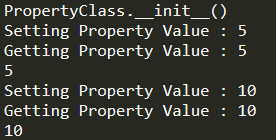
那么我们首先要知道什么是Pixel Shader?
Pixel Shader在OpenGL里也叫做Fragment Shader,可以简单的理解成针对每一个pixel做处理的Shader。

在这个网站上编写Pixel Shader还有一个好处就是快速方便的看到效果,当你要去测试一些数学算式算法的时候,很容易可视化的在上面编写并测试。

Shader Toy Study

接下来是基于ShaderToy上”GLSL 2D Tutorials”教程学习的一些事例。

fragColor

fragColor就是我们在GLSL的fragment shader里最后代表像素颜色的最后输出变量,他控制着我每一个像素最终的颜色值

1
2
3
4
void mainImage( out vec4 fragColor, in vec2 fragCoord )
{
fragColor = vec4(0.0,1.0,1.0,1.0);
}

mainImage(…)是我们的Pixel Shader的函数路口,每一帧都会对每一像素进行调用。
Final Effect:
ShaderToyfragColor

fragCoord

fragCoord是针对像素坐标而言的,因为mainImage会针对每一个像素执行一次,而fragCoord就给出了像素的坐标位置(左下角为原点)。
iResolution是ShaderToy里给出的关于frame的宽高像素信息(主要用于适应屏幕的大小变化,做到按比例而非特定像素值)

1
2
3
4
5
6
7
8
9
10
11
12
13
14
15
16
17
18
19
20
21
22
23
24
void mainImage( out vec4 fragColor, in vec2 fragCoord )
{
// fragcoord通过使用像素的fragCoord位置除以iResolution的宽高像素信息,
// 成功将像素位置的width和heigth都映射到了[0.0,1.0]
vec2 fragcoord = vec2(fragCoord.xy / iResolution.xy);
vec3 backgroundcolor = vec3(1.0,1.0,1.0);
vec3 pixelcolor = backgroundcolor;
vec3 gridcolor = vec3(0.5,0.5,0.5);
vec3 axescolor = vec3(0.0,0.0,1.0);
const float thickwidth = 0.1;
for(float i = 0.0; i < 1.0; i+=thickwidth)
{
if(mod(fragcoord.x, thickwidth) < 0.008 || mod(fragcoord.y, thickwidth) < 0.008)
{
pixelcolor = gridcolor;
}
}

if(abs(fragcoord.x ) < 0.006 || abs(fragcoord.y) < 0.006)
{
pixelcolor = axescolor;
}
fragColor = vec4(pixelcolor,1.0);
}

Final Effect:
ShaderToyfragCoord

Own Coordinate System

前一节讲到的把像素坐标映射到了[0.0,1.0],那么如果我们想把坐标信息映射到[-1.0,1.0]并且把屏幕中点作为(0.0,0.0)改如何映射了
而且前一节有一个问题需要注意,我们绘制出的grid是长方形而不是正方形(这主要是由于我们屏幕宽高是不一样,但我们都把x,y映射到了[0.0,1.0]并且用相同的interval即thickwidth去做等分导致的)

1
2
3
4
5
6
7
8
9
10
11
12
13
14
15
16
17
18
19
20
21
22
23
24
25
26
27
void mainImage( out vec4 fragColor, in vec2 fragCoord )
{
// 这里值得注意一下,因为一般情况都是屏幕宽大于高,
// 所以我们在映射宽高的时候,只需把高映射到[-1.0,1.0],
// 宽保持和高的比例差即可,即映射到[-width/height, width/height]
// 这样一来,同一个interval对于宽和高来说就一样了
vec2 r = vec2( fragCoord.xy - 0.5*iResolution.xy );
r = 2.0 * r.xy / iResolution.y;
vec3 backgroundcolor = vec3(1.0,1.0,1.0);
vec3 pixelcolor = backgroundcolor;
vec3 gridcolor = vec3(0.5,0.5,0.5);
vec3 axescolor = vec3(0.0,0.0,1.0);
const float thickwidth = 0.1;
for(float i = 0.0; i < 1.0; i+=thickwidth)
{
if(mod(r.x, thickwidth) < 0.008 || mod(r.y, thickwidth) < 0.008)
{
pixelcolor = gridcolor;
}
}

if(abs(r.x ) < 0.006 || abs(r.y) < 0.006)
{
pixelcolor = axescolor;
}
fragColor = vec4(pixelcolor,1.0);
}

Final Effect:
ShaderToyOwnCoordinateSystem

Cicle Demo

接下来我们即将看实现以下功能:

  1. 绘制圆
    针对绘制圆,我们主要是通过判断像素到圆心的位置的距离来决定是否处于圆内。
  2. 让圆之间的颜色实现叠加计算
    针对叠加运算的判断,我们主要是通过一个smoothstep的函数去得出像素在圆内和圆外所参与颜色计算的比例(这里是院内1.0,圆外0.0)
    这里要介绍一下smoothstep函数。
    函数原型:
    float smoothstep(float edge0, float edge1, float x)
    如果我们传递x<edge0则返回0.0,x>edge1则返回1.0,如果在中间则返回edge0-edge1的interpolation值(这里我们主要用来实现判断像素是在圆内还是圆外来决定是否参与叠加运算)
  3. 使圆做周期性运动。
    圆做周期性运动主要是通过iGlobalTime(Pixel Shader运行后的一个动态时间)来计算得出圆心的位置来实现的。

1
2
3
4
5
6
7
8
9
10
11
12
13
14
15
16
17
18
19
20
21
22
23
24
25
26
27
28
29
30
31
32
33
34
35
36
37
38
39
#define PI 3.14159265359
// 绘制圆并返回是否改圆的该像素是否应该参与像素叠加计算
float disk(vec2 r, vec2 center, float radius, vec3 color, inout vec3 pixel)
{
float rtoclength = length(r - center);
float inside = 0.0;
if(rtoclength < radius)
{
//pixel = vec3(clamp(rtoclength, radius / 4.0,radius / 2.0));
inside = 1.0 - smoothstep(radius - 0.005,radius + 0.005, rtoclength);
}
return inside;
}

void mainImage( out vec4 fragColor, in vec2 fragCoord )
{
vec2 p = vec2(fragCoord.xy / iResolution.xy);
vec2 r = vec2( fragCoord.xy - 0.5*iResolution.xy );
r = 2.0 * r.xy / iResolution.y;
vec3 backgroundcolor = vec3(0.0, 0.0, 0.0);
vec3 color1 = vec3(1.0, 0.0,0.0);
vec3 color2 = vec3(0.0, 1.0, 0.0);
vec3 color3 = vec3(0.0, 0.0, 1.0);
vec2 circle1center1 = vec2(sin(iGlobalTime / 1.0), cos(iGlobalTime / 1.0));
vec2 circle1center2 = vec2(cos(iGlobalTime / 2.0), sin(iGlobalTime / 2.0));
vec2 circle1center3 = vec2(-sin(iGlobalTime / 3.0), -cos(iGlobalTime / 3.0));

vec3 resultcolor = vec3(0.0,0.0,0.0);

vec3 pixel = backgroundcolor;

resultcolor += disk(r, circle1center1, 0.6, color1, pixel) * color1;

resultcolor += disk(r, circle1center2, 0.6, color2, pixel) * color2;

resultcolor += disk(r, circle1center3, 0.6, color3, pixel) * color3;

fragColor = vec4(resultcolor, 1.0);
}

Final Effect:
ShaderToyCircleDemo

Plasma Effect

Plasma Effect
关于这一节还有很多相关知识需要学习理解,暂时只贴代码和效果,后续会进一步深入了解。
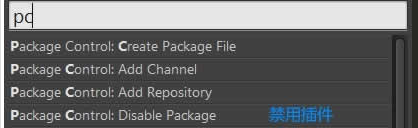
1
2
3
4
5
6
7
8
9
10
11
12
13
14
15
16
17
18
19
20
21
22
23
24
25
26
27
28
29
30
31
32
33
34
35
36
37
38
39
40
41
42
43
44
45
void mainImage( out vec4 fragColor, in vec2 fragCoord )
{
vec2 p = vec2(fragCoord.xy / iResolution.xy);
vec2 r = vec2( fragCoord.xy - 0.5*iResolution.xy );
r = 2.0 * r.xy / iResolution.y;
vec3 ret = vec3(1.0, 1.0, 1.0);
float t = iGlobalTime;
r = r * 8.0;
float v1 = sin(r.x + t);
float v2 = sin(r.y + t);
float v3 = sin(r.x + r.y + t);
float v4 = sin(sqrt(r.x * r.x + r.y * r.y) + t);
float v5 = v1 + v2 + v3 + v4;

if( p.x < 1.0 / 10.0 )
{
ret = vec3(v1);
}
else if( p.x < 2.0 / 10.0)
{
ret = vec3(v2);
}
else if( p.x < 3.0 / 10.0)
{
ret = vec3(v3);
}
else if( p.x < 4.0 / 10.0)
{
ret = vec3(v4);
}
else if( p.x < 5.0 / 10.0)
{
ret = vec3(v5);
}
else if( p.x < 6.0 / 10.0)
{
ret = vec3(sin(v5));
}
else
{
ret *= vec3(sin(v5), cos(v5), tan(v5));
}

fragColor = vec4(ret, 1.0);
}

Final Effect:
ShaderToyPlasmaEffect

Texture & Video as Input

下面这个效果比较有趣,是通过把两个视频作为输入,通过把其中一个视频作为背景,把另一个含绿色背景的颜色出掉后合二为一实现的效果。
在Shader Toy里,我们可以设置几个Texture到iChannel上,然后通过texture2D(iChannel,*)去访问纹理值。
参考至A Beginner’s Guide to Coding Graphics Shaders

1
2
3
4
5
6
7
8
9
10
11
12
13
14
void mainImage( out vec4 fragColor, in vec2 fragCoord )
{
vec4 backgroundtexture = texture2D(iChannel0, p);
vec4 fronttexture = texture2D(iChannel2, p);

if(fronttexture.r + fronttexture.b > fronttexture.g)
{
fragColor = fronttexture;
}
else
{
fragColor = backgroundtexture;
}
}

Final Effect:
ShaderToyTextureAndVideoInput
ShaderToyTextureAndVideoInput2

Mouse Input

这一节讲到ShaderToy里关于如何响应Mouse Input。
ShaderToy里给了一个iMouse变量,用于得到Mouse输入的信息,我们可以通过iMouse变量的值去做出对应的响应效果。

1
2
3
4
5
6
7
8
9
10
11
12
13
14
15
16
17
18
19
20
21
22
23
24
float disk(vec2 r, vec2 center, float radius, vec3 color, inout vec3 pixel)
{
float rtoclength = length(r - center);
float inside = 0.0;
if(rtoclength < radius)
{
//pixel = vec3(clamp(rtoclength, radius / 4.0,radius / 2.0));
inside = 1.0 - smoothstep(radius - 0.005,radius + 0.005, rtoclength);
}
return inside;
}

void mainImage( out vec4 fragColor, in vec2 fragCoord )
{
vec2 r = vec2( fragCoord.xy - 0.5*iResolution.xy );
r = 2.0 * r.xy / iResolution.y;
vec3 backgroundcolor = vec3(iMouse.x / iResolution.x);
vec3 resultcolor = backgroundcolor;
// 这里值得注意的一点是,因为我们把高映射到[-1.0,1.0],但宽是[-aspect, aspect]
// 我们必须把mouse的x也映射到一样的比例才能正确显示在以r为坐标系的位置
vec2 center = 2.0 * vec2(iMouse.xy - 0.5 * iResolution.xy) / iResolution.y;
resultcolor += disk(r, center, 0.3, vec3(1.0,0.0,0.0), resultcolor) * vec3(1.0,0.0,0.0);
fragColor = vec4(resultcolor, 1.0);
}

Final Effect:
ShaderToyMouseInput1
ShaderToyMouseInput2

Random Noise

这一章讲关于OpenGL Shader里随机数的生成,这里还了解的不清晰,暂时只贴出代码和效果,后续会进一步学习修改。

1
2
3
4
5
6
7
8
9
10
11
12
13
14
15
16
17
18
19
20
21
22
23
24
25
26
27
28
29
30
31
32
float disk(vec2 r, vec2 center, float radius, vec3 color, inout vec3 pixel)
{
float rtoclength = length(r - center);
float inside = 0.0;
if(rtoclength < radius)
{
//pixel = vec3(clamp(rtoclength, radius / 4.0,radius / 2.0));
inside = 1.0 - smoothstep(radius - 0.005,radius + 0.005, rtoclength);
}
return inside;
}

void mainImage( out vec4 fragColor, in vec2 fragCoord )
{
vec2 p = vec2(fragCoord.xy / iResolution.xy);
vec2 r = vec2( fragCoord.xy - 0.5*iResolution.xy );
r = 2.0 * r.xy / iResolution.y;
vec3 backgroundcolor = vec3(0.0,0.0,0.0);
vec3 resultcolor = backgroundcolor;
float widthratio = iResolution.x / iResolution.y;
vec2 center;
vec2 pos;
for(float i = 0.0; i < 6.0; i++)
{
// 这里有一点要注意,
// 我们需要将随机数映射到正确的宽高映射值才能正确随机显示在整个屏幕上
pos = vec2(2.0 * widthratio * hash(i) - widthratio, 2.0 * hash(i + 0.5) - 1.0);
center = pos;
resultcolor += disk(r, center, hash(i * 5.0 + 10.0) / 5.0, vec3(1.0, 0.0, 0.0), resultcolor) * vec3(1.0, 0.0, 0.0);
}
fragColor = vec4(resultcolor, 1.0);
}

Final Effect:
ShaderToyRandomNumber

更多学习待更新

……

Shader Toy Relative Knowledge

Shader Toy Inputs

ShaderToyInputs

总的来说ShaderToy是一个很好的Shader学习网站,让我们可以在上面方便可视化的测试一些数学算式和算法效果。