
AssetBundle资源打包加载管理
前言
本篇文章是为了记录学习了Unity资源加载(Resource & AssetBundle)相关知识后,对于AssetBundle打包加载框架实战的学习记录。因为前一篇学习Unity资源相关知识的文章太长,所以AssetBundle实战这一块单独提出来写一篇。
基础知识学习回顾,参考:
Unity Resource Manager
鸣谢
这里AssetBundle加载管理的框架思路借鉴了Git上的开源库:
tangzx/ABSystem
同时也学习了KEngine相关部分的代码:
mr-kelly/KEngine
AssetBundle打包这一套后续个人参考MotionFramework思路编写的。
Unity官方也推出了一个高度可视化和高度自由度打包方案(个人觉得此工具更适合用于辅助查询打包冗余):
AssetBundles-Browser
本文重点分享,参考ABSystem编写的一套AB加载管理方案实现:
基于AB引用计数的AB加载管理
AssetBundle打包
Note:
这里的AssetBundle打包主要是针对Unity 5.X以及以后的版本来实现学习的。
相关工具
- Unity Profiler(Unity自带的新能分析工具,这里主要用于查看内存Asset加载情况)
- Unity Studio(Unity AB以及Asset等资源解析查看工具)
- DisUnity(解析AB包的工具)
AB打包
AB打包是把资源打包成assetbundle格式的资源。
AB打包需要注意的问题:
- 资源冗余
- 打包策略
- AB压缩格式
资源冗余
这里说的资源冗余是指同一份资源被打包到多个AB里,这样就造成了存在多份同样资源。
资源冗余造成的问题:
- 余造成内存中加载多份同样的资源占用内存。
- 同一份资源通过多次IO加载,性能消耗。
- 导致包体过大。
解决方案:
依赖打包
依赖打包
依赖打包是指指定资源之间的依赖关系,打包时不将依赖的资源重复打包到依赖那些资源的AB里(避免资源冗余)。
在老版(Unity 5之前),官方提供的API接口是通过BuildPipeline.PushAssetDependencies和BuildPipeline.PopAssetDependencies来指定资源依赖来解决资源冗余打包的问题。
在新版(Unity 5以后),官方提供了针对每个Asset在面板上设置AssetBundle Name的形式指定每个Asset需要打包到的最终AB。然后通过 API接口BuildPipeline.BuildAssetBundles()触发AB一键打包(Unity自己会根据设置AB的名字以及Asset之间的使用依赖决定是否将依赖的资源打包到最终AB里)。或者通过API接口BuildPipeline.BuildAssetBundles(*)传入自定义分析的打包结论指定如何打包。
这里值得一提的是Unity 5以后提供的增量打包功能。
增量打包(Unity 5以后)
增量打包是指Unity自己维护了一个叫manifest的文件(前面提到过的记录AB包含的Asset以及依赖的AB关系的文件),每次触发AB打包,Unity只会修改有变化的部分,并将最新的依赖关系写入manifest文件。
*.manifest记录所有AB打包依赖信息的文件,内容如下:
1 | ManifestFileVersion: 0 |
问题:
虽然Unity5提供了增量打包并记录了依赖关系,但从上面的*.manifest可以看出,依赖关系只记录了依赖的AB的名字没有具体到特定的Asset。
最好的证明就是上面我把用到的Shader都打包到sd_shaderlist里。在我打包的资源里,有两个shader被用到了(SingleTextShader和NormalMappingShader),这一点可以通过UnityStudio解压查看sd_shaderlist看到: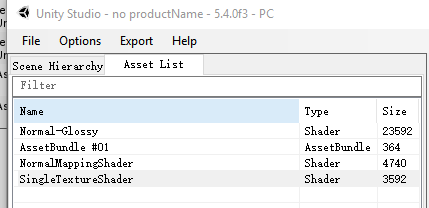
从上面可以看出Unity的增量打包只是解决了打包时更新哪些AB的判定,而打包出来的*.manifest文件并不能让我们得知用到了具体哪一个Asset而是AssetBundle。
解决用到哪些Asset这一环节依然是需要我们自己解决的问题,只有存储了用到哪些Asset的信息,我们才能在加载AB的时候对特定Asset做操作(缓存,释放等)。
Note:
每一个AB下面都对应一个.manifest文件,这个文件记录了该AB的asset包含情况以及依赖的AB情况,但这些manifest文件最终不会不打包到游戏里的,只有最外层生成的*.manifest文件(记录了所有AB的打包信息)才会被打包到游戏里,所以才有像前面提到的通过读取.manifest文件获取对应AB所依赖的所有AB信息进行加载依赖并最终加载出所需Asset的例子
依赖Asset信息打包
存储依赖的Asset信息可以有多种方式:
- 通过加载依赖AB,依赖Unity自动还原的机制实现依赖Asset加载还原(这正是本博客实现AssetBundle打包以及加载管理的方案)
- 存储挂载相关信息到Prefab上
在设置好AB名字,打包AB之前,将打包对象上用到的信息通过编写[System.Serializable]可序列化标签抽象数据挂载到该Asset对象上,然后打包AB,打包完AB后在运行时利用打包的依赖信息进行依赖Asset加载还原,从而做到对Asset的生命周期掌控。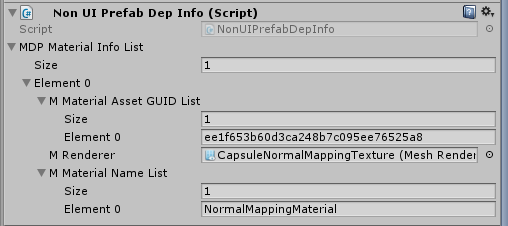
- 创建打包Asset到同名AB里,加载的时候读取
通过AssetDatabase.CreateAsset()和AssetImporter.GetAtPath()将依赖的信息写入新的Asset并打包到相同AB里,加载时加载出来使用。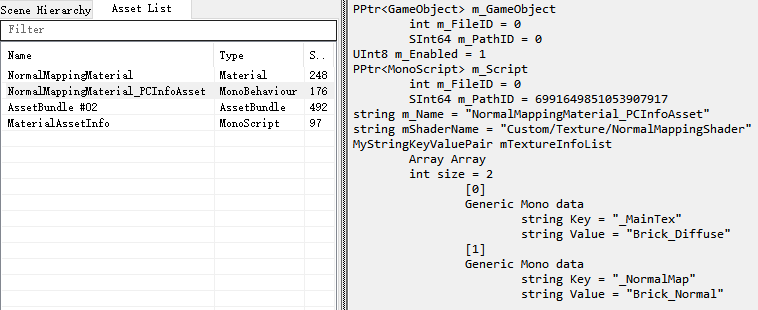
打包策略
除了资源冗余,打包策略也很重要。打包策略是指决定各个Asset如何分配打包到指定AB里的策略。打包策略会决定AB的数量,资源冗余等问题。AB数量过多会增加IO负担。资源冗余会导致包体过大,内存中存在多份同样的Asset,热更新资源大小等。
打包策略:
- Logical entities(按逻辑(功能)分类 – 比如按UI,按模型使用,按场景Share等功能分类)
优点:可以动态只更新特定Entity - Object Types(类型分类 – 主要用于同类型文件需要同时更新的Asset)
优点:只适用于少部分需要经常变化更新的小文件 - Concurrent content(加载时机分类 – 比如按Level分类,主要用于游戏里类容固定(Level Based)不会动态变化加载的游戏类型)
优点:适合Level based这种一层内容一层不变的游戏类型
缺点:不适合用于动态创建对象的游戏类型
打包策略遵循几个比较基本的准则:
- Split frequently-updated Objects into different AssetBundles than Objects that usually remain unchanged(频繁更新的Asset不要放到不怎么会修改的Asset里而应分别放到不同的AB里)
- Group together Objects that are likely to be loaded simultaneously(把需要同时加载的Asset尽量打包到同一个AB里)
从上面可以看出,不同的打包策略适用于不同的游戏类型,根据游戏类型选择最优的策略是关键点。
AB压缩格式
AB压缩不压缩问题,主要考虑的点如下:
- 加载时间
- 加载速度
- 资源包体大小
- 打包时间
- 下载AB时间
这里就不针对压缩问题做进一步介绍了,主要根据游戏对于各个问题的需求看重点来决定选择(内存与加载性能的抉择)
AB打包相关API
- Selection(获取Unity Editor当前勾选对象相关信息的接口)
1 | Object[] assetsselections = Selection.GetFiltered(Type, SelectionMode); |
- AssetDatabase(操作访问Unity Asset的接口)
1 | // 获取选中Asset的路径 |
- AssetImporter(获取设置Asset的AB名字的接口)
1 | // 获取指定Asset的Asset设置接口 |
- BuildPipeline(AB打包接口)
1 | BuildPipeline.BuildAssetBundles(outputPath, BuildAssetBundleOptions, BuildTarget); |
可以看到AB打包Unity 5.X提供了两个主要的接口:
- 前者是依赖于设置每个Asset的AB名字,然后一个接口完成增量打包的方案。
优点:
自带增量打包
缺点:
需要有一套资源AB命名规则。
开发者可控度低。 - 后者是提供给开发者自定义哪些Asset打包到指定AB里的一个接口。
优点:
可自行实现指定需求的打包规则。
开发者可控度高。
缺点:
不自带增量打包需要自己实现。
Note:
AssetBundle-Browser也是基于前者的一套打包方案,只不过AssetBundle-Browser实现了高度的Asset资源打包可视化操作与智能分析。
AssetBundle加载管理
实战学习AB加载之前让我们通过一张图先了解下AB与Asset与GameObject之间的关系: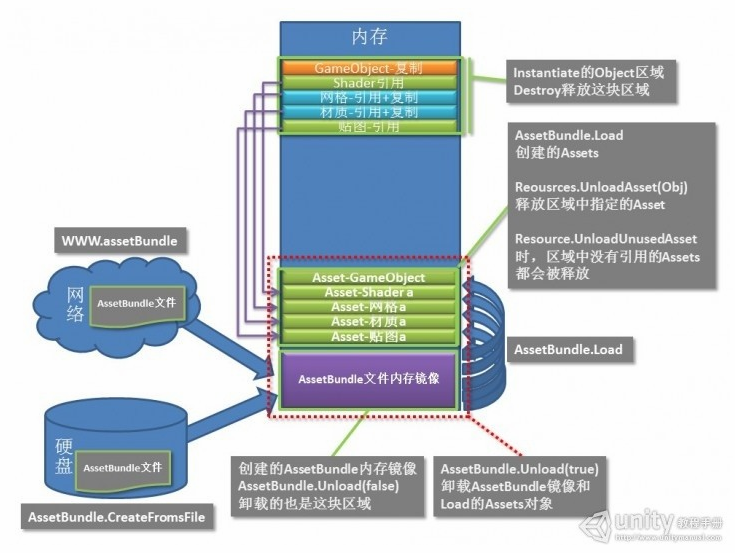
依赖加载还原
还记得前面说到的依赖的Assest信息打包吗?
这里就需要加载出来并使用进行还原了。
这里接不细说加载还原了,主要就是通过存储的依赖信息把依赖的Asset加载进来并设置回去的过程(可以是手动设置回去也可以是Unity自动还原的方式)。
这里主要要注意的是前面那张大图上给出的各种资源类型在Asset加载还原时采用的方式。
资源加载还原的方式主要有两种:
- 复制+引用
UI – 复制(GameObject) + 引用(Components,Tranform等)
Material – 复制(材质自身) + 引用(Texture和Shader) - 引用
Sprite – 引用
Audio – 引用
Texture – 引用
Shader – 引用
Material – 引用
Note:
- 除了GameObject使用对象绑定(考虑到对象池的情况,不好明确释放时机),其他支援类型都建议使用引用计数
AB加载相关API
- AssetBundle(AB接口)
1 | // 加载本地压缩过的AB |
AB回收相关API
- AssetBundle(AB接口)
1 | // 回收AssetBundle并连带加载实例化出来的Asset以及GameObject一起回收 |
- Resource(资源接口)
1 | // 回收指定Asset(这里的Asset不能为GameObject) |
- GC(内存回收)
1 | // 内存回收 |
AB回收的方式有两种:
- AssetBundle.Unload(false)(基于Asset层面的重用,通过遍历判定的方式去判定Asset是否回收)
- AssetBundle.Unload(true)(采取索引技术,基于AB层面的管理,只有AB的引用计数为0时我们直接通过AssetBundle.Unload(true)来卸载AB和Asset资源)
接下来结合这两种方式,实战演练加深理解。
基于Asset重用的AB加载
核心思想:
- 打包时存储了依赖的Asset信息,加载时利用存储的依赖信息并还原
- 缓存加载进来的Asset的控制权进行重用,卸载AB(AssetBundle.Unload(false))
- 加载时通过Clone(复制类型)或者返回缓存Asset(引用类型)进行Asset重用
一下以之前打包的CapsuleNormalMappingTexture.prefab进行详细说明: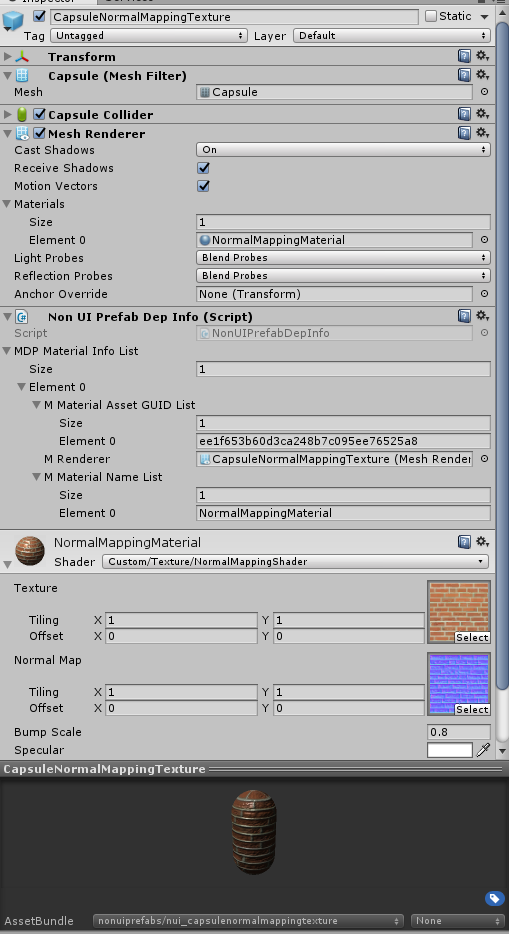
可以看出CapsuleNormalMappingTexture.prefab用到了如下Asset:
- NormalMappingMaterial(材质)
- Custom/Texture/NormalMappingShader(Shader)
- Brick_Diffuse和Brick_Normal(纹理)
开始加载CapsuleNormalMappingTexture.prefab:
首先让我们看看加载了CapsuleNormalMappingTexture.prefab前的Asset加载情况: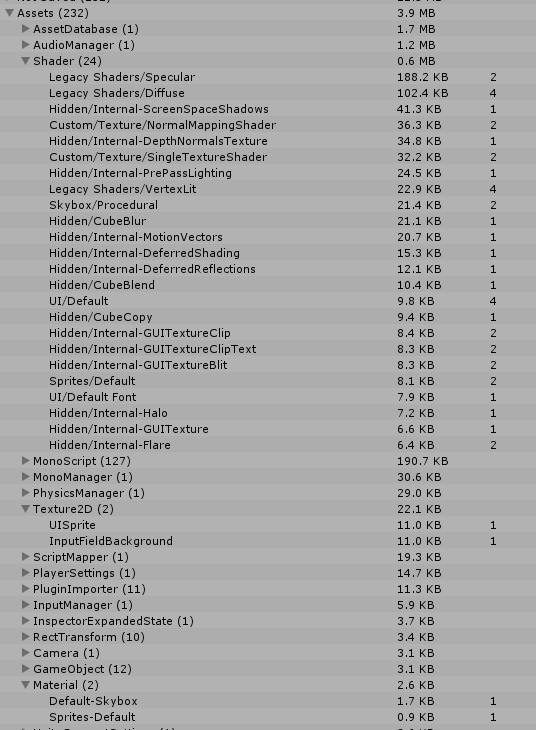
可以看出只有Shader Asset被预先加载进来了(因为我预先把所有Shader都加载进来了)
第一步:
加载CapsuleNormalMappingTexture.prefab对应的AB,因为Prefab是采用复制加引用所以这里需要返回一个通过加载Asset后Clone的一份对象。
1 | nonuiprefabab = loadAssetBundle(abfullname); |
第二步:
还原依赖材质
1 | NonUIPrefabDepInfo nonuidpinfo = nonuigo.GetComponent<NonUIPrefabDepInfo>(); |
第三步:
还原依赖材质的Shader和Texture依赖引用
1 | // 根据材质_InfoAsset.asset进行还原材质原始Shader以及Texture信息 |
接下让我们看看加载了CapsuleNormalMappingTexture.prefab后的Asset加载情况: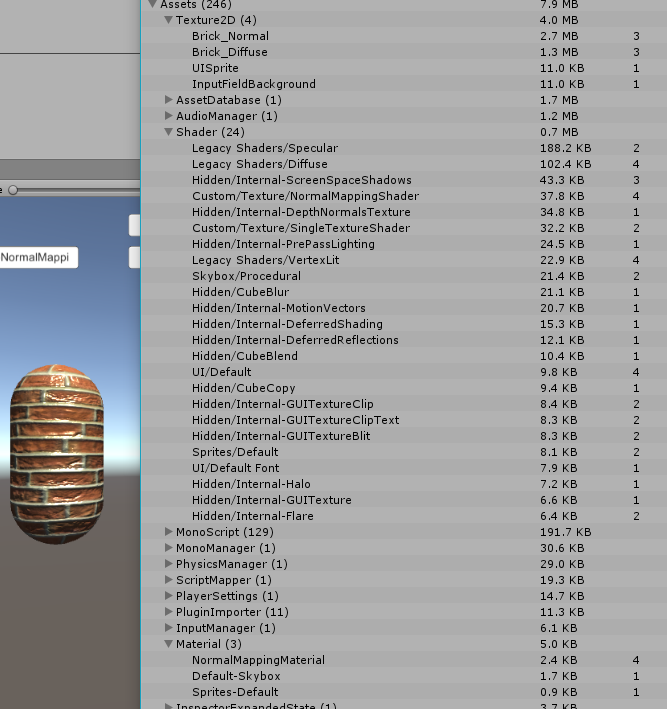
可以看出引用的材质和纹理Asest都被加载到内存里了(Shader因为我预先把所有Shader都加载进来了所以就直接重用了没有被重复加载)
第四步:
对缓存的Asset进行判定是否回收(这里以材质为例,判定方式可能多种多样,我这里是通过判定是否有有效引用)
启动一个携程判定特定Material是否不再有有效组件(所有引用组件为空或者都不再使用任何材质)时回收Material Asset
1 | Resources.UnloadAsset(materialasset); |
接下来让我们看看卸载实例对象后,材质被回收的情况:

可以看到没有被引用的材质Asset被回收了,但内存里的Asset数量却明显增加了。
这里多出来的是我们还没有回收的Texture以及Prefab的GameObject以及Components Asset依然还在内存里。


第五步:
通过切换场景触发置空所有引用将还未回收的Asset变成UnsedAsset或者直接触发Texture Asset回收,然后通过Resources.UnloadUnusedAssets()回收所有未使用的Asset
1 | mNonUIPrefabAssetMap = null; |


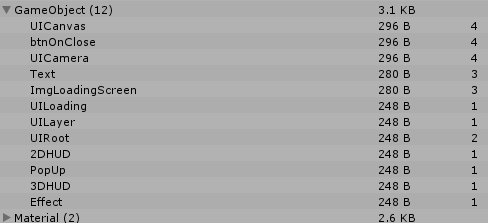

可以看到所有的Texture, GameObject, Transform都被回收了,并且Asset的数量回到了最初的数值。
基于AB引用计数的AB加载管理
这是本文重点分享的部分
方案1:
核心思想:
- 基于AB的引用计数 + AssetBundle.Unload(true)
- 给每一种资源(e.g. 特效,模型,图片,窗口等)加载都编写统一的资源加载接口(父类抽象)进行自身加载使用的AB引用计数,每个资源负责自身的资源加载管理和返还(主动调用)
- 由一个单例管理者统一管理所有加载AB的引用计数信息,负责判定是否可回收
优点:
- 严格的AB引用计数加载管理和释放
- 可以做到对资源对象的重用减少GC
- 对资源对象的重用可以减少AB的重复加载
缺点:
- 底层管理的内容比较多(比如基于资源对象的重用),上层灵活度欠缺(相当于对象池已经写在了最底层)
- 需要主动去调用返还接口(针对不同资源加载释放时机都需要编写一套对应的代码)
方案2:
核心思想:
- 基于AB的引用计数 + AssetBundle.Unload(true)
- 绑定加载AB的生命周期判定到Object上(e.g. GameObject,Image,Material等),上层无需关心AB的引用计数,只需绑定AB到对应的对象上即可
- 通过单例管理者统一管理判定依赖使用AB的Object列表是否都为空来判定是否可以回收,无需上层管理AB引用计数返还
优点:
- 上层只需关心AB加载绑定,无需关心AB引用计数返还问题,上层使用灵活度高
缺点:
- AB的返还判定跟绑定的Object有关,Object被回收后,AB容易出现重复加载(可以在上层写部分对象池来减少AB的重复加载)
考虑到希望上层灵活度高一些,个人现在倾向于第二种方案。
接下来基于第二种方案来实战编写资源AB加载的框架。
AB打包这一块采用最新的可视化指定打包策略的方式。
新版AssetBundle加载管理,打包以及热更新
为了弥补以前设计和实现上不足的地方,从而有了新版AssetBundle加载管理和打包的编写。
新版AssetBundle加载管理
老版的资源加载管理缺点:
- 面向Asset路径加载,加载路径会比较长。
- 面向AssetBundle级别,没有面向Asset级别的加载管理,无法做到Asset级别的加载异步以及Asset级别加载取消的。
- 老版AssetDatabase模式要求资源必须在设置AB名字后才能正确使用(因为依赖了AB名字作为加载参数而非资源全路径),无法做到资源导入即可快速使用的迭代开发
- 资源加载类型分类(普通,预加载,常驻)设计过于面向切场景的游戏设计,不通用到所有游戏类型
- 老版AssetBundle异步加载采用了开携程的方式,代码流程看起来会比较混乱
- 老版异步加载没有考虑设计上支持逻辑层加载打断
- 老版代码没有涉及考虑动态AB下载的设计(边玩边下)
- 资源加载代码设计还比较混乱,不容易让人看懂看明白
- 异步加载AB管理不严谨,异步加载过程中加载AB没有加计数,可能出现错误卸载问题
- 同步加载没提供非回调式直接获取的方式
- AB名字没带MD5信息,热更时可能出现CDN缓存问题(2026/08/12)
综合上面4个问题,新版资源加载管理将支持:
- 支持Asset名字(含后缀)的资源名加载方式。**
- 面向Asset级别加载管理,支持Asset和AssetBundle级别的同步异步加载。
- 支持资源导入后配置打包策略+更新EditorAssetInfoAsset后AssetDatabase模式马上就能通过Asset名(含后缀)代码加载
- 资源加载类型只提供普通和常驻两种(且不支持运行时切换相同Asset或AssetBundle的加载类型,一旦第一次加载设定了类型,除非卸载后再次加载否则无法修改资源加载类型(常驻资源推荐一开始就手动加载)。提供统一的加载管理策略,细节管理策略由上层自己设计(比如对象池,预加载)
- 异步加载准备采用监听回调的方式来实现,保证流程清晰易懂
- 设计请求UID(通过资源请求句柄封装)的概念来支持加载打断设计(仅逻辑层面的打断,资源加载不会打断,当所有逻辑回调都取消时,加载完成时会返还索引计数确保资源正确卸载)
- 设计上支持动态AB下载(未支持,未来填坑)
- 加载流程重新设计,让代码更清晰
- 保留索引计数(Asset和AssetBundle级别)+对象绑定的设计(Asset和AssetBundle级别)+按AssetBundle级别卸载(依赖还原的Asset无法准确得知所以无法直接卸载Asset)+加载触发就提前计数(避免异步加载或异步加载打断情况下资源管理异常)
- 支持非回调式的同步加载返回(通过抽象Loader支持LoadImmediately的方式实现)
- 打包输出到临时目录,然后复制到临时目录统一添加MD5改名,根据改名后的文件信息生成VerifyABInfo.json和ABInfo.json文件,最后根据打包需求再将相关文件复制到目标目录(2026/08/12)
Note:
- 一直以来设计上都是加载完成后才添加索引计数和对象绑定,这样对于异步加载以及异步打断的资源管理来说是有漏洞的,新版资源加载管理准备设计成提前添加索引计数,等加载完成后再考虑是否返还计数的方式确保异步加载以及异步加载打断的正确资源管理
加载流程设计主要参考:
对象绑定加索引计数设计主要参考:
类说明
Manager统一管理:
- ModuleManager(单例类 Manager of Manager的管理类)
- ModuleInterface(模块接口类)
资源加载类:
- ResourceLoadMethod(资源加载方式枚举类型 -- 同步 or 异步)
- ResourceLoadMode(资源加载模式 -- AssetBundle or AssetDatabase(**限Editor模式下可切换,支持同步和异步(异步是本地模拟延迟加载来实现的)加载方式**))
- ResourceLoadState(资源加载状态 -- 错误,等待加载, 加载中,完成,取消之类的)
- ResourceLoadType(资源加载类型 -- 正常加载,常驻加载)
- ResourceModuleManager(资源加载模块统一入口管理类)
- AbstractResourceModule(资源加载模块抽象)
- AssetBundleModule(AssetBundle模式下的实际加载管理模块)
- AssetDatabaseModule(AssetDatabase模式下的实际加载管理模块)
- AbstractResourceInfo(资源加载使用信息抽象)
- AssetBundleInfo(AssetBundle资源使用信息)
- AssetInfo(Asset资源使用信息)
- LoaderManager(加载器管理单例类)
- Loadable(资源加载器基类--抽象加载流程)
- AssetLoader(Asset加载器基类抽象)
- BundleAssetLoader(AssetBundle模式下的Asset加载器)
- AssetDatabaseLoader(AssetDatabase模式下的Asset加载器)
- BundleLoader(AssetBundle加载器基类抽象)
- AssetBundleLoader(本地AssetBundle加载器)
- AssetRequestHandle(Asset加载句柄)
- AssetBundleRequestHandle(AssetBundle加载句柄)
- AssetDatabaseAsyncRequest(AssetDatabase模式下异步加载模拟)
- ResourcePath(AB资源路径相关 -- 处理多平台以及热更资源加载路径问题)
- ResourceDebugWindow.cs(Editor运行模式下可视化查看资源加载(AssetBundle和AssetDatabase两种都支持)详细信息的辅助工具窗口)
- ResourceConstData(资源打包加载相关常量数据)
- ResourceLoadAnalyse(资源加载统计分析工具)
AB加载管理方案
加载管理方案:
- 加载指定资源名(含后缀)
- 加载自身AB(自身AB加载完通知资源加载层移除该AB加载任务避免重复的加载任务被创建),自身AB加载完判定是否有依赖AB
- 有则加载依赖AB(增加依赖AB的引用计数)(依赖AB采用和自身AB相同的加载方式(ResourceLoadMethod),但依赖AB统一采用ResourceLoadType.NormalLoad加载类型)
- 自身AB和所有依赖AB加载完回调通知逻辑层可以开始加载Asset资源(AB绑定对象在这一步)
- 判定AB是否满足引用计数为0,绑定对象为空,且为NormalLoad加载方式则卸载该AB(并释放依赖AB的计数减一)(通知资源管理层AB卸载,重用AssetBundleInfo对象)
- 切场景,递归判定卸载PreloadLoad加载类型AB资源
相关设计:
- 依赖AB与被依赖者采用同样的加载方式(ResourceLoadMethod),但加载方式依赖AB统一采用ResourceLoadType.NormalLoad
- 依赖AB通过索引计数管理,只要原始AB不被卸载,依赖AB就不会被卸载
- 已加载的AB资源加载类型只允许从低往高变(NormalLoad -> Preload -> PermanentLoad),不允许从高往低(PermanentLoad -> Preload -> NormalLoad)
上述是框架层提供的索引计数+对象绑定+常驻资源不卸载的能力支持,那么逻辑层如何去管理特定场景(比如窗口打开和关闭,单独玩法的开始和结束)的资源卸载+异步资源请求取消了。
逻辑层资源加载卸载+异步资源请求取消设计:
- 通过抽象ResourceScope去封装逻辑层的资源请求数据和计数数据
- 通过ResourceScrope在合适的时机调用Clear进行相关资源加载的计数释放和异步加载请求取消
- 不同的上下文(比如窗口只需要在BaseWindow里new一个ResourceScope对象,然后使用这个对象去加载相关资源,然后在**BaseWindow.OnClose里调用ResourceScrope.Clear()**即可)
ResourceScope.cs
1 | /* |
加载和释放ResourceScope事例:
AtlasManager.cs
1 | public class AtlasManager : SingletonTemplate<AtlasManager> |
TImage.cs
1 | public class TImage : Image |
GameLauncher.cs
1 | /// <summary> |
可以看到在加载Sprite(TImage.SetSingleSprite())时将特定资源上下文的ResourceScope传给了AtlasManager.SetTImageSingleSprite()方法用于记录资源加载计数。
然后通过调用mResourceScope.Clear()进行mResourceScope所有记录的资源加载请求取消和计数资源释放。
Demo使用说明
先打开资源调试工具
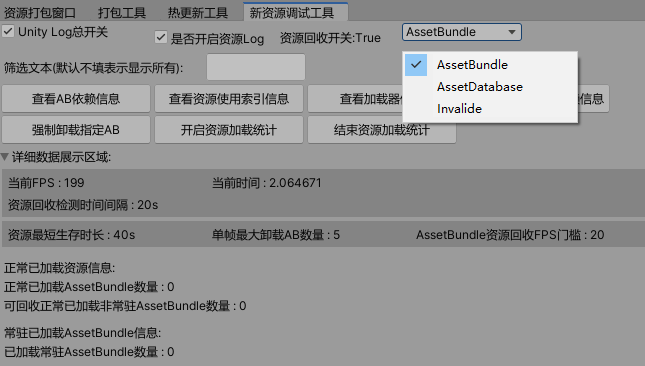
Tools->Debug->资源调试工具
AssetBundle和AssetDatabase资源加载模式切换
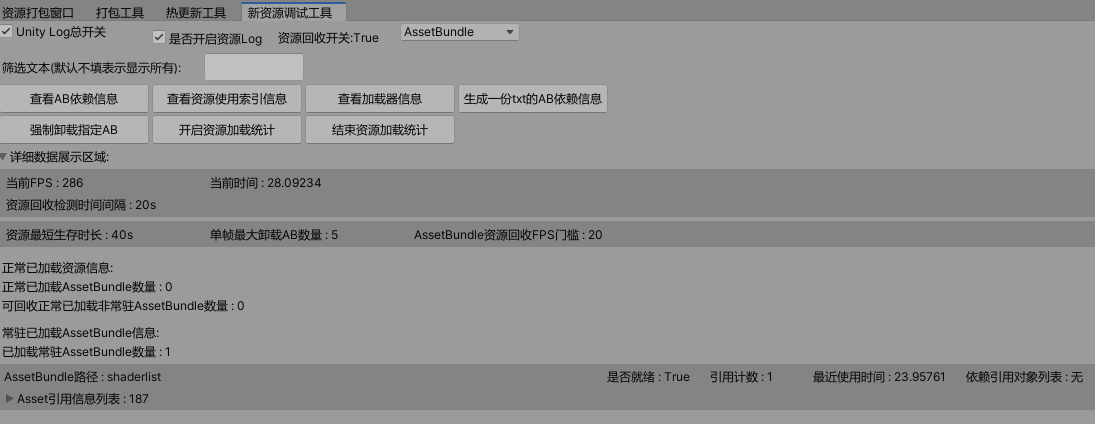
AB依赖信息查看界面

AB运行时加载管理详细信息界面
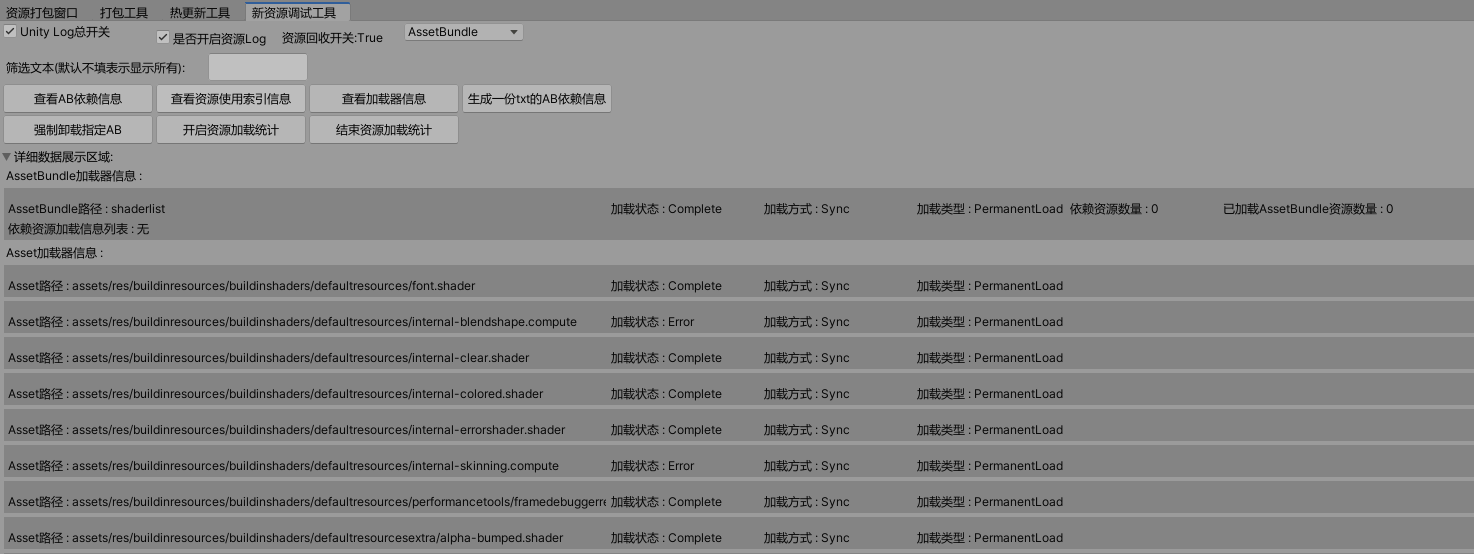
加载器信息查看界面
测试界面
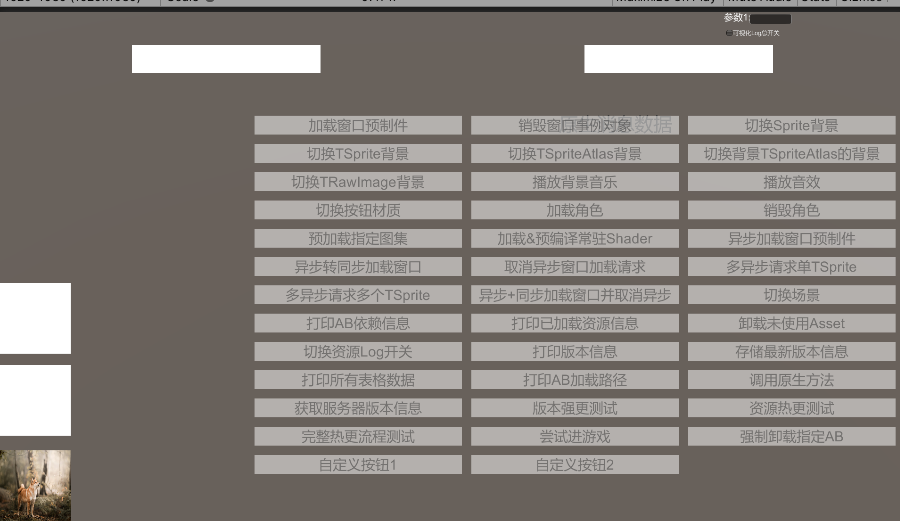
点击加载窗口预制件按钮后:
1
2
3
4
5
6
7
8
9ResourceManager.Singleton.getPrefabInstance(
"MainWindow.prefab",
(prefabInstance, assetRequestHandle) =>
{
mMainWindow = prefabInstance;
mMainWindow.transform.SetParent(UIRootCanvas.transform, false);
},
mResourceScope
);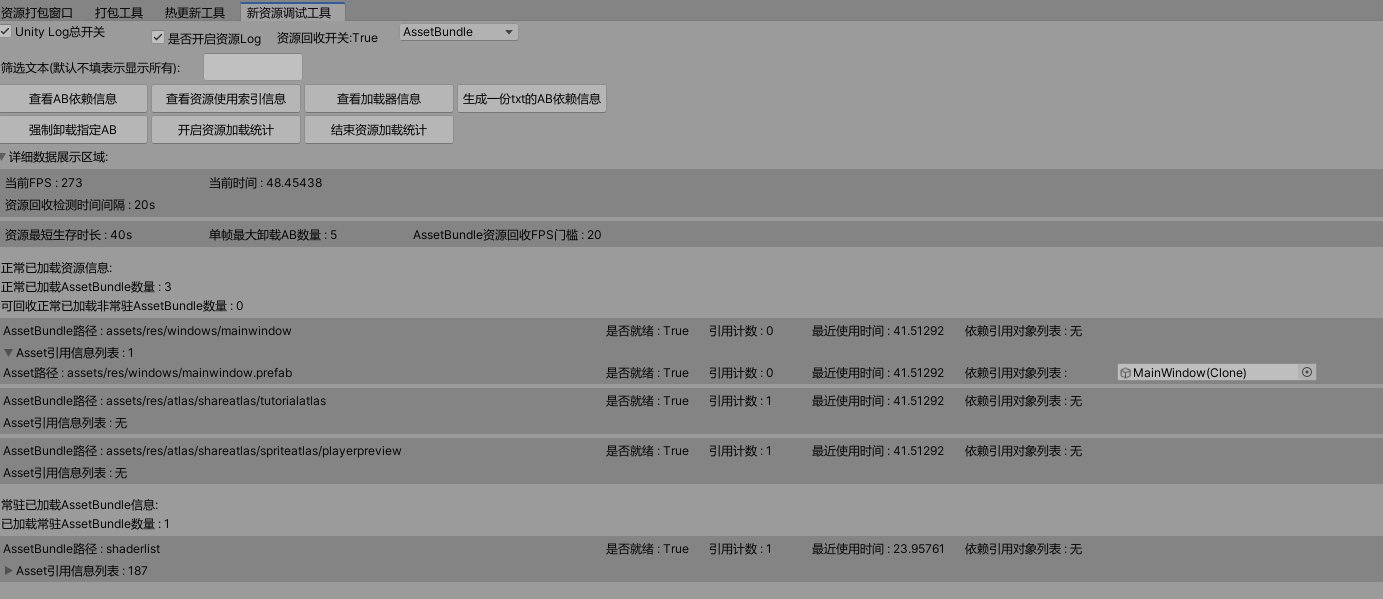
可以看到窗口mainwindow依赖于loadingscreen,导致我们加载窗口资源时,loadingscreen作为依赖AB被加载进来了(引用计数为1),窗口资源被绑定到实例出来的窗口对象上(绑定对象MainWindow)点击测试异步转同步加载窗口
1 | /// <summary> |
- 点击销毁窗口实例对象后
1 | /// <summary> |
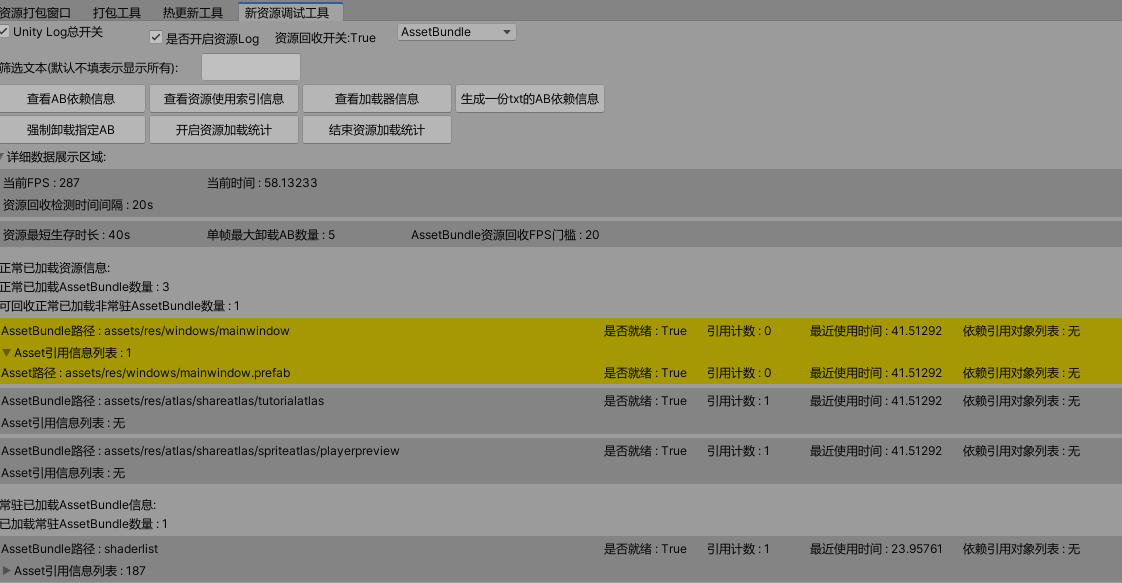
窗口销毁后可以看到之前加载的资源所有绑定对象都为空了,因为被销毁了(MainWindow被销毁了)
- 等待回收检测回收后
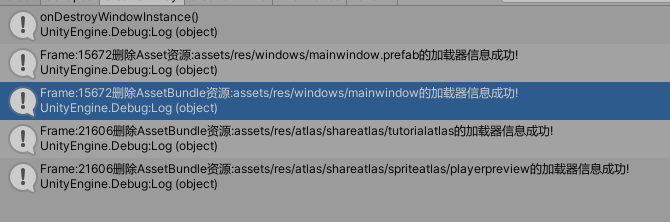
上述资源在窗口销毁后,满足了可回收的三大条件(1. 索引计数为0 2. 绑定对象为空 3. NormalLoad加载方式),最终被成功回收。
Note:
读者可能注意到shaderlist索引计数为0,也没绑定对象,但没有被卸载,这是因为shaderlist是被我预加载以常驻资源的形式加载进来的(PermanentLoad),所以永远不会被卸载。
1 | /// <summary> |
新版AssetBundle打包
新版资源打包将支持:
- 打包AB的策略由抽象的目录打包策略设定决定
- 打包后的AB保留目录结构,确保AB模式和AssetDatabase模式加载都面向Asset路径保持一致性
- 支持打包策略级别的AB压缩格式设置(Note: 仅限使用ScriptableBuildPipeline打包模式)。老版AB打包流程AB压缩格式默认由打包面板压缩格式设置决定。
- 不支持AB变体功能(ScriptableBuildPipeline也不支持变体功能),AB后缀名统一由打包和加载平台统一添加
- 老版AB依赖信息采用原始打包输出的*Manifest文件。新版ScriptableBuildPipeline采用自定义输出打包的CompatibilityAssetBundleManifest文件。
- 打包面板里支持了是否支持代码加载的勾选(用于支持文件名(含后缀)的资源加载和优化需要支持代码主动加载而生成的AssetBuildInfoAsset.asset(AB模式)和EditorAssetInfoAsset.asset(AssetDatabase模式)的数据量问题)
- 打包支持输出带MD5名字信息的AB文件,实际加载还是AssetBuildInfoAsset里记录的打包策略得出的AB名(带平台后缀),同时打包会生成VerifyABInfo.json(用于校验热更的ABInfo.json文件)和ABInfo.json(存储了打包AB热更以及MD5换算相关信息)(2026/08/12)
Note:
- 最新的AB打包不再直接输出到StreammingAssets目录,而是先输出到一个临时打包目录,然后通过复制到临时复制进行改名实现带MD5名字AB生成,最后根据生成的MD5名字AB生成VerifyABInfo.json和ABInfo.json文件用于AB的热更新和真实MD5名字换算加载。(2026/08/12)
设计主要参考:
核心AB打包思想和流程:
- 通过抽象纯虚拟的打包策略设置(即AB收集打包策略设置界面–设置指定目录的打包策略),做到AB打包策略设置完全抽象AB名字设置无关化(这样一来无需设置AB或清除AB名字,自己完全掌控AB打包策略和打包结论)
- 打包时分析打包策略设置的所有有效资源信息,统计出所有有效资源的是否参与打包以及依赖相关等信息,然后结合所有的打包策略设置分析出所有有效Asset的AB打包名字(如果Asset满足多个打包策略设置,默认采用最里层的打包策略设置,找不到符合的采用默认收集打包规则)(这一步是分析关键,下面细说一下详细步骤)
- 通过自定义设置的打包策略得到所有的有效参与打包路径列表
- 通过AssetDatabase.FindAssets()结合打包路径列表得出所有需要分析的Asset
- 通过打包配置信息分析所有Asset是否参与打包以及相关打包信息,得出最终的打包信息列表List
- 在最后分析得出最后的打包结论之前,这里我个人将AB的依赖信息文件(AssetBuildInfo.asset)的生成和打包信息单独插入在这里,方便AB依赖信息可以跟AB资源一起构建参与热更
- 最后根据分析得出的打包信息列表List
构建真真的打包信息List 进行打包 - AB打包完成后进行一些后续的特殊资源处理(比如视频单独打包。AB打包的依赖文件删除(个人采用自定义生成的AssetBuildInfo.Asset作为依赖加载信息文件)。循环依赖检查。创建打包说明文件等。)
- 不同的打包规则通过反射创建每样一个来实现获取对应打包规则的打包AB名字结论获取(采用全路径AB名的方式,方便快速查看资源打包分布)
- 然后根据所有有效Asset的所有AB名字打包结论来分析得出自定义的打包结论(即哪些Asset打包到哪个AB名里)
- 接着根据Asset的AB打包结论来生成最新的AssetBuildInfo(Asset打包信息,可以理解成我们自己分析得出的Manifest文件,用于运行时加载作为资源加载的基础信息数来源)(手动将AssetBuildInfo添加到打包信息里打包成AB,方便热更新走统一流程)
- 最后采用BuildPipeline.BuildAssetBundles(输出目录, 打包信息列表, ……)的接口来手动指定打包结论的方式触发AB打包。
AB打包策略支持了如下几种:
- 按目录打包(打包策略递归子目录判定)
- 按文件打包(打包策略递归子目录判定)
- 按固定名字打包(扩展支持固定名字打包–比如所有Shader打包到shaderlist)(打包策略递归子目录判定)
- 按文件或子目录打包(打包策略递归子目录判定,设定目录按文件打包,其他下层目录按目录打包)
- 不参与打包(打包策略递归子目录判定)
这里先简单的看下新的AB搜集和打包界面:
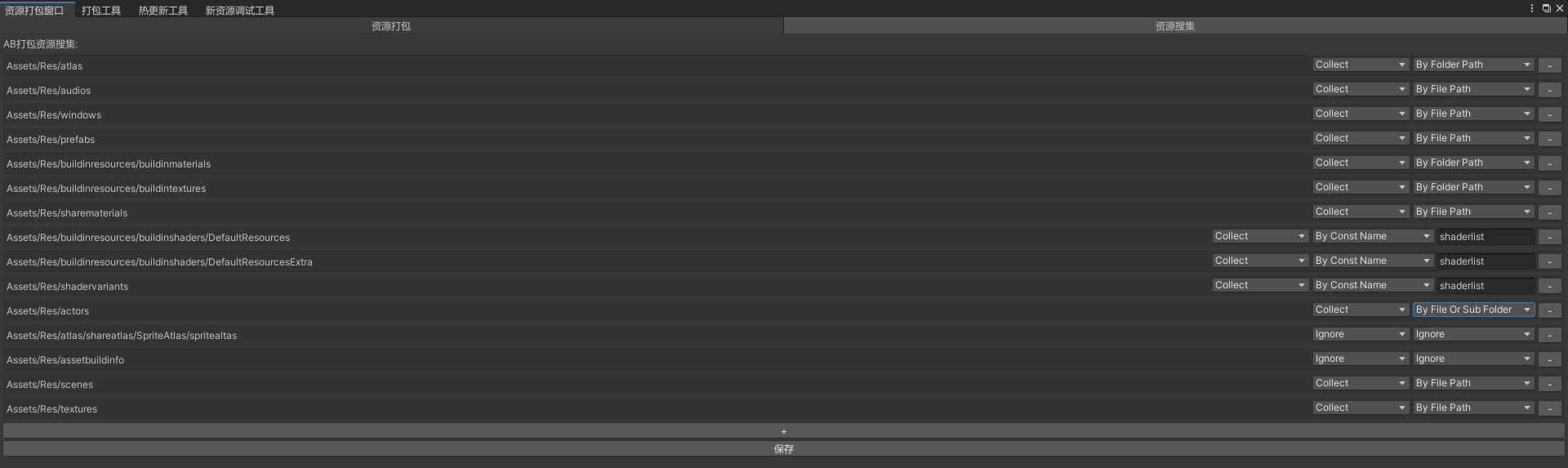
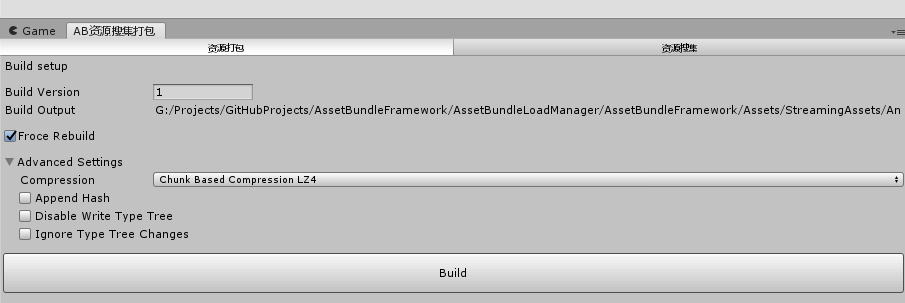
AB模式下关于Asset名,Asset路径和AB路径关联信息存在一个叫AssetBuildInfoAndroid.asset(不同平台名字不一样)的ScriptableObejct里(单独打包到assetBuildInfo的AB里),通过Asset名如何加载到对应AB的关键就在这里。这里和MotionFramework自定义Manifest文件输出不一样,AssetBuildInfoAndroid.asset只记录Asset名,Asset路径和AB相关信息映射,不记录AB依赖信息,依赖信息依然采用AB打包生成的*Manifest文件,同时AssetBuildInfoAndroid.asset采用打包AB的方式(方便和热更新AB走一套机制)
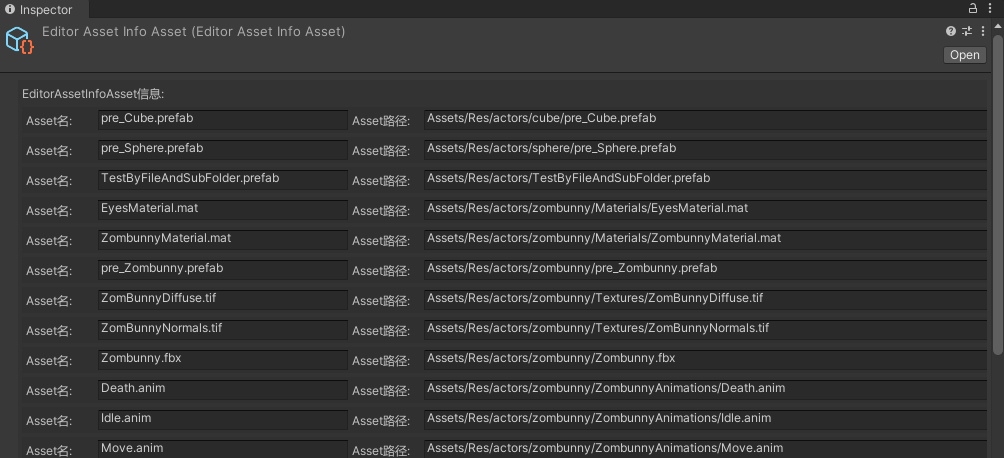
让我们先来看下大致数据信息结构:

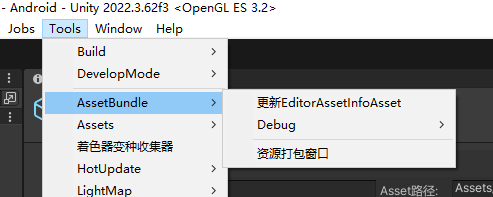
AssetDatabase模式下关于Asset名,Asset路径信息存储在EditorAssetInfoAsset.asset的ScriptableObject里(通过Tools>AssetBundle->更新EditorAssetInfoAsset**触发更新)
2022/1/26支持了资源打包后缀名黑名单可视化配置+资源名黑名单可视化配置

2023/2/8底层支持了新版ScriptableBuildPipeline打包工具打包,加快打包速度(需添加SCRIPTABLE_ASSET_BUILD_PIPELINE宏)
Scriptable Build Pipeline
从介绍可以看出Scriptable Build Pipeline是官方推出的新一代Asset Bundle自定义打包管线系统,主要是为了增加AB打包自由度和减少AB打包时间。
从老版BuildPipeline.BuildAssetBundles(*)自定义分析打包升级到Scriptable Build Pipeline自定义分析打包,注意事项:
- 老版打包参数走BuildAssetBundleOptions设置,SBP打包参数走BundleBuildParameters设置
- AB打包结论都是基于自定义分析得到的List
,只不过SBP通过自定义分析的List 构建BundleBuildContent指定AB打包策略 - 老版BuildPipeline.BuildAssetBundles()打包依赖信息是通过输出一个Manifest文件来记录AB依赖信息的,而SBP打包依赖信息是通过打包返回的IBundleBuildResults获取打包Bundle信息后构建自定义CompatibilityAssetBundleManifest数据对象实现类*Manifest依赖信息文件。(所以SBP自定义AB打包完成后,我们需要创建CompatibilityAssetBundleManifest文件后再单独打包AB)
SBP自定义打包代码:
AssetBundleBuilder.cs
1 | /// <summary> |
SBPAssetBundleBuilder.cs
1 |
|
详情代码参考Github源码:
Note:
- 并非老版所有的功能SBP都支持,具体区别参考:SBP Upgrade Guide
- Scriptable Build Pipeline不支持变体功能
- 打包参数*StripUnityVersion个人测试SBP不起作用,原因不明
- 自定义AB打包时,AssetBundleBuild.assetNames必须传Asset全路径(Assets///*)
- 自定义AB打包时,AssetBundleBuild.addressableNames传Asset全路径后,老版AB打包支持Asset加载使用多种加载方式(e.g. 全路径,文件名,文件名带后缀等),但SBP AB打包只支持按打包测AssetBundleBuild.addressableNames传设置的方式加载Asset
- 个人测试完全删除所有缓存AB重打的前提下,只对比AB打包这一步,SBP比老版AB打包速度要快10倍左右
新版资源热更新流程
类说明
热更类:
1 | - HotUpdateModuleManager.cs(热更新管理模块单例类) |
版本信息类:
1 | - VersionConfigModuleManager.cs(版本管理模块单例类) |
功能支持
- 支持游戏内版本强更(完成 – 暂时限Android,IOS待测试)
- 支持游戏内资源热更(完成 – 暂时限Android, IOS待测试)
- 支持游戏内代码热更(未做)
热更测试说明
UnityWebRequest支持本机file:///的访问方式,内网测试热更实用的file:///,后来使用阿里的OSS静态资源服务器做了一个网络端的资源服务器。
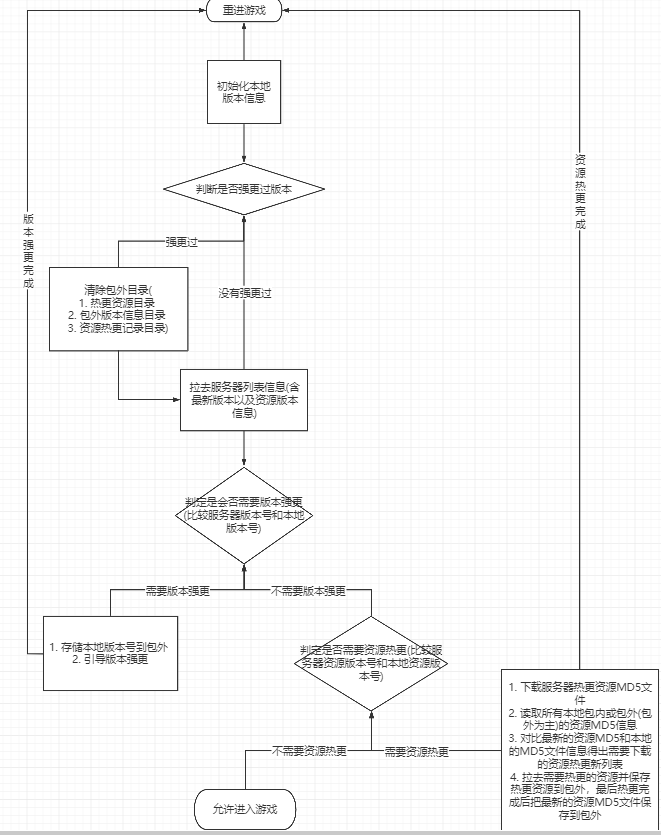
版本强更流程:
- 比较包内版本信息和包外版本信息检查是否强更过版本
- 如果强更过版本清空包外相关信息目录
- 通过资源服务器下载最新服务器版本信息(ServerVersionConfig.json)和本地版本号作对比,决定是否强更版本
- 结合最新版本号和资源服务器地址(Json配置)拼接出最终热更版本所在的资源服务器地址
- 下载对应版本号下的强更包并安装
- 安装完成,退出游戏重进
资源热更流程:
初始化本地ABInfo.json信息(优先包外)
通过资源服务器下载最新服务器版本信息(ServerVersionConfig.json)和本地资源版本号作对比,决定是否资源热更
结合最新版本号,最新资源版本号和资源服务器地址(Json配置)拼接出最终资源热更所在的资源服务器地址
下载对应地址下的VerifyABInfo.json(里面包含热更下载ABInfo.json的校验信息)
VerifyABInfo.json
1
2
3
4{
"ABInfoFileSize": 11133,
"ABInfoFileSha256": "ec28fd80d4a3dc44c95072555209dd22f7207e5e0d9e7456bf33ca2b69ebe44e"
}VerifyABInfo.json下载成功后根据比较对应地址下载ABInfo.json文件,下载下来的ABInfo.json先写入到本地临时热更目录(Stage目录),根据热更ABInfo.json和本地的ABInfo.json信息比较得出需要更新下载的资源列表
ABInfo.json
1
2
3
4
5
6
7
8
9
10
11{
"HotUpdateSingleABInfoList": [
{
"ABRelativePath": "Android",
"ABMD5": "034739fc628faffa9024979c6d7d87d1",
"ABSize": 4785,
"ABSha256": "5d583b2dda00f5c842288e65fda0fe8aa70d9bde9d6d70f572621eef01367315"
},
******
}
}根据得出的需要更新的资源列表下载对应资源地址下的资源下载先存储到临时热更目录(Stage目录),通过ABInfo.json里的AB校验信息验证后移动到包外热更目录(Application.persistentDataPath + “/Android/“)
直到所有资源热更完成,我们将ABInfo.json移动到包外热更目录以供下次使用
写入最新的热更版本号和资源版本号到包外。
最后退出重进游戏,让热更新生效(或者等玩家自己下一次打开游戏时生效)
流程图
热更新辅助工具
Tools->AssetBundle->资源打包窗口

主要分为以下几个步骤:
- AB打包(每次AB打包都输出到一个临时目录)
- 将AB打包的AB资源复制到临时改名目录
- 根据AB改名后的AB文件信息生成VerifyABInfo.json和ABInfo.json文件信息
- 根据打包用途(e.g. 母包构建和热更构建),将AB改名文件,VerifyABInfo.json和ABInfo.json文件复制到对应目标目录(比如母包构建移动到包内和Resources。热更构建移动到热更新准备目录)
打包临时目录结构:

热更新准备目录结构:


热更包外目录结构
PersistentAsset -> HotUpdate -> Platform(资源热更新目录)
PersistentAsset -> HotUpdate -> Stage(资源热更临时目录)
PersistentAsset -> HotUpdate -> Platform -> ABInfo.json(记录最新AB的资源信息(含AB相对路径(含平台后缀),文件MD5,文件大小,文件Sha256等)
PersistentAsset -> Config -> VersionConfig.json(包外版本信息–用于进游戏前强更和热更判定)
PersistentAsset -> HotUpdate -> 版本强更包
资源辅助工具
资源辅助工具五件套:
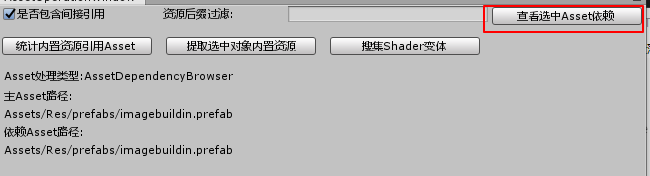
资源依赖查看工具
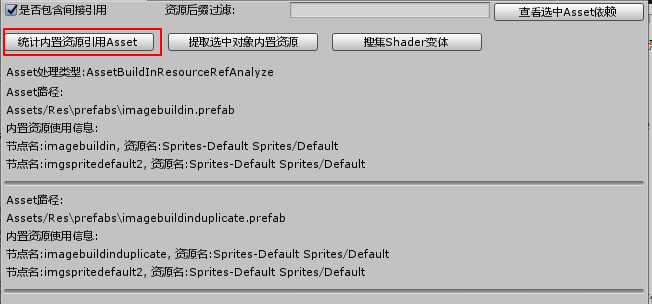
内置资源依赖统计工具(只统计了*.mat和*.prefab,场景建议做成Prefab来统计)
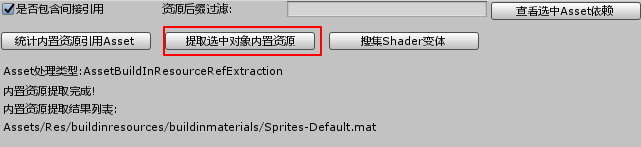
内置资源提取工具
Shader变体搜集工具(接入YooAsset的变体搜集工具)
核心思想是搜集所有需要参与打包的材质球(含被动依赖不在打包策略内的),然后通过单独的场景和摄像机去照射让ShaderVariantCollection去搜集

AB实战总结
- AB打包和加载是一个相互相存的过程。
- Unity 5提供的增量打包只是提供了更新部分AB的打包机制,*.manifest文件里也只提供依赖的AB信息并非Asset,所以想基于Asset的重用还需要我们自己处理。
- Unity并非所有的Asset都是采用复制而是部分采用复制,部分采用引用的形式,只有正确掌握了这一点,我们才能确保Asset真确的重用和回收。
- 打包策略是根据游戏类型,根据实际情况而定。
- AB压缩格式选择取决于内存和加载性能以及包体大小等方面的抉择。
- 资源管理策略而言,主要分为基于Asset管理(AssetBundle.Unload(false))还是基于AB管理(AssetBundle.Unload(true)),前者容易出现内存中多份重复资源,后者需要确保严格的管理机制(比如索引计数))
- 要避免热更CDN缓存问题,AB名需要带上MD5信息(Sha256过长所以选MD5)(2026/08/12)
- 没有采用Unity原生的注入MD5到AB名的打包参数是因为AB热更新相关的信息无论如何都还是需要自行收集(ABInfo.json文件),自己掌控AB名添加MD5流程比较好控制(2026/08/12)
